
Month-end rarely breaks because the accounting logic is hard. It breaks because the inputs are messy.
A client emails six bank statements in different formats. One is a clean PDF, one is a scan, one is rotated, one has foreign-language transaction labels, and two have balances that don’t tie because someone exported the wrong period. Then the manual work begins. Staff copy transactions into Excel, clean dates, standardize descriptions, trace missing lines, and rebuild a report package that should have flowed from the source data in the first place.
That is the practical starting point for financial reporting automation. Not dashboards. Not a glossy close calendar. The first job is getting raw financial data into a form you can trust.
Beyond Spreadsheets An Introduction to Automation
The teams I see struggle most with reporting aren't weak technically. They're overloaded operationally. They know what a clean close should look like. They just spend too much time wrestling source documents before they ever reach review, analysis, or final reporting.
Financial reporting automation is the set of tools and controls that moves data from source documents and systems into validated, repeatable reports with less manual handling. In a CPA firm, that usually means some combination of document extraction, rules-based mapping, reconciliation logic, workflow approvals, and direct exports into the accounting stack.
What automation actually replaces
The wrong way to think about automation is “software will do the accounting.”
The right way to think about it is simpler. Automation removes handoffs that don't add judgment:
- Manual rekeying: Staff shouldn't type bank transactions from PDFs into spreadsheets line by line.
- Fragile spreadsheet linking: One broken formula shouldn't flow into management reports, workpapers, and disclosures.
- Repeated cleanup work: Dates, payee descriptions, signs, and account mappings should be standardized once and reused.
- Version confusion: Teams need one governed workflow, not five copies of “final_v2_revised.”
A lot of firms already know this. The gap is execution. In a KPMG survey on automation in financial reporting, 90% of finance professionals recognized significant value in automating financial reporting, yet 70% reported that very little or no automation had been implemented.
Practical rule: If your reporting process depends on staff manually reshaping the same source data every month, you don't have a reporting problem first. You have an ingestion and control problem.
Why spreadsheets remain the default
Excel is still the fallback because it's flexible, familiar, and fast for one-off fixes. That's why teams stay in it longer than they should. But spreadsheet-heavy workflows fail in predictable ways during close:
- A junior staff member imports incomplete statement data.
- Another person fixes it locally.
- Someone else updates the lead sheet but not the board pack.
- Review catches the mismatch late, when timelines are already tight.
Automation doesn't eliminate accounting review. It gives review a cleaner starting point. That distinction matters. Good implementations don't remove professional judgment. They protect it by taking low-value document handling off the critical path.
Quantifying the Gains From Automated Reporting
The business case for automation gets clearer when you stop discussing it in abstract terms and look at where time and errors accumulate. For most finance teams, the damage isn't one dramatic failure. It's small repeated waste across hundreds of recurring tasks.
A good example is expense processing. According to Quadient's 2025 financial automation statistics roundup, manual expense reports cost an average of $58 to process, take 20 minutes each, and contain errors 19% of the time. The same source states that automation can cut these processing costs by 58% and save up to 40% of staff time on manual data preparation tasks.
Manual vs automated financial tasks
| Metric | Manual Process | Automated Process | Improvement |
|---|---|---|---|
| Cost per expense report | $58 | Lower with automation | 58% cost reduction |
| Time per expense report | 20 minutes | Faster with automation | Staff time saved |
| Error rate | 19% | Reduced through automation | Fewer processing errors |
| Data preparation effort | High manual involvement | Reduced manual involvement | Up to 40% staff time saved |
That table is about expense reports, but the pattern carries into reporting work. If your month-end package depends on people collecting source files, reformatting data, checking formulas, and reconciling versions, you're burning experienced staff time on production work instead of analysis.
What the gains look like in practice
In firms and finance teams, the primary gains usually show up in four places:
- Recovered review time: Managers spend less time tracing whether a number moved correctly and more time assessing whether it makes sense.
- Cleaner audit support: When the system records how data moved from source to report, support is easier to assemble.
- Better turnarounds: Client deliverables move faster because the bottleneck shifts away from data prep.
- Less hidden rework: Errors are caught closer to ingestion instead of after reports have already circulated.
The strongest ROI usually comes from removing recurring manual preparation work, not from automating the most technically complex report first.
A common mistake is trying to justify automation only with labor savings. That's too narrow. In practice, the value also comes from lower review friction, fewer deadline surprises, and more consistent outputs across clients and periods.
What doesn't produce ROI
Some projects disappoint because they automate the wrong layer.
These usually fail:
- Dashboard-first projects: If source data is still inconsistent, the dashboard delivers bad data faster.
- One giant rollout: Firms that try to replace every workflow at once usually create resistance and cleanup work.
- Automation without ownership: If no one owns mappings, exceptions, and review rules, the tool becomes another unreliable step.
The stronger approach is narrower. Automate repetitive document-heavy tasks first, prove that the output is reviewable, then extend into close and reporting workflows. That's where finance teams usually feel the gains quickly and believe the broader project is worth supporting.
Core Architectures of Reporting Automation Stacks
Most firms don't need a deep technical lecture on automation architecture. They need a working model they can use to evaluate software and design a process that holds up during close.
The simplest way to think about a reporting stack is as a digital assembly line. Data enters raw. The system extracts it, standardizes it, checks it, and publishes it into a reporting layer. If one stage is weak, everything downstream becomes manual.

The four layers that matter
Most workable stacks have four operational layers.
Data ingestion
Statements, exports, ERP feeds, and supporting schedules enter the process at this point. In many firms, this is still the weakest layer. If incoming data arrives inconsistently, staff starts fixing it manually before any automation can help.
Data processing
This layer standardizes dates, signs, field names, entities, and chart-of-account mappings. Good systems do this consistently. Weak systems force users to patch formatting exceptions one file at a time.
Validation and reconciliation
This is quality control. The system checks balances, compares source totals, flags anomalies, and routes exceptions for review. Without this layer, automation just moves bad data faster.
Reporting and export
This is the final output layer. It pushes validated data into financial statements, management packs, disclosures, and accounting systems.
Why connected data engines matter
The biggest architectural improvement over spreadsheet-based reporting is the move to a connected data engine, where one governed source feeds every downstream report element.
According to IRIS CARBON's discussion of financial reporting automation examples, platforms with connected data engines can synchronize narrative paragraphs with financial figures, preventing inconsistencies that plague 70-80% of manual reporting processes. The same source notes that these systems can reduce manual reconciliation time by up to 50% in multi-entity firms.
That matters more than is often realized. In a spreadsheet world, a changed number often updates in one schedule but not in the narrative, the footnote, or the summary page. In a connected environment, one update propagates across the report set.
Here's a short visual overview of how modern automation stacks fit together:
Review test: If a revenue change requires someone to update multiple schedules and text blocks by hand, the architecture is still too dependent on spreadsheets.
What works and what breaks
The stacks that hold up in practice usually have these traits:
- Single-source logic: Mappings and reporting rules are maintained centrally.
- Controlled exceptions: The system flags breaks for review instead of forcing staff to hunt them manually.
- Traceable outputs: Reviewers can see where a figure came from and when it changed.
The weak stacks look automated on the surface but still depend on hidden spreadsheet fixes. Those are dangerous because they create false confidence. During a normal month, they seem fine. Under close pressure, they fail exactly where firms can least afford it.
Mapping the Automated Financial Data Workflow
The most overlooked part of financial reporting automation is the part nearest the source document.
ERP integrations matter. Consolidation tools matter. But many CPA firms don't lose time because their reporting platform is weak. They lose time because the data arrives as unstructured PDFs that somebody has to decode before anything else can happen.
Where the first mile breaks down
A typical workflow starts with a client sending bank statements by email or portal. They may come from multiple institutions, in different layouts, with different date formats and transaction descriptions. Some are searchable PDFs. Some are scanned images. Some combine statement summaries with transaction pages in ways that confuse generic extraction tools.
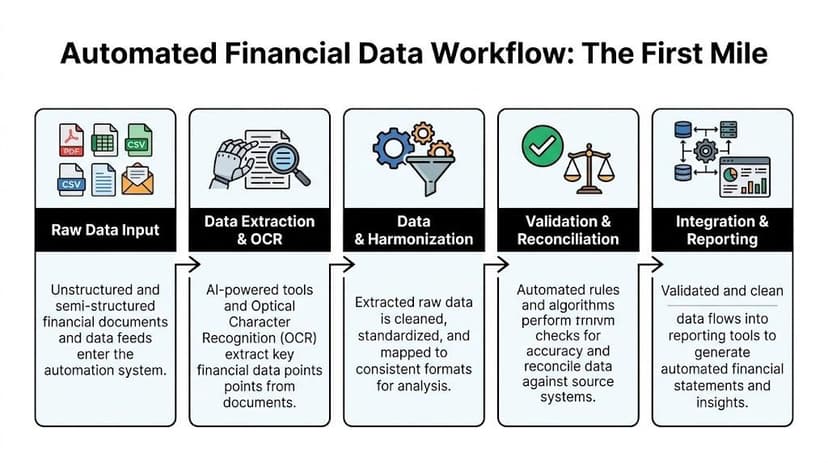
This is the first mile problem. According to TechAhead's overview of automated financial reporting, processing diverse, unstructured PDFs from 2,000+ global banks is a manual bottleneck consuming 12+ hours weekly per team, and that issue is often overlooked by guides that focus mainly on ERP integration.
What a usable workflow looks like
When this part is designed well, the workflow is straightforward:
- Raw documents arrive through email, upload, or shared folders.
- Extraction tools read the statement using OCR and document recognition.
- Transactions are normalized into consistent dates, descriptions, and debit-credit structures.
- Validation rules run against balances, totals, and expected formatting.
- Clean data moves forward into bookkeeping, reconciliation, and reporting.
That sounds simple, but the quality of each step matters. The firms that struggle usually don't lack a reporting system. They lack a repeatable intake process for messy financial documents.
The controls that make the workflow trustworthy
Automating PDF ingestion only helps if the extracted data is reviewable. In practice, that means the workflow needs several control points:
- Balance checks: Beginning and ending balances should tie to the statement.
- Confidence indicators: Low-confidence reads should be routed for review.
- Duplicate handling: Re-uploads and overlapping periods need to be identified.
- Format standardization: Dates and amounts must land in a consistent structure before import.
- Export discipline: The handoff into QuickBooks, Xero, or the workpaper file should be structured, not ad hoc.
A bank statement converter is only useful if it reduces review time. If staff still has to inspect every line manually, you've digitized the pain without removing it.
Why this workflow changes reporting quality
Once the first mile is controlled, the rest of the reporting process improves in quieter ways. Reconciliations get cleaner. Exception review becomes more targeted. Staff stops spending mornings preparing data and starts dealing with actual accounting issues.
That changes the quality of month-end work. Teams can focus on missing accruals, unusual activity, entity allocations, and variance explanations because the transaction data arrived in a usable state. For a CPA firm, that's the difference between production work and professional work.
Your Phased Implementation Roadmap for Automation
Most firms don't need a dramatic transformation plan. They need a sequence they can execute without disrupting client work. The best automation programs usually start small, solve one painful workflow well, and expand only after the controls are proven.
Phase one assess the friction
Start with the work that is repetitive, document-heavy, and easy to measure. In most firms, that means bank statement handling, reconciliations, or recurring report preparation.
Look for processes with these traits:
- High volume: The task happens every week or every month.
- Low judgment: Staff follows the same cleanup pattern repeatedly.
- Review pain: Managers spend too much time checking formatting and tie-outs instead of accounting conclusions.
- Clear before-and-after state: You can tell whether the output is cleaner, faster, and easier to review.
Don't begin with the most politically visible process. Begin with the process that frustrates staff the most and has a contained scope.
Phase two run a pilot
A pilot should be narrow enough to manage but real enough to prove value. Choose one client group, one document type, or one reporting package. Build the workflow, define review checkpoints, and document exceptions.
The goal isn't perfection. The goal is to answer three practical questions:
| Pilot question | What you need to learn |
|---|---|
| Does the output save staff time? | Whether manual prep work meaningfully drops |
| Can reviewers trust it? | Whether exceptions are visible and manageable |
| Does it fit your existing stack? | Whether the handoff into bookkeeping and reporting is clean |
This is also where you build internal confidence. People support automation after they see a messy process become easier, not after a strategy memo.
Phase three scale and integrate
Once the pilot produces dependable outputs, extend it carefully. Add more clients, more document types, or more reporting use cases. Standardize naming conventions, review ownership, and exception handling before volume increases.
The point of scaling isn't just to process more files. It's to reduce variation. If every manager is handling exceptions differently, the tool won't create a durable operating model.
A good scaling stage usually includes:
- Documented rules for mappings and corrections
- Assigned ownership for workflow updates
- Review thresholds for what gets escalated
- Integration discipline so exports land consistently in the accounting environment
Phase four optimize the close
Once ingestion and standardization are stable, the firm can automate more analytical work. At this stage, AI-driven variance analysis and anomaly detection become useful, because the underlying data quality is finally strong enough to support them.
According to IBM's overview of financial reporting automation, finance teams using AI-driven variance analysis and ML anomaly detection can shorten month-end close cycles from 10-15 days to 2-3 days in mid-sized firms, with automated rule application supporting 99% compliance in filings.
That doesn't mean every firm should jump straight to advanced analytics. It means the path exists once the basics are stable. Clean ingestion first. Controlled workflows second. Analytical acceleration after that.
Navigating Security Concerns and Change Management
Automation projects fail less often because of software limitations than because people don't trust the process. In accounting firms, that distrust usually appears in two forms. Staff worries the system will create more cleanup work. Clients worry their financial data will be exposed.
Both concerns are legitimate. Both need direct answers.

Getting staff to adopt the workflow
The wrong message is “automation will replace manual accounting.”
That triggers resistance immediately, especially from good staff who already carry close periods on their back. The better message is operational and honest. Automation removes repetitive document handling so accountants can spend more time on reconciliations, exceptions, judgment, and client communication.
In practice, adoption improves when firms do three things well:
- Train on edge cases: Staff believes a workflow after seeing how it handles messy statements and exceptions, not ideal samples.
- Keep a human review step: Early-stage rollouts need reviewer signoff so confidence builds from evidence.
- Name process owners: Someone needs responsibility for mappings, exceptions, and feedback.
The fastest way to lose team trust is to call a workflow “fully automated” before it survives a real month-end.
Addressing client confidentiality concerns
Clients usually ask a simple question: where does the data go?
A credible answer should cover encryption, access control, retention, and deletion. Firms should favor tools with strong transport security, restricted user access, and minimal retention practices. For sensitive client financial documents, shorter retention is better because it reduces exposure if something goes wrong.
When evaluating document and reporting tools, ask for clarity on:
- Encryption in transit
- User authentication and access controls
- Auditability of uploads and exports
- File deletion practices
- Whether data is retained beyond processing
Good security communication isn't marketing language. It's operational detail. Clients don't need broad assurances. They need to know who can access their files, how long those files exist in the system, and what controls are in place if an issue arises.
Change management that actually works
Financial teams don't resist automation because they love spreadsheets. They resist because they don't want unstable processes during busy periods. That's reasonable.
The firms that handle change well usually roll out in stages, let experienced reviewers challenge the output, and adjust the workflow based on live use. That creates buy-in because the process earns credibility instead of demanding it.
Embracing the Future of Accounting
The profession isn't moving away from judgment. It's moving away from avoidable manual handling.
That's the core promise of financial reporting automation. Not replacing accountants. Removing the repetitive work that keeps experienced people trapped in preparation instead of analysis. For CPAs, controllers, and bookkeepers, the biggest gains often start before the report package exists. They start where raw statements, exports, and support files first enter the workflow.
That first mile matters because every downstream report depends on it. If data arrives late, inconsistently, or with hidden extraction errors, the close absorbs the pain. If data arrives clean, standardized, and reviewable, the rest of the reporting cycle gets materially easier.
The firms that benefit most usually don't begin with an all-at-once transformation. They choose one ugly process, build controls around it, and prove that the output is faster to review and easier to trust. From there, automation becomes less of a technology decision and more of an operating model.
Start where the team feels friction every month. That's usually where automation pays for itself first.
For many accounting teams, that means bank statement ingestion, reconciliations, or recurring source-data cleanup. Those aren't glamorous projects. They are practical ones. And practical projects are what create momentum.
A modern firm still needs technical accounting strength, review discipline, and skepticism. Automation doesn't change that. It gives those skills better raw material. The firms that build that capability now will be in a stronger position to deliver faster closes, cleaner reporting, and more advisory value without scaling chaos alongside growth.
If bank statement PDFs are still clogging your month-end process, ConvertBankToExcel is a practical place to start. It’s built for CPAs, bookkeepers, and finance teams that need to turn scanned or digital statements into structured Excel, CSV, QuickBooks, and Xero-ready files quickly, with strong accuracy, reconciliation support, and secure handling. Starting with the first mile is often the lowest-risk way to begin financial reporting automation.