
Clients rarely send receipts in the condition OCR vendors use in demos. They send a wallet photo taken in a car, a faded thermal slip from a taxi, a hotel folio with a dense footer, and a restaurant receipt folded in half. Then they expect the books to reconcile cleanly.
That's why most conversations about ocr for receipts miss the practical issue. The scan isn't the finish line. It's the intake step. What matters is whether the extracted vendor, date, tax, and total can survive validation, match the card or bank transaction, and flow into the ledger without creating cleanup work later.
A lot of tools can read a decent receipt. Fewer can support an accounting workflow that holds up under month-end pressure. If you're evaluating receipt OCR for a firm, an internal finance team, or a bookkeeping process, judge it by what happens after extraction. That's where the hours are won or lost.
The Myth of the Magic Scanner
Every firm has some version of the same problem. A client drops off a batch of receipts at month end. Some are scans, some are phone photos, some are PDFs from email, and some are nearly unreadable. The team then spends time keying totals, checking dates, asking follow-up questions, and trying to match each document to a card charge that may have posted on a different day.
OCR gets marketed as if that pain disappears once the app reads the receipt. It doesn't.
The useful question isn't, “Did the software read the text?” The useful question is, “Can the firm trust the extracted data enough to reconcile it quickly?” Those are different standards. A tool can look impressive in a demo and still create extra work once exceptions start piling up.
Where the hype breaks down
Receipt scanning tools often promise automation, but accounting work lives in the exceptions. If the receipt says one amount, the card statement shows another due to tip handling, foreign currency, or partial settlement, somebody has to review it. If the OCR misses the merchant name or grabs the wrong total from a cluttered footer, the scan becomes one more item to correct.
That's also why teams spend so much time diagnosing common OCR extraction issues in financial workflows. The mistake usually isn't one bad character. It's a downstream problem caused by weak capture rules, poor validation, or no reconciliation logic.
Practical rule: A receipt OCR tool is only as good as the review process it reduces.
What actually saves time
A strong receipt process does three things well:
- Captures usable images before the document quality degrades further.
- Extracts the right fields consistently enough to avoid rekeying.
- Routes the result into reconciliation instead of leaving it in a separate app.
That last step is where many teams still lose time. They collect receipt data in one system and transaction data in another, then manually bridge the gap. That isn't automation. It's fragmented intake.
How OCR Turns Photos into Financial Data
Receipt OCR is easier to evaluate when you stop thinking about it as “reading text” and start thinking about it as translating a messy image into structured accounting fields.
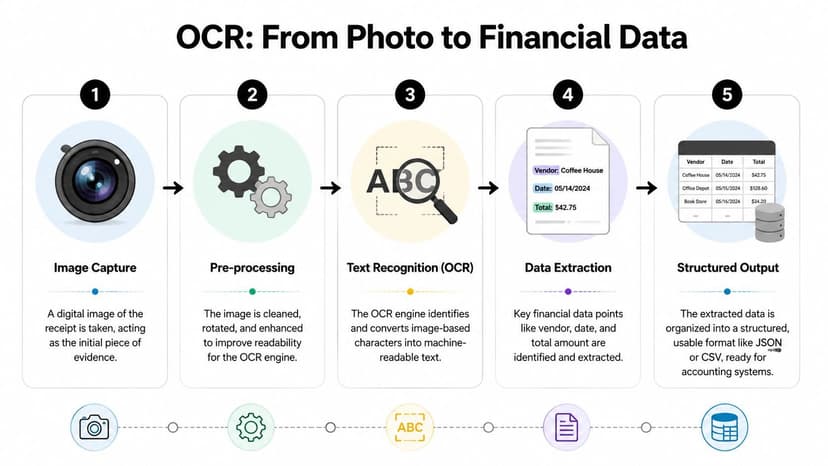
The raw photo is just evidence. The software has to clean it, identify characters, infer what those characters mean, and then place them into fields your accounting process can use. A good engine doesn't just see “12.45” on the page. It decides whether that number is a subtotal, tax, tip, or final amount.
The five working stages
In practice, most systems move through a chain like this:
Image capture
A phone photo, scanner image, or PDF enters the system.Pre-processing
The tool rotates, crops, sharpens, and improves contrast so the text becomes readable.Text recognition
The OCR engine converts characters on the image into machine-readable text.Field extraction
The system tries to identify meaningful values such as merchant, date, tax, and total.Structured output
The result gets exported into JSON, CSV, Excel, or another accounting-friendly format.
If you want a simple way to test adjacent tools for document conversion, it can help to find Scanned To on Flaex.ai and compare how different products handle scanned inputs before they enter your finance workflow.
Why some engines perform much better than others
Not all OCR is built on the same stack. According to industry guidance on receipt capture accuracy tiers, traditional pattern-matching OCR achieves about 64% accuracy, AI-enhanced machine learning systems deliver 85% to 95%, and LLM-based OCR reaches 97% to 99% on high-quality images. That gap matters because the underlying approach is different, not just the branding.
Here's the short version:
| OCR type | How it works | What usually happens on receipts |
|---|---|---|
| Traditional OCR | Matches shapes to characters | Struggles with skew, clutter, and unusual layouts |
| AI-enhanced OCR | Uses learned patterns from document samples | Better at variation, but can still misread context |
| LLM-based OCR | Adds contextual reasoning to extraction | Better at deciding which number is the real total |
An LLM-based system can use context to sanity-check fields. It can recognize that a total should align with the structure of the receipt, not just the biggest number on the page. That's a major advantage when layouts vary across merchants, regions, and document types.
What this means for accountants
When you review tools, don't stop at “supports OCR.” Ask what layer of intelligence sits on top of the character reading. If the vendor can't explain how the system handles layout variation, semantic validation, or structured export, you're probably buying text extraction, not a reliable accounting input.
For teams that also process statements, it helps to understand how bank statement parser OCR workflows handle similar layout and validation issues. The best mental model is the same in both cases. Raw text isn't enough. You need structured, reviewable financial data.
Why Most Receipt OCR Fails in the Real World
The software usually isn't failing in isolation. The document arrived damaged before the tool ever saw it.
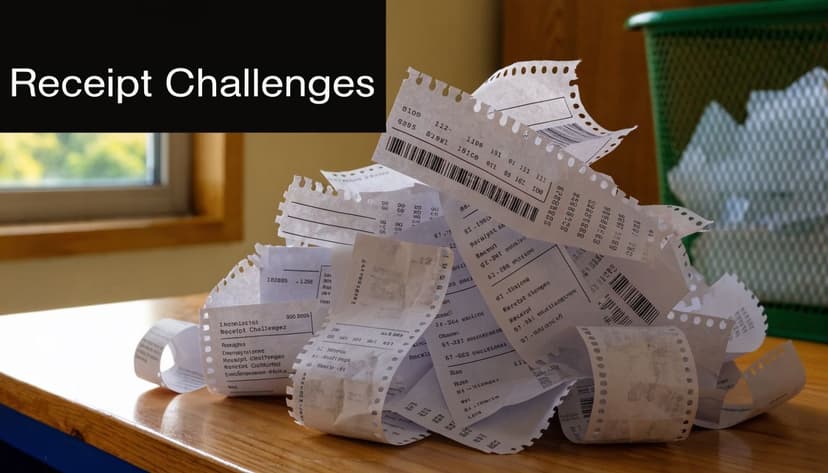
A thermal receipt that sat in a glove compartment for two months has already lost contrast. A phone photo taken under kitchen lighting adds shadow. A folded receipt creates warped lines. OCR systems then try to reconstruct financial data from a weak image, and small capture problems turn into extraction errors.
The error cascade
Receipt OCR breaks in stages, not all at once. Docsumo's discussion of receipt OCR preprocessing notes that preprocessing represents 20% to 30% of end-to-end extraction reliability, and that a crumpled, low-resolution receipt can lose about 15% of extractable data at the binarization stage alone. That's before the system even gets to higher-level field extraction.
The sequence typically looks like this:
- Poor contrast makes the text faint.
- Binarization then strips away weak character detail.
- Skew or bad framing causes line alignment problems.
- Field extraction misidentifies totals, dates, or tax amounts.
- Reconciliation fails because the numbers no longer match cleanly.
That's why a receipt that looks “mostly readable” to a human can still fail in automation.
If the image is weak, the OCR engine isn't choosing between perfect and imperfect output. It's choosing between several plausible mistakes.
Which receipts cause the most trouble
Some categories create repeated friction in live bookkeeping work:
Thermal paper receipts
Gas stations, parking slips, taxis, and small retail counters often print on thermal paper. Those receipts fade fast and lose edge contrast. By the time they're uploaded, the total may be the least visible field on the page.
Crumpled or folded receipts
Restaurant and travel receipts tend to get folded into pockets and wallets. The crease distorts text baselines and makes cropping harder. Even good OCR engines can grab partial fields when the fold cuts through the amount area.
Dense layouts
Hotel folios and itemized food receipts often include many numbers close together. The engine has to distinguish line items, taxes, service fees, tips, and final totals. That's where simple “largest amount wins” logic falls apart.
Mixed-language or unfamiliar formats
Cross-border expenses often include labels and tax formatting the reviewer doesn't expect. The OCR may still extract text, but field mapping becomes less reliable if the system wasn't built for international document variation.
What doesn't work
A common mistake is assuming every failure can be fixed with stricter automation rules. It can't. If the source image is poor, adding more downstream logic often just creates more exception handling.
What works better is separating two questions:
- Is this receipt good enough for straight-through extraction?
- Is this receipt good enough only for assisted review?
That distinction keeps teams from pretending every receipt should be fully automated. In practice, some documents need human confirmation, and there's nothing inefficient about admitting that early.
Best Practices for Capturing Clean Data
Most OCR problems start before the file reaches the software. If clients and staff capture receipts badly, even a strong engine will spend its time rescuing poor inputs instead of extracting clean data.
The fix isn't complicated. You need a simple capture standard that people can follow without training fatigue.
What to tell clients and staff
This is the short version I'd send to a client:
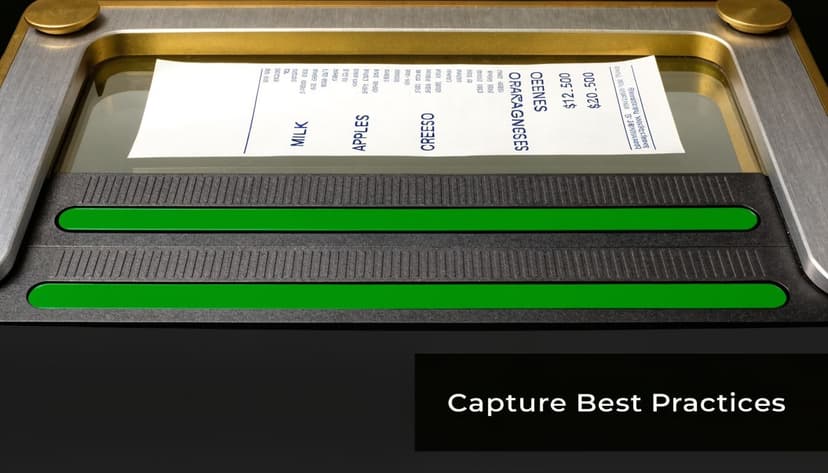
- Lay the receipt flat. Don't hold it in your hand.
- Use a dark, plain background so the edges are obvious.
- Capture the whole receipt from top to bottom, including the footer.
- Avoid shadows and glare from overhead lights.
- Take the photo immediately if it's thermal paper.
- Submit one receipt per image unless the software specifically supports batching.
Those six rules prevent a surprising amount of rework. They also reduce the number of follow-up emails asking for a better copy.
Field note: The best time to capture a receipt is when the expense happens, not at month end when the paper is wrinkled and fading.
What to look for in the software
Even good users need help from the tool. The software should do some cleanup automatically. If it doesn't, your team becomes the preprocessing engine.
Look for these practical features:
| Feature | Why it matters in accounting |
|---|---|
| Auto-crop | Removes background noise and isolates the document |
| Skew correction | Straightens angled photos so totals and dates align better |
| Perspective adjustment | Fixes images shot from the side instead of straight above |
| Multi-page handling | Useful for longer travel and lodging receipts |
| Field-level review | Lets staff verify totals and dates quickly without rekeying everything |
Build a capture policy, not just a tool stack
The biggest improvement usually comes from process discipline. Set one intake rule for all clients. Decide how receipts should be named, submitted, and reviewed. If a receipt is unreadable, reject it early and ask for a better image while the underlying transaction is still fresh.
Also decide which fields matter most in your workflow. For some firms, vendor, date, tax, and total are enough. For others, line items matter. Don't buy a tool based on generic OCR claims if your actual process needs structured detail that the software can't deliver reliably.
The Critical Last Mile of Validation and Reconciliation
Receipt extraction is only half the job. The accounting value shows up when the extracted data can be trusted against the statement, coded correctly, and cleared through reconciliation without a manual hunt.
That's the part most receipt OCR discussions ignore.
Why standalone scanners create extra work
A basic receipt app often produces an isolated list of extracted documents. That sounds useful until month end arrives and someone still has to match each receipt to a card charge or bank transaction. If the receipt app doesn't support that step directly, the team does the linking by hand.
That manual bridge is the primary bottleneck. According to Unstract's discussion of receipt OCR workflow gaps, the major issue isn't just extraction. It's the downstream reconciliation challenge. The same discussion notes that integrated OCR-to-reconciliation pipelines can eliminate the manual cross-referencing that still costs firms 12 hours weekly.
What validation should actually check
Before a receipt becomes a posted accounting record, someone or something should test a few obvious conditions:
- Does the total align with the matching card or bank transaction?
- Does the date make sense given posting delays?
- Is the merchant name plausible or did the OCR lift a partial header instead?
- Is this a duplicate of another receipt already submitted?
- Does the tax treatment fit the jurisdiction and document type?
Those checks are not “nice to have.” They're what separate useful automation from a stack of unverified scans.
A clean receipt record that doesn't reconcile is still unfinished work.
What a better workflow looks like
The strongest setup processes receipts and transaction data in parallel, then links them through review rules. That gives the bookkeeper one place to resolve exceptions instead of bouncing between unrelated apps.
A practical example of where mismatches surface is in reconciliation mismatch review workflows. The issue usually isn't that the receipt was unreadable. It's that the extracted amount, merchant, or timing needs to be tested against another financial source before posting.
Later in the workflow, video-based process training can help teams standardize review habits:
Where firms should draw the line
Not every receipt deserves the same review effort. Build a triage model.
- Low-risk receipts can move through automated matching with a quick spot check.
- Moderate-risk receipts should require a reviewer to confirm total, date, and merchant.
- High-risk receipts such as foreign documents, faded thermal slips, and complex folios should go to manual review early.
That approach protects the close process. It also prevents junior staff from wasting time “fixing” OCR output that should have been routed to exception handling from the start.
How to Choose the Right OCR Vendor for Accounting
When vendors sell ocr for receipts, they usually lead with speed, mobile capture, and a polished app. Those things matter less than people think. In accounting, the better questions are about reliability, controls, and whether the extracted data fits the rest of the workflow.
Start with the document intelligence layer
Recent evaluations summarized by AIMultiple's receipt OCR benchmark show that LLM-enhanced OCR pipelines can exceed 97% data-extraction accuracy on real-world receipt images, and the same benchmark reported an average success rate of 97% for Claude 3.5 Sonnet when extracting key receipt fields. The practical takeaway isn't “buy the vendor with the biggest number.” It's that modern systems can use contextual reasoning and can be fine-tuned for fields like VAT numbers and other structured business identifiers.
If a vendor still relies mainly on old template logic or raw OCR text output, expect more cleanup.
Questions worth asking in a demo
Ask direct, operational questions. If the answers are vague, that tells you a lot.
Security and retention
Client receipts can expose card details, addresses, and travel patterns. Ask:
- How long is data retained
- Can files be deleted automatically
- Who can access uploaded documents
- What audit trail exists for uploads and edits
Export and integration
A finance team rarely wants receipt data trapped in a mobile app.
- Can you export structured data cleanly?
- Does the API expose field-level outputs?
- Can the system fit your bookkeeping or ERP workflow?
- Can you retain review notes with the extracted record?
International handling
Many tools look good on domestic retail receipts and weaker on cross-border documents. Ask whether the vendor handles VAT-style fields, foreign merchants, mixed languages, and unusual statement conventions. That matters more than a polished dashboard.
Don't evaluate receipt tools in isolation
A vendor may be acceptable for basic expense capture and still be a poor fit for an accounting practice. Firms need software that supports review controls, exception handling, and ledger-ready outputs.
That's also why comparison shopping against finance-focused tools is useful. Looking at a Dext alternative comparison for accounting extraction workflows can sharpen your criteria. The point isn't to chase features. It's to identify whether the product supports the way accountants work, especially when exceptions and reconciliations drive the schedule.
Buying test: If the demo ends at extraction, the product probably ends too early for accounting.
A Practical Workflow Integration Example
Take a simple client expense. An employee buys office supplies and captures the receipt immediately with a phone app. The OCR tool extracts the merchant, date, tax, and total, then stores the image with the parsed data.
That alone is useful, but it's not enough.
The accounting team also processes the client's monthly credit card statement and imports the transactions into the ledger workflow. Once both data sources are in structured form, the reviewer matches the receipt against the card charge by amount, merchant pattern, and timing. If the values line up, the transaction gets coded and cleared. If not, it goes into exception review.
OCR proves its value here. A 2020 grocery receipt study found that OCR correctly retrieved the total in 75% of cases, and after excluding outliers the correlation between OCR-derived totals and manual totals was R² = 0.93. In plain terms, receipt OCR can be strong enough to support matching and profiling workflows even when some individual documents still need review.
A workable three-way match
In practice, the workflow looks like this:
Receipt captured early
The image is clean enough for extraction before fading or damage gets worse.Receipt data extracted
Key fields are parsed into a structured record.Statement data processed separately
Bank or card transactions are converted into usable accounting data.Records matched in review
The team confirms the receipt, transaction, and ledger entry agree.Exceptions handled deliberately
Duplicates, timing differences, or unclear totals get routed to a human.
For firms building broader process automation around document intake and review, it can also help to study platforms like the Magicagent all-in-one AI platform, especially if you're thinking beyond receipt scanning and into multi-step finance operations.
If your books live in Xero, it's worth designing this around a structured import path and a clean review queue. A practical starting point is a Xero-focused statement integration workflow that keeps transaction data usable once the receipt side is ready.
If you're tired of matching receipt data against messy statement PDFs by hand, ConvertBankToExcel helps turn bank and credit card statements into structured files your team can successfully reconcile. It's built for accountants who need clean transaction data, fast review, and less manual cross-referencing at month end.