
Month-end still breaks a lot of good accounting teams for one simple reason. The data arrives in terrible shape.
One client uploads a clean CSV. Another emails a sideways scanned PDF from a regional bank. A third sends a multi-page statement with fees, reversals, split deposits, and transaction descriptions that look like they were designed to defeat Excel. Then someone finds a discrepancy small enough to look harmless and large enough to burn half your evening.
Most articles skip this reality. They talk about neat bank feeds and direct ERP connections. They don’t talk about crooked scans, foreign-language statements, cutoff timing issues, or the one account that refuses to tie because a fee posted differently on the bank side than in the ledger.
I’ve seen more reconciliation pain come from bad inputs than bad accountants. The reconciliation logic usually isn’t the primary problem. The core problem is getting usable transaction data into the process without retyping it, mangling it, or trusting a spreadsheet that nobody wants to audit later.
Modern automated bank reconciliation software helps because it doesn’t just match transactions faster. The better tools can turn ugly statement files into structured data, apply matching rules, isolate true exceptions, and leave a trail you can defend. That changes the work. You stop acting like a transcription clerk and start acting like the reviewer who handles judgment calls.
The End of Month-End Reconciliation Chaos
It’s late. The close is due. You have coffee rings on the desk, three spreadsheets open, and a bank statement that looks like it was scanned through a windshield.
One account is off by a small amount. Another client sent a 50-page PDF with a layout you’ve never seen before. A third sent image scans, not text-searchable statements, so every line has to be checked twice because OCR errors can hide in dates, decimals, and signs.

That’s not an edge case. For many firms, that is the close.
Why manual reconciliation keeps falling apart
Spreadsheets still work for very small volumes and very clean data. They fail fast when the workflow depends on:
- Rekeying statement lines from PDFs into Excel
- Comparing dates manually when bank posting dates and book dates don’t line up
- Spotting decimal and sign errors that hide inside copied data
- Tracking reviewer decisions in emails, notes, and file names
- Handling non-standard statements from smaller or international banks
The cost of staying manual isn’t just frustration. The broader reconciliation software market, which includes bank reconciliation tools, was valued at $2.30 billion in 2025 and is projected to grow from $2.65 billion in 2026 to $8.10 billion by 2034, according to Fortune Business Insights on the reconciliation software market. That growth reflects a basic shift in finance teams’ behavior. They’re done treating reconciliation as a monthly spreadsheet ordeal.
Manual reconciliation usually fails before the accounting logic fails. It fails at ingestion, formatting, and review discipline.
What changes when the process is automated
Good automation removes the worst part first. It gets transaction data into a usable structure, then matches it systematically, then pushes only key exceptions to a human.
That matters because reviewers should spend their time on actual accounting questions. They shouldn’t spend it copying bank lines cell by cell. If you still have team members doing that, you’re paying professional rates for clerical work.
If you want a baseline on the traditional workflow before replacing it, this walkthrough on reconciling a bank account is a useful reference point. It shows exactly why the old process becomes painful once volume and document quality start slipping.
How Automated Reconciliation Software Actually Works
The easiest way to think about automated bank reconciliation software is this. It acts like a digital investigator with better eyesight, better memory, and no patience limit.
It collects evidence from different sources, standardizes it, tests likely matches, and separates routine items from transactions that need judgment.
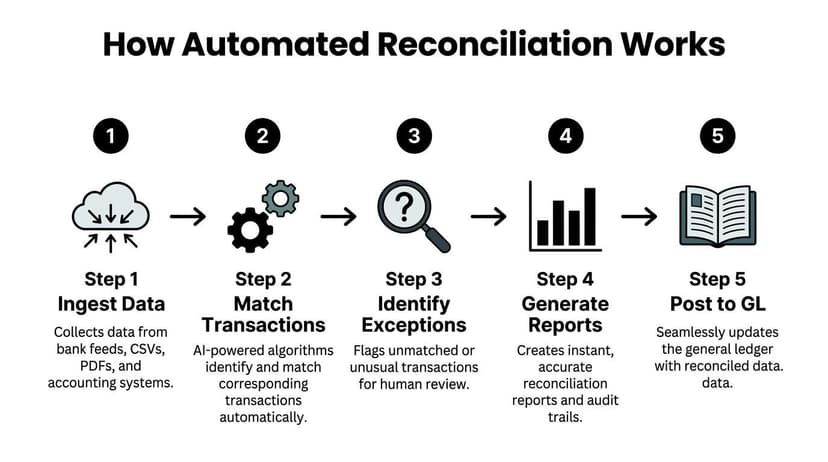
Step one is ingestion
The software starts by pulling in bank data and internal accounting data. Depending on the product, that can come from bank feeds, ERP exports, CSV files, or statement files such as PDF, BAI2, and MT940.
When the source is a scanned or low-quality statement, OCR and AI-based document reading become critical. The software has to detect where the dates are, where debits and credits sit, whether the running balance is reliable, and whether a negative sign is explicit or implied. That’s harder than marketers make it sound.
A feed-only system can look impressive in a demo and still fall apart in real life if half your clients send statements instead of direct connections. Teams benefit from understanding the role of OCR in banking in these situations, because the extraction layer often determines whether automation succeeds or fails.
Step two is normalization
Once the data is in, the system cleans it up so matching can happen on a common basis.
That usually means standardizing:
- Dates so posting formats line up
- Amounts so debits, credits, and signs are interpreted consistently
- Descriptions so references can be searched and grouped
- Currencies and fees so expected differences don’t create false mismatches
Many spreadsheet workflows break here. The statement may show one posting date. The GL may show another. The bank may net fees into a deposit, while the books show the gross receipt and a separate expense. A human can figure that out, but only after slowing down and checking line by line.
Step three is matching
After normalization, the software compares bank-side activity with the GL or subledger.
According to NetSuite’s explanation of automated reconciliation, these systems use AI-driven matching algorithms plus configurable rules to achieve match rates exceeding 95% on high-volume datasets, reducing reconciliation cycle times by up to 80%. That tracks with what good implementations look like in practice. Routine volume gets cleared automatically. Humans step in where nuance matters.
The matching engine should handle more than exact one-to-one comparisons. It should also cope with:
- Split transactions where one bank deposit ties to multiple book entries.
- Timing gaps when postings land on different days.
- Bank fees and rounding that create small differences.
- Many-to-many relationships such as batched settlements or grouped payments.
Practical rule: If a tool only demos perfect one-to-one matching, ask it to reconcile a statement with fees netted into deposits and dates shifted by a day or two. That’s the true test.
Step four is exception management
This is the part that matters most to experienced accountants.
Automation is not about eliminating review. It’s about reducing noise so review becomes useful. The system should surface unmatched items, unusual transactions, and low-confidence matches in one place. If it can’t explain why something matched or failed, the automation isn’t ready for serious use.
Strong exception handling lets you review:
- missing book entries
- duplicate postings
- reversals
- bank-only items such as service charges or interest
- suspicious outliers that deserve a second look
Step five is reporting and posting
Once transactions are matched and exceptions are resolved, the software produces reconciliation reports and an audit trail. Better tools then push the cleared results back into the accounting system or prepare them for import.
That final layer matters more than most buyers realize. Reconciliation software shouldn’t end with “export to spreadsheet and handle the rest yourself.” It should leave a clear record of what matched, what didn’t, who reviewed it, and what adjustments were made.
Core Features and Integrations Your Firm Needs
Most software demos look good when the vendor controls the data. The statement is clean. The format is known. The sample account has tidy one-to-one matches. None of that tells you how the product will perform when a client sends an upside-down scan from a niche bank and expects books by tomorrow morning.
The feature list that matters is shorter and more practical than most comparison pages suggest.
Start with ugly data support
The first question I’d ask any vendor is simple. Can it handle bad documents, or only clean feeds?
A lot of products automate matching after the data is already structured. That’s useful, but incomplete. In day-to-day firm work, the pain often starts before matching begins. You need a tool that can reliably ingest:
- Scanned PDFs
- Multi-page statements
- Low-quality image files
- Foreign-language or non-standard layouts
- Bank and credit card statements from a wide range of institutions
If a system depends on direct bank connections for most of its value, it may be a poor fit for firms that work with small businesses, cleanup projects, tax engagements, or document-heavy client onboarding.
Export flexibility matters more than flashy dashboards
A reconciliation tool earns its keep when data leaves the platform cleanly.
You should be able to move structured outputs into the accounting environment your team already uses. In practice, that means more than generic CSV. You want support for workflow-friendly outputs that reduce cleanup and avoid remapping every month.
Useful export options often include:
| Export need | What good support looks like | Why it matters |
|---|---|---|
| Excel review | Clean columns and consistent formatting | Reviewers can trace and annotate quickly |
| CSV import | Reliable field structure | Works for firms with mixed systems |
| QuickBooks-ready files | Native import-friendly format | Cuts manual posting work |
| Xero-ready files | Compatible bank import output | Reduces friction in small business workflows |
| Archive copies | Human-readable records | Helps with support, audits, and client follow-up |
A strong ingestion and export layer is the bridge between statement files and accounting records. That’s why firms evaluating automated data entry software should think beyond OCR alone. The value is in getting usable accounting data, not just readable text.
Security isn't a side feature
Financial data is sensitive by default. Client statements are not casual documents. They contain account numbers, balances, vendors, payroll clues, and cash activity patterns.
So the software needs more than a privacy paragraph. It should show disciplined controls around encryption, file access, and retention. Enterprise-grade security features matter because reconciliation often involves sending third-party financial records through an external system.
What I look for:
- Encrypted transfer and storage controls
- Tight user access and authentication
- Clear retention and deletion policies
- Auditability of uploads, exports, and changes
If a vendor can explain AI in detail but gets vague on deletion and access controls, keep looking.
Integration depth beats broad promises
“Integrates with everything” usually means “exports a file.”
That’s not useless, but it isn’t the same as a real workflow fit. The better question is whether the software works with your existing close process without forcing your team into awkward workarounds. For some firms, that means ERP sync. For others, it means structured exports that import cleanly into QuickBooks or Xero and preserve enough detail for review.
A firm with five clients and a firm with five hundred clients need different levels of integration depth. What they both need is consistency.
The Quantifiable Benefits of Automated Reconciliation
The business case for automation gets stronger when you stop describing it as convenience and start describing it as control.
Manual reconciliation doesn’t only consume time. It introduces avoidable risk at the exact point where your books need precision. That’s why firms that adopt automated bank reconciliation software usually notice the payoff in three places first. Accuracy, speed, and visibility.

Fewer errors and a faster close
Manual account reconciliation errors can cost businesses up to 1% of annual revenue, and some automated solutions report 70% fewer errors and 40% faster financial closes, according to Kosh on reconciliation KPIs improved by automation. That’s the clearest numeric argument for getting manual entry out of the workflow.
In practical terms, fewer errors means less rework. Less rework means fewer late-stage surprises during close. And fewer surprises mean your senior staff spend more time reviewing outcomes than rebuilding schedules.
If your team still prepares imports manually, a clean bank reconciliation format in Excel can improve consistency. But consistency in a spreadsheet is still a workaround. It’s not the same as system-level controls.
Better use of skilled staff
The hidden gain is role quality.
When reconciliation is automated properly, junior staff don’t spend their best hours keying transaction lines from statements. Managers don’t spend review time untangling preventable formatting errors. Controllers get faster access to exceptions that require judgment.
That shift changes what the accounting team contributes. You get cleaner handoffs, tighter review loops, and fewer status meetings built around “who’s still tying out cash.”
The best automation doesn’t replace accounting judgment. It protects it from low-value work.
A useful visual overview of the workflow benefits is below.
Stronger audit posture
Audit support often improves before teams even notice the time savings.
Automated workflows create a more consistent record of what matched, what was changed, and what remained unresolved. That means less scrambling through file versions and inboxes to explain how a reconciliation was prepared. You have a trail.
That matters for external audits, internal reviews, and partner-level supervision. When a reviewer can see the matched items, the exceptions, and the logic used, the reconciliation becomes easier to trust.
More current cash visibility
The strategic benefit is speed of insight.
Once the process no longer depends on late-month statement wrangling and spreadsheet cleanup, teams can reconcile more frequently. That improves awareness of cash position and reduces the lag between transaction activity and decision-making. For owners and finance leads, that means fewer blind spots.
Checklist for Choosing the Right Software
Buying software for reconciliation is easy. Buying the right software is harder.
The wrong tool usually fails in one of two ways. It either can’t handle your actual inputs, or it creates more cleanup work after extraction than you had before. A proper evaluation should look less like a feature tour and more like a workflow test.
Software selection checklist
| Criteria | What to Look For | Why It Matters |
|---|---|---|
| Data ingestion | Handles scanned PDFs, image statements, and standard bank files | Real firms receive messy documents, not just clean feeds |
| Bank coverage | Works across common, niche, and international institutions | Client diversity breaks narrow solutions fast |
| Matching logic | Supports rules-based matching plus learning from prior exceptions | Reduces recurring review work |
| Exception workflow | Clear queue for unmatched items and easy reviewer notes | Keeps judgment-focused work organized |
| Export options | Clean Excel, CSV, and accounting-friendly outputs such as XML-based workflows where relevant | Prevents rework after extraction |
| Accuracy checks | Balance validation, confidence indicators, and easy spot checks | Helps reviewers trust the output |
| Security controls | Encryption, access control, and deletion policy | Protects client financial records |
| Scalability | Works for one user today and more volume later | Avoids switching systems after growth |
| Pricing fit | Practical for low volume and larger teams | The tool has to work economically, not just technically |
| Support quality | Responsive help for odd statement formats and edge cases | You will hit edge cases |
Questions worth asking on a demo
A useful demo should answer these without hand-waving:
- Can it process scanned statements well, or does it depend on text-based PDFs?
- What happens when a statement layout changes without warning?
- How does it flag low-confidence extractions or uncertain matches?
- Can it export into the systems you already use, not just into CSV?
- What does the reviewer see when an exception is raised?
If the vendor can’t show those scenarios live, treat that as a warning sign.
Test with your worst sample, not your best
This is the step buyers skip.
Don’t evaluate with the clean statement from a major bank. Use the file your staff hates. Use the multi-page scan with the odd date format. Use the statement with fees buried in transaction detail and pages that aren’t perfectly aligned.
That’s where the software proves itself.
For firms that need structured accounting outputs beyond a simple spreadsheet, it’s worth understanding how convert PDF to XML workflows fit into downstream imports. The best tool is the one that preserves structure all the way through the handoff.
A reconciliation platform should reduce decisions, not create new ones about formatting, remapping, and file repair.
The practical selection filter
When I narrow options, I focus on three deciding factors.
First, can the tool ingest ugly statements reliably. Second, can a reviewer understand and trust what it matched. Third, can the output move into the ledger without another manual cleanup cycle.
If a product fails one of those, the rest of the feature list doesn’t matter much.
ROI Scenarios and Navigating Common Pitfalls
Return on investment in reconciliation software isn’t abstract. It shows up in recovered staff hours, smoother closes, cleaner reviews, and fewer ugly surprises tied to bad source documents.
But ROI depends heavily on fit. A product can look efficient in theory and still disappoint if it can’t handle the document formats your team receives.

Scenario one for the solo CPA
A solo practitioner usually feels the pain in bursts.
The close gets crowded. Bank statements arrive late. The bookkeeping is mostly manageable until one bad PDF or one odd account derails a full afternoon. In that setup, automation pays off by protecting calendar space. The obvious gain is time. The less obvious gain is consistency. You don’t have to rebuild the same extraction logic every month.
For solo firms trying to estimate whether the switch makes sense financially, it helps to know how to calculate the return on investment in practical terms. Use hours recovered, reduction in cleanup work, and lower review friction as your starting inputs.
Scenario two for the bookkeeping firm
A multi-client bookkeeping practice runs into a different bottleneck. Scale.
The challenge isn’t one difficult account. It’s repeated exception handling across many clients, each with their own statement style, posting patterns, and bookkeeping habits. The firm doesn’t just need automation. It needs repeatable automation.
Weak tools start to hurt here. If the software only works well on direct feeds or major-bank statements, the team still gets dragged into manual extraction for the messy clients. That breaks standardization and limits throughput.
Scenario three for the business owner or controller
For an internal finance lead, the value is often less about document handling and more about operating rhythm.
When bank activity reconciles more quickly, cash visibility improves and close pressure drops. The accounting team spends less time reconstructing the past and more time reviewing what needs attention. That can improve communication with management because the numbers are available sooner and with less uncertainty around unresolved cash items.
The pitfall most guides ignore
The most common implementation mistake is choosing software that automates matching but not ingestion.
That works only when your data is already clean. Many teams don’t live in that world. They deal with emailed statements, client uploads, scanned records, and old PDFs from smaller institutions. If the extraction step still depends on manual cleanup, your “automation” starts halfway through the process.
According to Netgain’s discussion of automated reconciliation software, exceptions can reach 15% to 25% for small firms without advanced rules, and ROI for small businesses can reach 12+ hours saved per week when the tool can process non-standard PDFs and support scalable pricing. That’s the practical dividing line. The software has to handle the ugly inputs, or the return gets diluted fast.
Bad inputs create fake exceptions. Good automation removes those before your reviewers ever see them.
Other failure points to watch
Not every problem is technical. Some are operational.
Weak rollout discipline
Teams buy the software, import files, and assume the process will settle itself. It won’t. Matching rules need review. Edge cases need examples. Ownership has to be clear.Overtrusting first-pass output
Early automation should be supervised closely. Review low-confidence items and compare outputs to known-good reconciliations until the workflow earns trust.Ignoring reviewer experience
If exception handling is clumsy, staff will work around the tool. Then you’re paying for software while rebuilding side processes in email and Excel.Choosing for today only
A tool that works for one account and one user may fail once client count, transaction volume, or statement variety expands.
What good adoption looks like
The firms that succeed with reconciliation automation usually do a few things right from the start:
- They test on difficult statements, not easy ones.
- They define who reviews exceptions and who tunes rules.
- They document edge cases such as fees, split deposits, and timing differences.
- They choose software that fits both current volume and likely growth.
That last point matters. If your workflow includes statement conversion, accounting imports, and exception review, end-to-end fit matters more than one impressive dashboard or one polished feed integration.
From Manual Labor to Financial Intelligence
The biggest change automation brings isn’t speed. It’s job quality.
When the software handles ingestion, matching, and routine exceptions properly, the accountant’s role shifts upward. You stop spending your best hours cleaning data and start spending them interpreting it. That’s a better use of training, and clients can feel the difference.
The close also becomes easier to manage because the process is more visible. Instead of chasing files and hunting unexplained variances in disconnected spreadsheets, you review a controlled workflow. That makes your work more defensible and more scalable.
The long-term upside is broader than reconciliation. Once teams trust cleaner, timelier financial data, they can build stronger reporting and advisory processes on top of it. For firms exploring that next layer, this overview of AI-powered financial analysis is useful because it connects reliable underlying data to higher-value analysis work.
The future role of the accountant isn’t data entry with better software. It’s financial judgment supported by cleaner systems.
Firms that adopt automated bank reconciliation software well don’t just close faster. They operate with more confidence. That’s the key advantage.
If your team is stuck converting messy bank statements before reconciliation can even begin, ConvertBankToExcel helps turn scanned or digital statements into structured files for Excel, CSV, QuickBooks, Xero, Sage, and other accounting workflows. It’s built for CPAs, bookkeepers, and finance teams who need accurate extraction from difficult PDFs without spending evenings cleaning data by hand.