
A partner reviews month-end numbers. A staff accountant imports a PDF statement. The reconciliation misses by a tiny amount, and nobody trusts the ledger until someone finds the problem.
That search usually takes longer than the original entry work. One dropped digit in a withdrawal, one date pushed into the wrong row, one balance copied from the wrong page. The team burns hours tracing a mistake that started with a document nobody wanted to type in the first place.
This is why ocr in banking matters to accounting firms now. Not because “automation” sounds modern, but because banking data is still one of the last stubborn handoff points between client documents and usable accounting records. A statement arrives as a PDF, scan, or photo. What the firm needs is clean transaction data that imports correctly, reconciles quickly, and holds up under review.
The catch is simple. Many OCR tools can read text. Far fewer can turn a bank statement into accounting-ready data without creating a second round of cleanup work.
The High Cost of a Single Typo
The familiar version goes like this. A bookkeeper gets a PDF statement from a client late in the day, keys in transactions, and everything looks fine until the reconciliation fails. The difference is small enough to feel trivial and big enough to stop the close.
Then the full cost shows up.
An hour goes into checking dates. Another goes into reviewing running balances. Someone compares the source PDF line by line against the spreadsheet. By the time the issue is found, the team has spent more effort proving the data than entering it.
Where the damage happens
A typo in banking data is rarely isolated. It affects the bank rec, then the general ledger, then cash reporting, and sometimes the confidence of the reviewer who has to sign off. In a firm setting, one bad import can also create internal friction. Staff lose time. Managers lose visibility. Partners lose margin.
The operational pain is not just the original error. It is the uncertainty that follows it.
If you work with clients who send mixed-quality statements, you have seen this already. Digital statements are usually manageable. Scanned statements, rotated pages, low-contrast images, and client-marked PDFs are where manual workflows start to break.
Why OCR is attractive, and why bad OCR is dangerous
OCR in banking promises a clean escape from hand entry. In the right setup, it replaces repetitive typing with extraction, validation, and structured export. In the wrong setup, it moves the error upstream and hides it behind a confidence score.
That is the part many buyers miss.
A weak OCR workflow can produce output that looks tidy in CSV form while carrying subtle row shifts or amount errors that only appear when the account refuses to reconcile. At that point, the firm has not eliminated manual work. It has delayed it.
The practical test is not whether a tool can read a statement. The test is whether the output survives reconciliation without a detective story.
For firms trying to tighten close processes, the issue is not theoretical. It sits at the center of daily cash work. Teams dealing with this repeatedly usually end up standardizing their bank rec process first, then rethinking document ingestion second. If that sounds familiar, this guide on reconciling a bank account is a useful companion to the OCR side of the problem.
The decision that matters
The smart question is not “Should we use OCR?” Most firms eventually will.
The better question is this: what has to happen after extraction so the data becomes usable inside accounting systems?
That final mile decides whether OCR reduces workload or creates a more technical version of the same mess.
What is OCR in Banking and Why It Matters Now
OCR stands for Optical Character Recognition. In plain terms, it converts text inside scanned or digital documents into machine-readable data.
In banking, that means reading statements, checks, IDs, loan documents, and other records that arrive as images or PDFs, then turning them into text and fields a system can work with.
From document image to usable data
The easiest way to explain OCR in banking is to think of it as a digital reader with some accounting discipline. It does not just “see” letters. A modern engine also tries to identify where the statement date sits, where the transactions begin, which numbers are debits versus credits, and whether the layout matches what the system expects.
That distinction matters.
Basic OCR reads characters. Banking OCR has to preserve financial structure. If it reads every number correctly but loses row alignment, the result is still wrong.
OCR has been around much longer than many buyers realize. Commercial OCR first emerged in the 1950s, with early banking and postal use cases, and by the 1990s it had evolved into broader multi-font and multi-lingual recognition. Modern banking systems now use OCR to capture information in seconds and support fraud checks, signature verification, and around-the-clock processing, while banks implementing OCR report 70% reductions in document processing costs, 65% decreases in manual data entry, and 60-80% faster loan processing in some cases, according to Visionify’s overview of OCR in banking.
Why firms care now
Accounting firms do not need OCR because the technology is new. They need it because client expectations changed faster than manual workflows did.
Clients want faster month-end reporting. Advisory work depends on cleaner books. Staffing is tight, and nobody wants experienced people spending their day retyping statement lines from a PDF. OCR helps when firms need to process more documents without turning every increase in volume into more clerical effort.
It also matters because the document mix is getting harder, not easier. Firms are working with statements from different countries, different banks, image quality that ranges from pristine to terrible, and supporting documents tied to KYC, lending, and compliance reviews.
A quick visual overview helps if you are explaining the concept to a team:
What mature OCR looks like in practice
Mature OCR in banking usually includes more than text capture:
- Document understanding that distinguishes headers, balances, and transaction rows
- Image preprocessing to handle skew, glare, and low contrast
- Validation rules that check whether extracted values make accounting sense
- Export readiness so the output can move into Excel, CSV, or an accounting workflow
The key shift is this. OCR is no longer only about digitizing paper. For firms, it is about shortening the path from bank statement to trusted ledger entry.
The useful benchmark is not “Can the software read the page?” It is “Can the team use the output without rebuilding it?”
That is why the current conversation around ocr in banking has moved beyond scanning. Value starts when extracted data becomes reviewable, reconcilable, and ready for import.
Comparing Modern OCR Approaches for Accuracy
Not all OCR engines fail in the same way. Some miss characters. Others read the characters correctly and still scramble the data structure. For CPAs, the second problem is usually worse.
The market generally puts four approaches in front of you. Their labels vary by vendor, but the operating logic is consistent enough to compare directly.
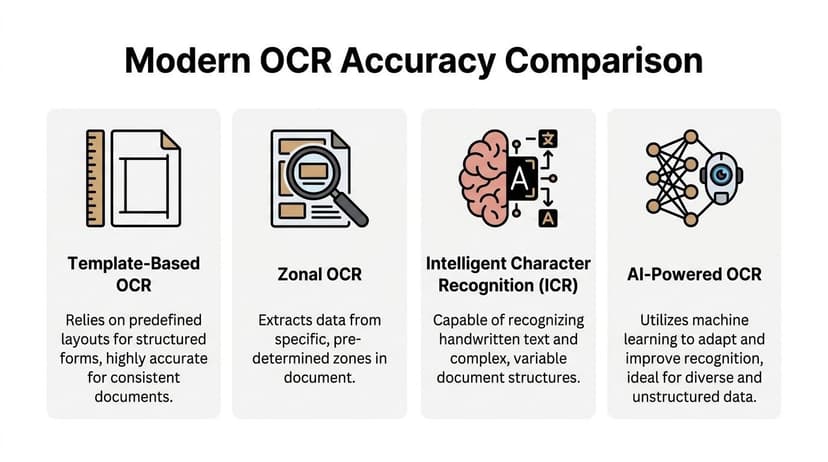
Basic OCR: This is the old image-to-text model.
For straightforward pages, basic OCR can be serviceable. For bank statements, it often struggles because statements are not just text blocks. They are structured financial tables with repeating rows, shifting columns, and bank-specific layouts.
When a statement from one bank puts debits left of credits and another reverses it, basic OCR often lacks the layout awareness to preserve the distinction.
Template-based OCR: Template systems work well when the document layout is fixed.
They rely on predefined locations for specific fields, so if the account number always appears in one spot and the date always appears in another, extraction can be very accurate.
The weakness is obvious once you deal with client work. A new bank, a redesigned PDF, or even a statement from the same bank with a different page format can break the template.
Template-based OCR can be useful for firms that process a narrow, repetitive set of documents. It is a poor fit for broad bank statement intake across many clients.
Zonal and rules-based extraction: This approach is a close cousin of templates.
The software looks for data in designated regions or fields and often applies simple rules after extraction.
It can be effective for pulling known elements from stable forms. It is less effective when transaction tables expand, compress, or wrap descriptions across lines. Those shifts are common in banking documents, especially multi-page statements.
AI-driven and hybrid OCR: This is the category worth serious attention.
Modern banking OCR uses layout analysis, preprocessing, model-based extraction, and post-extraction validation together. It is less dependent on one exact format and better at adapting to documents from multiple institutions.
That matters because layouts vary across many global banks, and weak table handling can cause significant extraction errors in transaction data. The more capable systems use AI-driven layout analysis plus validation rules such as balance checks and date consistency checks, and can reach over 99% numerical accuracy, as outlined in MoneyThumb’s technical explanation of bank statement OCR.
The technical issue most buyers underestimate
For statements, the hard part is not reading the amount “125.00.” The hard part is keeping that amount attached to the right date, description, and running balance.
If row alignment breaks, the extracted file may still look complete while carrying hidden corruption. A description slips down one row. A debit gets paired with the next day’s balance. Imports fail or, worse, succeed with bad data.
That is why advanced OCR stacks emphasize:
- Preprocessing such as deskewing, glare removal, and contrast enhancement
- Layout analysis to identify tables before text is extracted
- Field-level mapping to preserve row integrity
- Post-extraction checks such as running balance reconciliation
- Confidence scoring so low-trust output is reviewed before export
In statement work, row integrity matters more than pretty extraction screens. If the rows are wrong, the whole file is wrong.
Comparison of OCR Technology in Banking
| Approach | Accuracy | Flexibility (New Banks/Layouts) | Best For |
|---|---|---|---|
| Basic OCR | Low to variable on statements with tables | Low | Simple text-heavy documents |
| Template-Based OCR | High on stable formats | Low | Repetitive forms from the same issuer |
| Zonal OCR | Moderate when field positions are predictable | Moderate to low | Structured documents with limited variation |
| AI-Powered or Hybrid OCR | Highest on mixed banking layouts when paired with validation | High | Firms processing statements from many banks |
What I would ask any vendor
When teams evaluate OCR, I recommend asking questions that force the conversation away from demo-friendly PDFs:
- How does the engine preserve row alignment on multi-page statements?
- What validation rules run after extraction?
- How does the tool handle unfamiliar bank layouts?
- What happens when confidence is low?
- Can the output move cleanly into accounting workflows?
If a vendor only talks about character recognition, they are skipping the part that matters most to accountants. If they want a good non-banking comparison point, invoice extraction raises many of the same layout and field-mapping issues. This write-up on OCR software for invoices is useful because it shows how similar extraction problems appear in another financial document type.
For accounting firms, “having OCR” is not the win. Having OCR that survives reconciliation is the win.
The Hidden Pitfalls of Most Banking OCR Tools
Vendors like to show clean statements. Sharp PDFs. Standard layouts. No handwritten notes. No tilted pages. No strange foreign-language fields. That is not the document set most firms live with.
Banking documents are often messy. And most OCR failures happen in the gap between a polished demo and production work.
The accuracy illusion
A tool can claim high accuracy and still perform poorly on the files your team handles every week. The problem is not that vendors are always lying. The problem is that the benchmark often describes ideal inputs, not operational reality.
The weak spot in the market is accuracy degradation. Documents with handwritten annotations, faded print, odd layouts, or poor scans often produce materially worse results, yet those failure rates are rarely benchmarked in a way CPAs can evaluate. That gap is described directly in MSTS’s discussion of OCR accuracy degradation in banking.
The practical consequence is simple. Firms buy based on a headline number, then discover the ugly files still need manual remediation.
Extraction is not the same as usable output
I have seen teams celebrate when a tool extracts every transaction line into a spreadsheet, then lose the same afternoon cleaning descriptions, separating merged rows, and fixing amount columns before import. Technically, the OCR “worked.” Operationally, the firm gained very little.
This is the final mile problem.
Bank statement extraction has to do more than capture text. It has to produce data that maps to the destination system with enough integrity that the reviewer can trust it.
Common failure modes
The recurring issues are predictable:
- Row drift: Long transaction descriptions push amounts onto the wrong line.
- Column confusion: Credits and debits swap when statements use unusual layouts.
- Broken dates: Multi-line tables split dates from descriptions.
- Foreign-language damage: Names or addresses in non-Latin scripts get truncated or garbled.
- Duplicate imports: Overlapping statement ranges create repeated transactions.
- False confidence: The software marks output as acceptable even when one section is clearly compromised.
The multilingual trap
This one gets less attention than it should. Firms serving international clients often process IDs, statements, or supporting documents with non-Latin text. Older or weaker systems can mishandle longer character sets and special scripts, which creates problems in both bookkeeping and compliance workflows.
In practice, this means the OCR tool needs to do more than recognize English statements well. It needs to preserve data faithfully across the document types your clients submit.
If your client base is multilingual, test with multilingual files before you sign a contract. Demo datasets rarely expose this issue.
Integration is where many projects stall
A surprising number of OCR tools treat export as the finish line. It is not. Output still has to survive validation, deduplication, mapping, and import into the firm’s workflow.
If your team works in QuickBooks, Xero, Sage, or a custom review flow, “export to CSV” is only a partial answer. CSV is a container, not a control system. The questions are whether the transactions reconcile, whether duplicates are flagged, and whether someone can trace back to the source statement during review.
Red flags during evaluation
Look carefully when a vendor cannot answer these points clearly:
- No discussion of bad documents. If every example uses perfect PDFs, assume the hard cases are weak.
- No reconciliation logic. Fast extraction without downstream checks creates hidden labor.
- No confidence threshold policy. Low-quality output needs review rules.
- No multilingual explanation. Global client work exposes this quickly.
- No auditability. Reviewers need a clean path back to the source file.
The firms that get value from ocr in banking do not buy on marketing language. They buy on exception handling.
How ConvertBankToExcel Solves These Challenges
The firms that get the most from banking OCR usually stop treating extraction as the product. They treat validated output as the product.
That distinction is where platforms built for statement workflows separate themselves from generic OCR tools.
The final mile is reconciliation
For CPAs, the bottleneck is often not extraction speed. It is what happens after extraction. Data has to be validated against balances, checked for duplicates, and moved into accounting systems without creating cleanup work.
That gap is why platforms with built-in reconciliation logic matter. As noted in Citrusbug’s discussion of OCR bottlenecks in banking, post-extraction reconciliation is a major pain point, and tools that handle it inside the workflow can save teams 12+ hours weekly.

What a usable workflow looks like
A practical bank OCR workflow should do four things in one pass:
- Extract transactions from scanned or digital statements
- Preserve table structure across mixed bank layouts
- Validate amounts and balances before export
- Produce files the accounting stack can ingest
That is the standard I use when evaluating tools for firms.
One option built around that model is ConvertBankToExcel. It is designed for CPAs, bookkeepers, and finance teams converting PDF bank and credit card statements into structured exports. The platform supports statements from 2,000+ banks worldwide, handles low-quality and foreign-language files, uses multi-model validation, delivers 99%+ CPA-verified accuracy, supports 9+ export formats, and can batch process dozens of files in under 60 seconds, based on the publisher’s product information provided for this article.
Why this approach works better than generic OCR
The feature list only matters if it maps to a failure mode.
If row alignment is the risk, layout detection and model fallback matter. If imports are the issue, export format support matters. If reviewers do not trust the extraction, confidence scoring and balance checks matter.
That is why I look for these operational controls:
Balance validation
A good system does not just read the statement. It checks whether the extracted transactions reconcile to the running balance logic on the document.
This catches subtle issues that plain text extraction misses.
Multi-model fallback
One OCR engine will fail on some files. Hybrid workflows reduce that risk by using fallback logic when scans are poor, pages are complex, or the layout is unusual.
That matters more in production than in demos.
Accounting-ready exports
Excel and CSV are useful, but many firms need accounting-specific outputs. If the tool can export into formats that fit import workflows directly, the team avoids another manual transformation step.
Batch handling
Most firms are not converting one statement at a time forever. They need to process client volume in batches without losing visibility into review status.
The fastest OCR is not the one that reads a page quickly. It is the one that removes rework after the read.
A realistic before-and-after
Before a structured OCR workflow, a team might receive a stack of mixed PDFs, convert them manually, spot-check balances, then reformat the output for import. Every exception becomes a one-off process.
After a stronger workflow is in place, the path is simpler. Upload statements in batches. Let the system detect layout differences. Review only low-confidence or flagged items. Export in the format the downstream system needs. Keep the original statement tied to the extracted data.
That is what firms should mean when they talk about automation. Not “we extracted text.” Instead, “we reduced the number of documents that require manual intervention.”
The practical conclusion
The right OCR tool for banking is not a reader. It is a conversion and validation workflow.
If a product cannot explain how it handles reconciliation, duplicate detection, low-quality scans, and accounting exports, it is probably solving the wrong problem. For accounting firms, the job is not done when text appears on screen. The job is done when the data imports cleanly and holds up under review.
Implementation Security and Best Practices for Your Firm
Most OCR buying discussions start with speed and end with security. In accounting firms, that order should be reversed.
Bank statements, IDs, and supporting documents carry sensitive financial and personal data. A firm can save time with OCR and still create a serious governance problem if the implementation is careless.

Start with a controlled pilot
Do not roll an OCR tool across the firm on day one. Pick a contained document set first.
A pilot works best when the firm chooses a repeatable use case such as monthly bank statements for a small client group. That gives you enough volume to test quality, exceptions, review steps, and staff adoption without creating broad exposure.
During the pilot, define what success means for your team:
- Extraction quality: Does the output preserve transaction structure?
- Review burden: How many files still need manual intervention?
- Import reliability: Does the data move cleanly into your bookkeeping process?
- Auditability: Can staff trace entries back to the source file?
Build review rules before scaling
OCR should not eliminate review. It should concentrate review where it matters.
The cleanest implementations use confidence thresholds and exception queues. High-confidence extractions move forward with lighter checks. Low-confidence files, unusual layouts, or failed balance checks go into manual review.
This is safer than pretending every file deserves the same level of trust.
Security requirements that matter
For KYC and compliance-sensitive workflows, OCR tools need to handle security elements on IDs and preserve non-Latin data correctly. Just as important, a strict retention policy matters for client confidentiality. Tools that auto-delete files within 24 hours and maintain zero retention meet a high standard for accounting firms, as described in Regula’s overview of OCR in banking.
That point deserves attention because many firms focus on encryption and forget retention. Encryption protects data in transit and storage. Retention controls reduce how long the risk exists at all.
Practical adoption checklist
I recommend a short governance checklist before any firm-wide rollout:
- Limit the pilot scope. Start with one document type and one internal team.
- Test ugly files. Include poor scans, rotated pages, and multilingual documents.
- Define exception handling. Decide who reviews low-confidence output and when.
- Verify retention terms. Make sure the vendor’s deletion policy matches your confidentiality standards.
- Confirm traceability. Reviewers should be able to compare extracted records with the original document.
- Train for edge cases. Staff need to know when not to trust the output.
The safest OCR program is not the one with the longest security checklist. It is the one that limits exposure, deletes data quickly, and gives reviewers clear exception paths.
What firms often miss
Teams sometimes think implementation is mostly a software setup problem. It is not. It is also an operating model decision.
Who owns the review queue? Who signs off on exceptions? Which exports are approved for direct import, and which require a second check? How are confidential client files handled during troubleshooting?
Answer those questions early. OCR becomes useful when the process around it is disciplined.
From Data Entry to Strategic Advisor
The promise of ocr in banking is not that software reads documents faster than staff. That part is already obvious.
The promise is that firms can stop spending skilled accounting time on clerical conversion work and move that time toward analysis, cleanup, and advisory work clients will pay for.
The four things that matter
After working through the trade-offs, the practical checklist is short:
- Verified accuracy: Not headline claims, but output that survives messy source files
- Reconciliation logic: Data should be validated before it reaches the ledger
- System fit: Exports need to match the accounting workflow you already run
- Security discipline: Confidential financial files should not sit around longer than necessary
Miss any one of those, and the OCR project usually disappoints.
What changes inside the firm
When teams remove repetitive statement entry, they get more than a faster close. Reviewers spend less time hunting for transposition errors. Seniors spend less time cleaning imports. Partners get cleaner financials sooner.
That shift changes the type of work the firm can deliver. Better turnaround supports better conversations about cash flow, spending patterns, working capital, and planning. Those are advisory conversations. They start with cleaner data.
If your team is still trapped in manual rekeying, it helps to look at the broader category of automated data entry software as an operating decision, not just a tool purchase. The point is not to remove judgment from the workflow. The point is to remove low-value repetition so judgment can be used where it matters.
The practical conclusion
Banking OCR is worth adopting when it solves the final mile. It should extract, validate, reconcile, and hand off usable data. If it only digitizes text, it is unfinished.
Firms that choose carefully end up with a quieter close process and a better use of staff time. That is the payoff.
If your team wants a practical way to test this workflow, ConvertBankToExcel offers a free tier that lets you see how bank statement OCR, validation, and export work on real files before changing your process firm-wide.