
Month-end close usually fails in the same place. Not in the final review, and not in the adjusting entries. It breaks earlier, when someone is still copying line items out of a PDF bank statement at 9:40 p.m., trying to decide whether a truncated description is a transfer, a fee, or a vendor payment.
Every CPA firm and bookkeeping team knows that kind of work. You zoom in on a scan, retype dates and amounts, fix column shifts in Excel, and then spend more time proving your own data entry was correct than doing any actual accounting. One dropped digit can throw off a reconciliation. One duplicated line can create a false variance. The labor is tedious, but the ultimate cost is professional risk.
That's why automated bank statement processing matters. Not because it's trendy, and not because “AI” sounds modern. It matters because financial data has to be usable, reviewable, and defensible before it touches the ledger.
I've found that the useful conversation isn't “Can software read a bank statement?” Most tools can read something. The practical question is whether the output can survive reviewer scrutiny, audit questions, and the ordinary mess of real client documents. If it can't, the firm just moved the cleanup step downstream.
The End of Manual Data Entry
Busy season has a way of exposing weak processes. A client sends twelve monthly statements in mixed formats. Some are searchable PDFs. Some are image scans. One is upside down. Another has pages out of order. The staff member assigned to cleanup exports what they can, keys the rest by hand, and leaves notes everywhere so the reviewer can reconstruct what happened later.
That process looks familiar because it has been normal for a long time. It also creates a hidden quality problem. Manual entry doesn't just consume hours. It creates dozens of small judgment points, and every one of them can introduce inconsistency.
What the old workflow gets wrong
The manual approach usually breaks in predictable places:
- Transaction descriptions get abbreviated badly. A line that should help classify a payment turns into something vague and harder to review later.
- Dates shift across rows. Once one row is misread, every line beneath it can move one cell to the left or right.
- Review becomes reconstruction. Instead of checking accounting treatment, the reviewer has to ask what the preparer saw on the statement.
- Exception handling is informal. Staff use highlights, comments, and side notes instead of a consistent process.
A lot of firms first encounter automation through a basic bank statement to Excel converter workflow. That's a sensible starting point because it removes the worst part of the work. But extraction alone isn't the finish line for professional practice.
Manual entry is rarely the true deliverable. Clean, supportable financial data is.
Why this shift matters to a CPA practice
Automated bank statement processing provides value by changing who does what. Software handles the repetitive reading and formatting work. Staff handle exceptions, classifications, and review decisions. Partners and managers get cleaner source data earlier in the cycle.
That's more than efficiency. It's a control improvement.
When the routine part of statement handling becomes standardized, the firm can apply its judgment where it belongs. Cash anomalies stand out faster. Reconciliation issues surface earlier. Advisory work stops competing with copy-paste work for the same staff hours.
What Is Automated Bank Statement Processing
While often used loosely, automated bank statement processing in practice means taking a statement from raw document form to structured financial data that can be validated and exported into downstream systems. That is different from plain OCR.
OCR reads text. A complete processing workflow identifies what that text means, organizes it into usable records, checks whether it makes financial sense, and then packages it for another system. The gap between those two things is where many accounting teams get disappointed.
Beyond text capture
The useful way to think about it is this:
| Approach | What it does | What usually happens next |
|---|---|---|
| Basic OCR | Pulls visible text off the page | Staff still cleans columns, labels fields, and fixes errors |
| Automated processing | Captures, parses, structures, validates, and exports | Staff reviews exceptions instead of rebuilding the file |
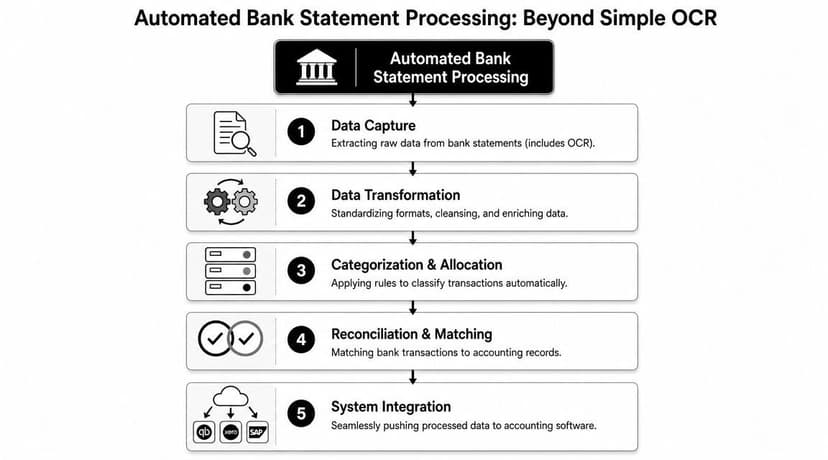
The technology has moved from simple OCR capture to an end-to-end workflow involving AI parsing, structured output, validation, and export. Modern AI models can identify transaction details from skewed, low-resolution scans without manual templates and turn those documents into formats such as JSON, XLSX, or CSV, as described in Infrrd's guide to automating bank statement processing.
What a complete process looks like
A sound workflow usually has five practical stages:
Capture the document
The system ingests a PDF, image, or scan, even when the statement quality is poor.Parse the content
It identifies statement-level and transaction-level fields such as dates, merchant names, balances, and line items.Structure the data
It turns scattered text into rows, columns, and standardized field types.Validate the output
It checks whether the extracted data is internally consistent.Export for use
It sends the validated output into Excel, CSV, JSON, or another accounting-friendly format.
The practical distinction that matters
A low-end tool gives you text that still needs labor. A good system gives you records that are close enough to accounting-ready that your team can focus on review, not rescue.
That distinction matters most with messy source files. In real engagements, statements arrive skewed, incomplete, and inconsistent. If a tool only works on clean templates, it's not really solving an accounting workflow problem. It's solving a demo problem.
The Core Engine Components Explained
The easiest way to understand the stack is to treat it like a digital assembly line. Each stage should make the document more reliable than it was in the previous stage. If one stage is weak, the rest of the process inherits the weakness.
Intelligent capture
Capture is where the software first meets reality. Bank statements aren't standardized in the way vendors often imply. Some banks print narrow transaction tables. Others spread information across multiple columns. Scans can be faint, crooked, or low resolution.
A capable engine has to read printed, typed, or handwritten content from noisy files and still isolate the data that matters. That's not just image reading. It's document interpretation.
Extraction and structuring
Once the image layer is readable, the next job is to identify field meaning. The system has to distinguish an account number from a statement number, a running balance from a transaction amount, and a posting date from a value date. Good extraction is layout-aware without forcing the firm to build templates for every bank.
If you want a plain-English breakdown of how OCR fits into this workflow, this guide to bank statement parser OCR is a useful reference.
Here's where weaker products often fail. They can pull text, but they don't reliably preserve transaction integrity across multi-page statements. That leads to merged rows, split descriptions, or misplaced credits and debits.
Validation and reconciliation
This is the essential layer for professional use. High-quality systems don't stop at extraction. They test whether the statement arithmetic holds together.
Sensible describes an important reconciliation rule in automated bank statement processing: opening balance + deposits - withdrawals = closing balance. If that equation fails, the document is automatically flagged for human review, which catches OCR errors or layout misinterpretations before bad data reaches accounting systems, as noted in Sensible's bank statement automation example.
Practical rule: If the software can't prove the statement balances, treat the output as unverified draft data.
That single rule does a lot of work. It catches line omissions. It catches duplicated transactions. It catches cases where credits and debits were read correctly as text but assigned incorrectly as accounting values.
Structured export
The final stage is export, but export quality depends on everything upstream. If data is structured poorly, the CSV is just a neat-looking container for bad records.
A reliable export should preserve dates, amounts, descriptions, and statement grouping in a way that downstream systems can use without manual remapping. In a CPA workflow, the best outcome isn't “we got a file.” It's “we got a file that another reviewer can trust.”
Business Benefits for Accounting Professionals
Most vendor pages lead with speed. That matters, but it's not the part that changes a firm's economics the most. The bigger payoff is that automated bank statement processing lets your team reserve human effort for judgment, follow-up, and exception review.
What improves inside the firm
The operational gains are straightforward:
- Turnaround improves because staff stop retyping routine transactions.
- Capacity expands because reviewers spend less time on mechanical cleanup.
- Consistency improves because every statement goes through the same extraction logic.
- Client service improves because the team can respond faster during close, cleanup, and due diligence projects.
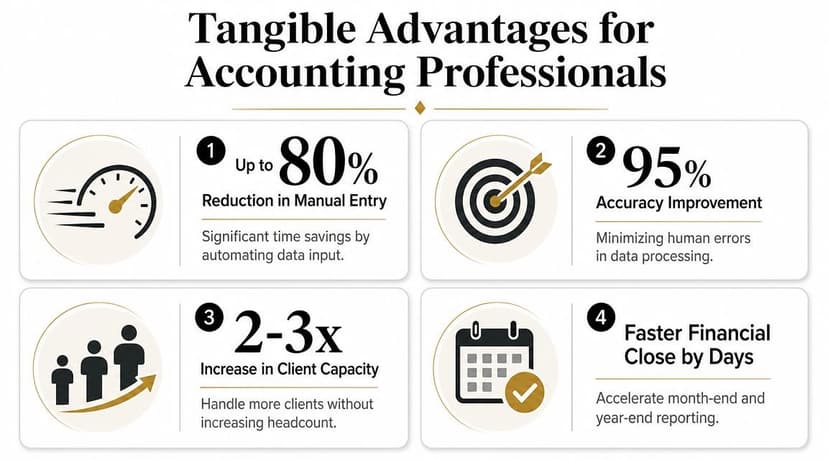
This isn't limited to bookkeeping. Automated bank statement processing is used for lending assessment, KYC, AML, fraud, and accounting workflows, and the process can move tasks from hours to minutes while enabling teams to handle thousands of documents without hiring more staff, according to Tungsten Automation's bank statement processing overview.
Why auditability creates the real return
The strongest business case isn't just labor reduction. It's the reduction of avoidable review friction.
When statement data arrives in a structured, checkable format, the reviewer can move directly to questions that matter:
- Does the cash activity agree to expected operations?
- Are there unexplained transfers or fees?
- Do timing differences need accrual treatment?
- Does the imported activity support the ledger position?
That shortens the path from source document to accounting decision.
For firms handling recurring statement loads, batch processing workflows for statement conversion become especially useful because they centralize uploads and reduce ad hoc staff handling.
A short explainer on the workflow is useful here:
What doesn't work
Two assumptions tend to disappoint firms.
First, automation doesn't eliminate review. It changes the shape of review. You still need exception handling, classification logic, and final oversight.
Second, a fast extractor isn't automatically a good accounting tool. If your team still has to manually verify balances, split merged rows, and reformat exports, the process has only moved labor around.
The best systems reduce keystrokes. The better systems reduce reviewer doubt.
Navigating Security and Compliance
CPAs don't get to treat client bank data casually. Any automation choice becomes part of the firm's confidentiality posture, whether the team admits it or not.
That means security evaluation has to go beyond the sales page. Encryption matters. Access control matters. Data deletion policies matter. But for accounting firms, the harder question is whether the system produces evidence that supports review and challenge.
Security is part of workflow design
A secure platform should let the firm answer ordinary client and reviewer questions without improvising:
| Question | What the system should provide |
|---|---|
| Who accessed the file? | Role-based access or similar access controls |
| How long was the file retained? | A clear retention and deletion policy |
| What changed after extraction? | A traceable review or correction log |
| Why was a transaction accepted? | Confidence indicators and validation results |
Those controls are practical, not theoretical. If your team handles statements for tax preparation, bookkeeping, lending support, or diligence work, you need a record of what happened to the source data after upload.
Audit-ready is the missing feature
Many products currently remain underdeveloped. They talk about extraction quality, but not about evidencing the quality in a way a CPA can defend.
Klippa identifies a key market gap clearly: proving the data is audit-ready. CPA-grade workflows require confidence scoring, reconciled balances, and traceable correction logs so accountants, underwriters, and tax preparers can answer assurance questions, as discussed in Klippa's review of bank statement processing.
If a platform can't show how it handled uncertainty, it's asking the accounting firm to absorb that risk manually.
The practical trade-off
The most secure-looking tool isn't automatically the safest in practice. A product can advertise strong controls and still force staff into workarounds like downloading files locally, renaming them by hand, emailing exceptions, or maintaining review notes outside the system.
That kind of fragmented workflow weakens confidentiality and weakens auditability at the same time. The safer approach is a platform that keeps ingestion, review, correction, and export in one controlled path.
Integrating Automation into Your Workflow
Implementation usually goes better when firms stop thinking in terms of “OCR deployment” and start thinking in terms of controlled reconciliation workflow. The goal is not to automate everything at once. The goal is to automate the repeatable majority while preserving a human path for exceptions.
Start with a narrow pilot
Use one or two clients first. Pick files with enough variation to be meaningful, but not so much complexity that the pilot becomes a special project. Good pilot candidates include recurring monthly bookkeeping clients with stable bank activity and familiar statement formats.
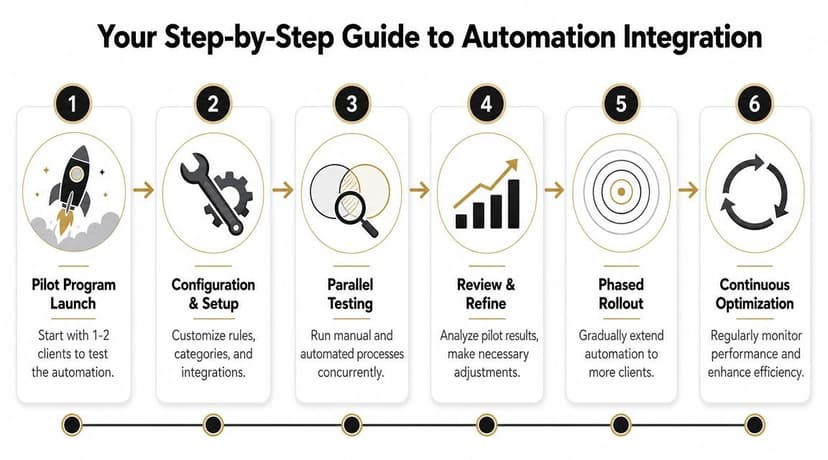
Run the automated output in parallel with your current process for a short period. Compare not just speed, but also reviewer questions, reconciliation exceptions, and how much post-export cleanup remains.
Build around reconciliation, not file conversion
Oracle JD Edwards provides a useful model for this. Its process consumes electronic bank data, loads it into staging tables, and then runs a reconciliation engine against the general ledger. When items don't reconcile, the system generates exception reporting and supports manual review, as explained in Oracle's automatic bank statement process documentation.
That architecture is worth copying even if you aren't using Oracle:
Ingest files consistently
Use naming conventions and batch handling so statements don't get lost in email threads or desktop folders.Transform into structured records
Normalize dates, descriptions, and signs before anything reaches the ledger.Reconcile before posting
Don't treat imported data as final just because it imported successfully.Route exceptions clearly
Someone should own unmatched items, fee anomalies, and balance failures.
Choose export formats that fit the destination system
Most firms need more than one output path. Excel or CSV works for review and custom analysis. Accounting systems may need import-specific formats depending on the client stack.
For example, teams working in Xero should think through the import process before choosing an extraction vendor. A practical reference is this guide to Xero integration workflows for statement data.
Some firms also need QBO, OFX, QFX, or IIF depending on whether the destination is QuickBooks, another ledger tool, or a review environment. If you want a central place to compare those export options, ConvertBankToExcel tools provide bank statement conversion outputs for Excel, CSV, QBO, OFX, QFX, IIF, JSON, XML, TXT, and PDF.
Borrow patterns from cloud automation
If your firm is standardizing multiple document workflows at once, it helps to look outside accounting software marketing and study broader cloud automation tools and patterns. The useful lesson is that durable automation relies on controlled inputs, exception paths, and system-to-system handoffs. Bank statements are no different.
How to Choose the Right Automation Vendor
The easiest way to get this wrong is to buy on demo quality. Demo files are clean. Real client files are not. Vendor due diligence should focus on what happens when the statement is ugly, the bank layout shifts, or the extracted data has to be defended later.
A practical buying checklist
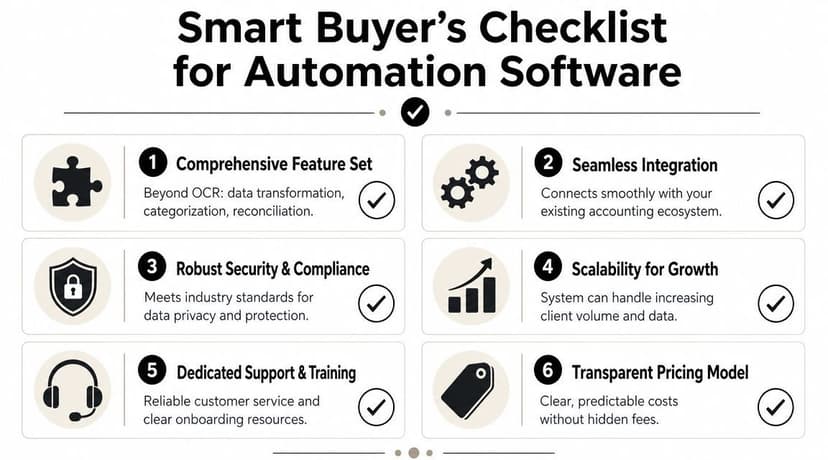
When I evaluate tools, these are the questions that matter most:
Can it prove financial consistency
Ask whether the system performs statement-level balance checks and what happens when the check fails.How does it handle exceptions
You want a review path, not silent failure and not a vague “manual verification available” claim.What does the export look like before cleanup
Request output from a messy multi-page statement, not a polished sample.Is there a review trail
Look for correction logs, confidence indicators, and evidence of what changed after initial extraction.Does it fit the firm's actual software stack
Exports matter more than feature lists if your team lives in Excel, QuickBooks, Xero, or mixed environments.What happens to the files after processing
Retention policy, deletion timing, and access controls should be explicit.
What sales teams often overstate
“Template-free” can still mean the system struggles with unusual layouts. “AI-powered” can still mean the user is expected to fix low-confidence rows manually. “Accounting integration” can still mean a CSV download with no real reconciliation logic behind it.
That's why side-by-side testing matters more than marketing language.
A helpful companion read is this comparison of free vs paid bank statement converter options. The important distinction usually isn't price by itself. It's whether the paid workflow materially reduces review effort and risk.
Good vendor selection feels less like shopping and more like audit planning. You're testing evidence quality, not just feature breadth.
If your team needs a practical way to turn PDF bank statements into structured outputs for Excel or accounting imports, ConvertBankToExcel is one option to evaluate. It's built for finance workflows that need extracted data, export flexibility, and a cleaner path from statement to review-ready records.