
By the time month-end hits, the inbox usually tells the whole story. PDFs from large suppliers. Phone photos from smaller vendors. Multi-page invoices with freight, tax, and line items spread across awkward tables. Someone on the team is still keying vendor names, invoice numbers, dates, and totals into the ledger while trying not to transpose digits.
That process breaks down in the same predictable ways. A PO number gets entered as the invoice number. One line tax amount is missed. A duplicate slips through because the file name changed. Then the actual cost shows up later, during approvals, reconciliation, and audit support.
That's why invoice ocr software matters. Not because it sounds modern, but because manual invoice entry is one of the most expensive low-value tasks in accounts payable. Good software turns unstructured documents into usable accounting data. Bad software just moves the mess from data entry to cleanup.
The End of Manual Invoice Entry
Most accountants don't need a lecture on what invoices are. They need a better way to survive the stack that builds every week and explodes at close. If your team still receives invoices by email, shared drive, vendor portal, and the occasional scanned attachment from a copier that should've been retired years ago, you already know where the bottleneck sits.
A clean AP process starts with a clean understanding of the document itself. For teams standardizing intake and workflows, the Start Right Now business operating system gives a useful primer on invoice structure and why consistency matters before automation ever enters the picture.
The manual version looks harmless one invoice at a time. It's just keying fields. Then the pile grows. The same clerk retypes vendor details that already exist in the accounting system. Another person checks totals. A manager approves from email. At month-end, everyone asks why accruals are late and why coding errors keep resurfacing.
Where manual entry actually fails
The problem isn't only speed. It's error concentration.
- Header fields get mixed up: Invoice number, account number, PO number, and customer reference often sit next to each other. Basic manual entry invites miscoding.
- Line items are ignored: Teams under pressure often enter the total and move on. That works until job costing, tax review, or spend analysis requires the missing detail.
- Exceptions get buried: Credit memos, partial invoices, and unusual tax treatment don't disappear. They just show up later in reconciliation.
- Batch work turns into rework: If you process invoices in groups, the operational fix is usually structured intake and batch processing workflows, not asking staff to type faster.
The month-end crunch rarely comes from one large mistake. It comes from hundreds of tiny manual touches that nobody designed on purpose.
Invoice ocr software is the practical answer because it changes the job. Instead of typing data, staff review extracted fields, resolve exceptions, and approve posting. That's a very different workload, and in most firms it's the difference between controlled AP and organized chaos.
How Invoice OCR Software Actually Works
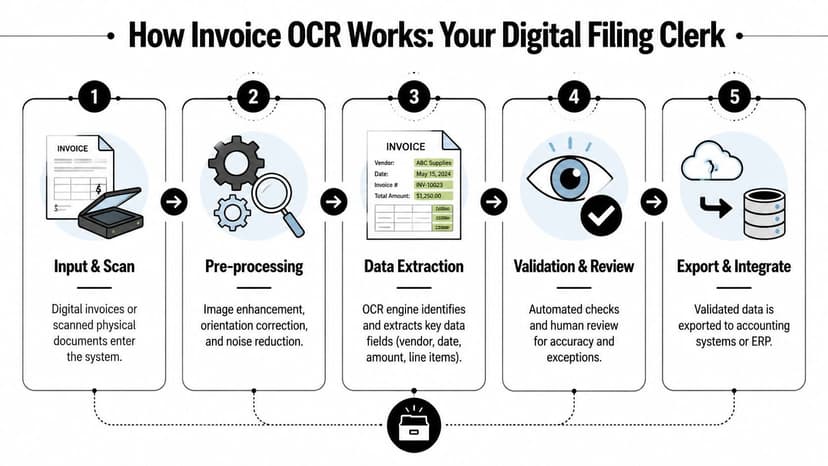
Think of invoice ocr software as a super-fast digital filing clerk. It doesn't just read a document. It receives it, cleans it up, identifies what kind of document it is, extracts the fields that matter, and pushes the result into a format your accounting system can use.
The category is no longer niche. The global OCR market reached $22.21 billion in 2026 and is projected to reach $60.04 billion by 2032, according to Gennai's invoice OCR overview. The same source notes that AI-powered OCR engines achieve 98-99% accuracy on printed invoices and cut processing time from minutes to seconds per invoice.
Input is only the first step
Invoices enter the system in whatever shape your vendors use. Native PDFs are easiest. Scanned images, email attachments, and phone photos are common. Enterprise tools are built to accept all of that without forcing the AP team to normalize files by hand.
This is the first point where weaker tools start losing ground. If a platform struggles before extraction begins, the rest of the workflow won't improve.
Pre-processing fixes bad documents before extraction
Good invoice ocr software cleans the image before trying to read it. It corrects tilted scans, improves contrast, and removes visual noise. That matters more than most demos admit.
A lot of OCR failures aren't really extraction failures. They're image quality failures that were never addressed upstream.
Extraction is about context, not just text
Modern tools don't behave like old OCR utilities that merely convert pixels into characters. They try to understand the role of each field. The software has to distinguish between:
- An invoice number and a PO number
- A due date and an invoice date
- A subtotal and a grand total
- A line item table and footer text
That's why there's a real difference between basic OCR and systems built with machine learning. In related financial document workflows, a bank statement parser using OCR follows the same principle. Recognition alone isn't enough. The software has to understand structure.
Validation is where real accounting value appears
Extraction without validation is just fast guessing. Useful systems check whether line items add up, whether tax and subtotal roll to the total, and whether required fields are present. Better ones score confidence and route uncertain fields for review instead of pretending every field is correct.
Practical rule: If a vendor demo focuses on recognition but glosses over validation, you're looking at a scanning tool, not an accounting tool.
Export turns documents into transactions
The final step is structured output. Clean invoice data gets exported as a bill, payable, or data file for downstream systems. At this point, OCR becomes operational, not just technical. If the output is clean, AP moves faster. If not, your team becomes the software's cleanup crew.
Evaluating Invoice OCR Beyond Accuracy Claims
Every vendor says “high accuracy.” That claim is almost useless on its own.
A key question isn't whether a platform can read a clean sample invoice during a demo. Instead, consider what happens when a vendor changes layout, sends a multi-page PDF, buries freight in the middle of a table, or mixes tax treatments on one document. That's where invoice ocr software earns its keep or falls apart.
One useful benchmark comes from Parascript's invoice capture overview. It states that advanced invoice OCR software can achieve straight-through processing on over 85% of invoices with more than 95% accuracy, and that these specialized systems outperform basic OCR APIs by 50% or more in complex variable-layout scenarios. That's the gap buyers should care about. Not a headline number, but performance on ugly documents.
What to test in a live trial
Don't ask the vendor for their best examples. Send your own invoice set. Include repeat vendors, one-off vendors, low-quality scans, credit notes, and documents with line-item tables that wrap across rows.
Then check these points:
| Feature | What to Look For | Why It Matters |
|---|---|---|
| Vendor recognition | The system should identify recurring suppliers without template babysitting | Repeated vendor correction work kills adoption |
| Line-item extraction | It should capture descriptions, quantities, prices, taxes, and totals accurately | Header-only extraction is too shallow for coding, review, and analysis |
| Multi-page handling | It must keep one invoice together and not split or merge pages incorrectly | Broken page logic creates downstream posting errors |
| Validation workflow | Review screens should show the source image next to extracted fields | Staff need fast correction, not detective work |
| Exception routing | Low-confidence fields should be flagged clearly | Teams need to focus effort where risk actually exists |
| Output structure | Export should map cleanly to your accounting or ERP fields | Dirty exports simply move the manual work downstream |
A vendor that can't demonstrate these with your own documents is asking you to buy hope.
Accuracy percentages can hide expensive labor
Many firms commonly fall into this trap. A tool can be technically “accurate” and still be operationally expensive if it leaves too many exceptions unresolved.
For example, if the system captures headers well but struggles with tables, your AP team still has to open the document, review each line, rekey problem fields, and verify the math. That's not automation. That's supervised data entry.
If your trial exposes recurring field mistakes, treat them like you'd treat recurring reconciliation breaks. Diagnose the pattern, don't wave it off.
- Repeated vendor mismatch: The model isn't learning your supplier base well.
- Missed table rows: The extraction engine likely isn't strong on line-item parsing.
- Date confusion: Field classification is weak.
- Poor review interface: Even decent extraction will feel slow if validation is clumsy.
What marketing fluff sounds like
You can safely discount a few common demo lines.
“No templates needed” only matters if the tool still performs on variable invoices.
“AI-powered” means nothing unless the output is stable enough for accounting review.
“Touchless AP” sounds great, but the only touchless workflow that matters is one your team trusts enough to approve.
If you're dealing with recurring extraction mistakes, it helps to think in terms of common OCR error patterns. Most bad implementations don't fail because OCR is impossible. They fail because buyers didn't test the exception paths that dominate real work.
Integrating OCR into Your Accounting Tech Stack
An OCR tool that extracts data well but exports badly is like a junior clerk who alphabetizes every document and then leaves it on your desk. Useful effort. Wrong endpoint.
Most firms already work across a patchwork of systems. QuickBooks for one client. Xero for another. Sage in older entities. Excel everywhere. That's why integration matters more than most buyers expect.
Square 9's discussion of AI and workflow friction makes the key point clearly. Most accounting firms use a fragmented stack such as QuickBooks, Xero, Sage, and Excel, and the biggest bottleneck is often the reformatting required to make OCR output fit those systems. The same source notes that solutions with nine+ export formats directly address that last-mile problem.
CSV is not the same as integration
Vendors love to say “we export to CSV.” So does every legacy system that creates cleanup work.
A basic export may still force your team to:
- map vendor names manually
- correct date formats
- fix tax field placement
- split line items
- re-import after validation errors
That's not integration. That's file handling.
A stronger setup maps extracted fields directly into the destination workflow. If you're evaluating options for firms standardizing bill imports and transaction flows, it's worth looking at how QuickBooks integration workflows are structured. The lesson applies beyond one platform. Good integration reduces handoffs.
What a workable AP flow looks like
In practice, the cleanest invoice OCR implementations follow a simple accounting path:
- Invoice enters from email, upload, or API
- Software classifies and extracts the document
- Low-confidence fields go to review
- Approved data posts as a draft bill or payable
- Coding, approval, and payment continue inside the accounting stack
If your team has to leave that flow to reshape the data manually, friction comes right back.
Here's a short walkthrough on why format and destination matter in real accounting workflows:
Questions to ask before you buy
Different firms need different endpoints, but the screening questions are consistent.
- Draft bill creation: Does the tool create a usable draft transaction, or just a file export?
- Line-level mapping: Can it preserve line items, tax detail, and coding structure?
- Approval fit: Will approvers work inside the OCR tool, the accounting system, or both?
- Multi-client flexibility: If you run an accounting firm, can the same extraction engine support different client stacks without constant remapping?
The best invoice ocr software doesn't just read invoices accurately. It hands your downstream systems data in the shape they already expect.
Security and Compliance Considerations for CPAs
For CPAs, security isn't a procurement checkbox. It's part of professional responsibility.
Invoices contain vendor banking details, addresses, tax data, pricing, and sometimes supporting correspondence that should never drift into uncontrolled storage or loose sharing workflows. If an OCR tool handles that information, the vendor is participating in your control environment whether they admit it or not.
Accuracy has a compliance impact
InvoiceOCRSoftware's overview of enterprise architectures notes that enterprise-grade invoice OCR systems achieve 99%+ accuracy using multi-model validation, and that a 1% accuracy improvement can reduce manual validation labor by 10%. For accounting professionals, that matters because higher technical accuracy reduces the risk of errors flowing into audited financials.
That point gets missed in many buying conversations. Compliance risk doesn't begin with a breach. It often begins with bad data accepted too casually.
When an extracted amount is wrong, the problem isn't “the OCR made a mistake.” The problem is your firm posted incorrect financial data and now has to defend the control failure.
Controls that actually matter
You don't need every security buzzword. You need evidence that the system supports sane controls.
- Encryption practices: Data should be protected in transit and at rest.
- Access control: Staff should only see the entities and documents they're allowed to access.
- Audit trails: Corrections, approvals, exports, and user actions should be traceable.
- Retention settings: You should know how long files are stored and how deletion is handled.
- Exception visibility: Low-confidence or corrected fields should remain reviewable.
For teams reviewing broader tooling around threat posture and operational risk, Modern application security software for SOC teams is a useful outside reference point. It's not invoice-specific, but it helps frame what mature software oversight should look like.
Ask privacy questions early
Too many firms leave privacy review until legal is already redlining the contract. Ask early:
- Where are files stored?
- How long are they retained?
- Can retention be shortened?
- What logs are available?
- Who can access the extracted data internally?
If you're evaluating document automation in a client-sensitive environment, your own privacy requirements should anchor the review. A fast workflow isn't worth much if it weakens confidentiality or muddies audit evidence.
Calculating ROI and Avoiding Implementation Pitfalls
The ROI case for invoice ocr software is usually straightforward. The mistake is assuming the return appears automatically once the software is purchased.
The hidden cost in AP isn't only keying time. It's the review burden created by mediocre extraction, weak exception handling, and exports that force rework. That's why buyers should look past surface-level savings and ask what work remains after the OCR pass.
Gotofu's analysis of OCR and compliance-grade review makes that issue clear. For CPAs and bookkeepers, 95% accuracy from an OCR-only tool isn't enough because the remaining 5% creates compliance risk and manual review burden. The same source says hybrid solutions with confidence scoring can achieve 99.5%+ verified accuracy, which directly addresses that liability.
How to think about ROI like an accountant
Start with your current process, not the vendor's calculator.
Ask:
- How much staff time goes into invoice entry?
- How much time goes into correction and exception review?
- How often do coding or data-entry issues surface later?
- How long does it take from receipt to approved posting?
Then separate labor into two buckets. First, unavoidable review work. Second, avoidable cleanup caused by bad extraction or poor integration. The second bucket is where many implementations gradually lose their return.
A useful management habit is tracking automation results with the same discipline used for operational reporting. If you need a simple framework for that mindset, Nexist's performance indicator insights are worth reading.
Common implementation mistakes
I see the same rollout errors repeatedly.
Buying off the demo set
Vendors show clean invoices. Your real AP inbox is messier. Test with your own files.Ignoring exception design
Every system has exceptions. The question is whether your team has a fast review path and clear ownership.Skipping user training
Staff need to know when to trust extracted data, when to challenge it, and how to correct it consistently.Automating bad intake
If invoices arrive through scattered channels with inconsistent naming and no ownership, OCR won't fix the process by itself.Treating “OCR-only” as the finish line
A tool that reads documents but leaves your team to validate every edge case may reduce typing while preserving most of the labor.
Field note: The best rollouts start with a narrow invoice group, establish review rules, and expand once the exception queue is under control.
If you want ROI, don't aim for magical touchless processing on day one. Aim for controlled reduction in repetitive work, then expand from there.
Invoice OCR vs Bank Statement OCR The Full Picture
Invoice OCR and bank statement OCR solve different accounting problems. They belong in the same automation strategy, but they're not interchangeable.
Invoice ocr software is built for accounts payable. It extracts supplier data, invoice numbers, dates, totals, tax, and line items so bills can move through coding, approval, and posting.
Bank statement OCR is built for cash activity and reconciliation. It extracts transactions, balances, descriptions, and statement structure from bank or credit card statements so teams can reconcile faster and import clean financial activity into their systems.
Why firms need both
If you automate invoices but still rekey bank statements, you've only solved half the back-office problem. AP may move faster, but reconciliation still drags. If you automate statements but not invoices, cash review improves while payable entry remains manual.
The document structures are different enough that purpose-built tools matter. Invoices vary by vendor layout, line-item design, and tax presentation. Bank statements vary by institution, transaction formatting, running balance logic, and statement period structure.
Choosing the right tool for the job
Use invoice OCR when the work starts with supplier bills. Use bank statement OCR when the work starts with reconciliation, transaction import, or financial document cleanup for accounting, lending, tax, or audit support.
For firms that want the bank side handled with the same discipline they expect from AP automation, ConvertBankToExcel tools are built specifically for bank and credit card statement conversion into structured accounting-ready formats.
If your team is buried in PDF statements, credit card exports, or multi-format transaction data, ConvertBankToExcel is a practical next step. It's built for CPAs, bookkeepers, and finance teams who need structured outputs for Excel and accounting systems without spending hours cleaning up financial documents by hand.