
For any CPA or bookkeeper, the month-end close used to mean one thing: a mountain of PDF bank statements and a long, tedious slog of manual data entry. We’ve all been there.
You squint at a scanned statement, keying in transaction after transaction, praying you don't transpose a number or miss a line item. That slow, fragile process has been the bottleneck in accounting for decades. It's not just boring; it's expensive and dangerously error-prone.
But that reality is finally changing. Automated data entry software isn't just another tool—it's a specialized "digital translator" that speaks the language of financial documents. It can read a dense, 50-page statement from a small credit union just as easily as a clean invoice, turning unstructured chaos into structured, ready-to-use data.
The Gap Between PDFs and Your Accounting Software
The fundamental problem has always been bridging the gap between messy documents (like PDFs and scans) and organized accounting systems (like QuickBooks or Xero). For years, manual keying was the only bridge, but it was a rickety one. A single human error could trigger hours of painful reconciliation work later.
It's not just a feeling; the numbers back it up. Manual entry from bank statements and invoices can eat up 40% of a bookkeeper's time. Worse, unchecked manual entries have error rates as high as 4-7%.
Automated solutions demolish that old standard. Modern tools consistently process thousands of transactions with over 99% accuracy, slashing error rates to below 1%. For example, platforms like ConvertBankToExcel can turn a messy PDF bank statement into a clean Excel file in under 60 seconds. It’s not uncommon for teams to save more than 12 hours every single week. You can dig into more data on these efficiency gains and see the market trends for yourself.
A quick look at the old way versus the new way makes the difference pretty stark.
Manual Vs. Automated Data Entry: A Quick Comparison
This table breaks down the core differences between sticking with manual entry and adopting an automated solution for your accounting workflow.
| Metric | Manual Data Entry | Automated Data Entry Software |
|---|---|---|
| Speed | Slow; hours per client | Fast; minutes or seconds per document |
| Accuracy | Prone to human error (4-7% error rate) | Highly accurate (often >99%) |
| Cost | High labor costs, plus costs to fix errors | Low subscription or usage-based fees |
| Scalability | Poor; more clients require more staff | Excellent; handle more volume with the same team |
| Focus | Low-value, repetitive data input | High-value analysis and client advisory |
| Employee Morale | Low; tedious and monotonous work | High; frees up team for engaging tasks |
The comparison isn't even close. Automation removes the bottleneck, allowing your team to shift from being data entry clerks to strategic advisors.
A New Focus on High-Value Work
This isn't just about saving time; it's about fundamentally changing what an accounting professional does all day. When you're not buried in data entry, you're free to focus on the work that actually matters and that clients will pay more for.
Suddenly, your team can prioritize:
- Strategic Analysis: Digging into the financial data to give clients advice that helps them grow their business.
- Client Relationships: Spending more time on calls advising clients instead of chasing them for documents.
- Firm Growth: Onboarding new clients without the automatic need to hire more data entry staff.
Ultimately, automated data entry software lets accountants and bookkeepers reclaim their most valuable asset—time. You can finally reinvest that time into activities that deliver real client value and drive the growth of your own firm. It marks the end of data entry as a chore and the beginning of a more efficient, accurate, and strategic future.
How Automated Data Entry Software Actually Works
Automated data entry software can feel like black magic. You upload a messy PDF bank statement, and seconds later, a perfectly clean spreadsheet appears. But what’s actually happening behind the scenes isn't magic—it's a clever, multi-step process that combines a few key technologies.
Think of it less like a single tool and more like a small, highly efficient team. You have an employee who reads the document, another who understands it, and a third who double-checks everything.
The Digital Eye: Optical Character Recognition
The first specialist on the team is the reader. This is a technology called Optical Character Recognition (OCR). When you upload a scanned statement, OCR’s job is to act like a digital eye, scanning the page and recognizing the shapes of letters and numbers. It converts the image's pixels into text your computer can read.
But old-school OCR was like a person who could read words without knowing what they meant. It could see "Deposit" and turn it into the letters D-E-P-O-S-I-T, but it had zero clue what a deposit was in an accounting context. This is where modern tools have taken a huge leap. If you want to see how far we've come, our guide on the bank statement parser with OCR digs into the details.
The Brain: Artificial Intelligence and Machine Learning
If OCR provides the eyes, then Artificial Intelligence (AI) and Machine Learning (ML) supply the brain. This is the part that adds context and genuine understanding. The AI engine doesn't just see a string of numbers; it analyzes the entire document to figure out what those numbers actually represent.
For example, the AI has learned to identify the structure of financial documents. It can spot a transaction table, tell the difference between a withdrawal and a deposit column, and correctly link a date to its transaction—even on a statement from a bank it has never seen before.
- Contextual Understanding: It knows that a number next to a minus sign or under a "Debit" header is an expense.
- Pattern Recognition: It can spot recurring descriptions like "MONTHLY SERVICE FEE" and automatically categorize them.
- Layout Agnosticism: Good AI doesn't need rigid templates. It intelligently finds key data points like the starting balance, no matter where the bank decided to place it on the page.
The Second Opinion: Multi-Model Validation
Even the smartest person makes mistakes, which is why the best automated software includes a system of checks and balances. This is usually done with multi-model validation and confidence scoring. Think of it as getting a second, or even third, opinion on every single piece of data.
The system might run several different OCR and AI models over the same document. If one model misreads a blurry number, another might get it right. The software then compares the outputs and assigns a confidence score, flagging anything it’s unsure about for a quick human check.
This layered approach is what makes the technology so reliable. By combining smart OCR with contextual AI, finance teams are saving an average of 12-15 hours a week on statement processing. More importantly, error rates drop from a typical 5% for manual entry to under 0.5% with this kind of validation.
The infographic below shows just how stark the difference is between the old way and the new way.
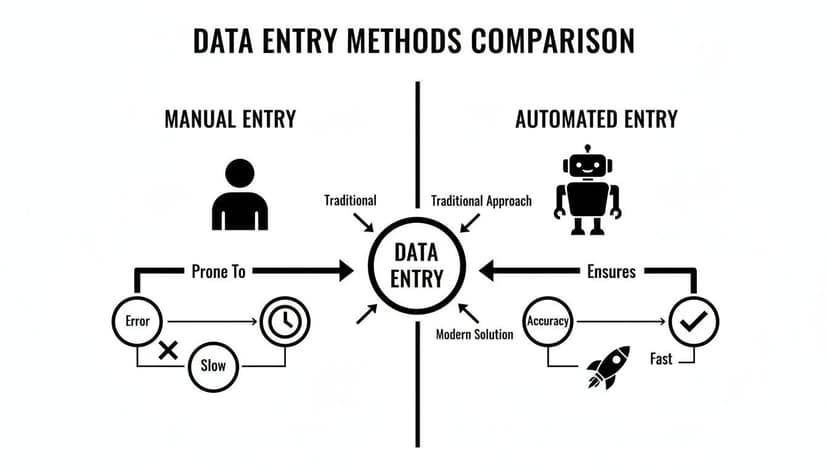
As you can see, automation isn't just a minor improvement. It replaces a slow, mistake-prone process with a fast, accurate system you can actually depend on. This trio—the digital eye (OCR), the thinking brain (AI), and the diligent fact-checker (validation)—is what makes automated data entry a game-changer for accounting firms everywhere.
Sure, the technology behind automated data entry is impressive, but let's be honest—what really matters are the results it brings to your firm. Forget the technical jargon for a moment. For CPAs and bookkeepers, the value comes down to four things: saving a shocking amount of time, getting rid of costly errors, growing without hiring, and keeping client data safe.
These aren't small tweaks. They fundamentally change what your firm is capable of.

Save a Ridiculous Amount of Time
The biggest, most immediate win is getting back your billable hours. We all know manual data entry is a soul-crushing time-sink. Teams spend hours keying in transactions from PDF statements for each client. By switching to automated data entry software, firms consistently claw back 12 or more hours every week.
Think about that. What could your team do with an extra day and a half each week? Instead of typing, they could be giving clients strategic advice, finding new business, or just getting home on time during tax season. This isn't about working less—it's about reassigning your smartest people to work that actually makes money.
Get to a Near-Zero Error Rate
Manual data entry is fragile. One typo, one misplaced decimal, and you’re stuck with hours of frustrating reconciliation work trying to find the mistake. The cost isn't just the time you burn fixing it; it's the hit to your reputation and the client's trust when the books don't add up.
Automated data entry software with AI-driven validation almost completely removes this risk. By cross-referencing data and using confidence scores to flag anything fishy, these tools hit accuracy rates over 99%. Suddenly, bank reconciliation goes from a painful detective job to a quick verification step.
Industry studies show that firms adopting this kind of automation see their data processing errors fall by an average of 90%. For a firm juggling hundreds of client statements a month, moving from "error-prone" to "error-free" is a game-changer. Many tools can now reconcile balances with over 99% verified accuracy. You can see more on the impact of automation on business operations for yourself.
Scale Your Firm Without Scaling Your Payroll
How do you take on more clients without hiring more people to type? It’s the classic growth problem for any service business. Automated data entry software is the answer, breaking the link between your firm’s growth and its data entry workload.
With features like batch processing, you can upload dozens—or even hundreds—of client statements at once. The system churns through all of them at the same time, turning what would have been weeks of manual labor into a few minutes of work. This lets you:
- Onboard more clients without adding data entry staff to your payroll.
- Handle seasonal spikes like tax time without burning out your team.
- Offer more competitive pricing because your overhead is lower.
Beef Up Security and Compliance
Handling sensitive financial data is a huge responsibility. Modern automation tools are built from the ground up with security in mind, often providing a level of protection that’s tough for a small or mid-sized firm to match on its own.
Look for these key security features that build client trust:
- 256-bit SSL Encryption: This is standard practice for scrambling data as it travels between your computer and the software's servers, making it unreadable to anyone trying to snoop.
- Automatic Data Deletion: Top-tier platforms like ConvertBankToExcel operate on a zero-retention policy. They permanently delete your uploaded files and the extracted data from their servers within hours of processing. This drastically reduces your risk and gives clients peace of mind that their information isn't sitting on some server indefinitely.
Choosing the Right Automated Data Entry Software
Picking the right automated data entry software can feel like a trap. Every vendor promises the moon, but how do you know which tool will actually save you time versus which one will just create new headaches?
It's like buying a new piece of equipment for your workshop. A flashy, complex machine might look impressive, but if it doesn't fit your workflow, it's just an expensive paperweight. The key is to ignore the marketing fluff and focus on what directly impacts your firm's day-to-day reality.
I've learned to evaluate every tool against four non-negotiable pillars: accuracy, integrations, speed, and security. Get these right, and you've found a winner.
Pillar 1: Accuracy and Validation
First and foremost, the tool has to get the numbers right. If you’re spending all your time fixing errors, you haven't automated anything—you've just created a different kind of manual work.
Real accuracy isn't just about basic OCR. The best tools use AI and machine learning to truly understand a bank statement's context, not just guess at the characters. For example, a smart platform like ConvertBankToExcel can correctly parse debits and credits even on a statement with a bizarre layout it's never encountered before.
Look for tools with built-in sanity checks. These two features are critical:
- Confidence Scores: The software should flag transactions it's unsure about. This lets your team focus their attention on the 1% of entries that might need a quick look, instead of re-checking everything.
- Balance Reconciliation: This is a must-have for accountants. The software should automatically verify that the sum of transactions matches the statement's starting and ending balances. It’s an instant confirmation that no transactions were missed.
Feature Checklist for Evaluating Data Entry Software
Use this checklist to cut through the marketing noise and compare different solutions on the features that actually matter for an accounting or bookkeeping practice.
| Feature/Criterion | What to Look For | Why It Matters for Accountants |
|---|---|---|
| Accuracy Rate | Published accuracy of 99%+ on digital PDFs. Specific handling for scanned documents. | A single misread decimal can blow up a reconciliation. You need reliability. |
| Validation | Automatic balance checks and confidence scores for extracted data. | Catches errors before they enter your books, saving hours of troubleshooting later. |
| Export Formats | Native .QBO, .OFX, and clean Excel/CSV exports—not just a generic CSV dump. | Direct import into QuickBooks, Xero, etc., saves manual formatting and cleanup time. |
| Batch Processing | Ability to upload and process entire folders of statements at once. | Crucial for handling month-end or tax season workloads without creating a bottleneck. |
| Processing Speed | Can process a multi-page statement in under 60 seconds. | Slow processing defeats the purpose of automation. Speed means efficiency. |
| Security Policy | 256-bit SSL encryption and a clear zero-retention policy for client data. | Protects your firm from catastrophic data breaches and simplifies compliance. |
| Bank Coverage | Explicitly supports a wide range of major and regional banks, not just "all banks." | A tool trained on specific bank layouts is far more accurate than a generic one. |
By running each potential tool through this checklist, you can quickly see which ones are built for professional use and which are just consumer-grade toys.
Pillar 2: Integrations and Export Capabilities
Your data entry tool can't be an island. It has to talk to your accounting software, otherwise, it’s useless. If the data is stuck in a proprietary format or a messy CSV, you're still stuck doing manual work.
A critical mistake is choosing software that only exports to a generic CSV file. You’ll waste just as much time cleaning up merged cells and reformatting dates as you would have typing it all in by hand.
Prioritize tools that give you analysis-ready output. A converter built for accountants should provide native file formats like .QBO (for QuickBooks) and .OFX (for Xero). This allows for a one-click import that maps transactions perfectly, preserving dates, descriptions, and amounts without any manual intervention.
Pillar 3: Throughput and Processing Speed
Next, think about scale. How does the tool perform when you’re up against a deadline? An accurate tool that can only process one file at a time won’t help you get through a mountain of year-end bookkeeping. For a head-to-head look at how different options perform under pressure, our comparison of the top 10 bank statement converters breaks it down.
The keyword here is batch processing. You need a platform that lets you drag and drop an entire client's folder—dozens or even hundreds of statements—and have the system process them all at once. A modern tool can chew through a dense, multi-page statement in under 60 seconds, turning an entire day of data entry into a task you can finish before your coffee gets cold.
Pillar 4: Security and Data Privacy
This last one is the most important. You are responsible for your clients' most sensitive financial information. A data breach isn't just an IT problem; it's an existential threat to your firm's reputation.
Don't settle for vague promises of "great security." Demand specifics.
- Bank-Grade Encryption: Data in transit and at rest must be protected with 256-bit SSL encryption. This is the standard for online banking and is non-negotiable.
- Zero-Retention Policy: This is the gold standard for accounting pros. The best tools, including ConvertBankToExcel, automatically and permanently delete all uploaded files and data from their servers within hours of processing. This means your client's data is never sitting on a third-party server, drastically reducing your risk profile.
By holding every potential software to these four standards, you can move beyond the sales pitches and choose a tool that will become a genuine asset—one that drives efficiency, improves accuracy, and helps your firm grow.
Integrating Automation into Your Accounting Workflow
Bringing a new tool into your firm can feel like a major project, but getting started with automated data entry is more like adding a powerful new calculator to your desk than it is rebuilding your whole office. You don't need a six-month implementation plan. With a tool like ConvertBankToExcel, you can see real results in less than an hour.
The idea is to make the change feel simple and valuable right away, not disruptive. Think of it as a low-risk experiment that proves its own worth at every step.
Start with a Simple Pilot Project
Before you overhaul any of your established processes, just run a quick test. Don't try to automate your entire client list on day one. Instead, pick one client—ideally one with messy bank statements—and grab their last couple of months' worth of PDFs.
Upload just those few files. The whole point is to see for yourself how a frustrating, 20-page scanned statement turns into a perfectly clean spreadsheet in about a minute. This gives you an undeniable proof of concept with zero risk. You can put the automated output side-by-side with your manual work and see the time savings instantly.
Define Your New Automated Workflow
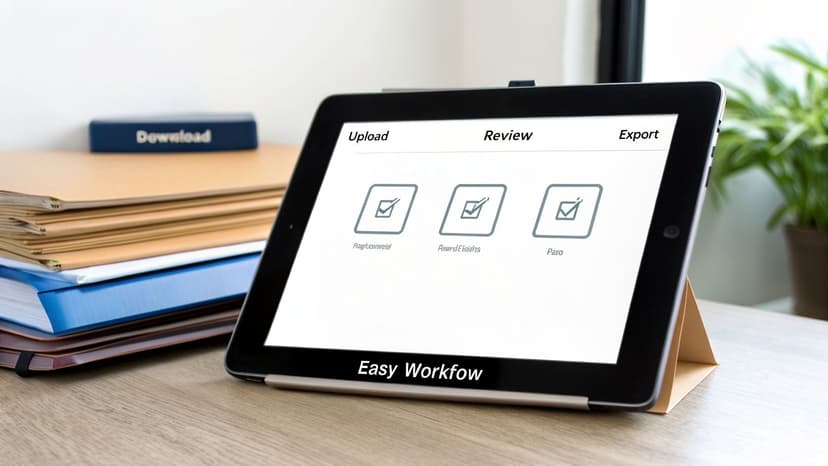
Once you’ve seen it work, you can map out a new, faster workflow for your team. This isn't complicated. The best automated processes are dead simple and usually boil down to just a few clicks.
Your new standard operating procedure could look like this:
- Download and Organize: As client statements come in, just save them into client-specific folders on your drive. A little organization here makes the next step incredibly fast.
- Batch Upload: Instead of opening files one by one, just drag and drop the entire client folder into the software. The system will process all the statements at once.
- Quickly Review and Verify: The software does all the heavy lifting, but a quick human check is just smart practice. Use the platform’s confidence scores to spot any transactions the AI flagged for a second look. Check that the balances reconcile—a process that now takes seconds, not hours.
- Export to Your System: With one click, export the clean data into the exact format you need. That could be a .QBO file for QuickBooks or a clean CSV. For accountants using Xero, you can take advantage of a direct OFX export integration that makes imports seamless.
This streamlined process replaces hours of mind-numbing keying with a few minutes of strategic review.
Train Your Team on Best Practices
Getting your team on board is the final piece. The key is to show them how this tool makes their jobs easier, not just different. Focus on practical tips that give them an immediate win.
A huge part of this is shifting the team's mindset from "data entry clerks" to "data reviewers." Their new role isn't typing numbers; it's providing the final expert validation. That's a much higher-value activity.
Here are a few tips to drill in during training:
- Organize First, Upload Second: Always group files by client before uploading. This keeps the outputs organized and avoids any mix-ups.
- Prioritize Digital PDFs: Whenever you can, use the original PDF downloaded from the bank's website. A clean source file means higher accuracy every time. Scanned copies work, but digital is always better.
- Trust But Verify with Confidence Scores: Teach your team how to use confidence scores to work smarter. They can quickly filter for low-confidence items and focus their review where it matters most.
By following this simple plan—pilot, refine, and train—you can slide automated data entry into your workflow without a hitch. Your firm will become more efficient, more accurate, and ready to scale almost overnight.
Common Pitfalls and How to Maximize Your ROI
Bringing in an automated data entry tool should be an easy win. But I’ve seen firms leave a ton of money on the table by making a few simple mistakes. It’s like buying a high-performance sports car and then driving it with the parking brake on—you’re not getting what you paid for.
Knowing what these pitfalls are is the first step to making sure you get the full value out of your software.
Pitfall #1: Feeding It Blurry Scans
The most common mistake is grabbing a grainy, scanned copy of a statement when the pristine, digital version is sitting right there in the online banking portal. Yes, good OCR can do impressive things with a bad scan, but it's still guessing.
Why guess? Always start with the original digital PDF straight from the bank. That’s how you get the highest accuracy right out of the gate, no questions asked.
Pitfall #2: Skipping the Final Review
Another oversight is thinking automation means you never have to look at the numbers again. The goal isn’t to replace your team; it’s to change their job description from typist to reviewer.
This is a critical mindset shift. You’re no longer paying people for mind-numbing data entry. Instead, they spend a few minutes verifying the AI's output, focusing their expert eyes only on the rare exceptions the system flags for review. This quick check builds trust and guarantees the data is perfect before it ever touches your accounting system.
Pitfall #3: Creating New Manual Work
The final pitfall is when the new tool doesn't plug into your existing workflow, forcing you to do more manual work. If you automate the data extraction but then have to manually reformat the spreadsheet or type the results into your accounting software, you’ve only solved half the problem.
Make sure your software exports directly into formats your accounting platform can read, like .QBO for QuickBooks or .OFX for Xero. This turns a clunky, multi-step process into one smooth action.
Calculating Your Real Return on Investment
Once you get these basics right, figuring out your ROI is simple math. The value isn’t just about the hours you get back—it’s also in the expensive, painful-to-fix errors you prevent. Bad data from manual entry is a huge source of reconciliation headaches that quietly drain your firm's profitability.
You can run the numbers for your own firm with a straightforward formula:
(Hours Saved Weekly x 4.33) x Hourly Rate + Cost of Corrected Errors = Monthly ROI
Let’s see what this looks like with a real-world example.
Case Study: Jane the CPA
Jane is a CPA whose team was burning about 12 hours a week just hand-keying client transactions from PDF bank statements. Her team’s blended hourly rate is $75.
- Hours Saved: 12 hours/week
- Hourly Rate: $75/hour
- Monthly Time Savings: (12 hours x 4.33 weeks/month) = 52 hours saved per month
- Reclaimed Value: 52 hours x $75/hour = $3,900 per month
And this number doesn't even factor in the "soft costs"—like the non-billable hours spent hunting down typos during month-end reconciliation.
For Jane's firm, that $3,900 a month adds up to $46,800 in reclaimed value every year. That’s time and money they can now put toward high-value advisory services, professional development, or just growing the business without piling on more payroll. With an automated data entry software like ConvertBankToExcel, the ROI isn't just a number on a spreadsheet—it's the fuel for a more efficient and profitable practice.
Frequently Asked Questions
Switching to a new tool always brings up a few key questions. For accountants and bookkeepers, they usually boil down to security, capability, and the real-world bottom line. Let's tackle the most common ones we hear about automated data entry software.
How Secure Is My Client's Financial Data with This Software?
This is the first—and most important—question you should ask. The answer needs to be uncompromising. Any reputable service treats security like a bank does. Platforms like ConvertBankToExcel, for example, use 256-bit SSL encryption for every single file transfer. This scrambles the data in transit, making it completely unreadable to anyone else.
But the single most critical feature for an accounting professional is a zero-retention policy. This means your uploaded files and the data pulled from them are permanently wiped from the servers just hours after you're done. Your client's sensitive information is never sitting around on a third-party server, which massively cuts down your risk and makes compliance much simpler.
Can This Software Handle Statements from International Banks?
Yes, the best tools are built with global accounting in mind. They don't rely on rigid templates that shatter the moment a bank in another country changes its statement layout. Instead, their AI is trained to understand the fundamental structure of a financial document—it knows what dates, descriptions, and amounts look like, regardless of the bank's specific format or language.
The top-tier services support thousands of banks worldwide and can process statements in multiple languages right out of the box. This is a game-changer for firms with clients operating in different countries. What used to be a nightmare of manual translation and data entry becomes a simple, automated step.
What If My Bank Statements Are Low-Quality Scans?
This happens all the time. It's rare to get a perfect, crystal-clear digital PDF for every client, every month. Premium software is built for this reality. Instead of using a single OCR engine, they combine several—including AI-powered ones—to take multiple shots at reading difficult or faded text.
Many tools also automatically clean up the images before they even start extracting data. They'll de-skew pages that were scanned crookedly, boost the contrast on faint print, and remove digital "noise" or speckles. This dramatically improves accuracy, even on those blurry, faxed, or poorly scanned documents that would otherwise be unusable.
How Much Time Can My Firm Realistically Save?
The time savings are immediate and massive—it's the main reason firms make the switch. On average, accountants and bookkeepers save between 12 to 15 hours per week just by cutting out the manual keying of transactions. A task that once took up an entire afternoon is now done in minutes.
That's almost two full workdays freed up every single week. This is time you can now pour back into high-value advisory services, take on more clients without burning out your team, and scale your practice in a way that was impossible before.
Ready to stop wasting hours on manual data entry? ConvertBankToExcel uses AI to convert PDF bank statements into perfectly formatted Excel, CSV, or QuickBooks files in under 60 seconds. See for yourself how much time you can save and start your free trial at https://convertbanktoexcel.com.