
If you're looking for bank statements right now, it's usually because a deadline is already moving. A lender wants the last few months. Your tax preparer needs missing periods. A bookkeeper is trying to close the month and one account is still incomplete. On paper, the task sounds easy. Log in, download the PDF, move on.
In practice, that's rarely the whole job.
The actual friction starts when the statement isn't in the portal anymore, the account was closed, the file arrives as a blurry scan, or you need records from several banks in one clean package. For professionals, the bottleneck also isn't just getting the document. It's getting a complete, usable, import-ready record without introducing avoidable errors.
Why Getting Bank Statements Is Still a Challenge
A common deadline problem looks like this. A business owner needs statements for underwriting by tomorrow morning. Two accounts are with one bank, one credit card is somewhere else, and an old operating account was closed after a merger. The current statements are easy enough to find. The missing month from last year is where the project stalls.
That gap causes more trouble than is commonly realized. One missing statement can block reconciliation, distort cash flow review, or force a lender to ask for a fresh document package. If the files come from different institutions, the formatting mismatch creates another layer of work. PDFs may be searchable, image-based, password-protected, or laid out differently month to month.
The problem isn't access alone
Most consumer guides treat this like a login issue. For working accountants and bookkeepers, it usually isn't. The issue is retrieval plus usability.
A junior staff member might download everything available online and think the job is done. Then the reviewer notices one statement is missing page 2, another has no running balance, and a third uses a revised layout that breaks the extraction process. Format drift is common enough that it deserves its own process, especially when banks redesign their statements. If you're dealing with layout inconsistencies, this note on bank statement format changes is directly relevant.
Practical rule: A statement set isn't complete because the folder has files in it. It's complete when every required account and every required period is present, legible, and reviewable.
What actually works
The fastest teams work backwards from the final use case. If the statements are for a mortgage, they confirm the exact date range first. If they're for bookkeeping, they confirm whether they need official PDF statements, transaction exports, or both. If the records will be analyzed later, they plan for extraction and balance checks at the moment they start collecting files.
That approach saves time because it avoids the most expensive mistake in this workflow. Gathering documents twice.
Digital First Online Portals and Mobile Apps
For many individuals, how to get bank statements starts on the bank's website or app. That's still the right first move. Historically, people downloaded statements as PDFs from online banking or scanned paper statements into PDF format. In the modern workflow, digital PDFs from online portals are the preferred starting point, and for direct digital downloads, extraction accuracy is typically 99% or higher while processing can take less than a minute per statement versus 30 to 60 minutes for manual entry, according to Lido's bank statement extraction guide.

Where statements usually live
Bank interfaces differ, but the labels are usually predictable:
- Statements and Documents often holds monthly PDFs, tax forms, and notices.
- Accounts may show recent transactions but not the official statement archive.
- Services or Profile sometimes contains paperless settings and eStatement enrollment.
- Download or Export is where you may find CSV, OFX, QBO, or similar data files.
On mobile apps, statement access is often nested one level deeper than on desktop. If the app only shows recent activity, switch to the full browser portal before assuming the statement isn't available.
PDF versus CSV versus accounting exports
People often lose time here.
A PDF statement is the official record most lenders, auditors, and underwriters want. It preserves the bank's formatting, statement date, account masking, opening balance, closing balance, and pagination. If someone asks for "bank statements," they usually mean PDFs.
A CSV export is usually better for bookkeeping because it gives you rows and columns instead of a visual document. Depending on the bank, it may include transaction date, description, amount, and sometimes balance. Some banks also offer OFX, QBO, or QFX for direct import into accounting software.
The catch is that these exports and statements are not interchangeable.
- Use PDF when you need the official monthly record.
- Use CSV or accounting formats when you need transaction data for analysis or import.
- Use both when the work needs an audit trail and a clean import file.
If you already have statement PDFs and need to turn them into spreadsheet-ready data, a bank statement to Excel converter workflow is often more reliable than copy-pasting from a browser PDF viewer.
A practical portal workflow
When I train staff on this process, I keep it simple:
- Confirm the date range first. Don't start downloading until you know exactly which months are required.
- Download from desktop when possible. Browser portals usually expose more history and more file types.
- Save files with a naming standard. Bank, account nickname, year-month.
- Check page count immediately. Don't wait until review to discover a partial download.
- Grab exports separately if needed. The statement PDF and the transaction export often sit in different menus.
A quick demo can help if you're dealing with unfamiliar layouts or mobile-first banking habits.
Where digital self-service breaks down
Online access is convenient, but it has limits. Some portals only keep a limited statement history. Others show statements for checking accounts but not older credit card or loan products. Mobile apps sometimes display transactions but hide the actual statement archive.
Download the official PDF when it's available, even if you also plan to use a CSV. The PDF is the fallback document when anyone later questions completeness or balance continuity.
When the file isn't there, you're no longer in a self-service workflow. You're in records retrieval.
When Digital Fails Traditional and Special Requests
Once a statement falls outside the online archive, the process changes. Many banks only keep statement downloads available online for a limited period, and older copies often require a branch visit or mailed request. SmartAsset notes that this shifts the true problem from simple access to recovering missing months and combining records at scale in professional workflows, as described in its overview of how to get a bank statement.
Branch, phone, and mail still matter
If the portal doesn't have what you need, the old channels are still the ones that work.
A branch visit is often the cleanest option when identity verification is likely to be the sticking point. Bring government ID, the account details you have, and the exact months needed. If the account is old or closed, say that immediately. Staff can usually tell you whether archived statements are retrievable locally or whether records management has to handle it.
A phone request can work well if you're prepared. Don't just ask, "Can you help me get statements?" Ask for "archived monthly statements for these specific months" and confirm whether they can be sent through secure message, email, or mail. That wording reduces the chance that support pushes you back to the website.
A mailed request is slower, but sometimes it's the only route for older periods, estate work, legal matters, or records tied to closed relationships.
Bank Statement Retrieval Method Comparison
| Method | Speed | Potential Cost | Typical History | Best For |
|---|---|---|---|---|
| Online banking portal | Fast | Usually no added cost for standard access | Recent statement archive only | Current accounts and recent months |
| Mobile app | Fast for viewing, mixed for downloads | Usually no added cost for standard access | Often narrower than desktop access | Quick self-service and immediate checks |
| Branch request | Moderate | Possible archival or copy fees | Older or harder-to-access records | Identity-sensitive requests and closed accounts |
| Phone support | Moderate | Possible archival or delivery fees | Varies by institution | Archived months when branch access is inconvenient |
| Mail request | Slow | Possible copy and mailing fees | Older record retrieval | Formal or legacy requests requiring paper handling |
Special cases people forget
Some of the hardest retrieval jobs aren't unusual. They're just poorly planned.
- Closed accounts: Banks can often retrieve records, but you'll need exact identifying details and patience.
- Joint accounts: Confirm who is authorized before sending a staff member or spouse into a branch.
- Visa or immigration files: Official monthly statements matter more than spreadsheet exports. If you're collecting documents for that kind of packet, this guide to a bank statement for visa applications can help you avoid avoidable formatting issues.
- Business accounts after ownership changes: Access rights may have changed even when the account history still exists.
Ask for the full monthly statement, not just transaction history. A transaction printout often omits exactly the fields reviewers care about.
The mistake I see most often is waiting until the deadline week to request archived records. Once you're outside the portal window, speed is no longer under your control.
Solving for Historical and Foreign Statements
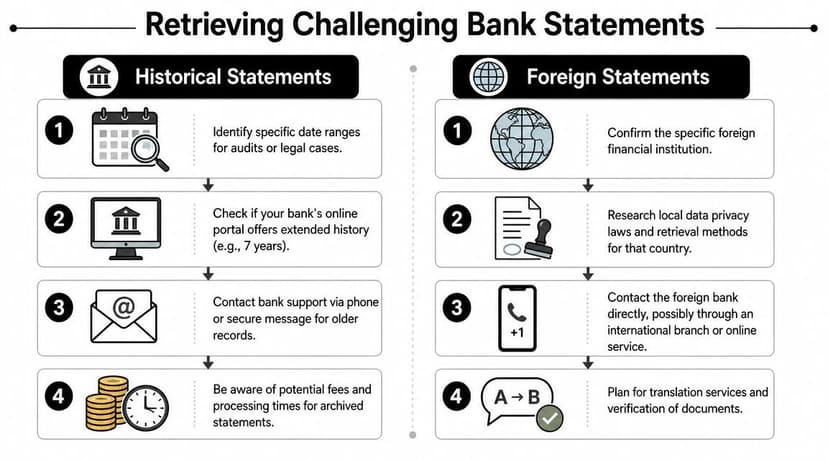
Historical and foreign statements cause the most rework because they add uncertainty at two levels. First, you may not know whether the records are still available through normal channels. Second, even when you get the files, they may arrive in a format your downstream process doesn't handle cleanly.
Historical records need a tighter request
When someone asks for "old statements," push for specifics. You need account name, approximate account number, statement period, and whether the account is open or closed. Without that, the request bounces between frontline support and records teams.
For audits, legal matters, and multi-year bookkeeping cleanup, I usually organize the request in a simple ledger:
- Account identifier
- Start and end month needed
- Whether portal access was already checked
- Preferred delivery method
- Who is authorized to receive the records
That structure matters because archived retrieval often happens outside normal self-service tools. The more precise your request, the less likely the bank is to send partial results.
Foreign banks add format and language issues
Foreign statement retrieval has its own traps. The challenge isn't only language. It's authentication, timezone lag, regional naming conventions, and unfamiliar statement layouts. Some institutions require local security steps or send records in a style that doesn't resemble a typical U.S. bank statement at all.
If you're working with non-English files, don't wait until conversion day to discover formatting problems. Review a sample early. Teams frequently run into trouble here with decimal separators, date order, translated merchant descriptions, and bank-generated notes. For those cases, a workflow designed for foreign language statements is more useful than a generic PDF parser.
If you can't read the statement language confidently, verify account holder name, statement period, opening balance, and closing balance first. Those fields tell you whether you have the right document before you spend time on translation.
Rights, records, and realistic expectations
In the United States, access to some bank-related records is not merely a convenience feature. The CFPB says consumers have the right to request a free copy of their checking account consumer report every 12 months, which underscores that account information access can be a regulated right in some contexts, as noted by the Consumer Financial Protection Bureau.
That doesn't mean every historical statement request will be easy. It does mean you should treat retrieval as a formal records process when the portal no longer helps. For foreign institutions, that same mindset applies. Be exact, document every request, and verify completeness as each file comes in instead of waiting until the end.
Authorization Security and Troubleshooting
Friday at 4:30 p.m., the client says they "sent everything." You open the folder and find three portal downloads, two phone screenshots, one branch scan, and a password-protected PDF no one can open. That is a normal bank statement retrieval problem. It is also a chain-of-custody problem, because once the files start bouncing between inboxes and desktops, you lose confidence in both security and completeness.
Use delegated access, not shared credentials
Clients still send usernames and passwords when they are in a hurry. I treat that as a cleanup task, not a shortcut. Shared logins blur who downloaded what, make it harder to revoke access later, and create unnecessary exposure if the same password appears anywhere else.
Use the bank's formal access path instead. Depending on the institution, that may be accountant access, a delegated user profile, a signed authorization form, or a client-upload workflow through a secure portal. It takes longer to set up, but it leaves a cleaner record and causes fewer disputes when a statement is missing or a date range was pulled incorrectly.
The same discipline matters after download. If your team is evaluating risk controls, keep an eye on reporting about financial institution data breaches. Statement PDFs contain enough personal and business information to justify stricter handling than ordinary client documents.
Keep the file set controlled
A workable process is simple:
- Store statements in one controlled location: secure client portal, encrypted document system, or restricted engagement folder.
- Keep filenames useful: include bank name, account identifier, and statement period so reviewers can match files without opening each PDF.
- Limit local downloads: if someone must save a file locally for extraction or review, delete it after the work is complete.
- Record source and date received: note whether the file came from the bank portal, the client, a branch printout, or mail.
That last point helps more than people expect. If a page is missing or a scan is unreadable, you can trace the problem back to the source instead of guessing.
Troubleshoot before you import
A statement is not ready because the PDF opens. It is ready after someone confirms that it is complete, readable, and consistent with the account period requested.
Common problems show up in predictable ways:
- Password-protected PDFs: get the official password or access instructions from the bank or client. Do not strip protection with unofficial tools if you need to preserve file integrity.
- Blurry scans or phone photos: request a fresh portal download or branch reprint. If that is impossible, verify key fields first, especially statement period, balances, and page count.
- Missing pages: compare page numbering and scan for jumps in running balance or transaction dates.
- Mixed file types: standardize the set before extraction. A folder with native PDFs, scans, and screenshots usually needs different handling rules.
- Wrong statement period: confirm the opening and closing dates against the engagement request, not just the month in the filename.
In practice, security and troubleshooting are linked. Every extra handoff creates another opportunity for the wrong file, a partial file, or an altered file to enter the workflow.
One more point matters for accounting teams. If the statements are headed into an app or ledger system, preserve the original PDFs and work from copies when converting or extracting data. The control issue is the same one you see in a Dext bank statement import workflow. Authorization, source tracking, and file integrity determine whether the imported transactions can be trusted later.
The Accountant's Next Step From PDF to Import-Ready Data
Once the statements are collected, the accounting work finally starts. At this stage, many teams lose the efficiency they thought they gained during retrieval. PDFs are document containers. They are not accounting-ready transaction tables.
That matters because the professional standard isn't "we got the files." It's "we turned the files into usable records without corrupting the data."
What the clean workflow looks like
The recommended method is to extract transactions into CSV or Excel and then reconcile the opening and closing balances back to the source PDFs before analysis. That balance verification is mandatory because even automated extraction can misread complex layouts, as noted in Kaaj's guidance on bank statement analysis.
A practical post-retrieval workflow usually looks like this:
- Collect the full statement set for the required period.
- Convert each file into structured rows rather than typing line items manually.
- Review field alignment for date, description, amount, and running balance.
- Reconcile balances against each original PDF.
- Export in the format your system expects before import.
Where tools actually help
This is the one place where software can remove hours of low-value labor, provided you still keep a review step. Teams may use spreadsheet workflows, OCR tools, or purpose-built statement converters depending on volume and statement variety.
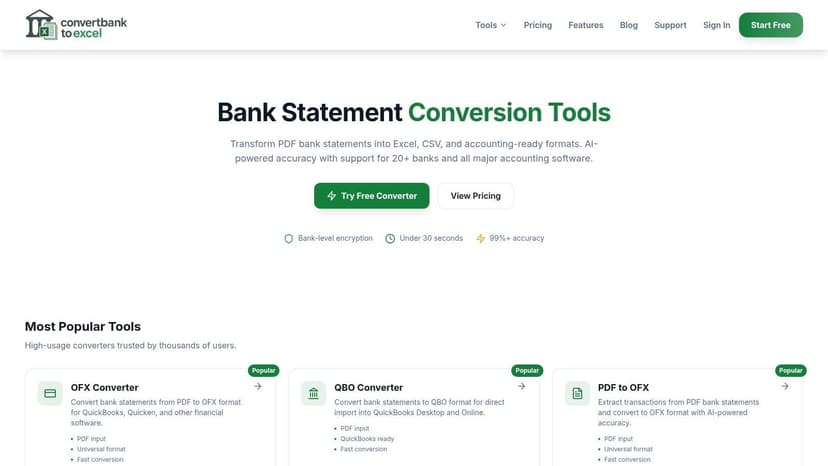
One purpose-built option is ConvertBankToExcel tools, which converts bank statement PDFs into formats such as Excel, CSV, and accounting-friendly outputs for downstream import. For firms handling varied file layouts, that kind of tool is useful because the retrieval problem often ends with a stack of PDFs that still need normalization.
If your endpoint is Xero, the last mile matters as much as extraction. The import structure, sign conventions, and field cleanup determine whether the ledger posts cleanly. This walkthrough on how to import a bank statement into Xero is the sort of operational step teams should standardize, not improvise.
The broader systems point
Statement retrieval is part of a larger finance operations stack. The organizations that handle this well usually think in terms of pipeline design, not one-off document hunts. That's true whether you're running a bookkeeping firm, a lending workflow, or a product team building finance infrastructure. If you're evaluating the architecture side of modern financial tooling, seeing how a web3 fintech development company frames data flows and system design can be useful context for why document standardization matters upstream and downstream.
The key takeaway is simple. Getting the statement is not the finish line. The finish line is a verified dataset that imports cleanly and stands up to review.
If you're sitting on a folder full of PDFs and need structured, reviewable transaction data, ConvertBankToExcel is built for that exact handoff from statement retrieval to accounting use. Upload the statements, export the data in the format your workflow needs, and still reconcile the results back to the source PDFs before posting anything to the books.