
Most readers looking for a sample bank statement aren't doing it out of curiosity. They need to answer a practical question fast. Is this document complete, usable, acceptable for a lender, or clean enough for bookkeeping?
That matters because a bank statement pulls double duty. It's a personal proof document for applications and a source document for accounting. If you read it casually, it looks simple. If you review it professionally, it tells you whether balances reconcile, whether the file is trustworthy, and whether the data can move into your workflow without creating cleanup later.
Understanding the Anatomy of a Bank Statement
A client sends a PDF five minutes before closing. The balances look fine at first glance, but the address is outdated, one page is missing, and the running balance skips in the middle of the month. That is a normal review problem, and it starts with understanding how the statement is built.
A bank statement is a source document with a fixed structure. Once you know that structure, you can tell the difference between a clean statement, an incomplete export, and a file that needs closer fraud review before it goes into underwriting or accounting.
For readers who also need to turn statement PDFs into workable transaction data, this bank statement converter complete guide covers the extraction side in more detail.
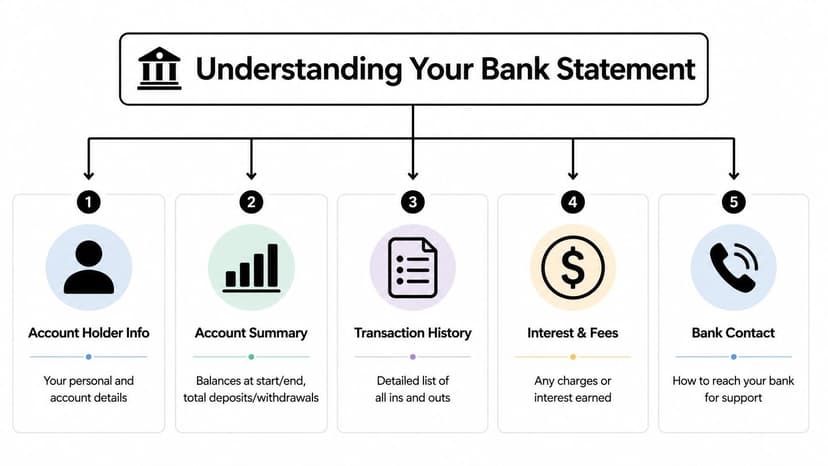
The five fields I check first
I start with the shell of the document before I read a single transaction line. If these top-level fields are wrong or incomplete, the rest of the review slows down fast.
| Section | What it includes | Why it matters |
|---|---|---|
| Account holder info | Name, partial account number, address, account type | Confirms the statement belongs to the right person or entity |
| Statement period | Start date and end date | Confirms whether the activity covers the requested month or reporting window |
| Summary section | Opening balance, closing balance, totals | Gives you control points for reconciliation and quick reasonableness checks |
| Transaction history | Date, description, amount, running balance | Shows detailed cash movement and whether the account activity flows logically |
| Bank contact details | Institution name and support information | Helps confirm the issuer and resolve exceptions during review |
Those five areas appear on personal and business statements alike, even when the layout changes by bank, country, or delivery method.
How to read the transaction grid like a reviewer
The transaction table is where coding errors, submission issues, and alteration red flags usually show up.
Read each line in this order:
- Date. Check posting order and watch for missing days around statement start and month-end.
- Description. Identify payroll, owner draws, transfers, fees, card settlements, returns, and vague entries that need backup.
- Amount column. Some banks separate deposits and withdrawals. Others label them credit and debit. You have to confirm the bank's sign convention before importing or coding.
- Running balance. This is the fastest built-in check for OCR mistakes, missing rows, and edited values.
One rule holds up across thousands of statements. Never accept an amount in isolation. If the running balance before and after the line does not support it, stop and verify the source file.
Practical rule: Opening balance, transaction flow, and closing balance should reconcile as one continuous sequence. If they do not, treat the statement as incomplete, misread, or potentially altered until proven otherwise.
Details that get missed and cause real work later
Small fields create expensive cleanup.
- Fees and interest may appear in a summary area instead of the main transaction list.
- Masked account numbers are normal on statements used for submission, but you still need enough digits to match the account correctly.
- Combined PDFs may include multiple accounts under one customer profile, especially for consumer banking.
- Page numbering matters. "Page 1 of 4" is a control feature. If you receive only three pages, you do not have the full statement.
- Statement headers and footers often carry issue dates, bank branding, and document identifiers that help distinguish an official statement from a spreadsheet dressed up as one.
For professional review, the minimum identifiers are straightforward: account holder name, account number or masked account number, statement period, opening balance, closing balance, transaction detail, and clear bank identification. If one of those is missing, the file may still be readable, but it is weaker as support for lending, compliance, or month-end close.
That is also why anatomy matters beyond simple reading. The same structure that helps a bookkeeper reconcile activity helps a reviewer spot tampering. A mismatched font in the balance line, inconsistent spacing in one transaction row, a running balance that resets without explanation, or a statement period that does not match the page sequence are all signs to pause and inspect the document more closely before accepting it.
Bank Statement Examples and Common Variations
A clean sample bank statement from a major bank is the easy case. Real work usually starts when the statement isn't clean.
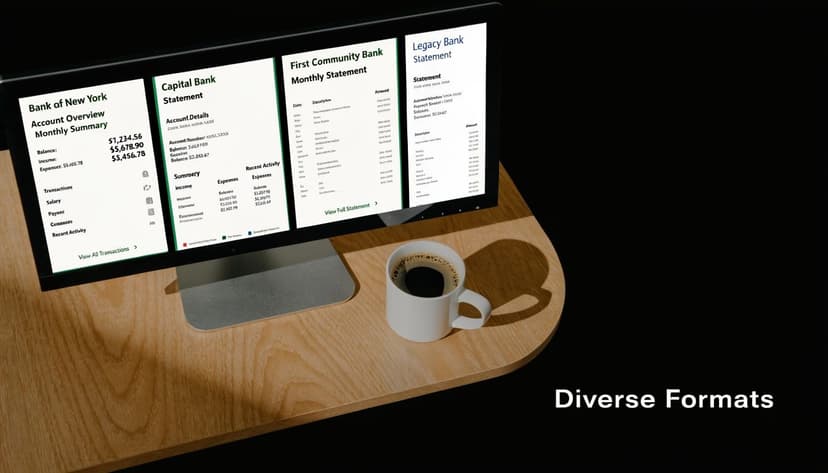
I've found it more useful to group statements by processing difficulty than by bank brand. That tells you what review method to use.
Personal, business, and poor-quality statements
| Type | What it usually looks like | Main challenge |
|---|---|---|
| Personal checking | Moderate transaction count, clear monthly summary, plain consumer labels | Distinguishing transfers from income |
| Business account | Dense activity, more pages, recurring vendor and payroll entries | Higher coding volume and more exception handling |
| Low-quality scan | Crooked pages, faded text, shadows, handwritten marks | OCR failure and balance verification |
A personal statement is usually easier to read but easier to misinterpret. A transfer from savings can look like income if you don't examine the description closely.
A business statement is less forgiving. Transaction volume is heavier, descriptions are often truncated, and one bad import can push errors across multiple expense categories.
Clean formatting helps, but consistent internal logic matters more than pretty columns.
Terminology changes by bank and country
Some institutions label money in as deposits and money out as withdrawals. Others use credits and debits. International statements can add another layer with translated labels, local date formats, and non-Latin scripts.
That's not a niche issue. CPAs serving international clients report that 65% of global bank statements are in non-English languages with non-Latin scripts, and manual entry can hit error rates of up to 25% because OCR struggles with complex character sets, according to Niagara University's financial examples resource.
If you're dealing with multiple layouts, file types, and software requirements, this overview of statement output formats and data structures is a practical reference.
What breaks weak processes
Three statement variations usually expose a bad workflow fast:
- Scanned statements from smaller institutions that don't have text-selectable PDFs
- Consolidated statements that combine several accounts in one file
- Foreign-language statements where field placement is familiar but labels aren't
What works is a review method that starts with document identity, then balance logic, then transaction extraction. What doesn't work is assuming every PDF behaves like a native digital statement from a large U.S. bank.
What Bank Statements Are Used For
The same document gets read very differently depending on who's holding it.
A borrower sees proof of funds. A mortgage underwriter sees stability, unexplained deposits, and account behavior. A bookkeeper sees a source record that has to tie to the ledger line by line.
That difference explains why a sample bank statement that looks "good enough" to a client still fails review on the professional side.
How each reviewer uses the statement
For loan and mortgage applications, the reviewer usually wants a complete period, readable balances, and explanations for unusual activity. Large deposits attract questions because they can affect affordability analysis, reserves, or source-of-funds checks. If you're preparing documents for that use case, this guide to a bank statement for mortgage review is a practical companion.
For visa and immigration files, the statement often supports proof of funds, financial continuity, and document authenticity. Missing pages, cropped headers, or inconsistent dates create delay immediately.
For bookkeeping and tax work, the statement is the independent record. If the client says an expense was posted correctly but the statement says otherwise, the statement wins until supporting evidence says different.
One document, different standards
A client may ask, "Can I just send page one?" For personal reference, maybe. For underwriting, audit support, or reconciliation, usually not.
Here's the working distinction:
- Submission use asks whether the statement proves something
- Accounting use asks whether the statement can be trusted and posted
- Compliance use asks whether the statement is complete and authentic
Those are different jobs. Treating them as the same job causes rework.
A statement that satisfies a client's immediate request can still be unusable for professional review if the period is incomplete or the detail pages are missing.
Preparing Statements for Submission and Verification
A file can look fine on screen and still fail review in two minutes.
That happens every day with bank statements. The balances may be correct, but the PDF is missing page numbers, the date range is cropped, transaction pages are split into screenshots, or the running balance cannot be followed from one page to the next. For a lender, immigration reviewer, auditor, or bookkeeper, those are not cosmetic issues. They block verification.

How to prepare a statement correctly
Good preparation starts with one rule. Submit the same statement a bank originally issued, with the least possible interference.
Use this checklist before sending any file:
- Keep the full statement period. Include every page, not just the summary or the page with the closing balance.
- Preserve headers and footers. The statement date, account identifier, page count, and bank branding help the reviewer test completeness.
- Redact narrowly. Mask only details that are not needed. If names, balances, dates, or transaction descriptions are covered, the document often becomes unusable.
- Send the original PDF when possible. Downloaded PDFs are easier to verify than screenshots, print-to-PDF copies, or phone photos.
- Check legibility. If a reviewer has to guess whether a figure is 3, 8, or 9, expect a follow-up request.
- Keep one account per file where possible. Mixed files slow down review and increase posting errors.
- Use a clear file name. Account name, institution, and statement period save time on both the client side and the reviewer side.
For year-end packs and formal reporting, I also like to cross-check statement handling against broader year-end financial reporting insights so the support documents line up with the financials being presented.
How professionals verify authenticity
Preparation and verification are related, but they are not the same job.
A clean PDF can still be altered. FinCEN has warned about increased use of fraudulent bank statements in applications and due diligence files, including visa and mortgage submissions. In practice, the problem usually shows up in basic control work, not in dramatic forensic testing. The statement fails because dates do not flow, balances do not recalculate, or formatting changes mid-page.
I treat every submitted statement as a record that must prove three things. It must be complete, internally consistent, and consistent with the stated source.
Red flags that deserve a second look
| Red flag | Why it matters |
|---|---|
| Inconsistent fonts or spacing | Edited balances and pasted transaction lines often disrupt the bank's normal formatting |
| Date range mismatch | Pages from different periods may have been combined into one file |
| Running balance breaks | Inserted, deleted, or changed entries often show up when the balance is recalculated line by line |
| Cropped edges or missing pages | You cannot confirm completeness if the file omits page numbers, headers, or ending pages |
| Summary totals that don't fit the detail | The account summary should reconcile to the listed transactions and ending balance |
For immigration files, reviewer expectations are stricter than many applicants realize. This bank statement for visa documentation guide explains the kinds of completeness and authenticity checks that commonly trigger delays.
When a statement feels off, start with arithmetic. Recalculate the running balance, confirm the opening and closing balances tie to the activity shown, and compare page formatting across the full file. Then ask for the original bank download, not a forwarded screenshot set.
Appearance is a weak test. Internal consistency is the stronger one. A real statement behaves like a bank record from top to bottom.
A Professional Workflow for Converting PDF Statements
Monday morning, month-end close, and a client uploads twelve statement files. Two are native PDFs, three are scanned copies, one is a phone photo saved as a PDF, and the rest mix personal and business accounts in the same packet. That is the point where a casual process starts creating posting errors, review delays, and bad imports.
The fix is a controlled workflow. A PDF is a document format. It is not usable accounting data until someone extracts it, checks it, and maps it to the system that will receive it.
Step 1: Triage the file before you extract anything
Good conversion starts with file classification.
Separate native PDFs from scans. Separate business accounts from personal accounts. Identify low-quality files early, because they need a different review standard and usually more cleanup time. If pages are out of order, rotated, cut off, or merged from different accounts, fix that first. Extraction quality usually reflects intake quality.
Set the target output before you process the file. A statement headed to Excel for review needs readable columns and stable sort order. A statement headed into QuickBooks or Xero needs field alignment, transaction signs, and dates formatted the way that platform expects.
Step 2: Choose an extraction method that fits the statement type
Native PDFs usually extract cleanly because the text layer is intact. Scanned statements depend on OCR quality. Low-resolution scans, dark backgrounds, and skewed pages create predictable problems such as broken rows, missing decimals, and descriptions split into multiple columns.
That trade-off matters. The faster tool is not always the cheaper option if staff spend twenty minutes fixing every export.
For firms testing software, the Digital ToolPad statement conversion tool is one example to compare against your current process, especially if you handle a mix of clean bank PDFs and low-quality client uploads.
Security matters here too. Statement files contain nonpublic personal information, so the conversion step should follow the same document-handling discipline you would use for tax records or payroll reports. The AICPA's guidance on protecting confidential information is a better standard to follow than marketing claims from template sites or software blogs.
Step 3: Validate the extracted data line by line
Extraction is only the first pass. Review is where the file becomes trustworthy enough to post or submit.
Use a short validation checklist:
- Confirm balances. Opening balance, listed activity, and closing balance should reconcile.
- Check date integrity. Imported dates should stay inside the statement period and remain in the correct order.
- Review amount signs. Debits and credits often flip during conversion, especially on credit card and mixed-format statements.
- Scan descriptions. Merchant names, check numbers, and memo fields should stay attached to the right transaction.
- Find duplicates and split rows. OCR often turns one line into two rows or repeats a transaction around page breaks.
- Flag exceptions. If a line is unclear, isolate it for review instead of forcing it into the final file.
I have seen plenty of files where every amount was correct and the export still failed because credits imported as negatives, or because one page header was mistaken for a transaction row. Those are ordinary workflow errors. They are not rare edge cases.
Step 4: Map the output to the downstream job
The destination controls the file structure. Treating CSV, QBO, OFX, and XLSX as interchangeable creates rework.
| Destination | Best-fit output | Main review concern |
|---|---|---|
| Excel workpaper | XLSX or CSV | Column consistency and transaction order |
| QuickBooks import | QBO | Transaction type mapping and sign handling |
| Xero upload | CSV | Field alignment and date formatting |
| Internal archive or data pipeline | JSON or XML | Completeness and schema consistency |
If you want a practical example of the review and handoff process, this guide on converting PDF bank statements to Excel for accounting use covers the cleanup decisions that usually determine whether an import works on the first try.
Step 5: Handle exceptions separately from clean files
Do not let one bad statement contaminate the whole batch.
Clean native PDFs can move through a faster path with a standard review. Low-quality scans, password-protected files, and statements with unusual layouts need an exception queue. That queue should include notes on what failed, what was corrected manually, and whether the output is suitable for bookkeeping, loan review, or compliance submission.
This is also where fraud awareness belongs. A converted file may still reflect an altered statement if the source document itself was manipulated. If transaction spacing changes mid-page, balances stop rolling correctly, or summary figures do not match the detail, stop the workflow and go back to the original bank download.
What a professional process looks like in practice
A good workflow does five things consistently. It classifies the file, extracts with the right method, validates the data, maps output to the destination system, and isolates exceptions before they hit the ledger.
That structure saves time because it reduces correction work later. More important, it gives staff a repeatable way to handle personal statements, business statements, and poor-quality files without guessing their way through each one.
Best Practices for Bank Statement Management
A statement problem rarely starts at reconciliation. It starts earlier, when a client uploads page 1 only, sends a phone screenshot instead of the bank PDF, or renames every file "statement.pdf." By the time the close is slipping or an underwriter asks questions, the underlying issue is file management.
Good statement management gives every file a clear path from receipt to archive. That matters for personal statements, business statements, and low-quality scans alike, because each type creates different review risks. A clean process also makes altered documents easier to spot. If the storage, naming, and review steps are loose, fraud checks become guesswork.
The habits that keep files usable
A workable standard usually includes these practices:
- Control intake. Tell clients exactly what to send. Bank-issued PDF, all pages, full statement period, no screenshots unless you approved an exception.
- Use a naming rule that survives scale. Include client name, account identifier, statement end date, and statement type so staff can sort files without opening them.
- Separate preparation from approval. The person cleaning a file for import should not be the only person deciding it is complete and accurate.
- Keep processing notes with the file. Record missing pages, password issues, redactions, manual edits, and any reason the statement was routed to an exception review.
- Set retention and deletion rules. Store statements in the approved document system, not in email inboxes or desktop downloads. Remove local copies after processing.
- Teach clients what "complete" means. A one-page summary may look fine to a client and still be unusable for bookkeeping, lending, or compliance review.
For the reconciliation side, this practical reconciling bank accounts guide is a helpful client-friendly resource when you need to explain why your process is strict.
What changes as volume grows
The right process for five statements a month often fails at fifty.
At higher volume, the bottleneck is not conversion. It is decision-making. Staff waste time asking the same questions over and over. Is this the final statement or an interim download? Are cropped margins acceptable? Did anyone verify that the opening and closing balances roll correctly? Those decisions need written rules, not memory.
Client education also starts to matter more than software. A short intake checklist can prevent a surprising amount of rework. I have seen firms cut review time just by requiring three things up front: original PDF, all pages, and a file name that includes the period end date.
A practical operating standard
My preferred standard is simple:
- Receive complete statements only.
- Confirm account holder, institution, and statement period before reviewing activity.
- Compare opening and closing balances to prior records before posting transactions.
- Flag unusual formatting, broken balance flow, or inconsistent fonts for fraud review.
- Save the original file, the processed output, and the review notes together.
- Remove statement copies from uncontrolled locations once the work is finished.
That standard does more than keep files tidy. It protects private data, gives reviewers a real audit trail, and lets the team handle clean PDFs, business statements, and poor-quality scans with the same baseline discipline.
If you're tired of cleaning up raw PDFs by hand, ConvertBankToExcel gives finance teams a faster path from statement to usable data. It converts bank statement PDFs into structured Excel, CSV, and accounting-ready outputs, which makes reconciliation, review, and imports much easier to manage.