
By the time most firms start looking for a bank statement checker, the problem is already painful. Staff are rekeying transactions from PDFs, clients are sending phone photos instead of clean exports, and reconciliation turns into a slow hunt for one bad date or a dropped negative sign. None of that is high-value accounting work. It’s clerical cleanup with audit risk attached.
The hard part is that bad software often makes the mess worse. A tool that extracts quickly but misreads balances creates review work. A tool that reads accurately but exports only generic CSVs pushes the pain into QuickBooks or Xero. A tool that handles domestic statements but fails on foreign-language layouts becomes useless the moment a client has cross-border banking. A good bank statement checker has to survive real practice conditions, not just polished sample files.
The End of Manual Bank Reconciliation
Every accountant knows the scene. A month-end close is waiting, the client has uploaded a pile of statements with mixed file quality, and someone on the team is flipping between a PDF viewer and a spreadsheet trying not to transpose digits. After enough repetitions, you stop worrying only about speed. You start worrying about silent errors.
Manual reconciliation fails in predictable ways. Page breaks hide transactions. Statement formats change from one bank to another. A junior staff member keys a balance correctly but assigns the wrong date format, and the import later lands in the wrong period. When that happens, the cost isn’t just time. It’s the follow-up work required to spot financial discrepancies before they turn into reporting problems.
What firms are really trying to eliminate
A bank statement checker isn’t just a PDF reader. In practice, it replaces several low-value tasks at once:
- Data entry: pulling dates, descriptions, debits, credits, and balances out of statements
- Format cleanup: turning unstructured PDFs into something accounting systems can use
- Basic validation: checking whether balances and transaction flows make sense
- Fraud screening: flagging documents that deserve human review
That’s why these tools matter inside an accounting workflow. They don’t remove judgment. They remove repetitive extraction work that steals time from review, client questions, and exception handling.
Practical rule: If your staff are still typing transactions from PDFs, the bottleneck isn’t bookkeeping skill. It’s workflow design.
The best setups also reduce handoffs. A usable checker should take a raw statement, standardize the output, and feed the next step cleanly. If you’re comparing platforms, it helps to review the kind of workflow support found in dedicated statement extraction features for accounting teams, because extraction quality on its own rarely solves the full reconciliation problem.
How Automated Bank Statement Checkers Work
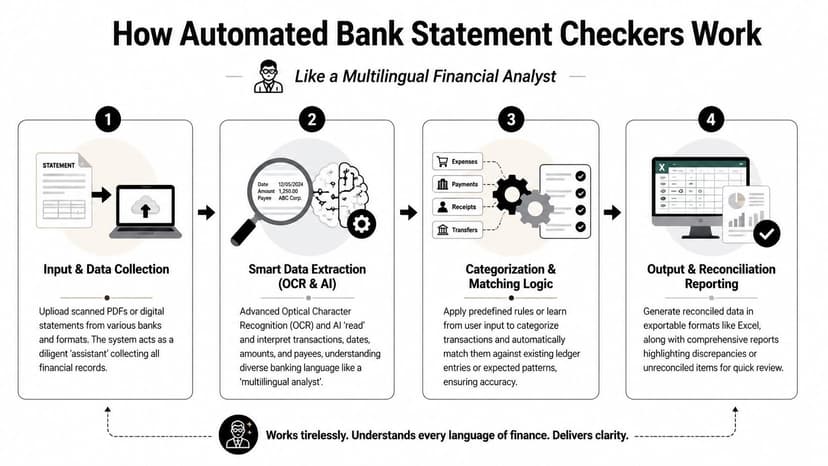
A good bank statement checker works like a multilingual financial analyst. It looks at a bank PDF, recognizes the layout, reads the text, understands which values are transactions and which are headers, then turns the whole thing into structured data you can review or export.
Step one is reading the document
The first layer is OCR, or optical character recognition. That part converts a scanned statement or image-based PDF into machine-readable text. On its own, OCR is not enough. It can read words and numbers, but it doesn’t reliably know whether a number is a balance, a debit, or part of an account summary.
That’s where the second layer matters.
Step two is understanding financial context
AI and machine learning take the OCR output and interpret the document structure. They identify transaction rows, separate dates from descriptions, and map credits and debits into a consistent schema. More advanced tools also recognize that different banks present the same information differently. One statement may use running balances on the right. Another may split deposits and withdrawals into separate columns. A third may place account metadata between transaction blocks.
This is why simple OCR apps disappoint accountants. They extract text. They don’t understand statement logic.
For a practical technical breakdown, a focused bank statement parser OCR explainer is useful because it shows why layout interpretation matters as much as character recognition.
Validation is what separates a checker from a converter
A real checker doesn’t stop at extraction. It tests whether the data is internally consistent.
The strongest products recalculate balances and inspect signs of tampering. According to DocuClipper’s bank statement analyzer overview, bank statement checkers use AI-driven OCR and machine learning to achieve fraud detection rates of up to 99% by analyzing over 50 fraud signals, including metadata inconsistencies and font variations.
That matters in practice because altered PDFs rarely announce themselves. The problem is usually subtle: inconsistent typography, broken spacing, arithmetic that doesn’t tie, or metadata that doesn’t fit the visible document.
Most accountants don’t need a tool to be clever. They need it to be suspicious in the right places.
Why some tools feel smarter than others
The quality gap often comes from the framework underneath. Systems that combine OCR, document reasoning, and rule-based validation usually hold up better across messy client files than single-method extractors. If you want a broader view of how these systems are built, SupportGPT has a useful guide to AI frameworks that helps explain why orchestration and validation layers matter in applied workflows.
Evaluating Bank Statement Checker Features
Most demos look good with a clean sample PDF. Real evaluation starts when you ask what happens with skewed scans, mixed bank formats, and accounting exports that need to work on the first try. A professional bank statement checker should be judged less like a convenience app and more like production infrastructure.
Accuracy and document intelligence
Accuracy isn’t just about reading characters correctly. It’s about extracting the right fields and preserving statement logic. According to ADVANCE.AI’s bank statement analyser overview, top-tier bank statement checkers deliver 99.5% accuracy in data recognition using heuristics, machine learning, and multi-model validation with AI like OpenAI Vision.
That benchmark is useful, but only if the product also exposes where confidence is lower. In practice, I trust systems more when they make uncertainty visible. If a low-quality scan has one questionable field, the software should flag it instead of pretending everything is clean.
Security and retention controls
Accounting firms handle statements that contain account numbers, addresses, income history, and transaction detail. Security can’t be a buried settings page. The same ADVANCE.AI source notes that enterprise-grade tools use 256-bit SSL encryption and automatic file deletion within 24 hours.
That’s the baseline I’d expect from any serious product. If a vendor is vague about retention, storage, or deletion, assume you’ll be the one explaining the exposure to a client later.
What I look for first: encryption in transit, short retention windows, and a clear deletion policy written in plain English.
Export formats and accounting compatibility
Many otherwise decent tools fall short in outputting data effectively. A checker that produces only generic CSV files often creates more cleanup after extraction. Date formats shift, debits and credits import inconsistently, and category mapping breaks when accounting software expects a native structure.
The strongest tools support exports that match the destination system, not just the source document. QBO, OFX, IIF, and related formats matter because they reduce post-processing friction.
Reconciliation and review controls
Balance validation should be built into the product, not left to a second manual check. If the extracted rows don’t tie back to statement totals or running balances, the system should say so immediately. Review tools also matter. Search, filter, exception flags, and side-by-side statement comparison save more time than flashy dashboards.
Batch handling and throughput
Small firms feel this first during month-end. Larger firms feel it every day. If the checker can’t process multi-page statements in batches, the time saved on one file disappears in queue management. Batch upload, progress tracking, and consistent output naming aren’t luxury features. They’re what make the tool usable at firm scale.
Here’s the checklist I use when assessing a platform:
| Feature | What to Look For | Why It Matters |
|---|---|---|
| Accuracy | High extraction accuracy, confidence indicators, support for difficult layouts | Reduces review time and prevents silent misreads |
| Security | 256-bit SSL, short retention, automatic deletion | Protects client financial data and supports firm controls |
| Export support | Native accounting-friendly formats such as QBO, OFX, IIF, plus spreadsheet options | Prevents import failures and manual remapping |
| Reconciliation logic | Balance checks, transaction validation, discrepancy flags | Catches issues before data enters the ledger |
| Scalability | Batch upload, multi-page handling, stable output across many files | Keeps month-end and high-volume workflows manageable |
Practical Use Cases for Statement Checkers
The easiest way to judge a bank statement checker is to stop thinking about the software and think about the job. Where does the work slow down now, and what changes when extraction, checking, and export happen in one pass?

Lending and application review
Mortgage, loan, and visa files are usually time-sensitive, and statement review often becomes the chokepoint. Teams need to confirm income patterns, look for recurring obligations, and verify that the balances presented by the applicant are consistent across the period reviewed.
According to Precisa’s discussion of metrics bank statement analysers evaluate, these tools are used beyond bookkeeping to instantly verify income, assess cash flow through measures like minimum monthly balances and loan payments, and process statements from over 2,000 banks worldwide.
That kind of coverage matters when applicants bank outside the usual domestic institutions. The use case isn’t just speed. It’s standardization across unfamiliar formats.
Monthly bookkeeping for messy clients
This is the daily grind use case. A client sends statements late. Some are downloaded PDFs, others are scans, and at least one includes pages that weren’t oriented correctly. Without automation, staff spend their time restructuring source data before they can even begin categorization and review.
With a capable checker, the workflow changes. The statement data lands in a structured file, exceptions get reviewed, and bookkeeping starts with analysis instead of typing.
For firms using Xero, practical compatibility matters more than broad promises. It helps to understand how statement data flows into Xero integrations before committing to a tool.
Audit support and forensic review
Statement checking is also useful when the question isn’t “what happened this month?” but “can we trust this document?” Altered statements usually aren’t caught by casual visual review. They show up through inconsistencies, balance mismatches, or formatting anomalies that software is better at surfacing than a tired reviewer after hours of review.
Cross-border clients and multi-bank histories
These are the files that break lightweight tools. A client has personal and business accounts in different countries, mixed statement layouts, and language variation across institutions. The firm still needs one reviewable output and one defensible process. That’s where document intelligence matters more than basic OCR.
A Step-by-Step Workflow with ConvertBankToExcel
The practical workflow starts when a client sends files that aren’t ready for the ledger. Maybe they’re scanned PDFs. Maybe they came from several banks. Maybe one is clear and the next looks like it was photographed under bad office lighting. The point is to move from raw statements to import-ready records with as little manual intervention as possible.
Step one, upload the full batch
Start with the original files. Don’t split pages manually unless a statement is corrupted. In a better workflow, the system should detect page order, identify statement layouts, and process multiple files in one queue. That keeps the audit trail cleaner and avoids introducing user error before extraction even starts.
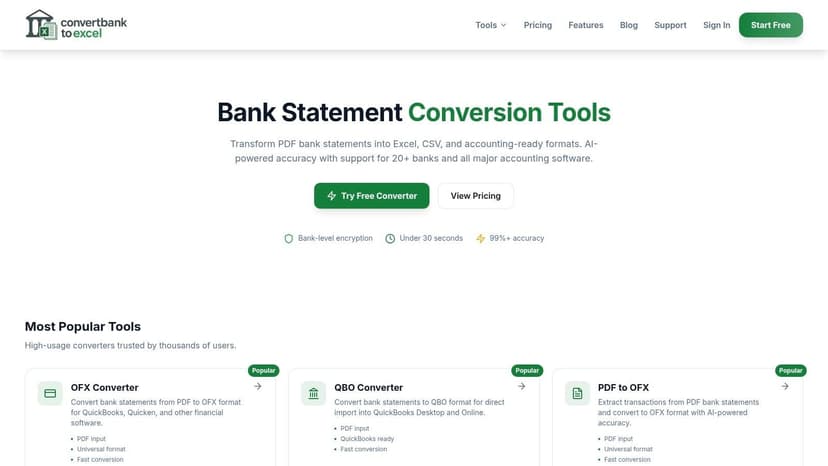
If you want a direct starting point, use the dedicated bank statement converter workflow rather than a generic upload utility. Purpose-built flows tend to handle statement-specific parsing better.
Step two, review what the software is uncertain about
This is the step firms skip when they trust software too quickly. Even strong tools benefit from a quick exception review. Look for low-confidence fields, missing balances, or rows where the sign appears questionable. The goal is not to recheck every line. The goal is to spend human time only where the machine signals ambiguity.
A good review pass should answer questions like these fast:
- Are opening and closing balances present
- Did dates stay in the correct order
- Did debit and credit signs map properly
- Did the extractor mistake summary figures for transactions
Step three, export in the format your accounting system expects
Many workflows often break. A 2025 Fintech Report summarized by MoneyThumb found that 62% of accounting firms name poor integration with software like QuickBooks and Xero as their top automation pain point. The best checkers solve this by offering native export formats like QBO, OFX, and IIF, which avoids the cleanup often caused by generic CSV imports.
That’s not a minor convenience. It’s often the difference between a smooth import and another round of manual correction.
Native accounting exports beat “universal” CSV files almost every time. Universal usually means the accountant becomes the integration layer.
A quick walkthrough is often easier than a feature list, especially for firms training staff across multiple clients:
Step four, import and verify inside the ledger
After export, complete one final software-side review. Confirm that dates landed in the proper period, transaction counts look reasonable, and duplicates weren’t created by a prior manual import attempt. Native files usually reduce problems, but they don’t remove the need for a final accountant check.
Step five, keep the process consistent firm-wide
The biggest gain comes from repeatability. Use the same file naming rules, the same review checkpoints, and the same export choices by client type. If one team member exports CSV and another uses a native accounting file, the resulting cleanup effort becomes impossible to standardize.
Calculating the ROI of an Automated Checker
Most firms don’t need a complicated model to evaluate a bank statement checker. The simple version is enough:
(Hours saved per week) x (your hourly rate) x 52
If that number exceeds the cost of the tool by a comfortable margin, the decision is usually straightforward. And in accounting firms, it often does.
The key is to count saved time honestly. Don’t just count the typing. Include the time spent fixing imports, chasing balance mismatches, and reviewing statements that were already “processed” by weaker tools. The return often comes from reducing rework, not just accelerating extraction.
Where firms miscalculate
Many firms undervalue the secondary gains:
- Less interruption: staff stay in the accounting system instead of bouncing between PDF viewers and spreadsheets
- Cleaner review paths: managers review flagged exceptions instead of reperforming the whole extraction
- Faster turnaround: client deliverables move sooner because statement prep stops blocking the close
A helpful way to frame this is the same way operations teams evaluate support automation value. The principle is identical. Time recovered from repetitive work becomes usable capacity.
What the payoff really looks like
The strongest argument for automation isn’t that software is cheaper than labor in the abstract. It’s that clerical statement handling is a poor use of trained accounting labor. Once a bank statement checker is accurate enough to trust and structured enough to fit your ledger workflow, every hour removed from manual prep can be reassigned to review, advisory work, or getting the close done without overtime.
Troubleshooting Common Statement Issues
Edge cases determine whether a bank statement checker belongs in an actual accounting practice or just in a demo. Clean domestic PDFs are easy. The true test is blurry scans, non-English statements, odd layouts, and files that arrive in the least convenient format possible.
Low-quality scans and skewed images
Weak tools fall apart when the statement isn’t perfectly aligned or the text isn’t crisp. Good tools recover because they rely on layout interpretation, not just raw text capture. That means the software should identify transaction tables even when the file quality is poor and then tell you where confidence drops.
If reconciliation keeps failing, review the extracted balances first. In practice, that catches more issues than staring at descriptions. A guide focused on reconciliation mismatches and how to fix them is useful here because most statement problems show up as balance logic problems before they show up anywhere else.
Non-English and foreign-bank statements
This is still where many products struggle. According to HyperVerge’s discussion of bank statement analysis, a major gap in most tools is handling non-English statements, which can see OCR error rates as high as 45%. Modern checkers address this using multi-modal AI like OpenAI Vision, which can interpret layouts and text from over 2,000 banks globally with over 99% accuracy.
That combination matters for firms with immigrant clients, international founders, or cross-border lending files. If a tool only works well on familiar domestic templates, it’s not a general solution.
Don’t assume “supports international banks” means “handles multilingual statements well.” Test the ugliest real file you have.
Password-protected PDFs and multi-currency files
These problems are less about AI and more about workflow discipline. Password-protected files usually need a secure intake step before processing. Multi-currency statements need careful downstream handling so the extracted data isn’t mistaken for normalized base-currency bookkeeping. A checker can extract accurately and still require an accountant to make the right posting decision.
If your team is tired of retyping transactions, fixing broken CSV imports, and chasing statement mismatches after the fact, ConvertBankToExcel is built for the practical work accounting firms perform. It handles scanned and digital statements, supports exports for Excel and accounting systems, and gives you a cleaner path from raw PDFs to reviewable, import-ready data.