
An invoice lands in AP with no usable trail behind it. The amount looks familiar, the vendor is approved, and someone in operations swears the order was legitimate. But nobody can find the purchase order. Now the work starts. Someone searches email, someone checks the ERP, someone asks receiving whether the goods showed up, and payment stalls while the finance team reconstructs a transaction that should have been clear from the start.
That’s where most purchase order invoice problems begin. Not in policy manuals, but in ordinary handoffs that failed.
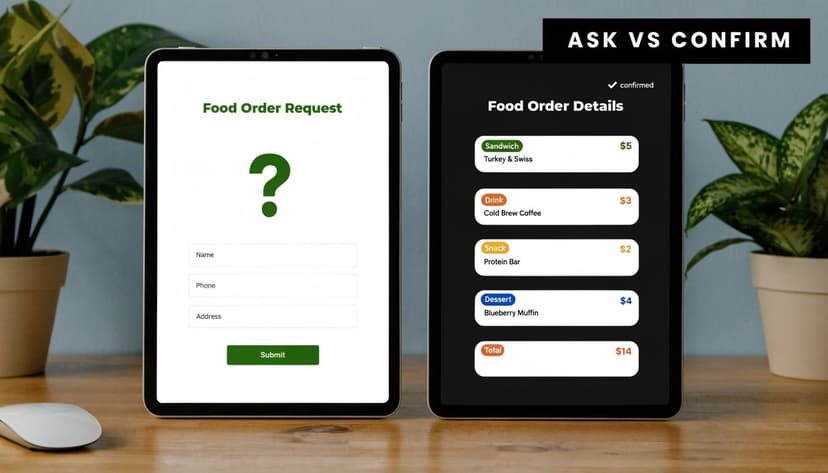
A practical way to teach this is simple. A purchase order is the question. It asks, “Can we buy these items or services, at this price, under these terms?” The invoice is the answer. It says, “Yes, we delivered, and here’s what you owe.” When those two documents line up, accounting moves quickly. When they don’t, cash flow, close quality, and vendor trust all suffer.
For bookkeepers and CPAs, this isn’t just procurement administration. It’s core financial control. The purchase order invoice workflow determines whether expenses are authorized, whether liabilities are recorded correctly, and whether payment activity can be tied back to real business events. Teams trying to improve that broader workflow usually end up touching adjacent processes too, including financial reporting automation, because clean purchasing data supports clean reporting.
Introduction
A clean procure-to-pay process doesn’t depend on fancy terminology. It depends on sequence.
The buyer creates the PO first. The supplier ships goods or delivers services. The business confirms receipt. Then the supplier sends the invoice. AP compares what was ordered, what was received, and what was billed. If those records agree, payment is routine. If they don’t, someone has to investigate.
That sequence matters because each document has a different job:
- The PO authorizes spend before money is committed.
- The receipt record confirms delivery before payment is approved.
- The invoice creates the payable that accounting needs to process.
When a new team member understands that distinction, they stop treating invoices as standalone bills and start treating them as one part of a controlled transaction.
Practical rule: If you can’t explain where the PO came from, who confirmed receipt, and why the invoice matches both, you don’t have a payment-ready file.
The rest of the work is discipline. Use the PO to set the expectation. Use the invoice to confirm what the supplier says is due. Then reconcile both against reality, including the eventual bank movement. That last step is where many teams struggle, because AP records and cash records often live in different systems.
Purchase Order vs Invoice What Sets Them Apart
A purchase order invoice issue usually starts with confusion about the documents themselves. New staff often see both as “vendor paperwork.” That’s too loose. They may contain similar fields, but they come from different parties and serve different purposes.
The buyer starts the transaction
The PO is issued by the buyer. It tells the supplier what the company intends to purchase, in what quantity, at what agreed price, and under what terms. It’s the internal control document that shows the purchase was requested, reviewed, and approved before the invoice arrived.
The invoice comes from the supplier after delivery or service completion. It requests payment for what the supplier says was provided. That means the invoice should confirm an existing agreement, not create one from scratch.
This distinction becomes operationally important when teams let invoices arrive before POs. In procurement benchmarking, up to 20-30% of invoices in non-optimized firms trigger post-hoc POs, which reverses the normal buyer-led process and increases fraud and dispute risk, according to APQC’s benchmarking on purchase orders created after invoice receipt.
Purchase Order vs. Invoice At a Glance
| Attribute | Purchase Order (PO) | Invoice |
|---|---|---|
| Created by | Buyer | Supplier |
| Timing | Before goods or services are delivered | After delivery or service completion |
| Primary purpose | Authorize and define the purchase | Request payment |
| Key function in accounting | Establish expected spend and approval trail | Establish amount due to vendor |
| Typical control question | Was this purchase approved? | Does this bill match what was approved and received? |
| Risk if missing | Unauthorized or poorly documented spend | Unrecorded liability or disputed payment |
A practical example
Suppose the company orders 10 laptops for a new team. The PO states the model, quantity, unit price, delivery address, and payment terms. Receiving logs the shipment when the laptops arrive. The supplier then sends the invoice.
AP’s job isn’t to trust the invoice because the vendor is familiar. AP verifies that the invoice reflects the approved order and actual receipt. That’s why expense coding matters too. If the buyer charged the laptops to one department and the invoice gets posted elsewhere, the reporting issue starts before cash leaves the bank. Teams that want cleaner downstream coding often pair this work with better rules for categorizing expenses.
Treat the PO as the commitment record and the invoice as the settlement request. If staff treat them as interchangeable, controls weaken fast.
The Three-Way Matching Workflow Explained
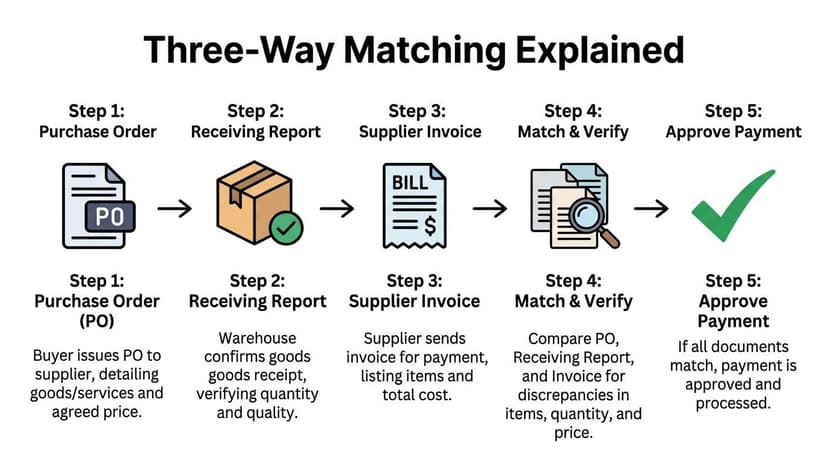
Three-way matching is the control point that turns a purchase order invoice process into a reliable accounting process. It compares three records: the PO, the goods receipt note or packing slip, and the invoice. When those three documents agree on what matters, payment can move.
What gets checked
At minimum, AP should verify:
- Item or service identity. Is the invoice billing for what the PO approved?
- Quantity. Did the business receive the amount being billed?
- Price. Does the unit price match the PO or an approved revision?
- Totals and taxes. Do the invoice calculations follow from the line data?
- Document references. Is the correct PO number attached, and does receipt exist?
This isn’t clerical busywork. In manual workflows, pricing variances and overbilling picked up through three-way matching are tied to 60-70% of AP errors, as described in Tradogram’s explanation of the purchase order to invoice process.
How the workflow looks in practice
Take a straightforward office equipment purchase.
The buyer issues a PO for desks and monitors. Receiving confirms that only part of the shipment arrived. The supplier sends an invoice for the full order. If AP pays from the invoice alone, the company pays too early for goods it hasn’t received. If AP pays from the receipt alone without checking price, the company may miss an overbilling issue. The three-way match prevents both mistakes.
A good workflow usually follows this pattern:
- PO sets the baseline for quantity, unit price, and terms.
- Receiving confirms reality on the warehouse floor or with the requesting department.
- Invoice requests payment based on the supplier’s view of delivery.
- AP compares all three and routes only the exceptions.
- Approved items post to the ledger and move into payment scheduling.
Where teams lose time
Most AP bottlenecks don’t come from clean invoices. They come from exceptions with missing context.
Common breakdowns include:
- Partial receipts not recorded promptly
- Unit prices changed informally by email
- Freight or extra charges billed outside the PO
- Wrong PO number on the invoice
- Multiple receipts against one invoice with no clear tie-out
That’s why strong document capture matters. If invoice PDFs, scanned packing slips, and ERP records all sit in separate places, AP staff spend more time locating evidence than reviewing it. Tools built for automated data entry software help reduce that hunt by standardizing extraction before the accounting review starts.
The fastest AP teams don’t avoid exceptions. They make exceptions easy to identify, document, and resolve.
Why PO Invoice Reconciliation Fails
The ideal process is clean. Real life isn’t. Reconciliation fails because the documents are often technically present but operationally disconnected.
Manual handling creates the first break
Manual entry is still the biggest source of trouble. Over 30% of PO discrepancies are caused by manual handling, and those errors stretch invoice processing from days to weeks. For a mid-sized firm handling 1,000 invoices a month, that means over 300 discrepant POs requiring manual intervention, according to Resolve’s analysis of invoice cycle delays from PO mismatches.
Those errors don’t need to be dramatic. One mistyped quantity, one omitted discount, or one wrong item code can hold an otherwise valid invoice.
The usual mismatch categories
When a purchase order invoice doesn’t reconcile, the issue usually falls into one of four buckets.
Price mismatch
The invoice unit price doesn’t match the PO. Sometimes the supplier updated pricing and the buyer agreed informally, but nobody amended the PO.Quantity mismatch
The invoice bills more units than receiving confirmed. This often happens with partial deliveries or when services are billed before acceptance.No PO at all
The invoice arrives first, and AP is asked to “sort it out.” That usually means the control failed upstream, not in accounting.Reference mismatch
The PO exists, but the invoice cites the wrong number, wrong entity, or wrong location, which prevents automatic matching.
A practical response when a mismatch appears
New AP staff often make the same mistake. They try to force the invoice through because the vendor is waiting. Don’t do that.
Use a short escalation routine instead:
- Freeze the posting decision until the variance is identified.
- Pull the source set. PO, receipt, invoice, and any buyer approval trail.
- Classify the mismatch. Price, quantity, missing PO, or document reference.
- Send the question to the right owner. Buyer for commercial terms, receiving for delivery confirmation, approver for unauthorized spend.
- Document the resolution before anything is posted or paid.
If the team sees the same issue repeatedly with the same vendor or department, it isn’t an invoice problem anymore. It’s a process problem. That’s when a more structured exception workflow, like the controls discussed in reconciliation mismatch handling, becomes necessary.
Don’t ask AP to solve procurement indiscipline with accounting shortcuts. That only moves the error deeper into the books.
Correcting Entries and Internal Controls
Once a mismatch is confirmed, the next job is accounting treatment. The fix needs to clear the payable without distorting inventory, expense recognition, or vendor balances.
Correct the accounting, not just the document
In ERP environments, invoice posting affects more than AP. In Dynamics 365-style workflows, posting the invoice journal increases open vendor balances and financial inventory values at the same time, and manual matching errors at that stage can cause 15-20% of financial misstatements, according to MTech’s documentation on purchase order invoice posting.
That means the wrong invoice amount doesn’t stay isolated in AP. It can flow into inventory valuation or expense reporting.
A practical approach looks like this:
Partial shipment
Record only the received quantity. Leave the remaining PO quantity open until later receipt or formal closure.Approved price change
Amend the PO or document the approval before posting the invoice. Don’t bury the variance in a miscellaneous account.Invoice billed in excess of receipt
Hold the unmatched portion. Post only what can be supported by approved order and receipt evidence, if system rules allow that treatment.Invoice with no valid PO
Route it through exception approval. If the spend is legitimate, document authorization and code it carefully so audit support exists.
Internal controls that actually work
Policies fail when they are too vague to enforce. The useful controls are the ones AP can apply every day.
No PO no pay with real exceptions
A strict PO-first rule works well for ordinary goods and planned purchases. It should also define legitimate non-PO categories, such as recurring charges or emergency spend, so AP isn’t left guessing.
Tolerance rules with human review
Small variances can move automatically if the business approves that model. Larger differences should route to the buyer or approver. The key is that tolerance settings must be explicit and documented.
Segregation of duties
The person requesting the purchase shouldn’t control approval, receipt confirmation, and final payment release. Even in small teams, separate at least one of those steps.
Clean audit trail
Keep the approval note, updated PO, receipt evidence, and invoice together. If someone has to reconstruct the story later, the file should answer the question without relying on memory.
Good controls don’t slow healthy transactions. They keep unhealthy transactions from pretending to be routine.
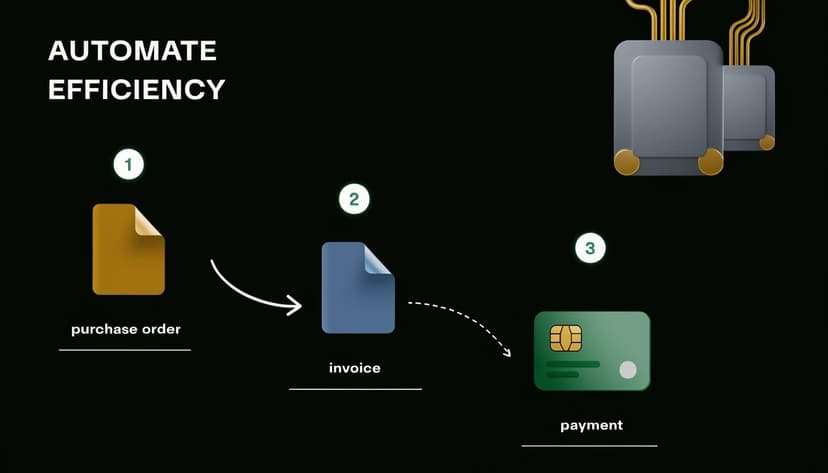
Automating Your PO to Invoice Process
Manual three-way matching is workable at low volume. It breaks down when invoice traffic rises, documents arrive in mixed formats, and AP has to connect supplier billing to actual cash movement.
What automation should handle
A useful automated workflow does four jobs well:
- Capture document data from invoices, POs, and supporting files
- Match records automatically when quantity, price, and references align
- Route only exceptions to staff for review
- Push verified data forward into ERP, reporting, and cash reconciliation
That’s where OCR and AI become practical, not theoretical. When invoice fields are extracted consistently, AP staff stop retyping vendor names, invoice numbers, totals, and PO references. Teams evaluating that layer should understand what modern OCR software for invoices improves. It reduces rekeying, improves document readability across formats, and creates cleaner inputs for downstream review.
The broader finance case is the same one driving automation in financial services. You want routine, rules-based work handled by systems, and you want staff spending their time on approvals, exceptions, and judgment.
The missing link is cash verification
Most guides stop at AP approval. That’s not enough.
A purchase order invoice may match perfectly inside the AP system, but finance still needs to verify that the payment cleared the bank, posted to the correct account, and can be tied back to the settled liability. In such cases, disconnected systems create fresh confusion. The invoice shows paid in the ERP, but the bank reference is unclear. Or the cash movement appears, but the invoice wasn’t closed properly.
That’s why the strongest process is end-to-end:
- PO establishes authorized intent.
- Receipt confirms delivery.
- Invoice creates the payable.
- AP approves and posts the liability.
- Bank activity confirms settlement of that liability.
A short walkthrough helps make that connection concrete:
When firms automate only the front half, they still leave staff reconciling PDF bank statements and payment reports by hand. The cleaner approach is to treat procurement data, AP data, and bank data as one control chain.
A CPA's Top Reconciliation Best Practices
The strongest purchase order invoice process is the one that connects authorization, liability, and cash without forcing staff to rebuild the story each month.
That matters because many guides isolate AP from cash work. The core issue is the data gap between AP systems and the transactions recorded on bank statements, as noted in Sage’s discussion of the relationship between purchase orders and invoices.
The checklist I’d hand to any new AP team member
Require the PO before the invoice whenever the spend type allows it
If the PO is created after the bill arrives, control already weakened upstream.Match three records, not two assumptions
Don’t compare only PO and invoice when receipt evidence exists and should be part of approval.Classify exceptions immediately
Price issue, quantity issue, missing PO, or wrong reference. Fast classification speeds resolution.Post only what you can support
If part of the invoice is valid and part is disputed, document the treatment clearly and avoid vague suspense handling.Tie paid invoices back to bank activity
An invoice marked paid in AP isn’t the end of reconciliation. Confirm the cash movement.Review recurring exception patterns
Repeated mismatches usually point to a vendor, buyer, or receiving problem. Fix the source, not just the symptom.
Teams looking at workflow design can also review examples of automating invoice processing and reconciliation, especially if they’re trying to connect document matching with downstream payment verification.
Strong reconciliation isn’t one approval step. It’s a chain of evidence from request to bank-cleared payment.
If your team is still manually retyping bank statement data while trying to close the loop on invoice payments, ConvertBankToExcel can help. It converts PDF bank and credit card statements into structured Excel, CSV, and accounting-ready formats, which makes it easier to verify that approved invoices were paid and posted correctly. For CPAs, bookkeepers, and finance teams, that means less time chasing payment evidence and more time resolving the exceptions that truly need judgment.