
OCR Software for Invoices: Automate Your Accounting
Invoice OCR is a tool that reads invoices for you. It automatically pulls key details like the vendor name, invoice number, date, and line items from a PDF or scanned paper, then hands that data off to your accounting software in a perfectly structured format.
Think of it as the fastest, most accurate team member you could hire—one that never gets tired of turning a mountain of invoices into clean, usable data. It's the technology that finally ends the soul-crushing cycle of manual data entry.
End the Tedious Cycle of Manual Data Entry
If you're an accountant or bookkeeper, you know the feeling. That stack of invoices—digital or physical—isn't just a to-do list; it's a bottleneck. Each one represents a series of tiny, repetitive tasks: find the vendor, hunt for the invoice number, type the date, and painstakingly enter every single line item into a spreadsheet or your accounting software.
It’s not just slow work. It’s a minefield of potential errors.
A single misplaced decimal or a mistyped digit can send you down a rabbit hole of reconciliation headaches, leading to incorrect payments and damaged vendor relationships. This isn't just an annoyance; it's a massive drain on your most valuable resource: your team's time.
The reality of manual invoice processing is a constant drag on efficiency, leading to:
- Wasted Hours: Skilled professionals spend their days on low-value data entry instead of high-impact financial analysis.
- Costly Errors: Human error is a given in manual work, resulting in payment mistakes that are expensive and time-consuming to fix.
- Delayed Payments: The slow pace of manual processing means you miss out on early payment discounts and risk late fees.
- Zero Visibility: When your accounts payable data is locked away in PDFs and paper files, getting a real-time view of your liabilities is impossible.
The core frustration for modern finance teams isn't the work itself, but the inefficient tools used to do it. Manual entry turns highly skilled professionals into data clerks, limiting their ability to add strategic value.
Fortunately, there’s a much better way. Modern OCR software for invoices is designed to completely eliminate this bottleneck. It offers a clear path to saving countless hours, slashing errors to near-zero, and freeing up your team to focus on what actually matters.
This technology is a specific application of a broader trend. To see how it fits into the bigger picture, you can learn more about how automated data entry software is changing workflows across industries. In this guide, we’ll stick to invoices, showing you exactly how OCR works and what it can do for your firm.
How OCR for Invoices Actually Works
So, what’s really going on when you upload an invoice and the software just… knows everything? It feels like magic, but it’s a smart, two-step process that goes way beyond simply taking a picture of the text.
Think of it like this: basic text recognition just sees letters. Invoice OCR, on the other hand, understands context. It knows the difference between the invoice date and the due date, and it knows that "Total" isn't just a word—it's the amount you actually have to pay.
From Image to Clean Text
First, the software has to make the invoice readable. This is a step called pre-processing.
Imagine someone hands you a crumpled, coffee-stained invoice that was scanned at a weird angle. You’d instinctively flatten it, smooth out the wrinkles, and hold it under a light to read it properly. Invoice OCR does the digital version of that:
- Image Cleanup: It sharpens blurry text, straightens skewed pages, and digitally removes "noise" like shadows or smudges.
- Layout Analysis: The software then maps out the document, figuring out what’s a header, what’s a table, and what’s a footer.
Once the image is clean and structured, the core Optical Character Recognition (OCR) engine does its job. It goes character-by-character and converts the pixels of the invoice into a raw stream of machine-readable text.
But at this stage, it’s just a jumble of words and numbers. The system knows the text says "$500.00," but it has no idea if that's the subtotal, the tax, or the final amount due.
This is the simple but crucial first step: turning messy documents into organized, but still context-free, data.
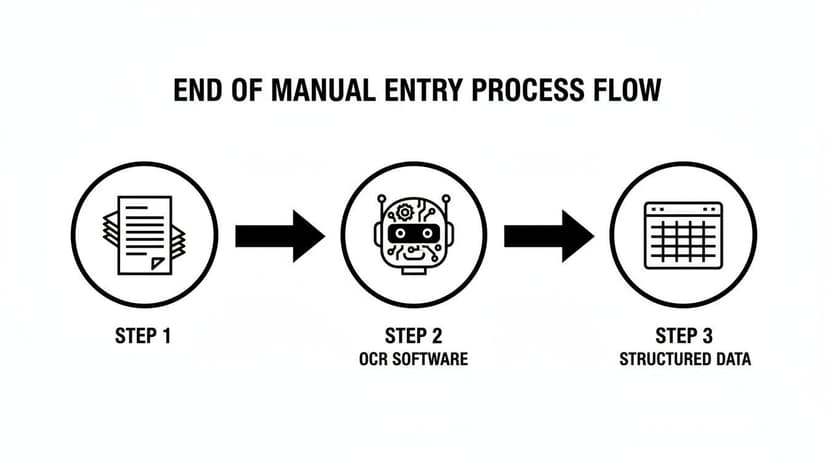
As you can see, the software acts as the bridge between the paper chaos on your desk and the clean, usable data your accounting system needs.
Adding Intelligence with AI
This is where modern invoice OCR leaves older tools in the dust. The final, most important step uses Artificial Intelligence (AI) and Machine Learning (ML) models to actually understand all that raw text.
These models have been trained on millions and millions of real-world invoices. They’ve learned to spot the patterns.
The real breakthrough isn't reading the text. It's understanding that "INV-123" is the invoice number, "Acme Corp" is the vendor, and "Total Due" is the figure that hits your accounts payable. This is what separates basic OCR from true, hands-off automation.
The AI finds and tags the key fields—vendor name, invoice number, line items, taxes, totals—with stunning precision, often hitting over 99% accuracy. It’s the same way an experienced bookkeeper can instantly extract financial statement data because they know exactly where to look for the important numbers.
It's no surprise the demand for this is exploding. The global OCR market was worth USD 10.62 billion in 2022 and is on track to reach USD 32.90 billion by 2030, according to Grand View Research. Why? Because it solves a massive, expensive problem for every business that deals with invoices.
The Real-World Benefits for Your Finance Team

The tech behind invoice OCR is impressive, but what really counts are the results you can see on your P&L. Bringing OCR software for invoices into your workflow isn't just a tech upgrade; it's about giving your finance team superpowers.
This goes way beyond just getting documents processed faster. It’s about building an accounts payable process that’s cheaper, more accurate, and lets your team focus on what actually matters. Let's break down the three biggest wins you can expect.
Dramatically Reduce Processing Costs
Manual invoice processing is a huge money pit hiding in plain sight. Every minute an employee spends keying in data from a PDF is a minute they aren't analyzing cash flow or advising the business. This adds up, fast—especially if you handle hundreds or thousands of invoices a month.
Studies show that old-school manual processing can cost an average of $22.75 per invoice. Compare that to AI-powered OCR, which can slash that cost to around $2.36. That’s an 83%+ cost reduction right off the bat. The savings scale directly with your invoice volume, making a massive difference to your bottom line.
To put this in perspective, here's how the numbers stack up side-by-side.
Manual vs. Automated Invoice Processing Cost Breakdown
| Metric | Manual Processing | AI-Powered OCR Processing | Improvement |
|---|---|---|---|
| Cost Per Invoice | $22.75 | $2.36 | 89.6% Reduction |
| Time Per Invoice | 10-15 minutes | < 1 minute | 90%+ Faster |
| Error Rate | 3-5% | < 0.5% | ~90% Fewer Errors |
| Approval Time | Days or Weeks | Hours or Days | Up to 80% Faster |
The table makes it obvious. The return on investment isn't just about saving a few dollars; it's a fundamental shift in how your AP function operates, freeing up thousands of dollars and hundreds of staff hours.
Eliminate Costly Human Errors
No matter how meticulous your team is, manual data entry leads to mistakes. It’s inevitable. One misplaced decimal, a transposed digit in an invoice number, or a misread due date can create a domino effect of problems—overpayments, missed early-pay discounts, and days wasted chasing down the error.
By automating how data is captured, you cut off AP errors at the source. The software doesn't get tired, bored, or distracted. It pulls data with the same precision on the first invoice as it does on the five-hundredth.
This level of accuracy directly stops money from walking out the door. It prevents overpayments and keeps your vendors happy by ensuring they get paid correctly and on time, protecting those critical relationships.
Supercharge Team Efficiency and Focus
This might be the biggest benefit, even if it’s the hardest to put a dollar amount on: getting your team’s time back. When you lift the dead weight of manual data entry, your skilled finance pros are free to do the job you hired them for—thinking strategically.
Instead of being data entry clerks, they become genuine financial partners to the business. They can finally focus on high-impact work like:
- Cash Flow Analysis: Getting a real-time view of liabilities to make smarter spending decisions.
- Vendor Negotiation: Using clean, accurate payment data to lock in better terms or early payment discounts.
- Budget Forecasting: Giving leadership up-to-the-minute expense data for better planning.
This technology is a key piece of a much larger puzzle. To get the full picture, you can explore this guide on what goes into effective OCR recognition software for financial automation. Moving your team from repetitive tasks to strategic work doesn't just improve morale; it multiplies the value your finance department delivers to the entire company.
Essential Features in Top Invoice OCR Software
When you're shopping for invoice OCR software, it's easy to get bogged down in demos and feature lists. They all promise to read text. But the real difference between a tool that just creates more work and one that actually streamlines your accounts payable is what happens after it reads the text.
The goal isn't just to find an OCR tool. It's to find a partner for your AP team. The right features separate a basic text-grabber from a genuine financial workhorse.
We've seen dozens of platforms, and they are not all created equal. For a full rundown, check out our guide on the best OCR software for invoices. But if you want the short version, here are the non-negotiable features you should be looking for.
Core Data Extraction Capabilities
The main job of invoice OCR is obvious: pull the data off the invoice. But the devil is in the details. Basic tools that only grab the vendor name and total amount are a dime a dozen—and they’ll leave you doing half the work manually.
A top-tier solution goes much deeper. Look for these specific skills:
High-Accuracy Line-Item Extraction: Just getting the invoice total is not enough. For real bookkeeping—job costing, inventory tracking, detailed expense analysis—you need every single line item. The software must pull the description, quantity, unit price, and any item-specific tax codes with near-perfect accuracy.
Zero-Template, Multi-Layout Detection: Your team shouldn't have to build a new template every time a new vendor sends an invoice. Modern AI should be smart enough to look at an invoice from any supplier, in any format, and understand it on day one. No manual setup required.
Multi-Language and Currency Support: If you work with global suppliers, this is a must-have, not a nice-to-have. The tool needs to read invoices in different languages and correctly parse currency symbols and formats without getting confused.
Verification and Workflow Integration
Getting the data is only half the battle. What does the software do with it? The best tools make it dead simple to verify the information and push it directly into your accounting system. If it can't, you’ve just created a new, isolated data-entry task.
The goal isn’t to replace your accounting system; it's to feed it perfectly clean, structured, and verified data without manual effort. An OCR tool that can't speak fluently with your existing software creates more problems than it solves.
This is where the real efficiency gains happen. Make sure your chosen software has:
Confidence Scoring: The AI should tell you how sure it is about each piece of data it extracted. For example, it might be 99% confident about the invoice number but only 75% confident about a handwritten date. This lets your team skip reviewing the perfect entries and focus only on the questionable ones, saving a massive amount of time.
Seamless Accounting Integrations: Look for deep, native integrations with platforms like QuickBooks, Xero, and Sage. This means the software doesn't just export a CSV; it creates a draft bill with all the data correctly mapped to your chart of accounts, ready for a one-click approval.
Automated Validation and Reconciliation: This is the feature that prevents headaches. Advanced systems can automatically check an invoice against a purchase order (known as PO matching) or compare it to past invoices from the same vendor. It can flag duplicate invoices or price discrepancies before they ever hit your books.
Finally, don't even consider a tool without rock-solid, enterprise-grade security. This is your company's financial data. The platform must use strong encryption (like 256-bit SSL), have strict data policies, and prove that your information is protected.
Focusing on these key features will steer you away from glorified text readers and toward a tool that delivers true automation and a serious return on your investment.
How to Implement Invoice OCR in Your Workflow
Getting started with OCR software for invoices isn't the month-long IT headache you might be picturing. Modern tools are built to plug in and go. Forget about complex rollouts—think of it more like hooking up a smart appliance that starts saving you time on day one.
I'll walk you through a practical, step-by-step roadmap. This is how you go from a chaotic mess of PDFs to clean, structured data you can actually use.
Step 1: Upload Your Invoices
First things first, you need to get your invoices into the system. Don't worry about pre-sorting them by vendor or splitting up massive PDF files. The best platforms are built for the messy reality of a bookkeeper's inbox.
You’ve got a few options for getting files in:
- Drag-and-Drop: The simplest way. Just grab a folder of PDFs from your desktop and drop it right into the web app.
- Email Forwarding: This is a game-changer. Set up a dedicated email address (like invoices@yourcompany.com) where vendors send their bills. The software automatically pulls them in for processing.
- Scanned Documents: Still dealing with paper? No problem. Scan a whole stack of invoices into a single multi-page PDF and upload the entire file at once.
A good system can automatically detect where one invoice ends and the next begins. That means it can take a 100-page PDF and intelligently split it into 100 separate transactions—no manual work required from you.
Step 2: Let the AI Do the Heavy Lifting
Once you’ve uploaded the files, the real magic happens. This is the hands-off part where the AI gets to work, and you can grab a coffee. You don't have to do anything but watch as the system chews through your files.
Here’s what the software is doing in the background:
- Image Cleanup: It starts by straightening any crooked scans and sharpening blurry text to make it easier for the machine to read.
- Text Extraction: The core OCR engine then scans the entire document and turns the image of text into actual, machine-readable text.
- Data Identification: This is the smart part. AI models then scan that text, identifying and tagging key information—vendor name, invoice number, due date, line items, and the total amount.
From the moment you upload to having all the data extracted, this whole process often takes less than 60 seconds per invoice.
The power here is in the AI's understanding. It's not just "reading" the words. It understands the context, correctly assigning a number to the "Total" field and a date to the "Due Date" field without you needing to build any manual templates or rules.
Step 3: Quick Validation and Review
Let's be realistic: no system is 100% perfect all the time. That’s why the best OCR software for invoices includes a fast and simple validation step. This isn't about re-doing the AI's work; it’s a quick quality check.
The software uses confidence scores to flag any fields it was a bit unsure about. Maybe a date was smudged on a scan, or a logo was covering part of an invoice number. The system will highlight these fields for a quick human confirmation.
This lets you skip the 99% of data that was captured perfectly and focus your attention only on the tiny fraction that needs a second glance.
Step 4: Export to Your Accounting System
With the data captured and verified, the final step is getting it into your books. You could just export a simple CSV file, but the top platforms offer direct, native integrations with popular accounting software.
This means you can push the clean invoice data straight into QuickBooks, Xero, or Sage with a single click.
The invoice appears in your accounting system as a pre-filled draft bill. The vendor, date, line items, and amounts are already there, often mapped to your existing chart of accounts. All you have to do is hit "approve." This closes the loop, turning a stack of paper or a folder of PDFs into a perfectly reconciled entry in your general ledger.
Common Questions About Invoice OCR
When you start looking at invoice OCR, a few key questions always come up. It's new territory for many, so let's tackle the big ones head-on.
How Accurate Is Invoice OCR?
This is the big one. The short answer: modern AI-powered OCR can hit over 99% accuracy on clean, machine-printed invoices. It’s gotten incredibly good.
But what about blurry scans or invoices photographed in bad lighting? That's where accuracy can dip. The best systems know what they don't know—they use confidence scores to flag any fields they're unsure about, queuing them up for a quick human check. This avoids the nightmare of a wrong number silently slipping into your books.
We have a whole guide on how to set up verification workflows and handle common OCR data entry errors if you want to dive deeper.
Does It Handle Different Languages and Currencies?
Yes, and this is where the technology really shines for anyone doing international business. The top platforms are built to be global.
They can process an invoice in German, pull out a line item in Euros, and not get confused by a different date format (DD.MM.YYYY vs. MM/DD/YYYY). No manual switching or special settings are needed.
The real value of modern OCR software for invoices is its ability to adapt. It can read an invoice from Germany just as easily as one from Japan, understanding different layouts, languages, and currencies on the fly.
This isn't a "nice-to-have" feature; for firms with international clients or vendors, it's a must.
How Is My Financial Data Kept Secure?
Security is non-negotiable when you're dealing with financial documents. Any reputable OCR provider will treat it with the same seriousness you do.
Look for enterprise-grade security measures like 256-bit SSL encryption for data both in transit (while you're uploading) and at rest (on their servers).
Even better, check their data retention policies. The best services automatically and permanently delete your files shortly after processing. They don't need to store your sensitive financial information long-term, and they shouldn't.