
You're probably staring at the same mess I've seen in firms of every size. A PDF bank statement in one window. QuickBooks or Xero in another. A spreadsheet off to the side. Maybe a stack of invoices, emailed receipts, and a month-end close that's already slipping.
That's what data entry in accounting still looks like in a lot of offices.
The mistake is thinking this work is just clerical typing. It isn't. It's the first control point in the entire accounting process. If the raw transaction data goes in wrong, every report built on top of it is shaky. Your P&L gets distorted. Reconciliation takes longer than it should. Audit prep turns into cleanup.
I've seen the old workflow from every angle. It works, until volume rises, file formats get messy, and one small coding mistake spreads through the books. The fix isn't hiring faster typists. The fix is treating data entry as a controlled pipeline, then automating the parts that should never have been manual in the first place.
What Data Entry in Accounting Really Means Today
A lot of people still picture data entry as someone keying numbers from paper into a ledger. That view is outdated.
In practice, data entry in accounting means capturing, classifying, validating, and posting financial information so it can be trusted later. That “later” matters. Management reports, tax workpapers, cash analysis, variance reviews, and audit support all depend on what happened at this first stage.
Accounting guidance makes that clear. An effective workflow is a controlled process of recording, categorizing, and reconciling financial data so each entry can be traced back to source documents. It starts with a defined chart of accounts, complete transaction fields, and reconciliation against bank statements for completeness and accuracy, as outlined in this accounting data entry workflow guide.
The job is no longer just input
The strongest teams don't treat data entry as typing. They treat it as a data quality function.
That changes how you look at routine tasks:
- Invoices aren't just bills to enter. They're source documents that need correct dates, vendors, amounts, tax treatment, and account coding.
- Receipts aren't just attachments. They support classification decisions and audit trails.
- Bank statements aren't just something to reconcile later. They're often the cleanest record of cash activity.
Practical rule: If an entry can't be traced back to a source document and explained quickly, it isn't finished.
Why this matters more now
Modern accounting platforms have moved well beyond simple bookkeeping. Accountants use statistics to analyze past performance, current trends, and future projections, and systems such as Business Central even support formal use of Statistical Accounts inside reporting workflows, as described in this overview of how accountants use statistics.
That's the shift. The books aren't just a historical record anymore. They feed budgeting, forecasting, and performance analysis.
So when people say data entry is low-value work, I disagree. Bad manual entry is low-value. Clean, controlled data capture is foundational.
The Traditional Accounting Data Entry Workflow
Before automation, most firms followed a very familiar path. The documents changed. The pattern didn't.
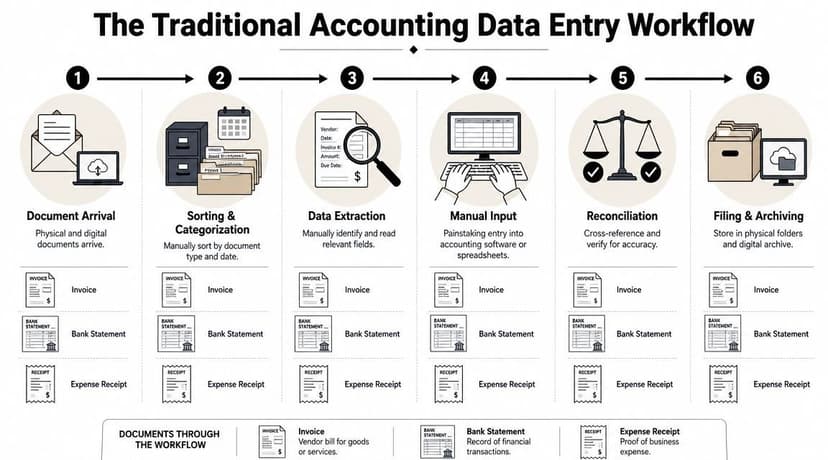
How a manual workflow actually runs
A vendor invoice comes in by email. Someone downloads it, renames it, checks whether it's already been entered, reads the date, invoice number, amount, tax, vendor name, and due date, then picks the right account code and keys it into QuickBooks, Xero, Sage, or an ERP.
A client expense receipt follows a similar path, but usually with more ambiguity. The bookkeeper has to decide whether it belongs to meals, travel, software, office supplies, or owner draw. If the receipt image is blurry or incomplete, the problem gets kicked back to the client, which delays the close.
A bank statement is the most labor-heavy of the three when the data isn't already available in a usable feed. Someone opens the PDF, reads each line, copies dates, descriptions, withdrawals, deposits, and balances into a spreadsheet or accounting system, then tries to match it back to the ledger.
The six steps most firms still use
Document arrival
Files show up through email, portals, scans, paper mail, or client uploads.Sorting and categorization
Staff separate invoices from statements, receipts from journal support, and then group them by entity, period, or client.Data extraction
Someone reads the document and identifies the fields that matter.Manual input
The transaction gets keyed into software, often with a second round of copying into Excel.Reconciliation
The entered data gets checked against statements, subledgers, or supporting reports.Filing and archiving
The source document is saved somewhere the team can find later.
Where firms get tripped up even when the process is “working”
The manual process looks straightforward on paper, but it depends on consistency. The team has to use the same account names, the same date logic, the same document naming habits, and the same review discipline every time.
Here's what usually separates clean books from messy books:
| Workflow area | What works | What fails |
|---|---|---|
| Chart of accounts | Defined early and used consistently | Ad hoc coding by different staff |
| Transaction fields | Date, amount, description, affected accounts captured fully | Missing fields that require later guesswork |
| Reconciliation | Entries checked to source documents and statements | Books posted first, questions asked later |
| Document retention | Standard file storage and naming | Attachments scattered across inboxes |
That's why old-school data entry always felt heavier than it looked. You weren't just typing. You were holding the entire control structure together with discipline.
Where Manual Data Entry Breaks Down
Manual entry doesn't fail all at once. It fails in tiny ways that pile up.
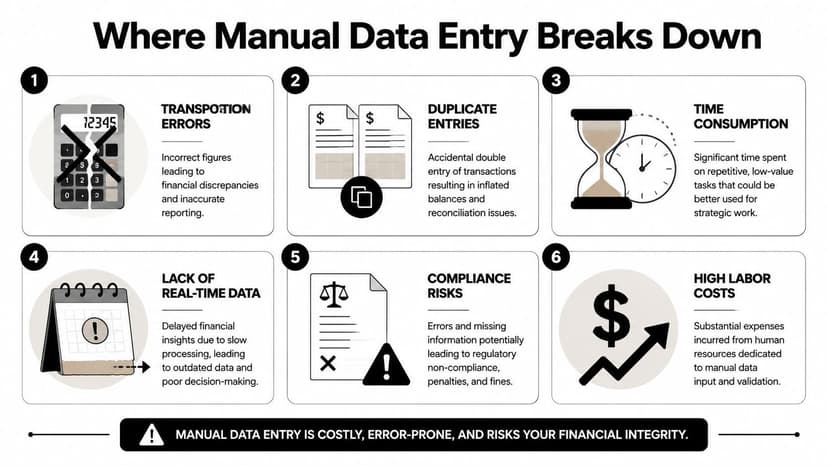
The accepted manual data entry error rate is about 1%, while automated systems can reach 99.99% accuracy. For every 10,000 transactions, a human is likely to make about 100 errors, while an automated system might make only one, according to these data entry accuracy benchmarks. That gap is why finance teams keep moving routine extraction out of human hands.
The errors that waste the most time
Some mistakes are obvious. Others hide for weeks.
Transposition mistakes
A number gets keyed as 59 instead of 95. The transaction still posts. The account still balances somewhere. But now the statement tie-out is off and you have to trace it.Misclassification
Software spend lands in office supplies. Loan payments get split incorrectly. Merchant fees sit inside general bank charges for months.Missing transactions
One line gets skipped on a statement import done by hand. Now the reconciliation difference looks like a bank issue, but it's really a capture issue.Duplicate entry
The invoice was entered from email, then entered again from the statement when the payment cleared.
One wrong account code doesn't just affect one line. It changes the report someone uses to make a decision.
Why month-end gets ugly fast
The cost of manual data entry isn't the first mistake. It's the search that follows.
When books don't tie to the bank, staff stop doing accounting and start doing detective work. They scan statement lines, compare exports, inspect attachments, and second-guess prior coding decisions. Those hours are rarely billable in full, and clients don't enjoy paying for cleanup caused by process weakness.
That's also where OCR failure becomes a real operational issue. If the extracted text is inconsistent, your team ends up reviewing junk instead of reviewing exceptions. This breakdown is common enough that it's worth understanding the root causes of OCR errors in accounting workflows.
What manual entry looks like at scale
Manual methods get especially brittle when firms support many clients, many file layouts, and many institutions. A workflow that feels manageable with one client becomes unstable when every statement format is different and every staff member has slightly different habits.
The breakdown usually shows up in three places:
- Review bottlenecks because senior staff have to recheck basic entry work
- Close delays because unresolved mismatches keep rolling forward
- Reporting distrust because partners and clients stop believing the first draft of the numbers
The worst part is that teams start accepting this as normal. It isn't. It's a sign that the workflow is relying on effort where it should rely on structure.
The Shift to Automated Data Entry Tools
The practical case for automation is simple. If a machine can read, structure, and validate a routine document more consistently than a person keying line by line, you should let the machine do that part.
That doesn't mean giving up control. It means moving the control to a better place.
What automation actually does
Best practice in accounting is to treat data entry as a quality-assurance pipeline. That means using software to import bank feeds, digitize source documents with OCR, and apply validation rules before posting, which improves reliability of the resulting financial statements, as described in this accounting data entry fundamentals resource.
In plain language, modern tools handle three jobs well:
- Read the document
- Turn it into structured fields
- Check whether the extracted data looks credible before it hits the books
For invoices, that might mean vendor, date, amount, and line items. For bank statements, it means transaction dates, descriptions, credits, debits, and balances in clean columns that can be reviewed and exported.
What works and what doesn't
Basic OCR alone isn't enough if you're dealing with low-quality scans, rotated pages, multi-column statements, or unusual bank layouts. It may capture text, but still scramble context.
What works better is layered extraction. OCR reads the image. Parsing logic identifies transaction rows. Validation rules compare totals and balances. In banking and finance, the broader move toward strategic banking automation follows the same idea. Don't automate blindly. Automate repeatable work and add controls around the output.
A practical example is using a dedicated parser for PDF statements instead of hand-copying lines into Excel. This walkthrough of a bank statement parser with OCR shows the kind of workflow firms are now adopting for statement-heavy work.
One useful use case for accounting teams
If your staff still receives PDF bank or card statements and then rebuilds them manually in spreadsheets, a tool like ConvertBankToExcel tools fits directly into the data entry stage. It converts statement data into structured files for Excel, CSV, and accounting imports, which is exactly the kind of repetitive extraction that shouldn't consume skilled bookkeeping time.
The key point is this. Automation is strongest when you apply it to high-volume, repeatable, format-driven work. It is weakest when you expect it to replace accounting judgment. Keep that boundary clear and the ROI becomes obvious quickly.
From Data Entry to Exception Management
Indeed, the role changes for real.
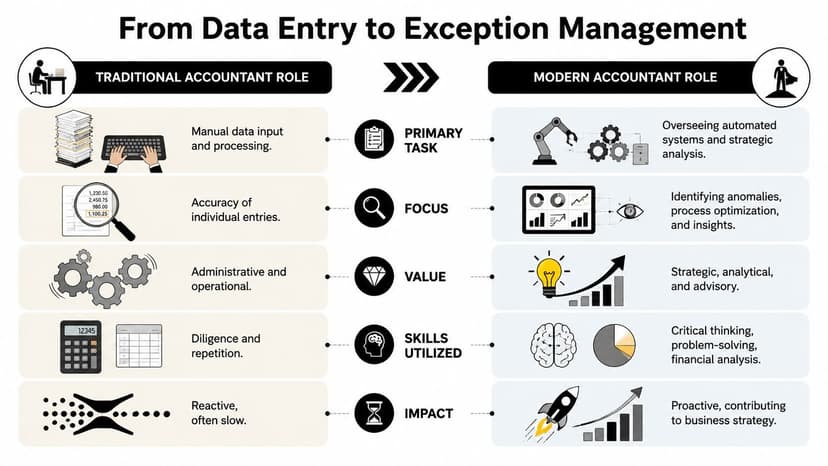
Recent automation guidance describes the shift clearly. Accounting work is moving from doing data entry to controlling exceptions, with AI and OCR structuring routine transaction data while humans review edge cases, as explained in this exception-focused automation view.
What the accountant does after automation
The old model rewarded endurance. Open documents. Read lines. Key lines. Repeat.
The better model rewards judgment. Review extracted data. Check confidence. Resolve outliers. Approve posting. Investigate only what doesn't fit.
That changes the daily workflow in a meaningful way:
| Traditional role | Modern role |
|---|---|
| Types most transactions manually | Reviews batches processed automatically |
| Checks line items one by one | Focuses on flagged items and anomalies |
| Spends time rekeying | Spends time reconciling and explaining |
| Adds value through effort | Adds value through judgment |
Working rule: The human should spend time where context matters, not where repetition dominates.
A common example is monthly statement processing. Instead of keying every line from several PDFs, the bookkeeper uploads the files, reviews extracted transactions, spots any odd descriptions or split amounts, and then resolves only the exceptions before import.
What counts as an exception
Not every irregularity is an error. Some are just transactions that need a human decision.
Typical exceptions include:
- Unclear payees where bank text is abbreviated or noisy
- New vendors that don't match prior coding rules
- Split transactions that belong across multiple accounts
- Statement-to-ledger differences that need reconciliation work
- Foreign language or unusual layouts that need verification
This is also where reconciliation still earns its place. When automated extraction and ledger totals don't align, your review process should direct staff into mismatch resolution, not back into full manual entry. Firms dealing with this regularly should tighten their process around reconciliation mismatches in accounting workflows.
A short visual example helps make the role shift concrete.
Why this is better work
When staff stop acting like data processors, they become more useful to the client and the firm. They can spot duplicate charges, question coding patterns, identify missing support, and explain cash movement. That's accounting judgment. Clients notice it immediately.
The job doesn't disappear. It improves.
Real-World ROI for Accountants and Bookkeepers
Partners usually ask the same question. “Will this improve margin?” That's the right question.
The hidden cost of manual data entry isn't just labor. It also shows up as delays, rework, and quality issues, especially for CPA firms dealing with statements from many institutions where format variability makes manual work brittle, as noted in this discussion of scaling problems in accounting data entry.
Where the return shows up first
In practice, the first gains usually aren't dramatic headlines. They're operational wins:
- Fewer cleanup cycles because source data lands in a more consistent structure
- Shorter review loops because staff inspect exceptions instead of every line
- Better staff utilization because trained bookkeepers spend less time on keyboard work
- Cleaner handoff to tax and audit because support is easier to trace
That matters more than flashy promises. Most firms don't need magical transformation. They need a close process that doesn't break every month.
Three common ROI patterns
The solo bookkeeper usually sees capacity first. When statement extraction becomes structured and repeatable, the owner can absorb more client work without expanding the most tedious part of the month-end cycle.
The growing bookkeeping firm usually sees standardization first. Different team members stop inventing their own import workarounds. Review becomes easier because the data arrives in a similar format each time.
The CPA practice often sees downstream savings. Audit prep, client queries, and recoding work all get easier when the original input stage is less chaotic.
The strongest ROI usually comes from removing rework, not from chasing speed for its own sake.
A practical buying lens
Firms sometimes get distracted by feature lists. A simpler evaluation works better:
| Question | Why it matters |
|---|---|
| Can the tool handle messy source documents? | Clean demos are easy. Live client files are not. |
| Does it reduce review time or just move it? | Bad extraction shifts work. Good extraction removes it. |
| Can the output fit your accounting stack? | Structured export matters more than flashy interface design. |
| Does it support consistent workflow rules? | Standardization is where margin improves. |
If you're comparing options, this review of free vs paid bank statement converter tools is a useful starting point because cost only matters after you've tested output quality and review burden.
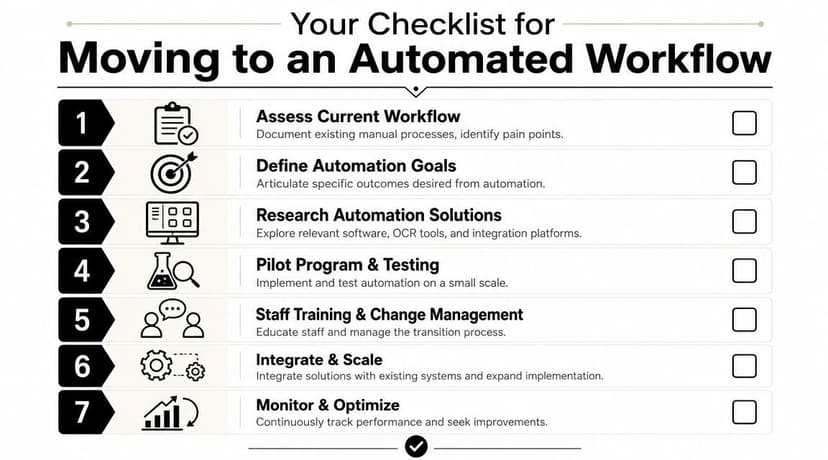
Your Checklist for Moving to an Automated Workflow
Most firms don't need a full rebuild. They need a controlled transition.
Start with one painful process
Pick the document type your team complains about most. For many firms, it's PDF bank statements. For others, it's vendor invoices or expense receipts.
Don't automate everything at once. Start where volume is high, formatting is repetitive, and the current process is draining staff time.
Use this rollout checklist
Map the current workflow
Write down where documents arrive, who touches them, where rekeying happens, and where errors usually surface.Define what success looks like
Keep it practical. Fewer manual touches. Faster review. Cleaner reconciliation. Better document traceability.Standardize your coding rules
Automation struggles when your chart of accounts is inconsistent. Tighten naming, account use, and document handling before rollout.Pilot with a limited batch
Use one client, one entity, or one month of documents. Review output carefully before widening the scope.Train staff to review, not retype
This is the mindset shift. The goal isn't to double-check every field manually. It's to inspect exceptions and validate credibility.Connect output to your accounting system
If your team uses Xero, make sure the export format and import process are clean. Firms planning that step can review Xero integration workflows for imported financial data.Refine the review rules
Add checks for duplicate transactions, odd descriptions, missing balances, and account mapping edge cases.
What to avoid during the transition
- Don't skip reconciliation. Automation improves input, but it doesn't replace control.
- Don't measure success by speed alone. Faster bad data is still bad data.
- Don't leave procedures informal. Staff need a written review standard.
- Don't automate judgment-heavy work too early. Start with extraction, then improve coding logic later.
Better accounting workflows don't remove humans. They remove preventable manual effort so humans can do the part that actually requires accounting skill.
If your team is still rebuilding statement data by hand, ConvertBankToExcel is a practical place to start. It helps turn PDF bank and card statements into structured files your staff can review, reconcile, and move into the rest of the accounting workflow with less manual entry.