
Most definitions of what is data reconciliation sound fine until you try to use them during month-end close.
They talk about data pipelines, source systems, target systems, and governance layers. Meanwhile, the actual accountant is staring at a PDF bank statement, a general ledger, and a list of transactions that don’t quite line up. One deposit is split differently. A bank fee hit the statement but never made it into the books. A scanned page is blurry. Someone posted a transaction twice. That’s the work.
For bookkeepers and CPAs, data reconciliation isn’t an abstract IT discipline. It’s the daily process of proving that the records you rely on are complete, accurate, and usable before you file taxes, finalize reports, or answer a client who wants to know why cash moved.
Why Most Reconciliation Advice is Useless for Accountants
Most reconciliation advice was not written for people doing bank recs in actual practice.
It was written for database teams comparing tables after migration, or for enterprise IT teams checking whether one system updated another system correctly. That material isn’t wrong. It’s just incomplete for accounting work.
The gap matters because the accountant’s version of reconciliation usually starts with messy inputs. You’re not comparing two pristine datasets sitting neatly in a warehouse. You’re often dealing with bank statements in PDF format, scanned copies, odd column layouts, foreign-language descriptors, and ledgers that were posted by more than one person over time.
Existing content on data reconciliation overwhelmingly focuses on enterprise IT systems, databases, and ETL pipelines, but underserves the practical application for CPAs and bookkeepers reconciling unstructured bank statements to accounting ledgers, according to Future Processing’s discussion of reconciliation gaps.
That disconnect is why generic advice often fails. “Compare the source and target datasets” sounds simple until the source is a low-quality bank PDF and the target is QuickBooks with inconsistent memo fields. In practice, the hard part isn’t understanding the word reconciliation. It’s handling ugly inputs without introducing fresh errors.
What accountants are actually dealing with
A normal reconciliation problem in accounting looks more like this:
- Bank data arrives in bad formats: PDFs, scans, screenshots, or exports that don’t map cleanly to Excel.
- Descriptions don’t match cleanly: The bank says one thing. The ledger says another.
- Timing creates confusion: Charges clear later than expected, deposits batch together, and transfers appear differently across systems.
- Manual handling adds risk: Every copy-paste, retype, and spreadsheet formula creates another opportunity for a miss.
If you’ve ever done cleanup work, you already know reconciliation problems usually show up after the books have drifted for a while. That’s why messy recs and catch-up bookkeeping tend to travel together. A lot of what people call bookkeeping cleanup is really delayed reconciliation work. That’s also why practical cleanup workflows matter more than abstract definitions, especially in bookkeeping cleanup services.
The advice that actually helps
Useful reconciliation advice for accountants starts from the document, not the database.
It asks different questions. Can you reliably extract the transactions? Can you standardize dates, signs, and amounts? Can you tell whether a mismatch is a timing issue, a posting error, or a bad source document? Can you prove the ending balance agrees even if a few line items still need review?
That’s the lens that matters in practice. Not theory first. Accuracy first.
The Core Concept Data Reconciliation Explained
At its simplest, data reconciliation means checking whether two records that should agree do agree.
A grocery analogy works better than most technical definitions. You have a receipt and you have the items in the shopping bag. Reconciliation is the act of comparing the two. Did you get everything you paid for? Is something missing? Was something charged twice? Did the total make sense based on the items?
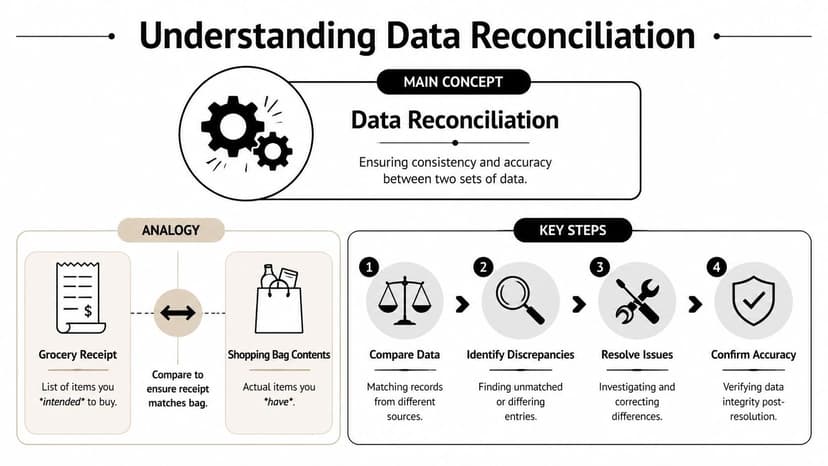
For accountants, the “receipt” is often the bank statement. The “shopping bag” is the accounting ledger. If both represent the same financial activity, they should line up after you account for known differences.
Working definition: Data reconciliation is the process of comparing a source record and a target record, finding differences, resolving them, and confirming that the final data is trustworthy enough to use.
How the process works in accounting terms
The standard reconciliation flow follows four stages: extraction, standardization, comparison, and exception handling, as described in Acceldata’s breakdown of the reconciliation process.
In bookkeeping language, that looks like this:
Extract the data
Pull the bank transactions from the statement and pull the corresponding transactions from the ledger or accounting platform.Standardize the format
Get dates into one format. Make sure debits and credits are interpreted consistently. Clean up descriptions enough that like can be compared with like.Compare the records
Check for missing items, extra items, amount mismatches, date offsets, and split transactions.Handle exceptions
Investigate anything that doesn’t match. Post the missing fee, fix the duplicate entry, reclassify the transfer, or leave a documented timing difference if that’s the correct answer.
Transaction-level versus balance-level reconciliation
This distinction matters a lot in accounting.
Transaction-level reconciliation checks each line item. You match the payment on the statement to the payment in the books. This is the best method when you need confidence at the detail level, especially for cleanup work, tax prep, and client review.
Balance-level reconciliation checks totals instead. You compare the statement ending balance or a summary total against what the ledger says. It’s faster, but it can miss line-level problems if the totals happen to net out.
A good accountant uses both. Line items tell you where the problem is. Balances tell you whether the account is broadly sound.
Here’s a simple comparison:
| Method | What it checks | Best use | Main limitation |
|---|---|---|---|
| Transaction-level | Each individual transaction | Detailed bank recs, cleanup, audit support | Slower if done manually |
| Balance-level | Totals and ending balances | Quick checks, high-level review | Can hide offsetting errors |
Revenue teams run into the same basic logic. They may not be reconciling bank statements, but they still need records from different systems to agree before they recognize revenue. If that’s part of your world, TimeTackle's guide to rev rec is a useful companion read because it shows how reconciliation discipline affects downstream accounting decisions.
For a bank-specific version of the concept, this practical explainer on bank statement reconciliation maps the same logic directly to the accountant’s daily workflow.
The Manual Bank Reconciliation Workflow A Step-by-Step Breakdown
Manual reconciliation usually starts in a very ordinary way. You download a statement. You open the ledger. You tell yourself this account shouldn’t take long.
Then the friction starts.
Step one is gathering the mess
The first problem is that the data often isn’t ready to compare.
The statement might be a locked PDF. It might be a scanned image. It might split deposits across lines in a way the ledger doesn’t. Before you even begin reconciling, you spend time turning the statement into something you can work with.
Some accountants print the statement and tick items manually. Others keep the PDF on one screen and the ledger on another. Others export what they can and patch the rest in Excel. None of those methods are elegant. They’re just familiar.
Step two is making the formats comparable
Manual tasks are prone to introducing errors.
You normalize dates. You convert text to columns. You adjust signs so money out doesn’t show up as money in. You remove blank lines and headers. You make transaction descriptions readable enough to compare.
A lot of spreadsheet-based bank rec work lives here. If you want a practical reference for structuring that workbook, this article on streamlining month-end bank reconciliations is helpful because it focuses on layout and review flow rather than vague accounting theory.
Step three is line-by-line matching
This is the part new hires underestimate.
You scan the statement and try to find the same transaction in the books. If the amount matches exactly and the date is close enough, you clear it. If not, you stop and investigate. Repeat that process over and over until the statement is exhausted or your attention is.
A typical manual pass includes checks like these:
- Exact amount matches: Same amount, same date, same payee pattern. These are the easy wins.
- Near matches: Same amount, but date shifted. Often a timing issue or posting delay.
- Grouped amounts: One statement deposit may correspond to multiple ledger entries, or the reverse.
- Unmatched lines: Fees, interest, ACH pulls, reversals, and transfers often surface here.
The manual process feels simple because each decision is small. The risk comes from making hundreds of small decisions while tired.
Step four is investigating the exceptions
At this point, reconciliation turns into actual accounting judgment.
An unmatched item might be a bank fee that never got posted. It might be a duplicate entry in the ledger. It might be a transaction entered to the wrong account. It might be a real timing difference that belongs on the reconciliation report and nowhere else.
The hard part is that all of those problems can look similar at first glance. You have to trace them back to source documents, ledger history, or prior-period activity.
Step five is adjusting and hoping the balance clears
Once you know what the differences are, you book the corrections.
That may mean journal entries. It may mean deleting duplicates. It may mean reclassifying a transfer or fixing a date. Then you rerun the comparison and see whether the ending balance agrees.
When firms use spreadsheets for this stage, having a clean worksheet structure matters more than people think. A solid bank reconciliation format in Excel can reduce confusion, but it still doesn’t solve the core problem. Humans are doing too much mechanical comparison work.
And that’s why manual reconciliation becomes such a drag. It isn’t hard because the concept is difficult. It’s hard because the workflow is fragile.
Common Reconciliation Errors and Key Metrics to Track
The same reconciliation errors show up again and again. Once you know the patterns, you can spot them faster and build a process that catches them earlier.
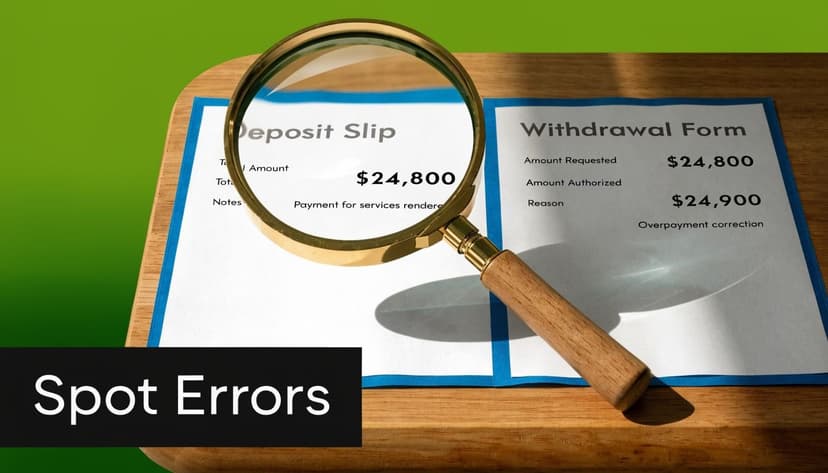
The errors that consume the most time
Some problems are genuine accounting differences. Others are just comparison failures.
| Error type | What it looks like | Usual cause | Typical fix |
|---|---|---|---|
| Timing difference | Transaction appears in one record, not the other yet | Outstanding items, posting delay | Document it and clear later |
| Data entry mistake | Amount or date is close, but not correct | Typo, transposed digits, wrong sign | Correct the ledger entry |
| Missing transaction | Statement line has no book entry | Bank fee, interest, forgotten posting | Add the missing entry |
| Duplicate transaction | One real transaction appears twice in books | Import overlap, manual double-posting | Remove or reverse duplicate |
| Wrong classification | Amount exists but in the wrong account | Coding mistake | Reclassify |
| Description mismatch | Same transaction, different labels | Bank text versus user-entered memo | Match using context, amount, date |
Why manual matching breaks down
Traditional manual review is basically a crude form of exact matching. If the amount, date, and wording don’t line up cleanly, the transaction gets kicked into review.
Modern reconciliation systems use deterministic matching, probabilistic matching, and fuzzy matching, as outlined in IBM’s explanation of data reconciliation. Deterministic matching requires exact agreement. Probabilistic matching estimates whether two records likely represent the same thing. Fuzzy matching handles minor variations in spelling or format.
That’s why a machine can often connect records that a spreadsheet user treats as mismatches. Manual processes are limited because they depend too heavily on exact agreement, especially in text fields.
Practical rule: If your reconciliation process depends on descriptions matching perfectly, it will fail on ordinary bank data.
The metrics worth tracking
A bookkeeper doesn’t need a giant dashboard to improve reconciliation. A few plain metrics can tell you whether the process is healthy.
Match rate
How much of the data clears without investigation. A falling match rate usually means source quality changed, posting discipline slipped, or formats drifted.Exception count
How many items need manual review. This is the easiest way to see whether the process is becoming more stable or more chaotic.Resolution time
How long it takes to clear exceptions. If that number keeps growing, your team is spending too much effort on preventable mismatch work.
These are not vanity metrics. They help you identify whether the issue sits with source extraction, ledger posting, review habits, or a weak import process.
What to do when mismatches keep recurring
Recurring mismatch categories are usually a process problem, not a one-off annoyance.
Use this review logic:
- If fees and interest are often missing, your posting workflow isn’t capturing statement-only items consistently.
- If duplicates appear often, your import process needs tighter controls.
- If transfers are repeatedly confusing, standardize how both sides are recorded.
- If text mismatches dominate, stop relying on description fields as the primary key for matching.
When you need a deeper framework for diagnosing repeated exceptions, this guide to reconciliation mismatches is useful because it breaks recurring mismatch patterns into root causes you can correct.
How Automation Solves Data Reconciliation in 60 Seconds
Automation changes reconciliation at the point where accountants lose the most time. Not in final review, but at the front of the workflow where raw statements have to become usable data.
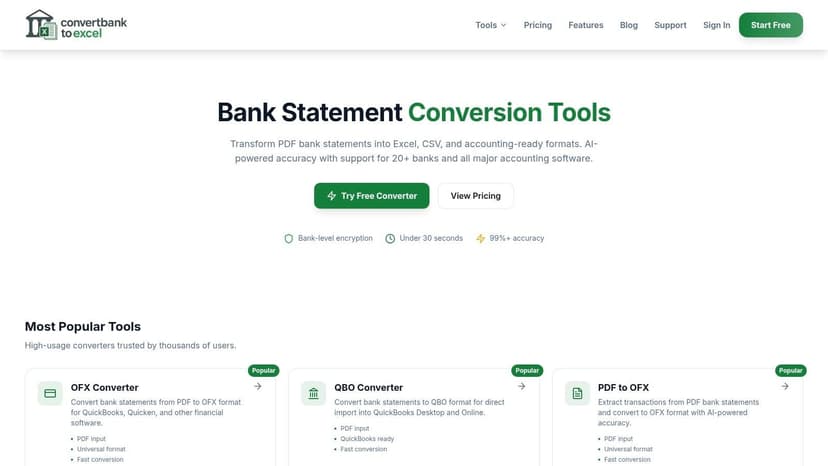
The important shift is this: instead of asking a person to read a PDF, type transactions into Excel, normalize fields, and then start matching, automated workflows extract, structure, and validate the data before the reconciliation review begins.
That’s a different kind of process. It’s not “manual reconciliation, only faster.” It’s a cleaner system with fewer opportunities to create fresh errors.
Reconciliation in motion matters
When data moves from a bank statement PDF into structured output, there are several points where it can break. Extraction can misread a character. Transformation can shift a sign or date. Export can map fields incorrectly.
That’s why reconciliation during processing matters as much as reconciliation after processing.
According to Precisely’s explanation of modern data reconciliation, current implementations can use multi-model validation, with OpenAI Vision as a primary extraction method and advanced OCR as a secondary check. That means one model extracts the data and another independently validates key values. If the outputs diverge beyond a defined confidence threshold, the system can flag the record for review instead of passing bad data downstream.
This is the practical value of automation for accountants. The system isn’t just reading the statement. It is checking its own work.
Why balance checks still matter
Even strong extraction isn’t enough by itself.
A solid automated workflow should also perform balance reconciliation as a macro-level checksum. In plain terms, the extracted transactions should agree with the statement totals. If they don’t, that signals a missing line, a duplicate line, or corruption introduced during parsing.
That dual layer matters. Transaction-level validation catches line-item problems. Balance-level validation catches systematic drift that line-by-line review can miss when the source document is messy.
Good automation doesn’t replace reconciliation. It performs part of the reconciliation before the accountant even opens the file.
Here’s the practical difference between manual and automated handling:
| Workflow stage | Manual approach | Automated approach |
|---|---|---|
| Statement intake | Open PDF and read visually | Upload file and extract structured data |
| Data preparation | Reformat in Excel | Standardize fields automatically |
| Validation | Human spot-checking | Model cross-checks plus balance checks |
| Exception handling | Review after errors surface | Flag low-confidence items earlier |
| Export | Copy-paste or import cleanup | Export in accounting-ready formats |
What accountants actually gain
The first gain is speed, but speed isn’t the main reason to automate.
The main gain is control. Automated extraction with internal validation reduces the amount of silent damage caused by retyping, skipped rows, and inconsistent formatting. It also makes high-volume work more realistic, especially when firms handle many statements from different institutions and layouts.
If you’re thinking about the broader operational case, this article on boost productivity with workflow automation is worth reading because it frames automation as a process design choice, not just a software purchase.
A short product walkthrough makes the point better than a long claim:
What still requires human judgment
Automation doesn’t eliminate accounting judgment. It changes where judgment is applied.
Humans still decide whether a transaction belongs in the right account, whether an exception is a real difference or a timing issue, and whether the final record is suitable for reporting, tax, or underwriting. But they stop wasting as much time on mechanical tasks that software can handle more consistently.
That's the main improvement. Less keying. Less eyeballing. More review.
If you want to see how that workflow translates specifically into accounting operations, this overview of automated bank reconciliation software is a useful next step because it focuses on how structured extraction feeds directly into the reconciliation process.
Putting It All Together A Reconciled Future
For accountants, what is data reconciliation has a very practical answer. It’s the work of proving that the bank record and the book record tell the same story, or identifying exactly why they don’t.
The old advice treats reconciliation like a systems topic. The actual job is closer to document control, transaction review, and exception management. You extract the data, normalize it, compare it, investigate what fails, and confirm the account is reliable enough to trust.
That’s why the strongest workflows combine two things. First, they reduce document chaos early, before anyone starts matching line items. Second, they reserve human attention for the parts that require accounting judgment.
The goal isn’t to spend more time reconciling. The goal is to trust the reconciliation faster.
That shift changes the role of the accountant. When fewer hours disappear into typing and ticking, more time goes into analysis, cleanup decisions, and client advice. That’s better work, and usually better service.
If you want a faster way to turn PDF statements into reconciliation-ready data, try ConvertBankToExcel. Its tools page lets you convert bank and credit card statements into structured files for Excel, CSV, and accounting workflows, so you can spend less time preparing data and more time reviewing it.