
Month-end reconciliation rarely fails because the accountant forgot the theory. It fails because the inputs are ugly, the records arrive late, and one bad PDF can waste an entire evening.
If you’ve done this work long enough, you know the pattern. A client emails scanned statements from two banks, one credit card export, three screenshots, and a message that says, “The balance should be close.” Then someone on the team starts ticking and tying line by line, hoping the statement dates match the ledger dates and that nobody duplicated an entry during cleanup. That’s how reconciliation turns from routine accounting work into a morale problem.
The good news is that the mechanics of how to do reconciliation are still simple. The hard part is building a workflow that survives real-world mess. That means standardizing inputs, matching transactions in a disciplined way, documenting unresolved items properly, and stopping the habit of saving everything for month-end.
The Unspoken Chaos of Bank Reconciliation
The textbook version of reconciliation sounds clean. Compare bank activity to the books, identify differences, post adjustments, move on.
Real life looks different.
A bookkeeper is staring at a low-resolution PDF from a regional bank. A staff accountant is trying to decide whether a withdrawal is a bank fee, a duplicate posting, or a client payment misclassified three weeks ago. The controller wants the close done. The client hasn’t answered email. The statement has one page rotated sideways. Nobody trusts the opening balance.
That’s not rare. That’s standard.
Manual reconciliation creates too many points of failure. In claims reconciliation, error rates can reach 25%, and manual processes can take up to 2 hours per payment rail versus 10 to 15 minutes with automation, while 58% of US companies still rely on manual methods. The financial stakes are real enough that Medicare Fee-for-Service reported a 7.66% improper payment rate equating to $31.70 billion in fiscal year 2024, according to Talli’s reconciliation statistics overview. Different industry, same lesson. When matching work depends on humans rekeying and eyeballing data, mistakes survive longer than they should.
Bank recs suffer from the same disease. Not because accountants don’t know what they’re doing, but because the process usually starts with bad source material. PDFs don’t import cleanly. Scanned statements break OCR. Date formats shift. Descriptions get truncated. By the time you’re chasing the difference, the underlying problem started hours earlier at data intake.
That’s why most advice on reconciliation mismatches misses the mark. It tells you how to investigate differences after they appear. It doesn’t address the daily operational mess that creates them in the first place.
Reconciliation isn’t hard because the rules are complicated. It’s hard because the evidence is messy.
Preparing for a Flawless Reconciliation
Good reconciliation starts before anyone compares a single transaction. If the source data is inconsistent, every step after that gets slower.
The firms that stay sane at month-end usually do one thing well. They treat preparation as a control, not admin work.

Build a pre-flight checklist
Before matching anything, gather the complete record set for the period:
- Bank statements for the exact date range. Not “around month-end.” Exact dates.
- General ledger detail for the same account and same cutoff.
- Supporting transaction records such as merchant processor reports, deposit logs, or loan activity where relevant.
- Prior reconciliation and outstanding item list so old timing items don’t get rediscovered as new problems.
- Client notes on known exceptions. If they changed banks, switched processors, or posted a cleanup entry, you want that before review.
This sounds basic. It isn’t. Most broken reconciliations begin with missing context, not bad accounting.
Standardize the source files before review
If you manage multiple entities or multiple clients, you can’t afford ad hoc file handling. Use a naming convention that tells your team exactly what each file is without opening it. Keep one folder per entity, one subfolder per period, and one location for statements that are still missing.
Then standardize the files themselves. That’s where many teams lose hours.
Some statements are digital PDFs with selectable text. Others are scans. Some are exports from foreign banks. Some include image-based tables that won’t copy cleanly into Excel. That’s why a good bank statement conversion workflow matters long before reconciliation begins. This is one of the few areas where a dedicated guide to converting bank statements for accounting workflows is worth keeping on hand.
Practical rule: If you’re manually retyping statement lines into a spreadsheet, you’re not doing reconciliation yet. You’re doing data recovery.
Decide who owns intake
Preparation fails when ownership is fuzzy. Someone must own intake completeness before the reconciliation owner starts review.
In larger teams, that may be a staff accountant or outsourced support function. In smaller firms, it may be worth using dedicated staffing support when document collection and cleanup keep blocking higher-value work. If your team is stuck in a cycle of chasing source records, a vetted resource like Hire Bookkeepers can help offload repeatable prep tasks without pushing review responsibility away from the accountant.
Know what automation is actually buying you
This isn’t just about convenience. In a typical 1000-person organization, manual reconciliation consumes about 100,000 person-hours annually and costs $3-5 million in direct labor, while automation can reduce the process from 8 days to 3 and cut month-end close times by up to 70%, according to Resolve’s analysis of reconciliation bottlenecks.
That matters because preparation work compounds. Every manual import, renamed file, and rekeyed line adds friction before the actual accounting judgment starts.
What good prep looks like
A clean start usually has these traits:
| Item | Bad setup | Better setup |
|---|---|---|
| Statement collection | Files arrive by email thread | Centralized intake by entity and period |
| File naming | “statement-final-new.pdf” | Consistent entity-account-period naming |
| Data format | Mixed scans, screenshots, exports | Standardized, review-ready tabular data |
| Ownership | Everyone assumes someone else checked it | One person confirms completeness |
| Prior issues | Old recon items buried in notes | Outstanding items tracked period to period |
If you want to know how to do reconciliation efficiently, this is the first real answer. Start with complete, standardized, review-ready inputs. Everything else depends on that.
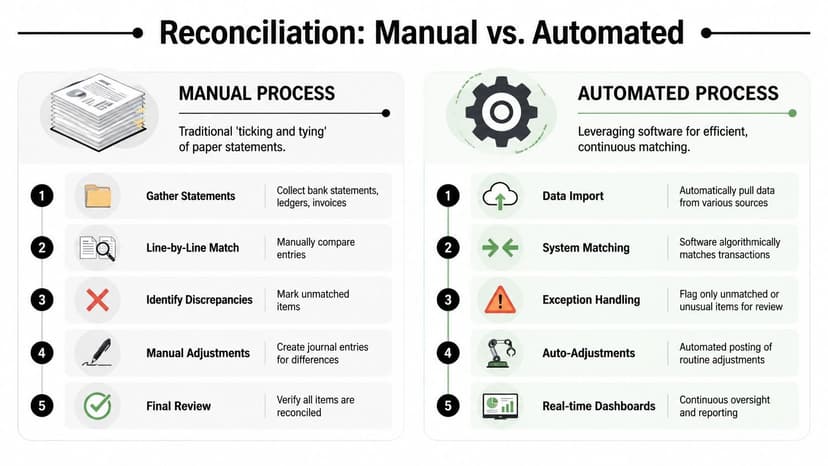
The Core Matching Process From Manual to Automated
At 6:30 p.m. on close day, the bank statement is a scanned PDF, the client sent a second export that does not match the first, and half the transaction descriptions look like they were written by a payment processor having a bad day. That is the matching process. The accounting logic is straightforward. The inputs rarely are.
The job is to clear what belongs together, isolate what does not, and avoid turning a formatting problem into an accounting problem. Accountants who stay sane at month-end do not waste judgment on clerical cleanup if they can prevent it.
What manual ticking and tying still teaches well
Manual reconciliation is still useful because it forces attention to detail. You see cutoff issues. You catch duplicate postings. You notice that a deposit booked on the 30th did not clear the bank until the 1st.
That matters early in a career.
It matters less when the file stack includes multiple entities, mixed exports, scanned statements, and client-provided PDFs that were clearly printed and rescanned three times. At that point, manual matching stops being disciplined work and starts becoming data entry with a CPA license attached.
The matching logic that works
Good matching follows a sequence, not a single rule. Start with exact matches. Then review near-matches. Then push the leftovers into an exception queue.
That is consistent with how data matching systems are commonly designed. IBM’s overview of deterministic and probabilistic matching methods explains the same basic idea. Exact rules clear clean records first, and more flexible logic handles naming differences, inconsistent references, and incomplete fields. In accounting terms, that means no one should be hand-reviewing obvious clears while actual exceptions pile up.
A practical bank rec usually runs like this:
Clear exact matches first
Same amount, same date, same reference, or a reliable unique identifier. These should move fast.Review likely matches next
Dates drift by a day or two. ACH descriptions are truncated. Merchant processor batches collapse several book entries into one bank line.Separate true exceptions from ugly formatting
An unmatched line is not always a recon problem. Sometimes it is just poor source data.
That last point is where many teams lose hours they never get back. If the statement arrives as a scan or image-based PDF, convert it into usable rows before anyone starts comparing lines. A tool like ConvertBankToExcel cuts out the worst part of the job by turning bank statements into structured Excel data you can sort, filter, and match instead of retyping from a PDF.
A workflow that holds up under real month-end pressure
Use this order and you will avoid a lot of false alarms:
- Confirm the opening balance first. A bad beginning balance contaminates the entire rec.
- Match at the transaction level. Balance-only reviews hide duplicate entries, missing postings, and offsetting errors.
- Standardize descriptions before reviewing exceptions. Clean up spacing, dates, abbreviations, and memo noise so similar items can surface together.
- Isolate known bank activity. Fees, interest, loan sweeps, and automatic debits should not sit mixed in with unexplained differences.
- Review timing items separately. A one-day lag is different from a missing entry.
- Post adjustments only with support. If someone suggests plugging the variance, stop the conversation there.
A reconciliation that ties because someone forced it is not finished. It is undocumented risk.
Manual versus automated workflow
The trade-off is not philosophical. It is operational.
| Approach | Strength | Weakness |
|---|---|---|
| Manual line-by-line review | Good for learning and small, clean accounts | Slow, repetitive, easy to derail with messy source files |
| Spreadsheet-assisted matching | Flexible and familiar | Breaks down with version control, large volumes, and inconsistent imports |
| Automated matching with exception review | Faster first pass, more consistent treatment of common items | Depends on clean source data, setup discipline, and reviewer judgment |
The best setup combines software speed with accountant review. Let the system clear the routine items. Let the accountant spend time on items with real uncertainty, odd timing, or control implications.
If the workflow itself is the problem, not just the volume, outside implementation help can be worthwhile. A specialist such as an AI automation agency can help build document intake, routing, and exception-handling steps around the accounting process instead of forcing your team to work around a generic tool.
Format problems are reconciliation problems
Plenty of reconciliations go sideways before matching even starts. The transaction data may be complete, but the import format is wrong for the accounting system, the fields map poorly, or the file creates duplicates on upload.
That is why file format decisions deserve more respect than they usually get. If you are importing bank data into accounting software, understanding the differences between OFX, QBO, and IIF import formats prevents a lot of avoidable cleanup later.
What holds up in practice
What works:
- Clearing exact matches before touching judgment calls
- Converting scanned or locked statements into structured data first
- Standardizing transaction text before reviewing exceptions
- Keeping human review focused on low-confidence items
- Matching detail for material accounts instead of relying on balance movement alone
What fails:
- Starting with unexplained differences before validating the opening balance
- Treating every unmatched line as suspicious
- Rekeying statement data by hand because the bank file is ugly
- Letting import format mistakes create duplicate cleanup work
- Forcing a tie-out with unsupported entries just to close the month
That is the version of reconciliation that survives real bookkeeping conditions. Keep the accounting judgment. Remove the clerical punishment.
Investigating and Resolving Discrepancies
Differences don’t automatically mean something is wrong. They mean something needs classification.
That distinction matters because too many accountants waste time treating normal timing items like emergencies, while actual control failures sit untouched in the exception list.
Sort discrepancies by type, not by panic level
Start by separating routine differences from real unknowns.
Routine items usually include:
- Timing differences such as deposits in transit or outstanding checks
- Bank-originated entries like service fees, interest, or automatic debits
- Ledger posting delays where the transaction is known but not yet recorded in the books
Those should move quickly. The accountant confirms support, decides whether an adjustment is needed, and updates the recon schedule.
The dangerous category is the unresolved item with no clear support. That’s where sloppiness creeps in.
A working framework for exception review
Use a short decision matrix:
| Exception type | Immediate action | Outcome |
|---|---|---|
| Timing item | Confirm cutoff and clear next period | Track as outstanding |
| Missing book entry | Obtain support and post adjustment | Clear with journal entry |
| Duplicate or erroneous ledger item | Reverse or correct | Clear with documentation |
| Bank-side unknown | Contact bank or client, preserve evidence | Pending investigation |
| No support available | Mark could not verify, escalate | Leave open with audit trail |
This last category deserves more attention than most articles give it.
Full reconciliation is often impossible if one party is uncooperative or refuses to provide information, and accountants routinely face missing statements, withheld records, and transactions that can’t be fully explained. That’s the core takeaway from this discussion of reconciliation and noncooperation. In practice, you need a framework for documenting irreconcilable differences, not pretending every difference can be solved by persistence.
If the client won’t provide support, the correct answer is not “reconciled.” The correct answer is “could not verify,” backed by notes.
How to document the black-hole transaction
When an item can’t be resolved, document it like an auditor will read it later:
State the transaction facts
Date, amount, account, statement reference, ledger reference if any.List the work performed
Requested support from client, checked prior-period schedules, reviewed bank detail, searched ledger activity.Describe what’s missing
No invoice, no client response, no bank clarification, incomplete historical records.Assign current status
Pending, unreconciled, or could not verify.Define next action
Follow up next close, escalate to controller, or leave as a disclosed open item.
That level of documentation protects the firm and keeps the next reviewer from restarting the same investigation from zero.
Be skeptical of source data quality
Some discrepancies aren’t accounting issues at all. They start with extraction errors from scanned statements, especially when image quality is poor or transaction text is clipped. If your team is seeing strange splits, broken dates, or malformed descriptions, it helps to understand the common causes of OCR errors in financial document extraction.
That doesn’t replace review. It tells you where review effort should go.
A short walkthrough can also help train junior staff on what deserves escalation and what doesn’t:
What experienced reviewers do differently
Seasoned accountants usually make three calls early:
- They verify the opening balance first.
- They separate timing from error immediately.
- They refuse to force-close unsupported items.
That last point saves careers. A rushed reconciliation can satisfy a deadline and still fail the moment someone asks for support.
Leave a clean open item before you post a dirty fix.
Adopting a Continuous Reconciliation Cycle
It’s the third business day of the month. The controller wants cash tied out by noon, one client still has not sent the missing statement page, and someone on the team is trying to reconcile from a scanned PDF that looks like it came off a fax machine in 2009. That mess usually starts long before month-end. It starts when firms let reconciliation pile up.
If transactions are available during the month, review them during the month. Waiting until close week turns ordinary cleanup into forensic work. By then, the person who posted the entry barely remembers it, backup lives in three inboxes, and a simple transfer issue can eat half a day.
Why month-end batching keeps creating avoidable problems
A batch-only process breaks down for practical reasons, not theoretical ones.
Older exceptions are harder to explain. Support disappears. Staff lose context. Reviewers get surprised late in the close, which is exactly when judgment gets worse and bad shortcuts start looking tempting.
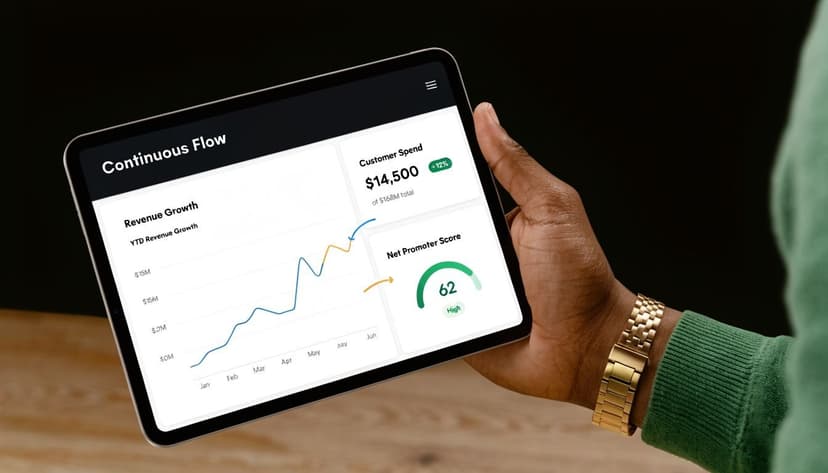
Continuous reconciliation fixes that by shrinking the queue. A reviewer looking at three days of activity can usually spot the odd item in minutes. A reviewer looking at four weeks of mixed bank activity, card settlements, reversals, and client corrections is doing archaeology.
The workflow matters more than the slogan
Plenty of teams say they reconcile continuously. In practice, they still wait on ugly source files, inconsistent CSV exports, and bank PDFs that do not import cleanly into the ledger support.
That is why the process has to be built around transaction-ready data. Convert the statement early, standardize columns, and get the activity into a format the team can sort, filter, and match without hand-cleaning every line. For firms dealing with mixed statement formats and scanned documents, that is the difference between a weekly routine and a monthly fire drill.
A lot of teams keep that working file in a shared sheet before final posting. If that is your setup, a Google Sheets workflow for finance teams gives reviewers one place to track imported bank activity, open items, and reviewer notes without emailing versions around.
A cadence that holds up in real life
The right schedule depends on risk, volume, and how painful the account becomes when it goes wrong.
Daily for high-volume cash activity
Operating accounts, merchant processors, payroll clearing, and any account with frequent inflows and outflows.Weekly for moderate-volume accounts
Credit cards, intercompany cash, and other accounts that stay manageable if reviewed before they age.Month-end signoff for formal close
Month-end should be the point where you confirm, document, and clear the remaining exceptions. It should not be the first time anyone looks closely.
Some firms overdo this and create busywork. Every account does not need daily attention. The practical rule is simple. Reconcile often enough that unresolved items are still easy to explain.
What changes once the cycle is working
The immediate benefit is sanity.
Teams stop spending close week reconstructing old activity from half-usable PDFs and vague client replies. Review comments get shorter. Escalations get cleaner. Managers see issues while there is still time to fix the process behind them, not just patch the balance.
That also improves the quality of the close. Current books make it easier to spot unusual cash movement, duplicate postings, failed feeds, and missing transfers before they become recurring noise next month. Continuous reconciliation is less about speed than control. Speed is just what you get once control is in place.
From Reconciliation Task to Strategic Insight
The core lesson is simple. Reconciliation is not a spreadsheet exercise. It’s an evidence-handling process.
If the inputs are messy, the work becomes clerical. If the matching logic is weak, the review becomes guesswork. If unresolved items aren’t documented properly, the close may look finished while risk remains buried in the file.
Good accountants know how to do reconciliation by instinct. Great ones build a workflow that keeps the process dependable even when the source documents are chaotic, the client is late, and the statement format changes without warning.
That’s also where the value of the work changes. Once the repetitive cleanup is under control, reconciliation starts producing insight instead of exhaustion. Clean transaction data supports better cash analysis, faster answers, and cleaner reporting downstream, whether that data eventually lands in an ERP, a close package, or a shared model in Google Sheets for finance workflows.
Reconciliation will never be glamorous. It doesn’t need to be. It needs to be controlled, documented, and repeatable.
That’s how you get your evenings back. And that’s how the close stops feeling like damage control.
If you’re tired of wrestling with bank PDFs, scanned statements, and import cleanup, ConvertBankToExcel gives accounting teams a practical way to turn messy bank statements into structured files for Excel, CSV, QuickBooks, Xero, and other workflows. It’s built for CPAs and bookkeepers who need fast extraction, confidence scoring, and cleaner reconciliation prep without adding more manual work at month-end.