
Month-end bank reconciliation usually starts the same way. You open the statement, open the ledger, and immediately find a balance that doesn't match. Then the main problem shows up. Was it a timing issue, a missed bank fee, a duplicate entry, or a bad opening balance that's been wrong for months?
That's why knowing how to reconcile the bank statement matters far beyond basic bookkeeping. A clean reconciliation tells you whether your cash number is real. A bad one gives you false confidence, messy close cycles, and preventable audit stress. The process isn't complicated, but it does punish sloppy setup and random guesswork.
Most guides make it sound cleaner than it is. In practice, many reconciliations involve imported PDFs, incomplete history, odd transaction descriptions, and accounts that were never reconciled properly in the first place. That's the version worth talking about.
Why Bank Reconciliation Is More Than Just Matching Numbers
A bank reconciliation is often treated like clerical cleanup. It isn't. It's one of the few routine accounting tasks that directly tests whether the cash on your books can be trusted.
When finance teams skip it, delay it, or force balances to match without understanding the difference, they create bad financial statements. Management then makes decisions off numbers that are not settled. Auditors see unsupported adjustments. Fraud and processing errors stay buried longer than they should.
The cost of getting this wrong is not theoretical. A 2023 AFP survey found that 42% of firms report average variances of 2-5% during monthly reconciliations, leading to an estimated $4.5 billion in annual U.S. business losses from undetected errors and fraud according to HighRadius on bank reconciliation.
What reconciliation actually proves
A proper reconciliation answers three questions:
- Is the cash balance real: Does the ledger reflect what the bank processed?
- Are the differences explainable: Can you identify each mismatch as timing, an omitted item, or a true error?
- Is there an audit trail: Can another reviewer follow the logic without asking you to recreate the month from memory?
If you need a broader refresher on how reconciliation fits into accounting generally, this accounting reconciliation guide gives useful context before you get into bank-specific detail.
Practical rule: If you can't explain a difference clearly enough for someone else to verify it, you haven't reconciled the account. You've only postponed the problem.
Why experienced bookkeepers treat it like a control
The businesses that stay out of trouble usually don't view reconciliation as a monthly punishment. They use it as a control point. It catches items that no dashboard will catch on its own, especially missed postings, stale outstanding checks, and bank activity that never made it into the books.
That's also why data quality matters from the start. If you're dealing with PDF statements, scanned copies, or inconsistent exports, the reconciliation will only be as good as the transaction data you begin with. A practical overview of that side of the process sits in this reconciliation workflow resource.
Preparing Your Data for a Flawless Reconciliation
Most reconciliation failures happen before a single item is matched. The statement period is wrong, the opening balance is unreliable, or the transactions were brought into Excel by hand and inadvertently corrupted in the process.
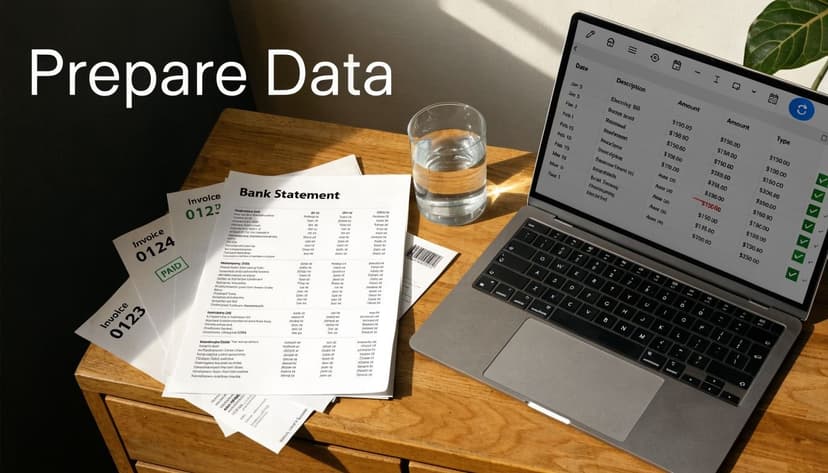
The minimum data set is straightforward. You need the bank statement for the exact period, the cash ledger or bank register, and any supporting records that explain known items such as undeposited funds, issued checks, or direct debits. If a credit card account feeds the same close process, pull that too, but keep it separate from the bank rec itself.
Start with usable transaction data
The worst way to begin is by typing statement lines into a spreadsheet manually. It's slow, it invites keying mistakes, and it makes review harder because nobody trusts data that was re-entered by hand.
A better approach is to extract the statement into structured rows first, then reconcile from that file. For PDF-heavy workflows, an OCR parser such as this bank statement parser guide is the practical starting point because it turns bank statement pages into sortable transactions you can tick and tie.
That same prep step also helps with transaction coding. If your books are messy because expenses were posted inconsistently, this piece on ReceiptGen insights on categorizing spending is useful before you start chasing mismatches that are really classification problems.
The first-time reconciliation problem
Many guides become useless when they assume the account has been reconciled before and that the beginning balance is already correct.
In practice, that's often false. New QuickBooks users, businesses moving from spreadsheets, and companies switching systems often inherit a cash account that has never been reconciled properly. For the 40% of small businesses starting digital accounting, the biggest hurdle is establishing a correct beginning balance for an account that's never been reconciled. Manually fixing this can take hours, whereas automated data extraction can reconstruct a full statement history for a clean import according to this QuickBooks first-time reconciliation video.
That changes the job completely. You are no longer reconciling one month. You are rebuilding a trustworthy starting point.
Don't force the current month to reconcile if the opening balance is wrong. Fix the opening balance first, or every month after it will stay contaminated.
What works when the account has never been reconciled
Use a reset-and-rebuild mindset:
- Pull a full statement history for the period needed to establish a clean opening balance.
- List uncleared historical items that still sit in the books but no longer make sense.
- Separate migration issues from real transactions so you don't post duplicate corrections.
- Import clean historical activity into the accounting system in a format it can use.
For that kind of cleanup, ConvertBankToExcel tools are one practical option when you need statement history extracted from PDFs into Excel, CSV, or accounting-friendly formats instead of rekeying old periods by hand.
A quick walk-through can help if you're trying to visualize the extraction side before reconciling:
The Core Reconciliation Workflow
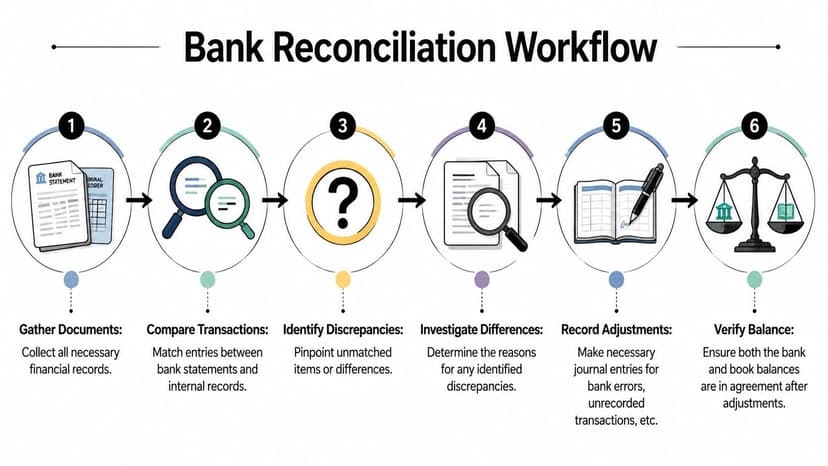
Once the data is clean, reconciliation becomes a controlled workflow instead of a scavenger hunt. The biggest shift is mental. Don't look for random mistakes. Sort every line into one of two buckets: matched or investigate.
Check the opening balance first
Before you compare a single transaction, confirm that the statement opening balance agrees with the prior reconciled closing balance in your books. If it doesn't, stop there.
An incorrect opening balance usually points to one of four things:
- A prior reconciliation was forced
- Historical transactions were added, deleted, or edited after the last rec
- A migration into new software changed the bank register
- The prior period was never properly reconciled at all
If the opening balance is wrong, every unmatched item you investigate afterward will be suspect.
Tick and tie line by line
With the opening balance validated, compare the bank transactions to the ledger. Match by amount first, then date, then description or reference. Dates can drift slightly, especially around weekends and month-end cutoffs, so amount and transaction nature usually matter more than an exact same-day match.
I tell staff to work deposits and withdrawals separately. Mixing receipts and payments in one pass makes it easier to miss duplicates or offsetting mistakes.
A simple working method looks like this:
- Mark exact matches on both the bank side and the book side.
- Create an investigate list for anything left over.
- Group investigate items by type before you start fixing them.
- Keep notes as you go so review doesn't turn into guesswork later.
Reconciliation gets faster when you stop trying to solve every difference on sight. First classify it. Then decide what action it needs.
Use the dual-adjustment approach
Often, reconciliations fail at this step. Professional reconciliation requires a dual-adjustment approach. You must adjust the bank balance by adding deposits in transit and subtracting outstanding checks, while separately adjusting the company's book balance for unrecorded items like interest income or bank fees. A common pitfall is adjusting only one side as explained in NetSuite's bank reconciliation method.
That means you're running two tracks at once.
Items that adjust the bank side
These are usually book entries the bank hasn't processed yet:
- Deposits in transit
- Outstanding checks
- Occasional bank-side errors
Items that adjust the book side
These are statement items your ledger hasn't recorded yet:
- Bank fees
- Interest income
- Automatic payments or collections
- NSF activity or similar reversals
The reconciliation is complete only when the adjusted bank balance equals the adjusted book balance.
Keep the workflow repeatable
A repeatable reconciliation process depends on consistent files and imports. If you're moving transaction data into accounting software, file type matters more than people think. The wrong format can create avoidable cleanup. This comparison of OFX vs QBO vs IIF formats is useful when you're deciding how to bring bank activity into QuickBooks or another ledger system.
The practical standard is simple. Match what you can, isolate what you can't, adjust both sides correctly, and document every unresolved item until it has a clear explanation. That's the version that survives review.
Identifying and Resolving Common Discrepancies
Once you've built the investigate list, the work becomes diagnostic. Most unmatched items fall into three groups, and each group needs a different response. Problems start when bookkeepers treat all differences as errors.
Timing differences
These are the easiest to misunderstand and the easiest to overcorrect. Timing differences, such as outstanding checks and deposits in transit, are the most common source of temporary imbalance but require no correction. The next most frequent issues are bank-only items like service fees or interest earned, which must be added to the company's books to reconcile according to QuickBooks on bank reconciliation.
If a payment was recorded in your books but hasn't cleared the bank yet, that's not a bookkeeping error. If a deposit was logged at month-end and the bank processed it after cutoff, same answer. Don't “fix” timing.
What you should do is track it and make sure it clears in the next cycle. If it doesn't, it stops being a timing issue and becomes an investigation.
Unrecorded bank items
These appear on the bank statement but not in the ledger. Common examples include service charges, interest, direct debits, returned payments, and automatic credits.
This category does require action. The bank has already processed the item. Your books are late.
The right response is to post the missing entry to the cash account and the relevant offset account, then retain support with the reconciliation workpapers. Don't bury these in suspense unless temporary holding is necessary while you identify the correct coding.
True errors
These are the items that usually waste the most time because they can come from either side. It might be a typo, a duplicate posting, a sign error, an amount entered with digits reversed, or a rare bank mistake.
When I'm reviewing a stubborn difference, I usually test for these patterns first:
- The same amount appears twice in the ledger or on the statement extract
- The difference looks like a transposition rather than a random value
- A transaction posted to the wrong bank account
- A deposit or payment was split incorrectly
- One side uses the gross amount while the other uses a net amount after fees
If a difference keeps surviving multiple passes, stop rereading the same lines. Change the lens. Sort by amount, then by date, then by reference. Patterns show up faster than they do in chronological order.
Common Reconciliation Discrepancies and Actions
| Discrepancy Item | Where It Appears | Required Action |
|---|---|---|
| Outstanding check | In books, not yet on bank statement | Track as timing difference. No journal entry unless it becomes stale and needs separate handling |
| Deposit in transit | In books, not yet on bank statement | Track as timing difference. No correction if it clears shortly after period end |
| Bank service fee | On bank statement, missing from books | Post an adjusting entry to record the fee in the books |
| Interest earned | On bank statement, missing from books | Post an adjusting entry to record interest income in the books |
| Automatic payment or debit | On bank statement, missing from books | Record the payment in the books with the correct expense or liability account |
| Duplicate posting | Usually in books, sometimes in imported data | Reverse the duplicate and document why it occurred |
| Data-entry typo | Usually in books | Correct the entry and verify whether any related posting also needs correction |
| Bank error | On bank statement | Contact the bank, document the issue, and keep it on the reconciliation until resolved |
A practical triage order
When the investigate list is long, work in this order:
- Clear timing items first because they explain legitimate differences quickly.
- Post obvious bank-only items next because they usually have direct support.
- Leave ambiguous errors for last because they need actual investigation, not speed.
That order keeps you from wasting time “solving” items that aren't problems and gives you a shorter, cleaner exception list to review.
Creating Adjusting Entries and Finalizing the Report
Finding the difference isn't the end of the job. The books only become correct when the needed entries are posted and the reconciliation report shows how you got there.
Post the adjustment cleanly
Suppose the bank statement shows a monthly service fee that never hit the ledger. The accounting treatment is usually simple:
- Debit bank fees or bank charges expense
- Credit cash
If the statement shows interest earned that wasn't recorded, the direction flips:
- Debit cash
- Credit interest income
The principle is straightforward. If the bank processed it and the books didn't, post the missing book entry. If the item is only a timing difference, don't post anything just to make the screen go green.

Build a report someone else can review
A proper bank reconciliation report should show:
- Statement ending balance
- Book balance before adjustments
- Bank-side reconciling items
- Book-side adjustments posted
- Final adjusted balances that agree
- Supporting detail for each unusual item
This report is the audit trail. It should let a reviewer understand the logic without needing a verbal walkthrough from the preparer.
A reconciliation report should read like proof, not like a memory aid. If the support sits only in someone's head, the reconciliation isn't finished.
Don't let imports create new cleanup
A lot of finalization problems come from poor import choices. If you're moving corrected bank activity into software such as Xero, use a format that preserves transaction detail and minimizes rework. This guide on how to import bank statements into Xero is helpful when you're turning statement data into actual posted activity rather than a spreadsheet side file.
The main thing is discipline. Post only the entries that belong on the books, leave timing items off the journal, and save the final report with enough detail that the next month starts from a clean base.
Automating Your Workflow for Future Reconciliations
The true win isn't finishing one hard reconciliation. It's building a workflow that prevents the next one from turning into a forensic exercise.
Teams usually improve this in three ways. They shorten the reconciliation cycle, reduce manual data handling, and standardize how exceptions are reviewed. That's the difference between a monthly panic and a routine cash check.
What a sustainable setup looks like
For many businesses, the right stack includes direct bank feeds where available, statement extraction for institutions or formats that don't feed cleanly, and accounting software that supports clean imports and review notes. If your firm processes a lot of statement PDFs at once, a batch processing workflow for bank files matters because volume is where manual work starts to break.
Automation also matters more once accounts get more complex. With 65% of SMBs now handling cross-border transactions, reconciling foreign-language or multi-currency statements is a growing challenge. Discrepancies from exchange rate timing and unrecorded forex fees cause 30% of reconciliation failures in these scenarios, a problem legacy methods can't handle according to Experian on reconciling bank statements.
That's one reason rigid, domestic-only workflows fail. Foreign statements, multi-currency timing differences, and inconsistent PDF layouts don't respond well to copy-paste bookkeeping.
What actually saves time
The best automation doesn't remove judgment. It removes repetitive handling so judgment can be used where it matters.
A useful target looks like this:
- Capture transaction data automatically instead of retyping statement lines
- Reconcile more frequently so unmatched items stay small and recognizable
- Use exception review rather than manually touching every clean transaction
- Document inside the workflow so review doesn't depend on side emails or memory
If you're redesigning your finance process more broadly, HeyBRB's accounting automation strategies give a practical view of where automation fits without weakening control.
One tool that fits this specific reconciliation problem is ConvertBankToExcel, which extracts bank statement data from PDFs into structured outputs like Excel, CSV, and accounting import formats. That's especially useful when bank feeds are missing, statements are scanned, or the account history needs to be rebuilt before reconciliation can even begin.
If you're tired of fixing bank data before you can even start reconciling, ConvertBankToExcel gives CPAs, bookkeepers, and finance teams a faster way to turn PDF statements into clean, reviewable transaction files. Use it to rebuild first-time reconciliations, batch-process client statements, and move from manual cleanup to a repeatable bank rec workflow.