
Month-end usually looks the same. You’ve got a stack of PDFs from different card issuers, one client forwarded a blurry scan from their phone, another exported a CSV that doesn’t match the PDF totals, and someone swears a payment “already cleared” even though the statement says otherwise.
That’s where credit card statements stop being simple billing documents and start becoming accounting records. If you treat them like casual reference material, you’ll spend too much time fixing coding mistakes, chasing missing receipts, and explaining avoidable discrepancies during tax prep or a lender review. If you treat them like structured source documents, the workflow gets faster and cleaner.
The Reality of Managing Credit Card Statements
The hard part isn’t reading one statement. The hard part is processing dozens of them consistently when every issuer formats things a little differently and every client hands them over in a different state.
A junior bookkeeper often starts by keying transactions line by line into Excel. That works for a while. Then the statement has split dates, credits mixed into purchase rows, cardholder names buried in footnotes, and a payment that posted in the next cycle. The file still gets finished, but now the review takes longer than the entry.
Credit card statements also carry a deeper history than is commonly understood. The system behind them didn’t appear overnight. The modern credit card system evolved from Charga-Plates introduced in 1928 by department stores to the Diners Club card in 1950, the first widely accepted multipurpose charge card. Later, bank-led lending accelerated after the 1980 Marquette National Bank decision, with lending growing from $50 billion in 1976 to $500 billion by 1990 as banks took over consumer credit from merchants, according to the history of credit cards reference.
That history matters because it explains why modern statements are standardized enough to reconcile, but still messy enough to trip people up in practice.
What usually goes wrong first
- Dates get misunderstood. The transaction date, posting date, and statement closing date don’t always line up with the month your client thinks they spent the money.
- Personal and business charges get mixed. The statement captures both. Your books shouldn’t.
- Payments get trusted without proof. If it’s not on the statement or cleared in the bank activity, it still needs verification.
- Manual entry creates review work. Most bookkeeping errors aren’t dramatic. They’re small coding errors that snowball across a reporting period.
A credit card statement is often the cleanest month-end record you have for card activity, but only if you extract and review it systematically.
Anatomy of a Modern Credit Card Statement
A good bookkeeper reads a statement in layers. First, verify the summary. Then test the transaction detail. Then check whether the statement tells a story that matches the general ledger.
The modern statement format is much more structured than many clients assume. The U.S. Credit CARD Act of 2009 mandated the standardized Account Summary, including fields such as balance subject to interest rate and interest charged. Statement transaction data also includes a 4-digit Merchant Category Code, or MCC, such as 5411 for groceries, which is useful for automated categorization and review according to this credit card statement breakdown.
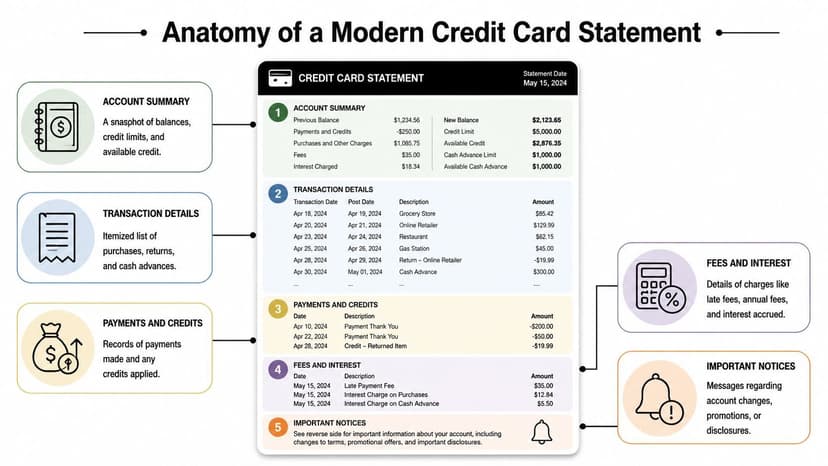
Account summary fields that matter most
Start at the top of the statement, not the transaction list.
The summary tells you whether the month can reconcile before you do any detailed coding. If the previous balance, payments and credits, purchases, fees, interest charged, and new balance don’t form a logical chain, stop there and investigate. Don’t import data into QuickBooks or Xero and hope it sorts itself out later.
These are the fields I tell juniors to verify first:
- Previous balance. This should tie back to the prior statement’s ending balance.
- Payments and credits. Confirm timing. A client may have paid during the month, but the issuer may have posted it after the cutoff.
- Purchases. This is your gross activity bucket before coding and exclusions.
- Fees and interest charged. These need their own expense treatment and should never disappear into general spend categories.
- New balance and available credit. These are good reasonableness checks against prior month activity.
Transaction lines are accounting data, not just spending history
The itemized section is where most workflow problems begin. Every row may include a purchase date, vendor name, amount, reference information, and MCC. That’s enough structure to classify expenses, identify likely duplicates, and flag vendors that need follow-up documentation.
If your team handles high-volume cleanup, combining statement extraction with enrichment can help. A tool like Context.dev’s transaction identification API can add clarity when merchant names are abbreviated or inconsistent across issuers.
Use the transaction list for three things:
Categorization
MCCs and merchant names help you assign likely expense accounts quickly, especially for recurring vendors.Exception review
Strange descriptions, reversals, and credits should be isolated before posting.Evidence
During tax prep, audits, or lender reviews, the statement line is often the first document you’ll be asked to support.
What doesn’t work
Bookkeepers get into trouble when they treat every line as equally trustworthy. Merchant descriptions can be cryptic. MCCs help, but they don’t replace judgment. A restaurant inside a hotel, an online marketplace, or a payment processor may need manual review.
That’s why I like using a purpose-built credit card statement parser as an intake step, then reviewing exceptions instead of retyping everything. Automation should narrow the review queue. It shouldn’t eliminate review.
Practical rule: Read the summary for balance logic first. Read the transaction table for coding second. Read the notices last unless you already know there was a rate change, dispute, or card replacement.
Obtaining and Exporting Statements Efficiently
Most statement problems begin before bookkeeping starts. The file arrives late, incomplete, password-protected, or exported in the wrong format. Fix the intake process and the downstream work gets easier.

Download the statement and the raw activity when possible
For month-end accounting, I prefer having both the official PDF statement and any downloadable transaction export the issuer offers. The PDF is the formal record. The export is easier to manipulate.
Use a simple collection routine:
- Get the final issued statement. Not a screenshot of current activity. Not an in-app transaction view. The closed statement matters.
- Pull the matching date-range export if available. Compare totals before using it.
- Rename files consistently. Client name, card nickname, and statement end date prevent chaos later.
- Store them in the client’s secure folder immediately. Desktop downloads become lost work faster than people admit.
PDF versus CSV
A CSV is easier to import, sort, and filter. A PDF is usually the legal or practical record you’ll rely on during review, tax work, or disputes.
The trade-off is simple:
| Format | Best use | Main drawback |
|---|---|---|
| Official reconciliation record | Harder to extract cleanly | |
| CSV | Fast import and analysis | May omit statement-only context |
| Both together | Strongest audit trail and workflow | Requires one extra intake step |
If your team works in Xero, this is where a clean import process matters. A practical walkthrough on importing bank statement data into Xero is useful when you’re moving from raw statement files to accounting entries.
Security during collection
Credit card statements contain account and identity data. Treat retrieval as sensitive handling, not admin work.
- Use secure client portals instead of asking clients to text screenshots.
- Avoid public Wi-Fi when downloading or reviewing statements.
- Limit access inside your firm to staff who need the files.
- Check the page count before filing the document away. Missing pages are common with forwarded PDFs.
I’ve found that a clean intake checklist saves more time than any fancy reconciliation trick. If the file set is complete and named correctly, half the battle is already won.
Common Reconciliation and Error Scenarios
Most reconciliation issues aren’t caused by dramatic fraud. They come from timing, incomplete support, and overconfidence in secondary records.
A client says they paid the card. The card report says a different amount. The general ledger shows a transfer that looks close, but not exact. In that moment, the statement is usually the deciding record.
The deeper problem is that outside data sources often don’t tell the full story. The sharing of actual payments data with credit bureaus dropped by 53 percentage points between 2013 and 2022, and 165 million U.S. borrowers may be missing payment information for at least one card on their credit reports, according to the paper on unraveling missing payments data. For accountants, that means the statement itself often becomes the only dependable source for reconciliation.

The mismatch patterns you’ll see most often
Here are the scenarios I see repeatedly in cleanup work:
Processing lag
A purchase happens at month-end, but the issuer posts it in the next cycle. Clients often book by memory instead of by statement date.Duplicate appearance
A pending charge and a final posted charge can look like two transactions when someone is reviewing screenshots or activity feeds instead of the closed statement.Credits coded as income
Refunds, charge reversals, and statement credits need separate review. They don’t automatically belong in revenue.Payment booked to the wrong card
This happens more than people think when a business has multiple accounts from the same issuer.
A practical review order
When a card account doesn’t reconcile, use this sequence:
- Tie the current statement’s opening amount to the prior statement’s ending amount.
- Match the payment on the statement to the actual cash movement in the bank.
- Review credits and reversals separately from purchases.
- Scan for transactions near the statement cutoff date.
- Compare any imported file against the PDF total before posting.
If the imported transaction list and the PDF statement disagree, trust the discrepancy enough to stop and investigate.
Why statements beat credit reports for bookkeeping
A credit report can help with borrowing context. It’s a weak accounting source when payment detail is missing. That gap matters for tax returns, mortgage packages, and business loan files where someone needs to show actual account activity, not just existence of an open trade line.
That’s also why I push teams toward repeatable extraction and reconciliation methods instead of ad hoc copying and pasting. If a client brings inconsistent files every month, a workflow built around reconciliation mismatch handling is far more reliable than trying to reconstruct payment history from multiple systems after the fact.
The Modern Workflow for Processing Statement Data
Manual entry still works. It just stops working well once volume rises, document quality drops, or review standards tighten.

I separate the work into two models. The first is the spreadsheet-first approach most firms start with. The second is the extraction-first approach that stronger workflows usually move toward.
The old way
The manual process usually looks like this:
- download the PDF
- read line items off the screen
- key transactions into Excel
- clean merchant names
- assign categories
- check totals
- fix whatever doesn’t tie
That’s manageable on one clean statement. It breaks down when files are scanned, multi-page, rotated, password-protected, or delivered by clients in mixed quality. It gets worse with foreign-language statements or cards issued by smaller institutions with inconsistent formatting.
That challenge matters even more for clients with limited access to mainstream banking. For 45+ million unserved or underserved Americans, credit card statements can be important for building credit history, and bookkeepers serving these clients often deal with low-quality scanned files that are difficult to process manually, as described in TransUnion’s overview of credit unserved and underserved consumers.
The new way
A modern workflow treats the statement as data first and document second.
The practical sequence is:
- collect the PDF statement
- convert it into structured transaction data
- reconcile summary totals against extracted detail
- review only the exceptions
- export to Excel, CSV, or the accounting format you need
That’s the difference between doing bookkeeping and building a bookkeeping system.
Here’s the side-by-side view.
| Metric | Manual Process (Excel) | Automated Process (ConvertBankToExcel) |
|---|---|---|
| Intake | Open each PDF and inspect manually | Upload files in batches |
| Data capture | Re-key or copy-paste transactions | Extract transactions automatically |
| Handling poor scans | Slow and error-prone | Built for messy PDFs and scans |
| Categorization prep | Merchant cleanup by hand | Structured output ready for mapping |
| Review style | Review every line | Review exceptions and totals |
| Best fit | Very low volume, very clean files | Recurring monthly workflow and mixed-quality files |
When firms evaluate document capture tools generally, I like resources that focus on the workflow trade-offs instead of hype. CatchDiff’s document capture software guide is useful for thinking through extraction, validation, and review design.
What actually improves in practice
The win isn’t just speed. It’s consistency.
When statement data arrives in a structured format, junior staff can follow a narrower review checklist. Senior reviewers spend less time correcting keyboard mistakes and more time checking classification, cutoffs, and support for unusual spend. That changes the economics of month-end work.
A short product walkthrough helps if you want to see the mechanics of statement conversion in action.
Where automation is worth it
I don’t think every workflow needs the same tooling. If you process one pristine statement a month, manual methods may be enough. But I’d stop defending manual entry in these situations:
- Multi-client bookkeeping where consistency matters more than improvisation
- Tax prep when support has to be traced back quickly
- Loan and mortgage files where statements may be scanned or incomplete
- Mixed issuer portfolios where every PDF has a different layout
- Historical cleanup projects when you need structured data from old statements
For teams dealing with any of that, a dedicated workflow for converting credit card statements to Excel becomes less of a convenience and more of a control.
Privacy Security and Record Retention Rules
Good statement handling isn’t only about speed. It’s also about professional discipline. Credit card statements contain enough information to create real risk if your storage or sharing habits are sloppy.
Retention needs a firm rule
Keep statements according to your tax, bookkeeping, and document support needs, and apply that rule consistently across clients. The mistake I see most often isn’t over-retention. It’s random retention. One client folder has every monthly PDF. Another has only year-end exports and a few screenshots.
Set a documented standard for:
- What gets saved. Final statement PDFs, supporting exports, and any reconciliation workpapers.
- Where it gets saved. One secure client location, not inboxes and desktops.
- Who can access it. Limit by role, not convenience.
- When it’s destroyed. Use a documented disposal process for records outside your retention window.
Secure transmission matters as much as storage
Many firms lock down cloud folders but still collect statements through insecure channels. That defeats the point.
If you need to send or receive sensitive documents, a practical overview like FaxZen’s secure document sending overview is a good reminder that the transfer method matters, not just the final storage location.
Non-negotiable practice: Never ask clients to send full credit card statements through casual channels if you can give them a secure upload option instead.
Storage and access controls
For internal handling, keep the setup boring and strict. That’s what works.
- Use encrypted storage with role-based access.
- Avoid local copies unless there’s a clear operational reason.
- Delete temporary working files after import or reconciliation is complete.
- Train staff on naming and filing rules so records are findable during review.
If a tool is involved in your workflow, read the provider’s data handling terms before you upload client files. A clear privacy policy for statement processing should tell you how files are stored, protected, and deleted.
Frequently Asked Questions About Statements
Can credit card statements be used as proof of income
Usually, not by themselves. They show spending, payments, and account activity. They don’t reliably prove earned income. Some lenders, visa processors, or underwriters may still request them as supporting evidence for cash flow, reserves, or recurring deposits, but I wouldn’t position them as a primary income document unless the requesting party specifically allows that.
What should I do with mixed business and personal expenses
Separate them line by line. Don’t wait until year-end. Code the business items to the proper expense accounts, move personal items to owner draw or shareholder distribution based on the entity structure, and keep notes where a charge could be questioned later. Mixed-use cards create avoidable cleanup work, so the best long-term fix is a dedicated business card.
How should I handle foreign-language or foreign-currency statements
Preserve the original statement first. Then work from a translated or normalized transaction file for coding and review. The key is keeping the source document intact while making the data usable for your ledger and workpapers.
Are statements enough for tax support
Sometimes, but not always. A statement proves that a charge hit the card. It doesn’t always prove business purpose. For travel, meals, contractor costs, or unusual purchases, you may still need invoices, receipts, or internal notes.
What’s the biggest mistake juniors make with credit card statements
They start coding before proving the statement ties. Reconciliation comes first. Categorization comes second. If the opening balance, payments, credits, and ending balance don’t make sense, detailed coding won’t save the file.
If you’re tired of retyping transactions from PDFs and cleaning up avoidable statement errors, ConvertBankToExcel gives accountants and bookkeepers a faster way to turn credit card statements into structured Excel and accounting-ready files while keeping the review process under your control.