
Reconciling a bank account is the process of matching your company's books to your bank statement. Think of it as a financial check-up—it’s how you prove your cash balance is real, catch costly errors, and spot potential fraud before it spirals.
Doing this right isn't just busywork. It's the foundation of solid financial management.
Building Your Foundation for Accurate Reconciliation
Before you even think about matching a single transaction, you need to get your prep work done. I’ve seen people rush this part, and it almost always leads to hours of frustrating backtracking later.
The goal here is simple: start with a clean slate. Get this right, and the rest of the process becomes smoother and far more accurate.
Gather Your Essential Documents
First things first, you need to round up all the necessary financial records for the period you're reconciling. This isn’t just about grabbing the latest bank statement; you need the complete picture to work from.
- Bank Statements: Download the official statement for the specific period. Make sure it covers the exact date range you need, from the first day of the month to the last.
- General Ledger (or Cash Book): This is your internal record of every cash transaction. It lists every check you've written, every deposit you've made, and any other cash movement.
- Supporting Documents: Keep related records handy. Things like check stubs, deposit slips, and credit card sales reports provide the details you'll need when an entry looks suspicious.
Trying to reconcile with incomplete documents is like solving a puzzle with missing pieces. A single unrecorded deposit can throw off your entire balance and send you on a wild goose chase.
Establish a Clean Cutoff and Schedule
When it comes to reconciliation, consistency is your best friend. Small, unresolved errors have a nasty habit of compounding over time, turning a tiny mistake into a major financial headache.
To stop this from happening, set a firm schedule. For most businesses, monthly reconciliation is the standard. It lines up perfectly with your bank statement cycles and keeps things manageable.
Just as important is setting a clean cutoff date. If you're reconciling for March, your reconciliation period ends on March 31. Any transaction that clears the bank on April 1—even if the check was written in March—belongs to April's reconciliation. This hard boundary prevents a world of confusion. You can learn more about how to streamline your data collection in our guide to automated data entry software.
Crucial First Check: The single most important step before you begin is verifying your opening balance. The cash balance in your books at the start of the period must exactly match the closing balance from your last successfully reconciled report. If they don't match, you have to find and fix the old error before you can move forward.
Automating Data Extraction from Bank Statements
Let's be honest, the worst part of any reconciliation is manually typing transactions from a PDF bank statement. It's the one task that can turn a quick job into an all-afternoon slog, especially if you're stuck with a scanned document, a low-quality image, or a massive multi-page statement. A single transposed number, and your entire reconciliation goes off the rails.
This is exactly why the shift away from manual data entry is happening so fast. Back in 2015, only 18% of U.S. accounting firms used automated reconciliation tools. By 2024, that number had shot up to nearly 67%. The reason is simple: teams that do it manually spend an average of 4.2 hours per week, per account on these tasks. With automation, that drops to just 45 minutes. The time savings are impossible to ignore.
The Shift from Manual Keystrokes to Automated Extraction
The solution is to let an AI-powered tool read your bank statements for you. Instead of spending hours hunched over a keyboard, you just upload a PDF and get a perfectly structured Excel or CSV file in seconds. This isn't just a small time-saver; it builds a foundation of clean, reliable data that makes the rest of your workflow incredibly smooth.
This is all powered by advanced Optical Character Recognition (OCR) and AI. These systems are trained to recognize the specific layouts of thousands of banks, so they know exactly where to find the date, description, debits, and credits. The best tools can hit over 99% accuracy straight out of the box. You can get a deeper look at how this works in our article on bank statement parser OCR technology.
A Practical Example with ConvertBankToExcel
Imagine you’ve just been handed a 15-page scanned bank statement. The old way meant printing it out and typing each line into a spreadsheet—a process that could easily take an hour and would almost certainly contain a few mistakes.
The new way is much, much simpler. With a tool like ConvertBankToExcel, the process looks like this:
- Upload the Statement: Just drag and drop your PDF bank statement into the converter. You can even upload a whole batch of them at once.
- Let the AI Work: The system instantly analyzes the document, figures out the bank format, and pulls out every single transaction.
- Download Your File: In about a minute, you can download a clean, formatted Excel file that's ready to go.
Here’s how simple that first step is. You're just dragging a file onto a webpage.
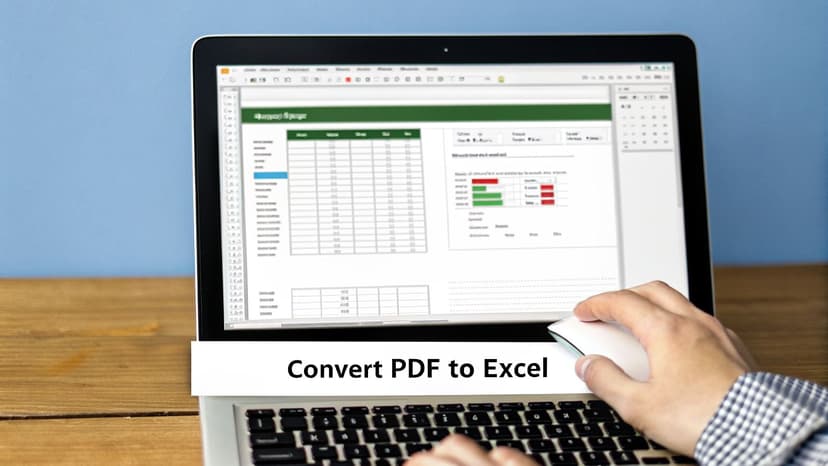
This one action completely replaces the most tedious and error-prone part of the reconciliation process, guaranteeing your data is accurate from the very start.
Key Takeaway: Automating data extraction doesn't just make reconciling faster; it makes it more accurate. By eliminating manual entry errors, you create a reliable data foundation. This lets you spend your valuable time investigating actual discrepancies, not hunting for your own typos.
For an even more hands-off approach, you can also use a specialized Finance Bank Statement Analyzer AI Agent that can automatically process and categorize transactions for you.
How to Match Transactions Methodically
Okay, your bank statement is finally in a spreadsheet. This is where the real reconciliation begins. The goal isn't to just stare at two long lists of numbers; it's to systematically knock out the easy matches so you can isolate the few transactions that actually need your attention.
The fastest way to get started is by sorting. Forget manually scanning line by line. First, sort both your company's books and the bank data by transaction amount. This one simple click will instantly pull identical payments and deposits next to each other, making them obvious.
Tackling the Straightforward Matches
Once you've sorted by amount, add a secondary sort by date. This helps you pair up transactions that have the same value and happened around the same time. For instance, a $150.25 payment you recorded on the 25th will likely pop up on the bank statement between the 26th and the 28th.
This two-step sorting trick is incredibly effective. I’ve seen it clear 70-80% of all transactions in less than five minutes. It’s all about clearing the clutter so you can focus on what's left.
- Sort by Amount: Your first pass to find exact dollar-and-cent matches.
- Sort by Date: A secondary filter to confirm the timing makes sense.
As you confirm each one-to-one match, hide those rows or change their cell color to green. Your "to-do" list shrinks with every click, leaving you with a much more manageable set of items to investigate.
Pro Tip: Use Excel’s "Conditional Formatting" tool. Select the two "Amount" columns, go to Conditional Formatting > Highlight Cell Rules > Duplicate Values. Excel will instantly color-code all the potential matches for you, saving you from having to visually scan for them.
Managing Complex Scenarios
The transactions left over are the tricky ones. These are rarely simple one-to-one matches. You'll run into bundled deposits, hidden bank fees, and checks that haven't cleared yet. These require a bit of detective work.
A classic example is a single bank deposit that bundles multiple sales. Your bank statement shows one credit for $2,500, but your books have five separate customer payments of $500 each. Your job is to group those five internal records and confirm they add up to the deposit total.
Another common headache is credit card processing fees. The bank statement might show a deposit for $975, but your daily sales report was for $1,000. That $25 gap is almost certainly the processing fee. Here, you aren't looking for a perfect match, but an expected and explainable difference.
Then you have outstanding checks. Checks you wrote in late March might not actually get cashed and clear the bank until early April. They won't be on the March bank statement at all. You just need to identify these in your ledger and flag them as "reconciling items." They are valid transactions, just caught in a timing gap.
You’ve powered through the easy matches, and now you’re staring at a few stubborn outliers. This is the heart of reconciliation. Don't worry, finding these discrepancies is completely normal. The trick is knowing how to investigate them efficiently without it turning into a multi-hour headache.
I find that almost every single discrepancy falls into one of three buckets:
- Timing Differences: These are perfectly valid transactions that just crossed over month-end. Think of checks you wrote on the 30th that the recipient didn't cash until the 2nd of the next month.
- Bank Errors: It's less common, but banks absolutely make mistakes. I've seen everything from a service fee charged twice to a deposit credited to the wrong account.
- Internal Mistakes: Let's be honest, this is where most issues hide. It could be a simple typo, a forgotten transaction, or a miscalculation. Happens to the best of us.
This simple flowchart shows how I decide when an item is a clean match versus when it needs a closer look.
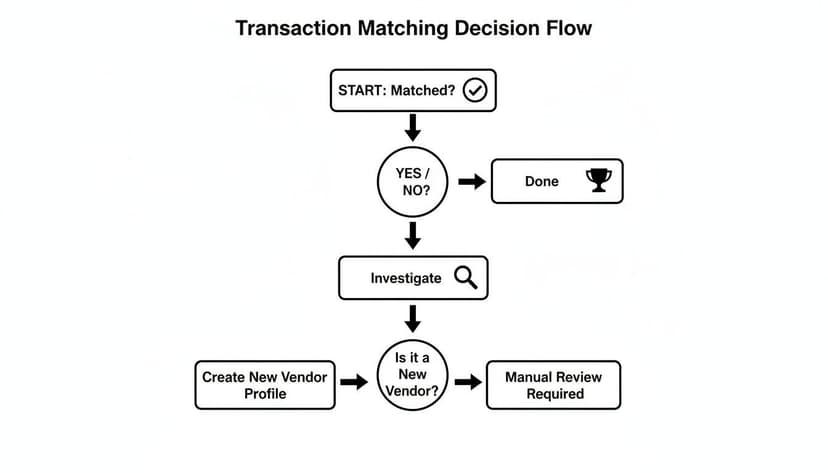
The key takeaway is that any transaction that doesn't match immediately needs a systematic investigation, not guesswork.
How to Spot and Fix Common Errors
Once you've got an unmatched item, the real detective work begins. If you suspect an internal mistake, start with the most common culprit of all: a transposition error. This is when you accidentally flip two digits, like keying in $45 when the receipt clearly said $54.
Pro Tip: The Rule of Nines
If the difference between your books and the bank statement is perfectly divisible by 9, you almost certainly have a transposition error. That $9 difference ($54 - $45 = $9) is a dead giveaway.
If it's not a transposition, look for a transaction that equals the exact amount of the discrepancy. It's often an unrecorded bank fee or a bit of interest earned. For these, you’ll just create an adjusting journal entry to get your books in line with the bank statement. For example, if the bank paid you $12.50 in interest, you’ll simply debit your cash account and credit "Interest Income."
Leaving these unresolved is more than a nuisance; it costs real money. Uncaught bank reconciliation errors cost U.S. businesses an estimated $2 billion a year. The more often you reconcile, the safer you are—monthly reconciliations catch about 73% of errors within 30 days, but I find weekly checks spot them in just a few days.
When to Contact the Bank
If you’ve ruled out timing issues and your own team's mistakes, the problem might be on the bank’s end. Before you pick up the phone, get your evidence in order. Have the specific transaction date, the exact amount, and a copy of the bank statement ready to go.
A classic scenario is a missing deposit. You have a deposit slip showing you dropped off funds on a Tuesday, but it's nowhere on your statement. That's a clear-cut case to present to the bank. For a complete walkthrough of resolving these headaches, check out our guide on handling a bank statement reconciliation discrepancy.
Finalizing and Documenting Your Work

You’ve hunted down every discrepancy and your adjusting entries are posted. It feels like the finish line, but there are a couple of crucial steps left. Don't skip them.
This is where you turn your messy spreadsheet and notes into a clean, official record. It’s not just about creating a paper trail for auditors, though they certainly appreciate it. Proper documentation proves your numbers are solid and creates a history that can save you hours of headache the next time a weird transaction pops up.
Building the Final Reconciliation Report
The reconciliation report is the formal summary that proves everything ties out. It’s a simple, logical document showing how your company's book balance and the bank's balance both arrive at the same correct number after all adjustments.
Your report needs to tell a clear story. It starts with two different numbers—the bank's balance and your books' balance—and walks the reader through the additions and subtractions that make them match. When you're done, both sides must hit the exact same final adjusted balance.
Here’s a quick look at how to structure the summary. This clean format shows anyone reviewing the report exactly how you balanced the books.
Example Bank Reconciliation Report Summary
This table provides a simplified look at the final reconciliation summary. Notice how it starts with different balances but ends with the same adjusted figure by accounting for items like outstanding checks and bank fees.
| Item | Book (Company Records) | Bank (Bank Statement) |
|---|---|---|
| Unadjusted Balance | $10,500 | $9,800 |
| Additions | ||
| Deposits in Transit | + $900 | |
| Interest Earned | + $50 | |
| Deductions | ||
| Outstanding Checks | - $450 | |
| Bank Service Fees | - $300 | |
| Adjusted Balance | $10,250 | $10,250 |
Every single line item in your report should directly correspond to the discrepancies you found and the adjustments you made earlier. It’s the final proof of your work.
The Importance of Review and Sign-Off
Once the report is drafted, it needs a second set of eyes. This isn’t optional; it’s a core internal control known as segregation of duties. The person who prepares the reconciliation should never be the person who approves it.
This two-person process is one of the most effective ways to catch honest mistakes and a powerful deterrent against fraud.
Key Takeaway: A manager's signature on a reconciliation report isn't just a formality. It signifies that an independent party has reviewed and verified the work, transforming it from a simple worksheet into a validated financial document.
Finally, archive everything. The signed report, the original bank statements, your adjustment notes, and the journal entries should all be filed together. Digital archiving is the standard now, and for good reason.
Regulations like IRS guidelines often require you to keep financial records for up to seven years. A well-organized digital archive makes retrieving documents for an audit painless and gives you an instant reference if questions come up months—or even years—down the road.
Common Questions About Reconciling a Bank Account
Even with a perfect workflow, the same few questions always pop up during reconciliation. Getting straight answers to these will save you a ton of time and prevent small headaches from turning into major problems.
How Often Should I Reconcile My Bank Accounts?
For most businesses, monthly reconciliation is the bare minimum. This lines up perfectly with your bank statement cycle, creating a natural rhythm for your bookkeeping. It's your best chance to catch things like a missed client payment or an incorrect bank fee before they get buried.
However, if your business handles a high volume of transactions, you should absolutely be reconciling weekly. A shorter period means fewer transactions to dig through, making the whole process faster and way less daunting. More frequent checks drastically cut the risk of a tiny error festering for weeks.
What Are the Most Common Reconciliation Mistakes?
The two culprits I see time and time again are timing differences and simple data entry errors.
Timing differences aren't really "mistakes"—they're just a normal part of doing business. But they will throw off your balance until they clear. The main ones are:
- Outstanding Checks: Checks you've recorded in your books, but the recipient hasn't cashed them yet.
- Deposits in Transit: Deposits you've made that haven't cleared the bank by the statement's cut-off date.
Data entry errors, on the other hand, are totally preventable. These are the classic manual slip-ups, like transposing numbers ($96 instead of $69) or just forgetting to record a transaction entirely. This is exactly where automating your data import pays for itself by all but eliminating human error. If you want a full walkthrough on matching transactions and fixing these issues, you can learn more about how to reconcile bank accounts.
What Should I Do If My Reconciliation Still Won't Balance?
When the numbers just don't line up, don't panic. Before you start re-checking every single line item, run through a quick diagnostic checklist. This methodical approach usually uncovers the problem much faster.
First, double-check your own math on the reconciliation report. A simple addition or subtraction mistake is a surprisingly common source of the problem. Next, make sure you started with the correct opening balance from last period’s finished reconciliation.
A Pro Detective Trick: If the basic math is right, calculate the exact difference between your book and bank balances. Look for a single transaction for that exact amount. No match? Divide the difference by 2 (this often finds a transaction posted as a debit instead of a credit) or by 9 (a dead giveaway for a transposed number).
If all else fails, it's time for the final, guaranteed-to-work step: a meticulous, line-by-line comparison of your books against the bank statement. It’s tedious, but it will expose the error.
Stop wasting hours on manual data entry. ConvertBankToExcel uses AI to pull transaction data from any bank statement into a perfect Excel file in under a minute, giving you a clean, accurate foundation for every reconciliation. Try it for free at https://convertbanktoexcel.com.