
That buzzing, grinding noise from the corner office? It's the sound of inefficiency. For any modern CPA, that old paper shredder is a bottleneck disguised as a security measure. There are far better alternatives to shredding paper that range from smarter physical destruction to a fully paperless, digital workflow.
Exploring Your Options Beyond the Shredder
Let's be honest: feeding stacks of paper into a machine, sheet by sheet, is a massive waste of time and money, especially when you consider that U.S. offices are still drowning in 12.1 trillion sheets of paper annually. Data privacy rules are getting tighter, and your clients expect more than just a locked filing cabinet.
It's time to move past the limits of that in-house shredder. Professional shredding services, for example, can process documents for as little as 0.3 cents per sheet, a fraction of the estimated 14 cents per page it costs to do it yourself. You can see a full cost breakdown here.
This guide will stack up the best physical destruction methods against the real endgame: a fully digital workflow. We'll give you a practical path to better security, airtight compliance, and a more efficient firm in 2026. If you're curious about how we handle data on our end, you can read our privacy policy.
Comparing Physical Destruction Methods For Accounting Firms
When you've got boxes of old tax returns and client files, just tossing them in the recycling bin isn't an option. For accounting firms, destroying physical documents is a matter of compliance and client trust. But not all destruction methods are created equal.
Looking for an alternative to shredding paper means weighing options like professional services, incineration, and pulping. The real differences come down to a few key things: NAID certification, chain of custody verification, cost, and environmental footprint. For example, a professional service gives you a Certificate of Destruction. That piece of paper is your audit trail, proving you met your compliance obligations—something you don't get from just burning documents yourself.
This decision tree gives a high-level view of the choice between physical and digital paths.
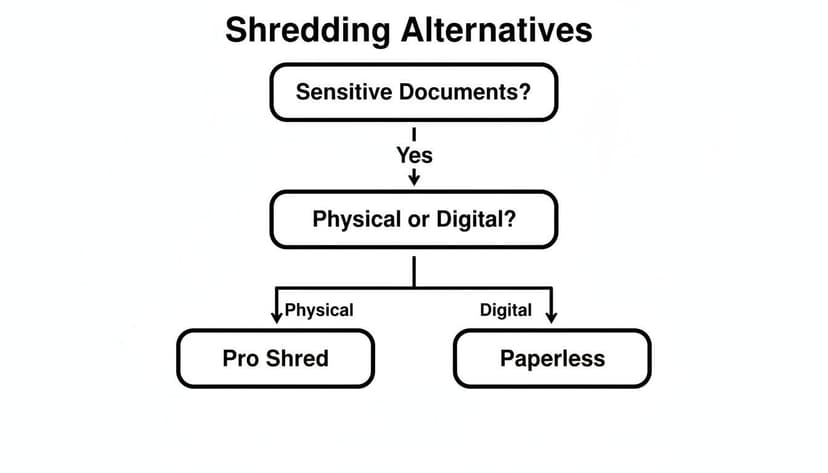
As you can see, if you're sticking with paper, professional shredding is the go-to for a reason. On the other side, going paperless is the main digital route. The right choice really boils down to your firm's security policies, how much paper you're dealing with, and what your budget looks like.
Is Pulping a Viable Shredding Alternative for Sensitive Documents?
You might have heard of pulping as the ultimate DIY method for destroying sensitive documents. On paper, it sounds foolproof. In practice, for a busy accounting firm, it's a non-starter.
The process is messy and surprisingly manual. You soak documents in a large container with a bleach-and-water solution for at least 24 hours. After that, you need to pulverize the soggy mess with something powerful, like a paint-mixing attachment on a high-torque drill, until the paper and ink dissolve into an unreadable slurry.
Yes, it absolutely makes data like account numbers completely irretrievable. For a one-off, tiny batch of papers, it works. But it’s far too labor-intensive for any kind of regular professional use.
Scenario: Imagine trying to pulp just one banker’s box of old client records. You'd need a large, well-ventilated space (thanks to the bleach fumes), protective gear for staff, and a significant block of time for both the soaking and the messy pulverizing. The cleanup alone is a major task. The labor costs and safety risks just don't add up.
The Gold Standard in Security: Incineration and Certified Services
Sometimes, a standard cross-cut shredder just doesn't cut it. When you're handling documents that carry massive legal or financial risk, you need a method that guarantees 100% destruction. This is where incineration comes in.
It’s exactly what it sounds like: turning paper into ash. Incineration is an NSA-approved method that offers total data annihilation, making it physically impossible for anyone to recover even a fragment of information. For CPAs with sensitive client financials, that level of certainty is often worth the investment.
The other top-tier option is hiring a certified destruction service. This isn't just a guy with a bigger shredder. These companies provide a documented ‘chain of custody’ from the moment your documents leave your office.
They use locked security consoles, run background checks on their staff, and use secure, GPS-tracked transport. At the end of the process, they issue a Certificate of Destruction. This isn't just a receipt—it's a legally binding document that proves you met your compliance obligations, which is indispensable for any audit trail.
The Ultimate Alternative: Go Paperless with an AI Workflow
What's the best alternative to shredding paper? Don't create the paper in the first place. By finally going paperless, accounting firms can eliminate physical document destruction entirely. It’s a shift from managing physical risk to controlling digital information, and it's what separates a modern firm from one stuck in the past.
The core idea is simple: instead of drowning in paper, you build a digital process for everything. This is a core principle of workflow automation.
Today's digital workflow looks like this: you receive or scan a document, then use an AI-powered tool to pull the data out with near-perfect accuracy. This doesn't just cut your shredding bill to zero; it gives you back all the hours previously lost to manual data entry. We break down exactly how this works in our guide to automated data entry software.
Security isn't an afterthought here. Features like 256-bit SSL encryption during transfer and automatic data deletion after processing act as a digital version of certified destruction, giving you and your clients total peace of mind.
How to Implement a Paperless Workflow in Your Firm
Going paperless is the ultimate alternative to shredding paper, but making the switch without a clear plan can create more chaos than it solves. I've seen firms get stuck halfway, with a mix of paper and digital files that nobody knows how to manage.
A smooth transition boils down to a few key steps.
The Paperless Playbook
First, get your clients on board. Send out a clear communication explaining the new process for submitting documents digitally. Most clients will welcome the convenience, but you have to show them exactly how it works.
Next, you need the right tools. A high-quality scanner is non-negotiable for any lingering paper, but the real workhorse is your data extraction platform. This is what turns a scanned PDF into usable data. If you want a look under the hood at how this works, our guide on bank statement parser OCR technology explains the core mechanics.
With the tools in place, your new daily process is simple: scan, upload, convert, and import.
One of the most overlooked steps is setting rules for your new digital archive. It's critical to implement a robust data retention policy to define how long you keep files and how they are secured. Finally, once a document is digitized and backed up according to your policy, you need a protocol for destroying the physical copy. This completes the loop and prevents a "hybrid" system from taking over.
Paper-Based vs. Paperless Workflow Cost & Time Analysis
The difference between a paper-based workflow and a paperless one isn't just about convenience—it's about measurable time and money. The table below breaks down where the hours and dollars really go in a typical accounting workflow.
| Workflow Stage | Paper-Based (Time/Cost) | Paperless with AI (Time/Cost) | Key Benefit of Paperless |
|---|---|---|---|
| Document Collection | Manual sorting, filing (2-4 hrs/month) | Automated upload/email (15 min/month) | Instant access, no physical storage. |
| Data Entry | Manual typing (8-10 hrs/month) | AI conversion (30 min/month) | 95% time reduction, eliminates typos. |
| Reconciliation | Manual cross-checking (3-5 hrs/month) | Automated matching (1 hr/month) | Faster error detection, higher accuracy. |
| Storage & Retrieval | Physical filing cabinets ($500+ cost) | Secure cloud storage ($10/month) | Searchable archive, disaster-proof. |
| Security Risk | Theft, fire, flood, misfiling. | Data breach, access control failure. | Controlled access, encrypted, auditable. |
As you can see, the time savings from automating data entry alone are massive. When you factor in the reduced risk and the ability to find any document in seconds, the argument for going paperless becomes impossible to ignore.
Your Questions About Shredding Alternatives, Answered
Moving away from the old office shredder brings up a lot of questions. I get it. You're weighing security, cost, and whether a new process will actually make your life easier. Let's tackle the big ones I hear from accounting pros all the time.
Is a Professional Shredding Service Really More Secure Than My Office Shredder?
Yes, and it’s not even close. The key difference is a single, crucial term: ‘chain of custody’.
When you use a professional service, you get locked bins, background-checked personnel, and a formal Certificate of Destruction when the job is done. That certificate is your auditable proof that you handled sensitive documents correctly. Your trusty office shredder offers none of that. It can’t prove you destroyed anything, and it’s vulnerable to everything from simple human error to a jam that leaves half a client's PII sitting in the machine.
How Can I Trust a Digital Tool with My Most Sensitive Data?
This is a fair question, but it often comes from thinking about digital tools the wrong way. A good tool isn't a storage locker; it's a temporary processing station.
Look for two non-negotiable security features: 256-bit SSL encryption for all data in transit, and a strict zero-retention policy. This means the tool automatically and permanently deletes your files within hours (or even minutes) of processing. The data doesn't live on a server somewhere waiting to be breached.
Think of it this way: a digital file that only exists for 10 minutes during processing has a dramatically smaller window of vulnerability than a paper document sitting in a "to-shred" bin for a week.
What's the Most Cost-Effective Solution for a Small Firm?
For most small practices, a hybrid approach hits the sweet spot. You don't have to go from 100% paper to 100% digital overnight.
Start by implementing a paperless-first policy. Use an AI conversion tool to digitize incoming documents, which immediately slashes your manual data entry costs. For the small amount of physical paper that remains, a scheduled professional shredding service is far more efficient than paying an employee to stand over a shredder. The low monthly fee is almost always cheaper than the combined cost of your team's time, machine maintenance, and disposal.