
By the time month-end gets close, the problem usually isn't a lack of effort. It's volume. Invoices are sitting in shared inboxes, PDFs are buried in vendor emails, someone dropped a paper copy on a desk, and the AP team is still keying header fields by hand while trying to keep approvals moving.
That setup breaks in predictable ways. A date gets entered wrong. A PO number is missed. A duplicate slips through because the same invoice arrived as both an email attachment and a scan. Then reconciliation takes longer, vendors start asking about payment status, and finance spends time cleaning up work that shouldn't have been manual in the first place.
Invoice scanner software is a common first tool to consider, but the useful question isn't "does it scan invoices?" Every product does that. The crucial questions are whether it handles messy layouts, whether staff can fix exceptions quickly, and whether the extracted data remains usable outside the vendor's platform later.
The End of the Manual Invoice Pile
Anyone who has run AP during close knows the scene. A stack of invoices on one side, a spreadsheet on the other, and a queue of approvals that can't move until someone retypes vendor names, dates, amounts, tax lines, and PO references into the accounting system.

That old process wasn't just slow. It was fragile. One bad scan, one typo, or one invoice routed to the wrong approver could hold up payment and create extra work for three different people.
Why the category matters now
Invoice scanner software used to mean basic OCR. It read text from a page and hoped the layout looked familiar. Modern tools are different. They classify documents, extract fields from varied layouts, and push data into downstream AP workflows with far less dependence on fixed templates.
That shift is showing up at the market level too. The global invoice processing software market is projected to grow from USD 25,312 million in 2024 to USD 98,417.71 million by 2032, at a CAGR of 18.5%, driven by the need to automate accounts payable and reduce human error, according to Credence Research on invoice processing software.
For finance teams, that's not just a trend line. It's a sign that invoice scanner software has moved from niche back-office tooling into core finance infrastructure.
What changed in practice
The best systems now do more than convert paper into text. They pull invoices from inboxes, read PDFs, process mobile captures, and feed the data into review and approval workflows. That's a different operating model.
From a practical perspective:
- Old approach: scan, save, type, check, post
- Current approach: ingest, extract, validate, route
- Finance result: less rekeying and tighter control over what gets posted
Practical rule: If your team is still using scanning as a filing step instead of a data-capture step, you're only solving storage, not AP workload.
Teams dealing with scanned bank documents often discover the same thing from the other side of the ledger. If you're handling statement PDFs as well as invoices, this guide on scanned statements workflows is a useful parallel because the operational problem is similar: unstructured documents create downstream accounting work unless the data becomes structured early.
How Invoice Scanner Software Actually Works
Most buyers hear "OCR" and assume that's the whole system. It isn't. Good invoice scanner software acts more like a digital mailroom clerk, junior accountant, and first-pass auditor working in sequence.
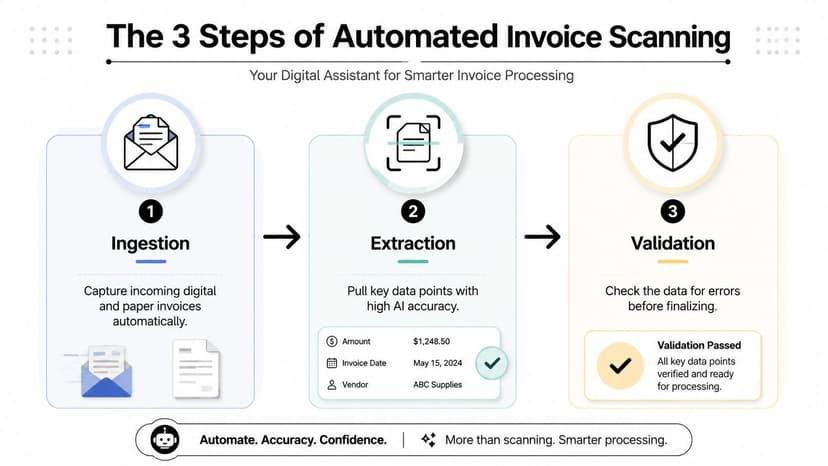
Ingestion comes first
Invoices don't arrive one way. They come through vendor emails, PDF uploads, paper scans, mobile photos, and sometimes structured electronic feeds. A capable system has to pull all of those into one capture flow without forcing staff to babysit the intake channel.
According to KlearStack's explanation of invoice scanning software, invoice scanner software is a full document-capture pipeline that ingests invoices from emails, scans, and PDFs, then uses AI to classify and extract header and line-item data without fixed templates. That's the key upgrade over older zone-based OCR systems.
If you're comparing invoice capture with adjacent workflows, Alignmint's receipt scanning docs are worth a look because they show the same basic idea in a simpler expense context: capture, extract, validate, then route.
OCR is only the reading layer
OCR turns text on an image into machine-readable characters. That's necessary, but by itself it's not enough. OCR can tell you that a page contains numbers and labels. It can't reliably decide which number is the invoice total when the layout changes across vendors.
Weak products often fail because they read the page but don't understand the document structure well enough to map fields consistently.
AI extraction does the heavy lifting
The AI layer identifies the vendor, invoice number, due date, tax amounts, totals, and line items even when placement shifts from one invoice to the next. Better systems don't need a custom template for every supplier.
In practical terms, this means the software can handle:
- Header capture: vendor name, invoice date, due date, currency, total
- Line-item extraction: quantities, descriptions, unit prices, taxes
- Document classification: invoice vs. credit memo vs. supporting attachment
- PO context: identifying whether an invoice is tied to a purchasing workflow
A lot of finance staff first encounter the same underlying challenge when dealing with bank PDFs. This overview of a bank statement parser with OCR is helpful if you want to see how document extraction logic differs from plain text recognition.
Validation is where the real value appears
Once data is extracted, the software should check math, compare totals, flag missing fields, and route low-confidence items for review. That's the stage buyers often underestimate.
The capture step gets attention in demos. The validation step determines whether AP actually saves time.
A product that extracts data quickly but sends too many invoices into a messy review queue doesn't remove work. It relocates it.
The True Impact on Your Finance Team
The business case for invoice scanner software isn't abstract. Manual invoice handling burns time and labor on work that software can now do faster and more consistently.
According to Parseur's AI invoice processing benchmarks, manual invoice processing can take 10 to 30 minutes and cost around $12 per invoice, while AI-based processing can cut that to about 1 to 2 seconds per invoice at a cost of about $2.36, an 80%+ reduction in both time and expense.
Manual vs automated invoice processing at a glance
| Metric | Manual Processing | Automated Processing |
|---|---|---|
| Processing time per invoice | 10–30 minutes | 1–2 seconds |
| Cost per invoice | about $12 | about $2.36 |
Those numbers matter most when invoice volume rises, but even smaller teams feel the effect because AP staff stop spending their day on repetitive entry and basic checking.
What the team gets back
The obvious gain is less typing. The more important gain is capacity. Staff can focus on exceptions, accrual support, vendor issues, and close-related review instead of transcribing invoice headers from PDFs.
That change usually improves operations in four ways:
- Faster posting: invoices move into the approval flow sooner, which reduces avoidable payment delays.
- Cleaner records: fewer manual re-entry points means fewer avoidable keying mistakes.
- Better audit support: digital capture creates a more consistent record of what came in and how it was handled.
- Stronger control: duplicate checks and validation rules can happen before posting instead of after cleanup.
What saves money isn't scanning. It's reducing how many human touches an invoice needs before it becomes payable data.
Where teams still go wrong
Some firms buy invoice scanner software and expect immediate labor savings without changing workflow design. That rarely works. If every invoice still gets manually reviewed by habit, the software becomes an expensive intake tool.
The second mistake is ignoring volume handling. High-volume AP teams need batch ingestion, queue management, and clean export behavior. Otherwise they replace a paper bottleneck with a review-screen bottleneck. If your team processes invoices in waves, thinking in terms of batch processing for financial documents helps because the operational challenge is the same: throughput matters as much as extraction.
Essential Criteria for Choosing the Right Software
Most vendor comparisons overweight one thing: extraction accuracy. That matters, but it isn't the whole buying decision. In practice, two issues separate a tool that helps from one that becomes shelfware. Exception handling and data portability.
Start with the workflow, not the demo
A polished demo usually shows a clean PDF, a perfect extraction, and an instant export. Real AP doesn't look like that. Real AP includes low-quality scans, emailed duplicates, multi-page invoices, nonstandard line items, and missing PO references.
So the right evaluation question is not "How accurate is the engine?" It's "What happens when the engine is uncertain?"
Exception handling is the product
Every invoice automation system needs a human review loop. The difference is whether that loop is efficient or miserable.
Look for these signs in a review screen:
- Confidence visibility: low-confidence fields should be obvious without opening three menus.
- Side-by-side review: the source invoice and extracted fields should be visible together.
- Fast correction paths: reviewers should correct a field in place, not bounce between screens.
- Clear routing: exceptions should go to the right person based on the issue, not land in one generic queue.
- Audit trail: every correction should be logged for later review.
What doesn't work is a vague "manual review" bucket. That setup turns every exception into detective work.
If the reviewer has to zoom, scroll, re-open the file, and guess what the AI meant, the software hasn't automated the job. It has changed the screen where the job happens.
Data portability is not optional
One of the most overlooked buyer questions is whether you can get your data back cleanly if you leave the platform. As DocuClipper notes in its invoice scanning software buyer guide, many guides focus on OCR accuracy while overlooking export fidelity to Excel or CSV, API limits, and schema consistency. Those details are central if you want to avoid lock-in and preserve downstream data integrity.
Ask vendors direct questions:
- Can exports preserve line items cleanly?
- Can you retrieve audit history along with the extracted values?
- Are exports consistent across invoice types, or does the schema drift?
- Can finance map fields without developer intervention?
- If you switch tools later, what format does historical data leave in?
Many lightweight products disappoint by exporting a flattened spreadsheet that looks fine until you need line-item detail, exception history, or approval metadata.
Integration matters, but depth matters more
Every vendor claims ERP or accounting integrations. That claim needs unpacking. A basic connector that posts header-level data is very different from an integration that preserves coding fields, approval state, and line-item structure.
Common integration targets include QuickBooks, Xero, Sage, and ERP platforms. But don't stop at the logo list. Test whether the field mapping is controllable and whether validation results carry over cleanly. If your team has dealt with document extraction issues before, this explainer on common OCR errors in financial workflows is worth reading because many invoice problems show up later as mapping and reconciliation errors, not at capture time.
A short walkthrough can help you frame what to check in a live system:
A practical vendor checklist
When I vet invoice scanner software, these are the questions that usually expose the gap between marketing and operations:
- Show me a bad invoice. Not the clean sample file.
- Show me the exception queue. That's where AP will live.
- Export ten processed invoices with line items. Then inspect the output.
- Show the audit history after a correction.
- Show how the tool handles a vendor layout it's never seen before.
If a vendor struggles with those five asks, the product probably looks better in a sales call than in production.
A Practical Implementation Checklist for AP Teams
Software doesn't fail because OCR exists. It fails because the rollout assumes capture alone will fix AP. It won't. The implementation has to be built around process, ownership, and exception review from day one.

Before you turn anything on
Start with cleanup. Vendor names, PO references, approval paths, and coding rules need to be reasonably consistent before automation can work well.
Use this pre-launch checklist:
- Define the target process: decide what should happen from invoice receipt to posting.
- Clean vendor master data: bad vendor records create avoidable exceptions.
- Choose a pilot group: use a manageable slice of invoices first.
- Set exception ownership: someone must own the review queue every day.
Teams doing cross-border or export-heavy operations often discover that AP efficiency problems are broader than invoice entry alone. This piece on improving South African export business efficiency is useful because it frames AP automation as an operating discipline, not just a software purchase.
Run a pilot that reflects reality
Don't pilot only on perfect PDFs from one cooperative supplier. Use a mix that includes the invoice types your team struggles with.
A good pilot should include:
- Email attachments and uploaded PDFs
- Multi-page invoices
- Invoices with line-item detail
- A sample of PO and non-PO invoices
- At least a few messy documents that need correction
Field note: The pilot isn't for proving the tool works. It's for finding out where your process breaks under normal conditions.
Train reviewers, not just admins
AP adoption depends on the people working the exceptions. If staff only get a basic admin overview, they'll create workarounds as soon as the queue gets busy.
Training needs to cover:
- How to correct low-confidence fields
- When to escalate instead of fixing
- How approval routing should work
- What to do with duplicates or invalid invoice data
If your posting flow ends in QuickBooks, it's worth checking your accounting-side setup early so extracted data lands cleanly. This guide to QuickBooks integration workflows is useful as a checklist for the downstream side of implementation.
Review the process after go-live
The first live month tells you more than the entire vendor selection phase. Watch where invoices stall, which vendors generate repeated exceptions, and whether staff trust the confidence indicators.
Refine the workflow quickly. If one exception type appears repeatedly, fix the rule or mapping. If reviewers ignore confidence scores, the interface or training isn't working yet.
Integrating Scanners into Your Full Financial Workflow
Invoice scanner software solves one side of the accounting data problem. It turns payables documents into structured records. But finance doesn't close the books from invoices alone.
The other half is reconciliation. You still need clean transaction data from bank and credit card statements to confirm that what was approved, posted, and paid lines up. That's why firms that get the most value from invoice automation usually standardize document extraction across both AP documents and statement data.
In practice, the stronger workflow looks like this:
- Invoices enter through scanner software
- Approved data posts into accounting
- Bank and card statements are converted into structured transaction files
- Finance matches invoice, ledger, and payment activity during reconciliation
Many teams discover a blind spot. They automate invoice capture but still rely on manual copy-paste from statement PDFs. That leaves reconciliation slower than it should be, even though AP intake improved.
For firms that want the rest of the workflow to catch up, the next step is usually adding document conversion tools on the banking side as well. A centralized set of financial document tools makes that much easier because the goal isn't just scanning documents. It's getting usable data from every document that touches the close process.
If your team has already improved invoice intake and now needs cleaner bank and credit card data for reconciliation, ConvertBankToExcel is the logical next step. It converts scanned or digital statements into structured Excel, CSV, and accounting-ready formats, so your AP automation and your reconciliation workflow finally operate at the same speed.