

By the time receipts reach most firms, the damage is already done. The ink is fading, the employee forgot what the charge was for, and someone still has to key vendor, date, tax, and total into the books by hand.
That's why receipt scanner and software matters now. It's not a nice extra for tidy businesses. It's basic operating infrastructure for any firm that wants cleaner records, faster close work, and fewer reconciliation headaches. I've seen the difference in practice. The firms that still rely on emailed JPEGs and month-end cleanup spend too much time chasing support for transactions that should have been captured correctly at the start.
From Shoeboxes to Software
A familiar scene in bookkeeping is the desk pile that turns into a box, then a drawer, then a tax-season problem. A restaurant owner hands over a stack of thermal receipts. A consultant forwards phone photos taken in bad lighting. A client swears everything “should match the card statement,” but half the receipts are unreadable and the rest are out of order.
Manual entry can still get the job done. It just does it slowly, inconsistently, and at the worst possible point in the workflow.
Receipt scanner and software changed that by moving capture closer to the transaction itself. Instead of waiting until month-end, employees snap a receipt when they spend. The software reads it, extracts the fields, and routes it into the accounting process while the details are still fresh. That one shift matters more than most feature lists admit.
The market moved hard in that direction. According to BILL, the sector is projected to exceed $5 billion globally by 2026, 90% of modern businesses have moved away from standalone scanners toward bundled tools inside accounting software, and adoption in US firms rose from 25% in 2019 to over 70% by 2025 (BILL receipt scanning market overview).
What changed in the real world
Three things pushed adoption from optional to normal:
- Mobile capture became usable. Staff no longer needed a desktop scanner to submit expenses.
- Remote work exposed paper-based bottlenecks. A receipt sitting in someone's backpack isn't part of your books.
- Accounting teams got tired of duplicate entry. If the receipt lives outside the accounting system, someone has to touch it again.
The biggest improvement isn't the scan itself. It's that receipts stop arriving as random evidence and start arriving as structured records.
That's the standard now. The useful question isn't whether to digitize receipts. It's which tools extract reliable data, integrate with the rest of your stack, and support reconciliation instead of creating another review queue.
How Scanners Turn Paper into Data
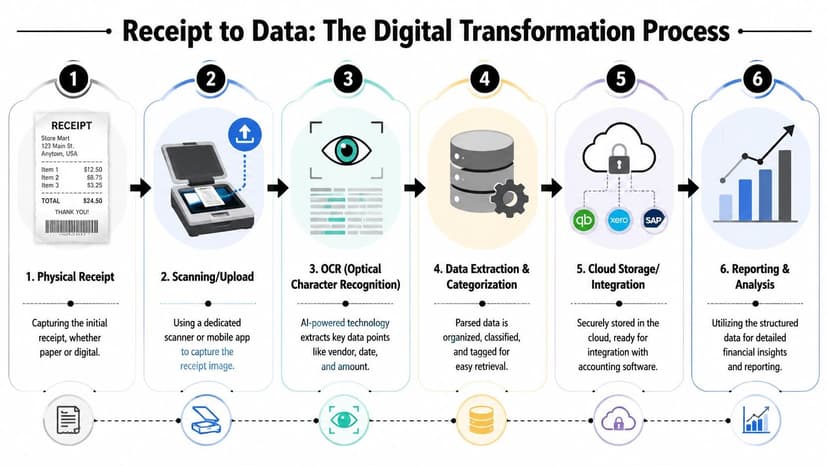
Receipt scanning feels simple from the user side. Take a photo, wait a moment, review the result. Under the hood, it's a layered extraction process. The easiest way to think about it is as a digital archivist. One part reads the text. Another part figures out what the text means.
OCR reads the characters
The first layer is OCR, or Optical Character Recognition. It converts the image into machine-readable text. On a clean receipt, that means reading fields such as merchant name, date, subtotal, tax, and total.
Top-tier systems now report more than 98% accuracy, and some tools claim 99.9% accuracy when combined with stronger processing pipelines (Veryfi on receipt OCR and IDP). That sounds abstract until you compare it to manual entry. In practice, good OCR removes most of the repetitive typing that eats up bookkeeping time.
IDP decides what the fields mean
OCR alone isn't enough. A receipt usually contains multiple numbers, inconsistent layouts, abbreviations, and low-quality print. IDP, or Intelligent Document Processing, adds context. It helps the system decide which number is the final total, which one is tax, and which line is just a subtotal or reference code.
That distinction is the whole game. If the software reads “23.40” correctly but assigns it to the wrong field, the extraction still fails.
For teams that also handle statement extraction, the logic is similar to how a bank statement parser using OCR turns messy PDFs into structured transaction data. Reading text is only step one. Structuring it correctly is what makes the output useful.
The actual workflow
Most modern receipt systems follow a pattern like this:
- Capture the receipt using a phone camera, email forward, upload, or scanner.
- Clean the image by correcting angle, contrast, and background noise.
- Run OCR to detect raw text.
- Apply IDP or AI rules to identify fields such as vendor, amount, tax, and date.
- Validate the extraction against expected patterns or confidence thresholds.
- Push the result into storage, approval, expense coding, or accounting software.
Practical rule: If a tool shows extracted text but doesn't clearly show field-level review before posting, it's not ready for serious accounting work.
What works best is software that treats extraction as the start of the workflow, not the finish. A photo isn't valuable because it's stored. It's valuable because it becomes data you can review, classify, and reconcile.
Core Features You Cannot Ignore
The right receipt scanner and software doesn't just scan. It reduces review time, limits exception handling, and fits the accounting process you already run. Most demos make every tool look competent. The difference shows up when you feed it crumpled taxi receipts, multi-page PDFs, foreign currency charges, and employee uploads with bad lighting.

Capture Expense notes that firms should look for hybrid AI-OCR pipelines delivering over 99% accuracy, along with mobile-first capture, cloud sync, and rule-based sorting. It also points to examples such as Dext at 99.9% accuracy and Veryfi at over 98% accuracy (Capture Expense on receipt scanning features).
OCR accuracy
Accuracy is the first filter. If extraction fails on ordinary receipts, everything downstream gets more expensive.
What matters isn't just whether the tool reads clean paper. It needs to hold up when receipts are:
- Thermal and faded
- Folded or crumpled
- Photographed at angles
- Printed in different formats
- Submitted in mixed currencies
A strong system should also make review efficient. Confidence scoring helps by telling your team where the software is uncertain, so staff can spend time on exceptions instead of rechecking every receipt.
Format support and batch handling
Some firms overfocus on mobile capture and forget how many records arrive in other ways. Clients upload PDFs. Staff email attachments. Admin teams inherit historical folders full of JPGs and PNGs.
You want broad input support and competent batch processing. That matters most during catch-up work, month-end cleanup, and onboarding new clients. If the software only works well one receipt at a time, backlogs pile up fast.
Good batch handling should let you:
- Upload multiple files together without breaking field extraction
- Separate receipts cleanly when one PDF contains several pages
- Export data consistently for review or import
- Keep image copies attached to the extracted record
Integration matters more than the demo
A beautiful extraction screen means little if the data stalls there. Receipt systems earn their keep when they move entries into the books with minimal rework.
If your firm runs QuickBooks, native handoff matters. If it doesn't map properly to chart accounts, vendors, or expense categories, staff will end up correcting entries by hand. For firms in that ecosystem, it helps to understand how QuickBooks integrations for accounting workflows reduce duplicate entry beyond receipt capture alone.
Here's a good walkthrough of what modern app interfaces are trying to do in practice:
Security is not a side feature
Security gets pushed to the bottom of comparison pages, but accounting firms should treat it as a core buying criterion. Receipts may contain card details, supplier data, travel patterns, medical spending, or client reimbursement records.
If the vendor can explain OCR in detail but can't explain retention, deletion, and access controls in plain English, keep looking.
A practical feature checklist looks like this:
| Feature | Why it matters in practice |
|---|---|
| High OCR accuracy | Cuts correction work before data reaches the books |
| Confidence scoring | Shows reviewers which extractions need attention |
| Multi-format support | Handles PDFs, phone photos, emailed files, and historical archives |
| Batch processing | Speeds cleanup and month-end work |
| Accounting integration | Prevents duplicate entry and mapping errors |
| Enterprise-grade security | Protects financial documents and supports client confidentiality |
The right setup feels boring in the best way. Receipts come in, exceptions get flagged, approved data moves forward, and nobody spends Friday afternoon decoding a fuel receipt from three weeks ago.
The Business Case for Automated Receipt Management
The return on receipt automation is straightforward. It removes low-value manual handling from a process that firms repeat constantly. Klippa reports that these tools can cut administrative costs by up to 75%, save 12+ hours per week for CPAs and bookkeepers on reconciliation work, and reduce error rates below 1% while supporting paperless compliance under IRS Revenue Procedure 97-22 (Klippa on receipt scanning ROI and compliance).
For CPAs and bookkeepers
The direct gain is time. Not vague “productivity,” but actual hours recovered from typing, renaming files, chasing support, and correcting mismatched entries.
That time matters because receipt work tends to grow unnoticed. A few minutes per document doesn't look serious until the firm is processing them across multiple clients, multiple staff members, and multiple card feeds. Automation cuts that drag and lets teams spend more energy on review, exception handling, and advisory work.
Receipt capture is one of the easiest places to remove manual data entry without lowering control.
If your broader goal is reducing repetitive finance work across the stack, Match My Assistant for data automation gives a useful overview of where firms are replacing manual entry with workflow-driven processes.
For business owners
Owners usually care about different outcomes. They want reimbursements to move faster, expenses to be documented correctly, and tax support to be easy to find when needed.
Automated receipt management helps because the supporting document enters the system earlier. That gives the business a cleaner trail for approvals, better visibility into spend, and less dependence on end-of-month memory. The compliance point matters too. If digital records are legible and retrievable, going paperless doesn't mean giving up audit readiness.
In practice, this shifts receipts from after-the-fact paperwork into live operating data. That's the difference between “we think this charge is travel” and “we have the receipt, category, date, and record attached already.”
How to Choose the Right Receipt Scanning Tool
Most buyers compare tools the wrong way. They start with price, then skim a feature list, then assume OCR quality is roughly the same across vendors. It isn't. The better approach is to start with your workflow, your risk level, and the kind of receipts you process.
Privacy deserves far more attention here. Receipt Lens notes that the receipt scanning market is valued at over $1B, and 65% of tax professionals cite privacy as a top adoption barrier. It also warns that free tools may retain data for AI training, which clashes with firms that need zero-retention practices and 256-bit SSL when handling sensitive financial records (Receipt Lens on privacy risks in receipt scanning apps).
Questions worth asking vendors
Don't ask whether the tool is “accurate.” Every vendor says yes. Ask narrower questions that expose where the product breaks.
- How does it perform on low-quality thermal receipts?
- What happens when the system is uncertain about tax or total?
- Can reviewers see confidence cues before posting data?
- How long are images and extracted fields retained?
- Is data used for model training?
- What export and integration options are available if we switch platforms later?
- Can permissions be limited by client, team, or entity?
A vendor with a mature product can answer those without hiding behind marketing language.
Match the tool to the user
Different users need different strengths. A freelancer may care most about ease of capture. An accounting firm needs control, review, and retention clarity. A growing agency needs approvals and clean sync to the books.
| Your Role / Need | Must-Have Features | Good-to-Have Features |
|---|---|---|
| Freelancer or sole proprietor | Mobile capture, simple categorization, searchable archive | Email forwarding, export flexibility |
| Growing business with staff reimbursements | Approval workflow, accounting sync, batch review | Multi-currency handling, policy controls |
| Accounting firm managing clients | Confidence scoring, retention clarity, role-based access | Bulk onboarding tools, advanced rule sets |
| Tax, mortgage, visa, or loan document handling | Strong privacy terms, secure storage, predictable deletion policy | Foreign-language support, structured exports |
For firms comparing bookkeeping document tools more broadly, Wistec's document management guide for accountants is useful because it frames receipt capture as one piece of a wider document control process.
There's also a practical comparison angle if you're weighing ecosystem tools against specialist capture products. A side-by-side like Hubdoc alternatives and comparisons helps clarify whether you need broader document capture or a tighter workflow around accounting data specifically.
What usually works best
In small teams, built-in receipt capture inside the accounting platform is often enough. In firms with higher volume, multiple approvers, or client segregation needs, dedicated expense platforms usually work better because they handle routing and review more cleanly.
Cheap software gets expensive when staff spend their time correcting bad extractions and worrying about where client data is stored.
The best choice is rarely the one with the longest feature list. It's the one that matches your volume, your review process, and your data handling obligations.
Common Pitfalls and Your Implementation Checklist
Buying the software isn't the hard part. Getting staff to use it consistently is where most firms stumble. Poor rollout creates a familiar result. The app exists, a few people use it, and the accounting team still receives random receipts by email at month-end.
Where implementations go wrong
The first problem is weak integration planning. Firms choose a scanner that extracts data well but doesn't map cleanly into the accounting system or approval flow. That leaves staff reviewing in one tool and posting in another.
The second problem is bad test data. Teams often pilot with clean sample receipts from the vendor demo instead of using the ugly receipts they deal with every week. If you want a realistic read, feed the system coffee-stained parking slips, hotel folios, and low-contrast merchant copies.
A third issue is ignoring exception handling. Every system makes mistakes. What matters is whether your team has a simple review path when OCR struggles. If you're seeing repeated field misses, it helps to understand common OCR extraction errors in financial documents so you can tell the difference between a training issue, an image-quality issue, and a platform limitation.
A rollout checklist that works
Use a short implementation cycle and tighten it before you expand.
- Run a small pilot with real receipts from different users and merchants.
- Test messy inputs including faded, angled, and multi-page documents.
- Confirm field mapping for vendor, date, tax, category, and total.
- Set review rules so uncertain extractions are checked before posting.
- Define submission rules for employees. Mobile app, email, or upload.
- Train reviewers on what to correct and what to reject.
- Write a retention policy that staff and clients can understand.
- Launch by group instead of forcing the whole firm onto it at once.
Start with one team, one approval path, and one month of receipts. Tight processes scale better than rushed rollouts.
The firms that succeed treat receipt capture as an operating habit, not just an app installation. Once staff know when to submit, where to submit, and what “done” looks like, adoption gets much easier.
The Complete Workflow with Bank Statement Converters
Receipt capture solves only half the accounting problem. It tells you what the transaction was supposed to be. The bank statement tells you what hit the account.
That's why the best workflow combines both. Employees or clients capture receipts as expenses happen. The receipt scanner extracts vendor, amount, date, and tax, then pushes that record into the accounting process. Separately, the accountant pulls transaction data from card or bank statements into a structured file for review and import. Reconciliation becomes much faster because you're matching two clean datasets instead of comparing a PDF statement to a folder of images.

Where the full workflow clicks
A practical end-to-end process looks like this:
- Receipt captured at purchase through mobile upload, email, or batch intake
- Expense data extracted and categorized inside the receipt system
- Bank or card statement converted into usable transaction data
- Transactions matched in QuickBooks or Xero
- Exceptions reviewed with supporting images already attached
That second document stream matters more than many firms realize. If you want the broader picture of how statement extraction fits into modern finance operations, this bank statement converter guide for accounting workflows explains the role clearly.
Receipt scanner and software is not the whole automation stack. It's the front-end evidence layer. Bank statement conversion is the transaction layer. Put them together and reconciliation stops being a hunt through PDFs, inboxes, and paper folders.
If your team already captures receipts but still wastes time rebuilding statement data by hand, ConvertBankToExcel fills the missing half of the workflow. It converts bank and credit card statements into structured Excel, CSV, and accounting-ready formats, so you can reconcile receipt data against actual transactions faster and with less cleanup.