
![Bank Account Proof: A Guide to Getting It Right [2026]](/_next/image?url=https%3A%2F%2Fconvertbanktoexcel.com%2Fapi%2Fuploads%2Fimages%2F1777706505549-f4639b8a.jpg&w=1920&q=75)
You usually find out you need bank account proof at the worst possible time. A lender asks for it after you've already uploaded everything else. A visa office uses the phrase “proof of funds” without telling you what version they’ll accept. A bookkeeper needs the same records for reconciliation, but the file you downloaded is only useful as a PDF attachment, not as workable data.
That’s where people get stuck. They have a bank account. They have access to online banking. But they don’t have documents prepared in a way that stands up to review.
The difference matters. Reviewers don’t just want a screenshot that “looks right.” They want evidence that is complete, consistent, and hard to dispute. In lending, immigration, tax, and audit contexts, sloppy submission creates delays. In some cases, it gets the document rejected outright.
What Is Bank Account Proof and Why It Matters
Bank account proof is documentation that shows an account exists, belongs to a specific person or business, and reflects real financial activity or balances. In practice, that usually means an official bank statement, a bank-issued account confirmation letter, or another formal record produced by the financial institution.
Most high-stakes reviewers treat this as evidence, not a convenience file. That’s why the exact document type matters. A visa officer reviewing funds for travel or residency doesn’t evaluate your bank file the same way a utility company does. A mortgage underwriter doesn’t treat a cropped mobile screenshot the same way they treat a full statement PDF. If you're preparing documents for immigration, this practical guide to a bank statement for visa applications shows the level of formality officials often expect.
Where bank account proof gets used
People usually need it for a few recurring situations:
- Loan and mortgage applications where the reviewer needs to confirm balances, deposits, and account ownership
- Visa and immigration filings where “proof of funds” must match the applicant’s name and timeline
- Tax and legal matters where statements support reported income or trace transactions
- Business accounting where statements back up reconciliation and audit support
A proper bank record carries weight because it comes from a third party, not from the applicant. That’s why it tends to move a file forward faster than informal evidence.
Bank account proof isn't just about showing money exists. It's about showing that the document itself is trustworthy.
What makes proof usable
Accepted proof usually has three traits. It’s official, complete, and readable.
That sounds obvious, but many rejections happen because one of those breaks down. The statement might be official but missing pages. The screenshot might be readable but not official. The letter might be official but too limited for the use case.
Choosing the Right Type of Bank Account Proof
Not all bank documents do the same job. The mistake I see most often is people submitting the easiest file to get instead of the file the reviewer is most likely to accept.
For serious review, official bank statements are usually the safest choice. They show account holder details, statement dates, transactions, balances, and bank branding in one package. That’s why they’re often the default for underwriting and compliance work. If you’re dealing with a home loan, the requirements usually look closer to a bank statement for mortgage review than to a simple balance confirmation.
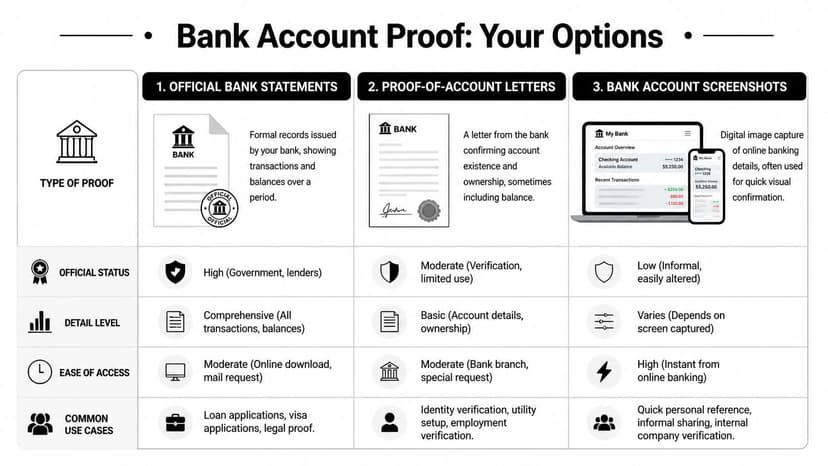
Bank Account Proof Types Compared
| Document Type | Best For | How to Get | Common Pitfall |
|---|---|---|---|
| Official Bank Statements | Mortgages, visas, audits, tax support | Download the full PDF from online banking or request it from a branch | Submitting only the first page or a screen print instead of the full statement |
| Proof-of-Account Letters | Account ownership confirmation, utility setup, basic verification | Ask the bank for a signed or stamped account confirmation letter | Assuming it replaces a statement when transaction history is required |
| Bank Account Screenshots | Informal internal checks, quick personal reference | Capture from online or mobile banking | Missing account holder details, missing date range, easy to alter |
What works in practice
A statement is the gold standard when someone needs to evaluate money over time. It answers more questions with fewer follow-ups. Reviewers can see opening and closing balances, deposits, withdrawals, and whether the document appears complete.
A proof-of-account letter is useful when the reviewer only needs confirmation that the account exists and belongs to you. It can work for lightweight verification. It usually falls short when the reviewer needs transaction history or evidence that funds were held over a period.
Screenshots are the weakest option. They’re fast, but they raise avoidable questions. A screenshot can hide the date range, crop out the bank name, or omit the URL and page context. Even when the balance is visible, many officials won’t rely on it because it’s too easy to manipulate.
A quick decision rule
Use this rule before you submit anything:
- Choose a statement when timing, balances, and transaction history matter
- Choose a bank letter when ownership confirmation is enough
- Avoid screenshots unless the reviewer explicitly allows them in writing
Practical rule: If the request uses words like “official,” “certified,” “history,” or “proof of funds,” submit the full bank statement unless they say otherwise.
How to Get Your Bank Account Proof Documents
Many already have access to their documents. The main issue is pulling the right version.
Start with online banking. Banks usually place statements under “Documents,” “Statements,” “eStatements,” “Accounts,” or “Services.” Download the full multi-page PDF, not a browser print preview and not a phone screenshot. If the site offers CSV and PDF, choose PDF for submission because it preserves the official layout and account identity details.
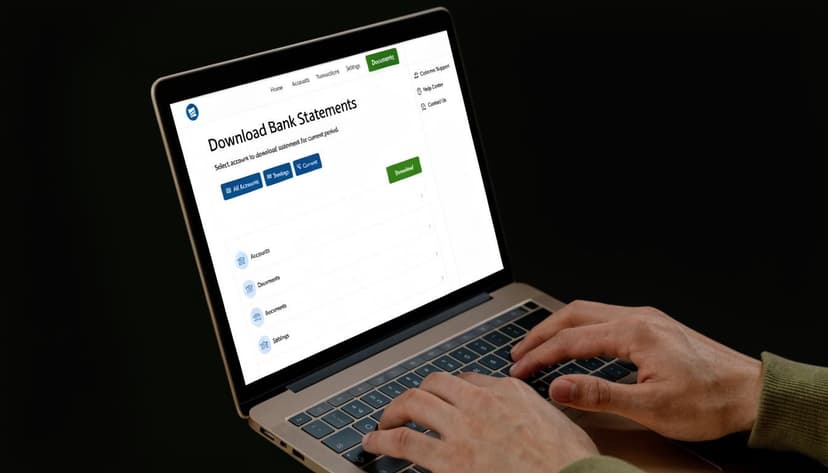
Getting statements online or in person
If the download isn’t obvious, use a branch. Tell the teller or account representative exactly what you need: an official statement for a specific date range, in full, with all pages. If your online portal only shows recent history, ask whether older statements can be printed or sent securely.
For people working with Bank of America files after download, this workflow for moving a Bank of America statement into Excel is useful once the PDF has been accepted and you need to work with the transactions.
If you need a proof-of-account letter, keep the request simple. Ask the bank to confirm the account holder name, account type, and that the account is open. If the receiving party allows it, ask the bank to include the current balance as well.
A short script works well:
- At the branch: “I need a bank-issued letter confirming that this account is in my name. If possible, include the date the letter is issued and my account type.”
- By secure message: “Please provide a formal account verification letter showing account ownership and current status for official submission.”
When you don't have a traditional bank account
This is a real issue, not an edge case. The FDIC reported that 4.2% of U.S. households, or 5.6 million, were unbanked, and 14.2% of U.S. households, or 19 million, were underbanked in 2023. The same survey notes this challenge disproportionately affects 1 in 5 Black and Hispanic households, many of whom may rely on mobile wallets or prepaid products instead of standard checking accounts (FDIC household survey).
That matters because official requests often assume everyone can produce a standard monthly statement. Many people can’t.
When that’s your situation, ask the reviewer what alternatives they accept before uploading anything. In practice, these can include transaction histories from prepaid cards, wallet apps, or fintech platforms, provided the record clearly shows your name, account identifier, and activity history. Acceptance varies. Don’t guess.
International applicants face another layer of friction when opening accounts abroad. If that applies to you, Legal Fournier’s expat banking in Spain guide is a useful reference on how local account-opening requirements can affect the proof you’re able to produce later.
A quick walkthrough helps if you’re assisting clients or staff with the download process:
Preparing Documents That Get Approved
The document itself is only half the job. The other half is preparing it so the reviewer doesn’t have to ask basic questions.
In financial auditing, bank statements are treated as authoritative third-party evidence because they come from the financial institution and help verify balances, match transactions, and surface possible fraud. That’s also why altered or incomplete statements can trigger immediate rejection in loan, visa, and compliance review (bank statement verification in financial auditing).
The reviewer’s checklist
Before submission, check these items in the actual PDF, not in your memory:
- Name match: Your account holder name should match the application name closely enough that the reviewer won't question ownership.
- Date coverage: The statement period must match the requested timeframe. If they asked for multiple months, provide an unbroken sequence.
- All pages included: Missing middle pages create suspicion fast, even when those pages only contain routine transactions.
- Readable balances and transactions: If the PDF is blurred, compressed, or photographed at an angle, replace it.
- Visible bank identity: The bank name or branding should remain visible.
A lot of avoidable problems come from “cleaning up” a document too aggressively. People crop margins, combine pages poorly, or remove sections that seem unimportant. To a reviewer, that looks like tampering.
Red flags that slow approvals
These are the issues that most often trigger follow-up:
| Red Flag | Why It Causes Trouble |
|---|---|
| Cropped pages | The reviewer can't tell what was removed |
| Mismatched address or name | It creates an ownership question |
| Missing page numbers | It suggests the file may be incomplete |
| Edited balances or blocked details | It undermines trust in the entire document |
Submit the ugly but complete statement, not the polished but questionable one.
Practical review before upload
Use a final pre-submission pass:
- Open the file on a desktop, not just your phone.
- Scroll every page in order.
- Confirm the first page shows the account holder clearly.
- Confirm the last page is present.
- Compare the name and address to the application you’re filing.
- Save the file with a neutral name such as “June_Statement_Checking_Official.pdf.”
If the statement shows a trade name, spouse name, or business variation that could confuse the reviewer, add context where the form allows it. Don’t make the officer guess why “ABC Studio LLC” appears on the statement when the applicant filed under a personal name.
From PDF Proof to Usable Financial Data
A PDF bank statement is ideal for review. It’s terrible for bookkeeping.
That’s the gap many applicants and finance teams discover after approval work begins. The same file that satisfies a lender or official often has to be keyed into Excel, matched against receipts, or imported into QuickBooks or Xero. Manual entry is slow, and it invites mistakes.
Why verification and bookkeeping need different tools
Instant Bank Account Verification can help confirm live account control. According to Signzy, IAV APIs offer an 85-90% success rate, but they don’t provide the historical detail needed for auditing and reconciliation. The same source notes that pairing IAV with OCR-based statement processing creates a more complete record for review and bookkeeping, cutting reconciliation errors to near-zero (how to conduct bank account verification).
That distinction matters in practice:
- IAV is good at confirming a live account connection
- PDF statements are good at preserving historical evidence
- Structured extracted data is good at actual accounting work
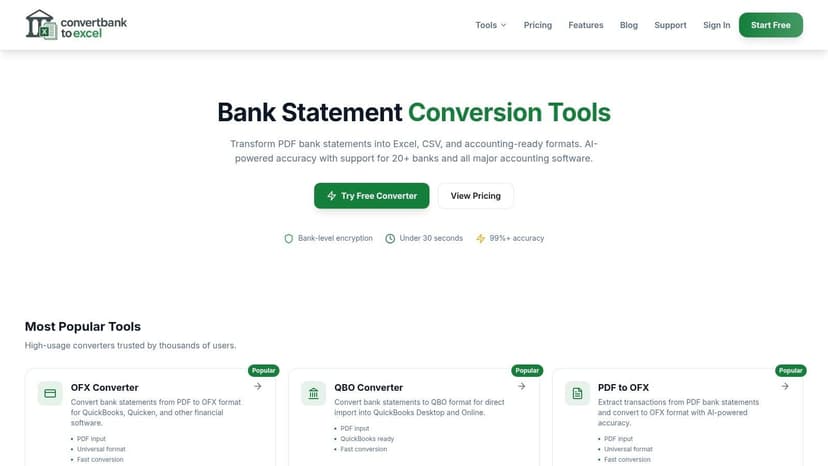
Turning statements into workable records
Once the proof has been accepted, teams typically need to move from static file storage to transaction-level review. That means exporting rows cleanly, preserving dates and descriptions, and checking that debits, credits, and balances line up.
If you regularly receive PDF statements from clients, this walkthrough on converting a PDF bank statement to Excel is the practical next step. It’s especially helpful when statements come from different banks and layouts.
For freelancers and small operators who also need to keep their books usable month to month, Receipt Router’s guide on freelancer finances is worth reading alongside your statement workflow. It deals with the core problem after document collection: matching statement activity to actual bookkeeping records.
A submitted statement proves something to an outsider. A converted statement lets your team do something with it.
What works better than copy and paste
If you’re handling more than one statement, avoid ad hoc copy-paste work from PDFs into spreadsheets. It breaks date formatting, mangles descriptions, and often drops lines from scanned files.
A better workflow is:
- Keep the original PDF untouched for submission and archive.
- Create a separate working file for extraction and reconciliation.
- Compare extracted totals back to the statement.
- Import only after you’ve confirmed the output matches the source document.
That separation keeps your audit trail clean. It also prevents the common problem where the “working version” becomes the only version anyone can find later.
Security and Privacy Best Practices
Financial documents need tighter handling than most application paperwork. People often focus on getting the proof fast and forget that the file itself contains enough information to create real risk if it’s shared carelessly.
What to redact and what to leave visible
If the receiving party allows redaction, limit it to details they clearly don’t need. Don’t remove anything that proves ownership, timing, or account continuity.
Keep these visible unless the reviewer instructs otherwise:
- Account holder name
- Statement period
- Bank identity
- Balances
- Page sequence
- Relevant account identifier
Be careful with account numbers. Some institutions accept partial masking. Others want the visible number to match what’s on file. If you guess wrong and hide too much, the proof stops being useful.
Never email unencrypted financial documents.
Safer handling habits
Use the lender’s or institution’s secure portal whenever possible. If they don’t offer one, ask whether they support encrypted upload or secure message delivery through online banking. Avoid downloading or transmitting statements over public Wi-Fi.
Phishing is a real risk here because these requests often arrive under time pressure. Verify the sender before uploading anything, especially if the email asks you to bypass the normal portal or send statements to a personal address.
If you manage client financial records professionally, internal controls matter as much as external sharing. For a plain-language overview of why reporting controls around financial documents matter, Affordable Pentesting’s article on SOC 1 for financial controls is a useful reference.
Data handling for tools and uploads
Before using any converter, portal, or document processor, read the provider’s handling policy. A clear privacy policy for statement processing should tell you how files are transmitted, stored, and deleted.
If that information is vague, treat it as a warning sign.
Frequently Asked Questions about Bank Account Proof
What if the name on my bank account doesn’t exactly match my passport or application
Small differences can cause delays. If the variation is explainable, submit supporting context where the form allows it. If the mismatch is substantial, ask the bank for a letter confirming ownership before you file.
How far back do statements need to go for a mortgage or visa application
It depends on the institution, not on a universal rule. Follow the request exactly. If the instruction is vague, ask for the required date range in writing before you upload anything.
How do I show proof for a joint account
Use the full statement and make sure both account holders are visible if possible. If only one holder appears clearly, add a bank letter or an explanatory note if the reviewer accepts attachments.
Can I use a statement from a digital-only bank
Often yes, if the institution issues formal statements and the file includes the necessary identifying details. Access has improved materially through Bank On-certified accounts. The Federal Reserve Bank of Kansas City notes that participating institutions grew from 2 in 2015 to 403 by 2023, a 20,000% increase, and these accounts were accessible near 97.4% of low-to-moderate income households in 2023 (Bank On-certified account access research).
If you need to turn statement PDFs into clean, structured files after they’ve served as bank account proof, ConvertBankToExcel gives you a practical next step. It’s built for accountants, bookkeepers, finance teams, and applicants who need statement data in Excel, CSV, and accounting-ready formats without retyping transactions by hand.