
By the time a team starts asking about two way match, it already has a symptoms problem.
Invoices are piling up in an AP inbox. Some have purchase order numbers, some don't. One vendor bills exactly as agreed every month. Another slips in a different unit price and hopes nobody notices. Someone in operations says the invoice is urgent. Someone in finance says the cash forecast is already tight. AP gets stuck in the middle, trying to pay on time without paying the wrong amount.
That pressure is familiar in small businesses and larger finance teams alike. The work looks simple from the outside. Match the bill to what was approved, then pay it. In practice, it turns into a chain of follow-ups, missing documents, rushed approvals, and exceptions that sit too long because no one owns them clearly.
When that happens, invoice control stops being an accounting theory issue and becomes a working capital issue. If you're cleaning up payables, it's worth grounding the process in the bigger cash cycle. Stewart Accounting Services has a practical guide to cash flow mastery that helps frame why AP discipline matters beyond bookkeeping.
The good news is that not every invoice needs the heaviest control. Some purchases need deep verification. Others just need a clean check between the purchase order and the invoice. That's where two way match earns its keep. It's a basic control, but when it's set up properly, it removes noise from routine spend and lets the team focus on the invoices that deserve scrutiny.
Teams dealing with high invoice volume usually find that the bottleneck isn't just approvals. It's document handling. If invoices and supporting files arrive in batches from email, portals, and shared folders, operational cleanup matters before any matching rule can work. That's one reason many firms tighten the intake side with batch processing workflows before they try to automate approvals.
The Daily Grind of Invoice Overload
What AP looks like before the process is under control
A typical morning in accounts payable starts with triage. Which invoices are due first, which vendors are chasing payment, and which bills can move today without creating a problem later.
One invoice might be for a monthly software subscription. Another might be for office supplies ordered last week. A third arrives with no PO listed, a vague description, and a total that nobody can immediately explain. The AP clerk opens the ERP, searches email threads, asks procurement for the PO, and waits for a reply that may not come until the afternoon.
That manual back-and-forth is where time disappears.
The actual match check is usually straightforward. The hard part is getting the documents into the same place, making sure the PO is the current one, and deciding whether a small discrepancy is normal or a sign that the invoice shouldn't be paid yet.
Practical rule: AP doesn't lose time on clean invoices. It loses time on incomplete context.
Why routine invoices still create risk
People often assume the danger sits only in unusual invoices or large purchases. In my experience, routine invoices can be just as problematic because they move faster and attract less scrutiny. A recurring vendor gets treated as safe, so the team stops reading closely. That's when price drift, duplicate billing, or unauthorized spend can slip through.
A lot of small businesses also run into a second problem. They buy services in a practical, informal way. A manager agrees to something over email, the vendor invoices later, and AP has to reconstruct what was approved. When there isn't a clear PO discipline, payment review becomes a judgment call instead of a control.
Here are the pain points that usually signal a weak process:
- Missing purchase orders: AP receives the invoice first and has to chase the approved order afterward.
- Inconsistent invoice data: Vendor names, line descriptions, and terms don't line up cleanly with internal records.
- Exception clutter: Small differences get mixed together with serious discrepancies, so everything feels urgent.
- Approval delays: Managers approve late because the packet they receive is incomplete or unclear.
Where two way match starts helping
Two way match brings order to that mess by narrowing the first check to two documents only. It asks a simple question. Does the invoice match what the business approved on the purchase order?
That sounds basic because it is. Basic controls are often the most useful when volume is high and staff time is limited. A clean two way match process won't solve every AP problem, but it gives the team a disciplined starting point. It also creates a clearer line between invoices that should move and invoices that need investigation.
Two Way Match vs Three Way Match Explained
The easiest way to understand two way match is to compare it with the control people usually mention right after it, which is three way matching.
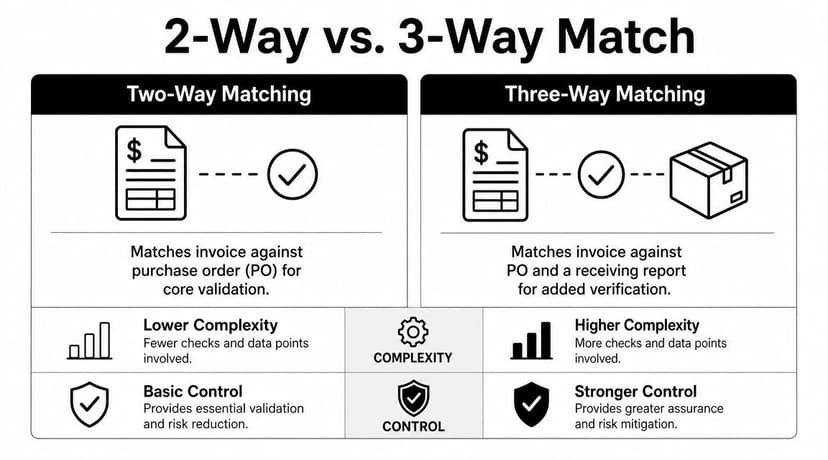
Two way matching is one of the oldest and simplest invoice controls in AP. It checks that the purchase order and the invoice agree before payment is released, including fields such as PO number, quantity, and price. Guidance also notes that it's commonly used for lower-risk or recurring purchases because it does not confirm receipt of goods or services, as explained by DataServ's comparison of 2-way, 3-way, and 4-way matching.
The short version
If you're paying a monthly software vendor against a standing PO, two way match often makes sense. If you're paying for physical inventory that could arrive short, damaged, or not at all, three way match is usually the safer control.
The extra "way" in three way matching is the receipt document. That might be a goods received note, receiving report, or similar proof that the order arrived.
A side by side view
| Control type | Documents checked | Main question |
|---|---|---|
| Two way match | Purchase order and invoice | Does the vendor bill what we approved? |
| Three way match | Purchase order, invoice, and receipt | Did the vendor bill what we approved, and did we actually receive it? |
The distinction matters more than people think. Two way matching is not an incomplete version of three way. It's a deliberate control choice. You're removing one document dependency to move faster, but you're also accepting that AP won't independently verify receipt before payment.
A practical example
Take two purchases.
First, a company renews a cloud software contract billed on a recurring basis. The approved PO states the product, the billing terms, and the agreed price. There isn't much value in waiting for a warehouse receipt because nothing physical is arriving. In that case, matching the invoice to the PO is usually enough.
Now take a bulk order of replacement laptops. The PO may be approved at the right price, but that alone doesn't prove the business received every unit. If AP pays based only on the invoice and PO, it could release funds before anyone confirms what landed.
Three way matching is better when the real risk sits in delivery, not just in billing.
Why teams get this wrong
The common mistake is applying one policy to everything. Some firms make every invoice go through the same approval path, including low-risk service spend. That slows the department down and floods AP with avoidable document chasing. Others go too far the other way and use two way match broadly, even for purchases where receipt verification matters.
A workable process recognizes that control strength should follow transaction risk. The best AP teams don't ask which method is more complex. They ask which method fits the purchase.
The Strategic Tradeoff Benefits vs Risks
Two way match is attractive for one reason above all others. It removes friction from invoice processing.
Compared with three way matching, it drops the receiving document from the approval path, which reduces document dependencies and manual reconciliation work. The tradeoff is that it can't independently verify whether goods or services were received, so it's best where the expected failure mode is invoice error rather than delivery failure, such as subscriptions, utilities, or recurring services, as outlined in Tipalti's explanation of 3-way matching and related controls.
Where it works well
For the right spend categories, two way match is efficient and sensible.
- Recurring services: Software licenses, maintenance agreements, telecom, and utilities often fit well because receipt confirmation adds little value.
- Stable vendor arrangements: If the supplier relationship is mature and pricing is predictable, AP can rely more on PO discipline and less on downstream verification.
- Non-inventory purchases: These items usually create fewer receiving disputes than warehouse-based purchases.
If your payable data feeds into bookkeeping or ERP workflows, clean downstream posting matters too. Teams that sync bank and payment activity into accounting platforms often tighten those handoffs with tools that support QuickBooks integration workflows, especially when payment reconciliation follows shortly after invoice approval.
Where it breaks down
The weakness is straightforward. Two way match confirms that the invoice agrees to the order. It doesn't confirm fulfillment.
That creates exposure in situations like these:
- Physical goods with delivery risk: Short shipments, missing items, or substitute products.
- High-value purchases: The cost of paying incorrectly outweighs the speed gain.
- Disputed services: Work may be billed before completion or outside agreed scope.
- Weak purchasing discipline: If POs are created late or after the fact, the match becomes meaningless.
The real management question
The decision isn't whether two way match is good or bad. The decision is whether the business can safely accept the control gap for a given spend category.
A practical way to think about it is this:
| If the main risk is... | Better control |
|---|---|
| Invoice price or quantity error | Two way match |
| Delivery, receipt, or completion dispute | Three way match |
Controller's view: Fast processing is only a benefit when the rule set still blocks the wrong payment.
When AP managers frame the choice this way, policy gets simpler. Don't debate methods in the abstract. Assign them by category, vendor behavior, and failure mode.
How to Implement Two Way Matching Controls
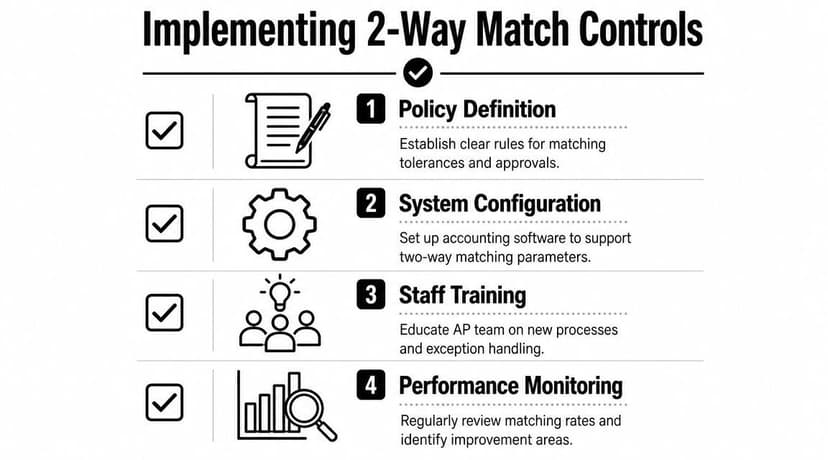
Good two way match controls start with policy, not software. If the team doesn't know where two way matching is allowed, every invoice turns into an argument.
A better approach is to decide in advance which spend categories qualify. The useful question isn't "Can we use two way match?" It's "When is it safe to rely on it instead of three way matching?" The control is weaker by design because it doesn't confirm goods were received, which is why it's generally best for low-risk, non-inventory, or service-based purchases rather than higher-risk or inventory-based buying, as discussed in SoftCo's guidance on when 2-way matching is a better option.
Start with a policy matrix
Don't leave this to AP judgment invoice by invoice. Document the rule.
For example, list approved categories such as software subscriptions, facility services, utilities, and routine professional fees. Then list excluded categories such as inventory, equipment, and one-time capital purchases. Add a rule for exceptions, including who can override the default.
A simple policy matrix should answer:
- Which categories qualify
- Which vendors qualify
- Whether a standing PO is required
- Who approves exceptions
- When AP must escalate to procurement or the budget owner
Configure tolerances carefully
In this context, many teams create unnecessary noise. If tolerances are too tight, AP spends the day clearing harmless exceptions. If they're too loose, overbilling slips through.
The technical objective in two way matching is to verify that billed quantity, unit price, and terms stay within the PO's approved tolerances. When the invoice exceeds those tolerances, it should go to exception handling rather than payment release.
That means your team needs explicit rules for things like:
- Price variance: What level triggers review.
- Quantity variance: Whether partial billing is allowed.
- Freight and taxes: Whether these are expected on top of the PO or must be included in approved terms.
- Service dates: Whether the billed period aligns with the contract or PO schedule.
Build the process around clean records
A two way match control is only as reliable as the records behind it. If vendor names are inconsistent, PO numbers are missing, or line descriptions are vague, the team will spend more time interpreting documents than matching them.
That is one reason firms often tighten accounting system setup alongside AP policy. If your reporting and bookkeeping run through Xero-connected workflows, standard field naming and disciplined PO entry make exception handling much easier later.
The strongest two way match process is boring. The same fields appear every time, the same categories follow the same rules, and exceptions go to the same owner.
Train for exceptions, not just approvals
Most invoices should follow the standard path. Training should focus on what breaks that path.
Teach AP staff how to spot a pricing issue, when to hold payment, when to ask procurement for a PO amendment, and when the invoice itself needs correction. That creates a process that's defensible in an audit and workable on a busy Wednesday afternoon.
Automating the Two Way Match Workflow
Manual two way matching works at low volume. It starts to strain when invoices arrive from multiple channels, purchase orders sit in separate systems, and AP staff spend more time keying data than reviewing exceptions.
Automation helps by turning the control into a repeatable workflow. The system captures invoice data, locates the purchase order, applies matching rules, and routes only the mismatches for human review.
Here's the basic workflow typically aimed for:
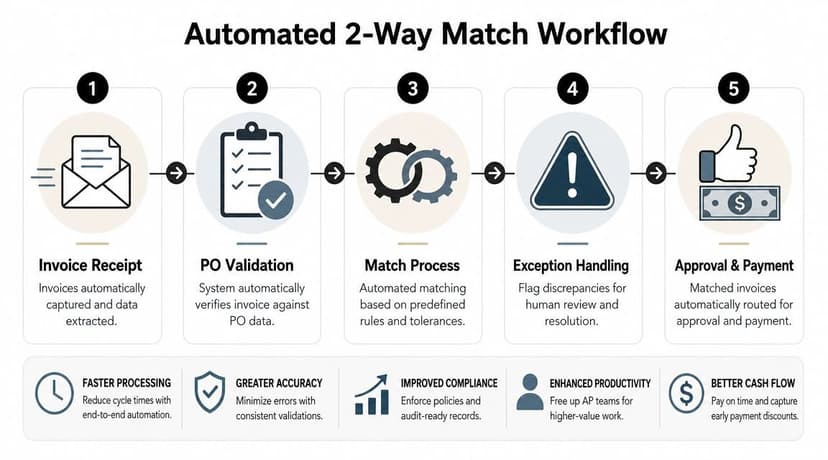
Automation can materially reduce processing effort, with some sources citing 40 to 70 percent faster processing and 60 to 90 percent fewer invoice errors, but the primary management issue is how teams govern tolerances, fees, partial deliveries, and human review paths, as noted in Yooz's discussion of automated 2-way matching.
What automation should actually do
A useful AP automation setup doesn't just scan invoices. It should:
- Capture invoice fields consistently
- Match against approved PO data
- Apply tolerance rules at line or header level
- Route exceptions to the right owner
- Create an audit trail of who approved, changed, or released the invoice
If the system only digitizes the document but still leaves AP to make every decision manually, you haven't solved much.
Later in the workflow, teams often need clean bank and card transaction data to confirm payments, clear open items, and support reconciliation. That's where document conversion tools can help. ConvertBankToExcel tools turn PDF bank and credit card statements into structured files for Excel, CSV, and accounting systems, which can support the payment and reconciliation side of the AP cycle when statement data isn't already available in usable form.
Bad data breaks good automation
Most failed automation projects don't fail because the matching logic is wrong. They fail because the inputs are messy.
Common examples include scanned invoices with weak OCR results, vendor invoices missing the PO number, duplicate supplier records, and inconsistent descriptions across systems. When that happens, AP staff lose confidence in the system and start bypassing it.
If your invoice intake still struggles with document recognition, cleanup usually starts upstream with better capture rules and targeted handling of OCR-related extraction errors.
A short walkthrough helps show how this looks in practice:
Keep humans in the loop where judgment matters
No serious AP team should aim for blind automation. The goal is not zero touch under all circumstances. The goal is low-touch handling for low-risk invoices and clear intervention for the rest.
Automation should remove repetitive checking, not remove accountability.
That's especially true where service billing, tax treatment, or contract interpretation requires judgment. Good systems speed up the easy decisions so the team has time for the hard ones.
Troubleshooting Common Matching Exceptions
Even a well-run two way match process generates exceptions. That's normal. The key is making sure the exception tells the team what to investigate instead of creating another vague queue item.
The technical objective is to confirm that billed quantity, unit price, and terms stay within approved PO tolerances. When the invoice exceeds those tolerances, it should route for exception handling instead of payment. That control prevents overbilling and unauthorized spend without requiring proof of receipt, which is why it's commonly used for low-risk, non-inventory, or service-based purchasing, as explained in Planergy's comparison of 2-way, 3-way, and 4-way matching.
Price mismatch
Symptom: the invoice unit price is higher than the PO.
Likely cause: the vendor billed using a new rate, missed a discount, or the buyer agreed to a change but never updated the PO.
What to do: hold payment, confirm whether procurement approved a price change, and decide which document is wrong. If the PO is outdated, get a formal amendment. If the invoice is wrong, request a corrected invoice.
Quantity mismatch
Symptom: the invoice quantity exceeds the PO quantity.
Likely cause: duplicate billing, overbilling, or a misunderstanding around phased or partial billing.
What to do: review the PO terms and the billing schedule. If partial invoicing is allowed, check whether previous invoices already consumed the remaining quantity. If not, escalate before payment.
Unplanned freight, fees, or tax differences
Symptom: the invoice total doesn't match even though the base item price looks correct.
This usually happens when freight, handling, taxes, or other charges weren't addressed clearly in the PO. AP shouldn't guess. Check the approved terms and confirm whether those extras were expected. If the business accepts them, update the PO policy so the same issue doesn't repeat.
Wrong PO or missing PO reference
Symptom: the vendor invoice can't be matched because the PO number is missing, invalid, or linked to the wrong supplier.
This is often a master data or process discipline problem rather than a vendor problem alone. AP should verify the supplier record, ask for the supporting order details, and avoid creating a workaround that bypasses controls. If this keeps happening with the same vendor or department, the fix is procedural, not transactional.
A simple triage model
Use a three-part test when an invoice fails:
| Question | Action |
|---|---|
| Is the PO valid? | Confirm it was approved, current, and issued to the same vendor. |
| Is the invoice accurate? | Check quantity, price, dates, and terms. |
| Is the variance acceptable? | Apply policy, not instinct. Escalate if outside tolerance. |
Teams doing month-end cleanup often need these exceptions tied back to payment activity and ledger entries. When open items don't line up cleanly, a focused reconciliation mismatch workflow helps separate invoice errors from posting or payment timing issues.
The best two way match process isn't the one with the fewest exceptions. It's the one where exceptions are easy to understand, assigned quickly, and resolved before they age into larger cash or vendor problems.
If your AP team spends too much time cleaning statement data before reconciliation, ConvertBankToExcel is one option for turning PDF bank and credit card statements into structured files that accounting teams can review, match, and import into downstream workflows.