
You open QuickBooks to finish a reconciliation, send payroll, or import the last batch of transactions before a deadline. Instead of the company file, you get a licensing message and the program stops cold. QuickBooks Error 3371 is one of those failures that feels random when it hits, but it usually follows a pattern.
I've seen it most often on busy bookkeeping machines that haven't had clean Windows maintenance, on workstations with aggressive antivirus settings, or after a QuickBooks update didn't land cleanly. The good news is that this error is usually fixable if you work through it in the right order and don't skip steps.
That Sudden Stop What Is QuickBooks Error 3371
You open QuickBooks expecting to get through payroll, finish a reconciliation, or post imported bank activity before the day gets away from you. Instead, QuickBooks stops during startup and throws quickbooks error 3371. At that point, the problem is usually not the company file. It is the program failing its license and activation check before QuickBooks fully opens.
In practical terms, QuickBooks cannot read the local files and Windows components it uses to confirm the installation is valid. That distinction matters because it changes the fix. Rebuilding data, verifying the company file, or restoring a backup usually does nothing for Error 3371. The repair needs to start with the QuickBooks program files, licensing records, and the Windows pieces that support startup.
I treat this as a startup failure first. That saves time.
The error tends to show up after a Windows update, a QuickBooks update that did not finish cleanly, a forced shutdown, profile corruption, or security software that blocked a file QuickBooks needed to write. For accounting teams, there is another pattern worth calling out. High-volume import work puts more pressure on the workstation itself. If the machine is already unstable, the error often surfaces right before or right after a bank import cycle, which is why firms using QuickBooks import workflows for cleaned transaction data should pay attention to workstation health, not just file formatting.
One rule helps keep the diagnosis on track.
Practical rule: If QuickBooks fails before you reach the file list or home screen, start with licensing and Windows startup components before you spend time troubleshooting accounting data.
That approach is especially useful for bookkeepers and accountants handling multiple clients on one machine. If Error 3371 appears on a busy close day, the fastest path is usually a clean startup repair sequence, not a company-file repair session.
The Three Culprits Behind Error 3371
Error 3371 usually comes down to three failure points. I see the same pattern over and over. QuickBooks starts, reaches the license check, then stops because it cannot read what it needs or cannot trust what it finds.
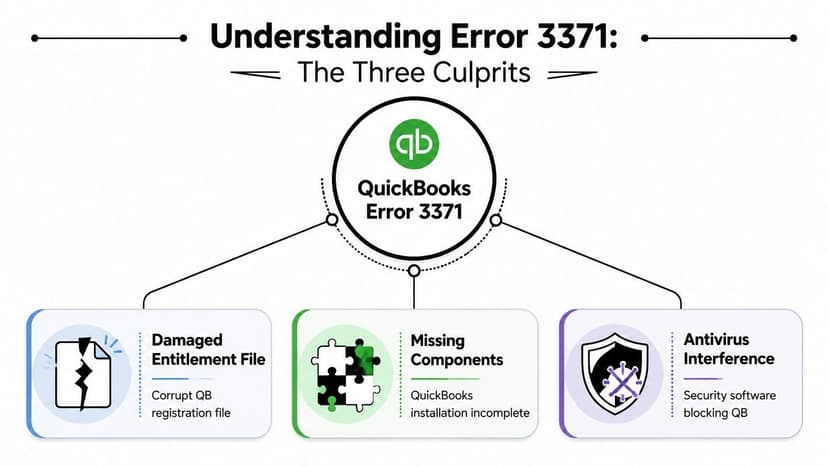
Damaged license storage
The first culprit is damaged entitlement or registration data. QuickBooks keeps a local licensing record on the workstation. If that record is corrupted, missing, or no longer matches the installed program state, startup fails before you ever get into the file.
This often shows up after a forced shutdown, a partial update, user profile damage, or an aggressive cleanup utility. From the user side, the symptom is simple. QuickBooks opens, checks the license state, and stops.
Missing or damaged startup components
The second culprit is damage in the QuickBooks startup chain. QuickBooks does not validate licensing in isolation. It also relies on supporting program files and Windows components to load that license data correctly.
This is why deleting one file sometimes fixes the error and sometimes does nothing. If the underlying install is damaged, or Windows components tied to startup are unstable, the entitlement file is only part of the problem. In practice, this is the version of Error 3371 that tends to come back after a basic repair.
Interference from security software or stale installs
The third culprit is environmental interference. Antivirus tools, endpoint protection policies, and leftover files from older QuickBooks installs can block access to licensing files or interrupt startup checks. I see this a lot on office PCs that have been upgraded across several QuickBooks versions without a clean cleanup in between.
Accounting firms should pay attention here. High-volume import work exposes weak desktops faster because the workstation gets used harder and restarted less often. If your team depends on repeatable imports, bank data cleanup, and stable posting cycles, your QuickBooks integration workflow for imported financial data needs to account for workstation health, not just file formatting.
| Culprit | What it breaks | What it looks like |
|---|---|---|
| Damaged entitlement data | License validation | QuickBooks stops before normal startup finishes |
| Missing or damaged components | Program and Windows startup chain | The error returns even after a restart or basic file reset |
| Antivirus or install conflict | Access to license files and startup checks | Repair appears to work, then the error comes back |
Your First Response A Sequential Fix Plan
When Error 3371 hits, the goal is simple. Get QuickBooks to rebuild or repair the licensing path with the least disruption possible. Start small. Escalate only when the previous step fails.
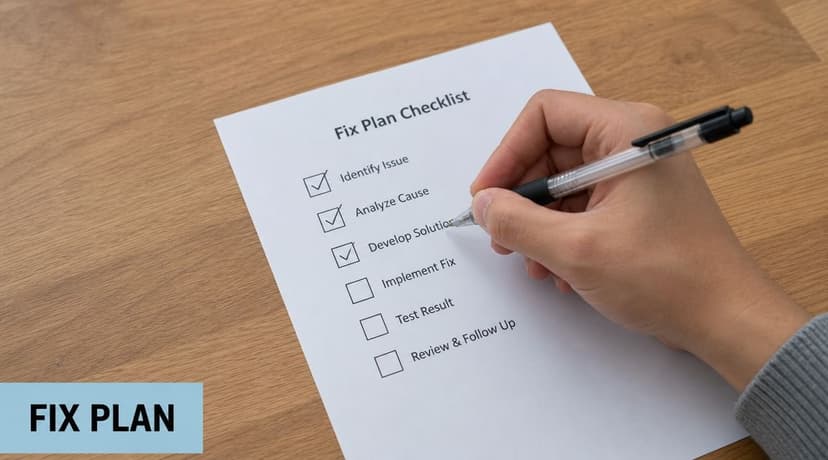
Step 1 close QuickBooks completely
This sounds obvious, but people miss it. Don't leave QuickBooks open in the background. Don't leave a stuck splash screen sitting there while you run repairs.
Intuit's support instructions explicitly say to close QuickBooks first, then install the latest QuickBooks Tool Hub, then run the built-in 3371 Error Fix under Installation Issues. Intuit also recommends QuickBooks Tool Hub version 1.6.0.8 or newer for this workflow (Intuit's 3371 Error Fix instructions).
If you try to repair licensing while QuickBooks is still open, the repair may finish without actually clearing the corrupted license state.
Step 2 reboot the workstation once
A reboot won't solve a damaged entitlement state by itself, but it does clear locked files and stale background processes. On a machine that has been asleep for days, this can make the difference between a repair utility working and failing unexpectedly.
If you support users remotely, tell them to restart before they try anything else. It saves time.
Step 3 run the dedicated 3371 repair in Tool Hub
This is the main fix I'd use first on most systems today.
- Close QuickBooks fully
- Install or update QuickBooks Tool Hub
- Open Tool Hub
- Go to Installation Issues
- Run 3371 Error Fix
- Reopen QuickBooks and test
This is the best first official repair path because it's designed for the exact licensing failure you're seeing, not a generic program crash.
A lot of accounting users run into this problem right before they need to import bank activity. If that's your situation, it can help to queue your files and keep your import package ready in a stable format like PDF to QBO conversion so you're not scrambling with source files while you repair QuickBooks itself.
Here's a walkthrough if you want a visual before you touch the machine:
Step 4 delete and rebuild the entitlement data if needed
If Tool Hub doesn't clear the error, the next move is to delete the damaged entitlement data so QuickBooks rebuilds it. This is a standard next step in stubborn licensing cases.
Be careful here. Don't copy an entitlement file from another computer. Licensing data is machine-specific enough that copying files between workstations often creates a bigger mess. A clean rebuild is safer than a transplant.
Step 5 watch for Point of Sale overlap
On systems that also run QuickBooks Point of Sale, the same entitlement file can be shared. That means a repair on one side may trigger re-registration needs on the other side. If you work in a retail environment or on a hybrid accounting workstation, keep that in mind before you assume the fix failed.
Advanced Solutions for Persistent Errors
Error 3371 that survives the standard repair path usually points to one of three things. Windows is damaged or out of date, security software is interfering with QuickBooks startup files, or the QuickBooks installation itself is broken badly enough that patching will not hold.
At that stage, treat the machine like a system problem, not just a QuickBooks problem. Random retries waste time and often make the trail harder to follow. On a firm workstation, I recommend writing down exactly what has already been tried, who tried it, and whether the error changed at all after each step.
When the issue is bigger than QuickBooks
Persistent cases often show up on machines with failed Windows updates, aggressive endpoint protection, or old reinstall attempts layered on top of each other. QuickBooks depends on Windows components to validate license data and start properly. If those pieces are unstable, QuickBooks keeps failing even after you reset entitlement files.
That trade-off matters. A quick fix feels faster, but a bad Windows base can keep pulling you back into the same error every few days.
Clean reinstall versus repeated patching
A clean reinstall is the right move when repairs stop making any difference. That means uninstalling QuickBooks, clearing leftover installation components, restarting the machine, and then reinstalling from a clean source. The goal is to rebuild the startup and licensing components in a known-good state.
Use a clean reinstall when:
- Repair tools finish but Error 3371 comes back immediately
- The workstation has a record of failed updates or half-finished reinstalls
- Antivirus or endpoint security changed shortly before the error started
- Other machines run the same QuickBooks version without trouble
- The computer is used for frequent imports and has gone through repeated file-handling interruptions
Do not use a clean reinstall as the first response. It takes longer, and if the problem is Windows corruption or a blocked file path, reinstalling QuickBooks alone will not solve it.
Checks that save time before you escalate
Before handing the machine to IT or rebuilding Windows, verify the basics that tend to get missed:
- Windows health: Install pending Windows updates and confirm the system restarts cleanly.
- Security rules: Check whether antivirus, EDR, or ransomware protection is blocking QuickBooks program folders.
- Admin profile: Run the reinstall from a Windows account with full local admin rights.
- Import discipline: Avoid opening import files, moving company files, or syncing cloud folders during the reinstall.
- File readiness: Keep your import queue organized so the accounting team can resume work quickly with a prepared bank statement to QBO conversion workflow.
High-volume bookkeeping teams should pay extra attention to that last point. I see Error 3371 hit hardest when someone is trying to repair QuickBooks and process incoming statements at the same time. Separate the repair window from the import window. If your team also tracks uncleared receipts or transfers while catching up books, this guide on tracking funds for service businesses is a useful reference for keeping those balances straight while QuickBooks is offline.
If Error 3371 still appears after a clean reinstall, current Windows patches, and security review, stop treating it as a normal desktop glitch. That usually means workstation policy conflicts, damaged Windows components, or a broader IT issue that needs system-level repair.
A Proactive Workflow for Accountants and Bookkeepers
The usual failure point is easy to recognize. A bookkeeper is halfway through month-end, has five client bank files queued, opens QuickBooks to start imports, and gets Error 3371 before the workday really starts. At that point, the licensing error is only part of the problem. The actual cost is the backlog it creates across every client waiting behind that machine.
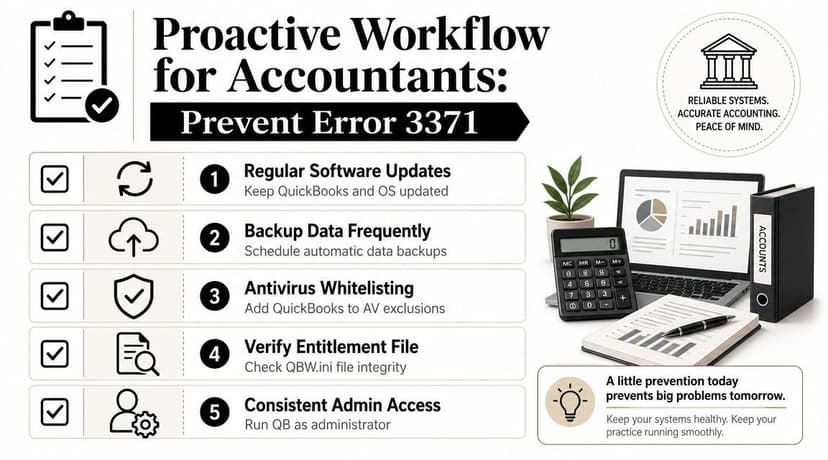
The workflow that reduces repeat headaches
Firms that see this error more than once usually have a process issue, not just a QuickBooks issue. The pattern I see is consistent. One person installs updates from a standard user profile, another runs imports from a synced desktop folder, and someone else disables security tools temporarily just to get through close. That setup invites repeat failures.
Use a standard operating workflow instead:
- Set a maintenance window: Update Windows and QuickBooks on a planned day, away from close, payroll, and catch-up work.
- Keep one designated QuickBooks admin profile: Install, patch, and repair QuickBooks from the same local admin account each time.
- Separate repair work from import work: If QuickBooks needs attention, pause the import queue first. Do not troubleshoot licensing while staff are actively pushing transactions into client files.
- Store import files in controlled folders: Keep raw statements, converted files, and completed imports in separate locations with clear naming rules.
- Document security exclusions with IT: If endpoint protection touches QuickBooks folders, licensing files, or background services, record the approved exclusions so the fix does not depend on memory.
- Back up before high-volume sessions: Large cleanup and import days create enough risk on their own. Start with a current backup so one workstation problem does not become a data recovery problem.
Why this matters for import-heavy firms
Error 3371 is a startup and licensing failure. It is not caused by the bank file format itself. But firms often trigger the disruption right before import sessions because that is when QuickBooks gets opened repeatedly, client files get switched fast, and staff are under deadline pressure.
That is why I recommend a simple import lane for accounting teams. First, collect statements in one intake folder. Second, convert and review them outside QuickBooks. Third, move approved files into a ready-to-import folder. Fourth, import only after QuickBooks opens cleanly and the workstation has already passed its normal checks. Teams that want to formalize that process can use this bookkeeping workflow standard for bank data imports.
This matters even more if your team is also tracking deposits in transit, pending receipts, or client transfers while QuickBooks is offline. A good companion read is this guide on tracking funds for service businesses. It helps keep timing differences and handoff errors from turning into reconciliation problems later.
Firms lose time on Error 3371 when workstation setup, user permissions, and import handling are all left to individual habit.
For accounting professionals, prevention is operational discipline. Standardize the machine, standardize the user steps, and standardize the import queue. That cuts down the odds that one licensing error turns into a full-day delay across multiple client books.
Your Path Forward From Error to Action
QuickBooks Error 3371 is frustrating because it blocks you before real work even starts. But it's manageable when you handle it in sequence instead of guessing. Start by closing QuickBooks completely. Use the dedicated Tool Hub repair. If that doesn't hold, move to entitlement rebuilds, reinstall work, and then deeper Windows checks.
The bigger lesson is operational. Licensing errors often expose weak workstation hygiene. Machines that miss Windows maintenance, run conflicting security controls, or carry years of partial QuickBooks upgrades tend to be the ones that fail at the worst time.
Keep one rule in place. Always back up before major repairs and always start with the least invasive fix. That approach protects both your time and your client data.
If you support a team, document the exact repair order and make it standard. That alone cuts a lot of repeat chaos.
QuickBooks Error 3371 FAQ
Is QuickBooks Error 3371 a company file problem
Usually, no. It's a startup licensing problem. QuickBooks is failing before normal access, so treat the program and Windows environment first.
Does this affect QuickBooks Online
No. QuickBooks Error 3371 is tied to QuickBooks Desktop licensing and activation behavior, not QuickBooks Online in a browser.
Can I copy the entitlement file from another computer
You shouldn't. That usually creates more confusion because the licensing state on one machine doesn't cleanly map to another. Rebuild the local entitlement state instead.
What if Tool Hub won't run
Treat that as a Windows or workstation issue. Reboot first, confirm you have proper administrative rights, and check whether security software is blocking the installer or executable. If Tool Hub itself won't open, I'd be more suspicious of Windows damage or endpoint protection than of QuickBooks alone.
Do I need to reinstall QuickBooks right away
No. Reinstalling is not the first move. Start with the dedicated 3371 repair path. Use a clean reinstall only when the simpler fixes fail.
Why does the error keep coming back on the same machine
That usually points to an unresolved root cause such as Windows instability, antivirus interference, stale installation remnants, or inconsistent admin practices on that workstation.
Does this matter for firms importing lots of bank activity
Yes, mainly because it creates downtime at the worst point in the workflow. The more your team depends on repeatable import and reconciliation cycles, the more important workstation maintenance and standardized startup repair steps become.
If your team regularly imports bank and credit card activity into QuickBooks, ConvertBankToExcel helps you turn PDF statements into clean Excel, CSV, and QBO-ready files without the manual cleanup that slows month-end work. It's built for bookkeepers, accountants, and finance teams that need structured data fast and want fewer import bottlenecks once QuickBooks is back up.