
Month-end always exposes the same bottleneck. Client statements arrive as locked PDFs, some clean, some scanned badly, some from banks your staff hasn’t seen before, and someone still has to turn that mess into usable transaction data.
Most firms respond by throwing labor at it. A senior bookkeeper reviews one stack, a junior accountant copies line items into Excel, and a manager fixes the import errors later. That feels normal because it’s familiar. It’s also one of the worst places in the firm to spend skilled time.
I’ve seen cost show up in three places. First, non-billable hours creep up unnoticed. Second, small transcription mistakes create rework that nobody budgets for. Third, talented staff get stuck doing clerical cleanup instead of review, reconciliation, and client-facing work. If your team wants to automate data entry, the right goal isn’t speed typing. It’s building a process where typing is the exception.
Why Manual Data Entry Is Costing Your Firm More Than Just Time
The bank statement problem usually looks small when you examine one file. It becomes expensive when you multiply it across every client, every month, every cleanup job, and every historical catch-up project. That’s why firms underestimate it.

Manual entry isn’t just an accounting problem. In sales teams, representatives spend 3.4 hours per week on CRM data entry, 32% spend over an hour daily, less than half use their CRM every day, and sales and marketing teams lose about 550 hours annually because needed data isn’t available fast enough, according to Everready’s summary of CRM data entry automation statistics. Different workflow, same failure mode. Skilled people spend time re-keying data instead of using it.
The real cost sits outside the spreadsheet
Most firms measure data entry as labor. That’s too narrow.
You also pay for:
- Interruptions to close work: Staff stop analysis to chase missing statement pages, unreadable scans, or formatting inconsistencies.
- Rework after import: One wrong date format or amount field can force a second pass through the entire file.
- Review drag: Senior staff end up checking basic transcription instead of reviewing exceptions.
- Client trust erosion: Clients rarely see the typo itself. They see the late report, the wrong cash balance, or the duplicate transaction.
Practical rule: If a task requires trained accounting staff to repeatedly copy visible numbers from one format into another, it’s a process design problem, not a staffing problem.
Why firms delay too long
Manual entry survives because it feels controllable. You can see the PDF, see the spreadsheet, and watch someone do the work. That visibility gives partners a false sense of reliability.
In practice, the process is fragile. It depends on focus, consistency, and patience under deadline pressure. Those are exactly the conditions that break at month-end.
This is also why cleanup work expands so easily. Once the bookkeeping is behind, statement conversion becomes a choke point for the entire engagement. That’s the same dynamic behind many bookkeeping cleanup services. The delay often begins with raw documents that nobody converted cleanly in the first place.
The firms that get ahead of this stop asking, “How can my team enter data faster?” They ask a better question. “How do we eliminate manual entry from the standard workflow and reserve human attention for review?”
Before You Automate Plan Your Attack
The biggest mistake I see is buying software before defining the workflow. If you want to automate data entry well, start with process scope, not features.
Manual data entry still eats 20–40% of employees’ daily time on repetitive transfers, and automated reporting can cut errors by up to 90% while saving 70–85% of reporting time, based on Keyence’s overview of data entry automation. Those gains are real only when the process is mapped clearly enough to automate.
Start with a workflow audit
Pull a sample of recent statement jobs and trace them from intake to import. Don’t generalize. Look at actual files.
Identify:
Where statements arrive
Email attachments, portal downloads, scanned uploads, shared drives, phone photos.Who touches them first
Admin, junior staff, bookkeeper, or manager.Where the data lands
Excel, CSV, QuickBooks import file, working paper, or temporary spreadsheet.Where errors appear
Dates, payee text, debit-credit sign issues, broken running balances, split pages.
A good planning exercise usually shows that the bottleneck isn’t extraction alone. It’s inconsistency at intake and review.
Define KPIs before you pick a tool
I use a short KPI set for statement automation. If you can’t measure these, you can’t prove ROI.
| Method | Average Time per Statement | Typical Error Rate | Required Rework |
|---|---|---|---|
| Manual entry | High and dependent on staff experience | Highest risk because every line is re-keyed by hand | Frequent |
| Basic OCR | Lower on clean files, inconsistent on messy statements | Moderate to high on nonstandard layouts | Common |
| Dedicated AI solution | Lower and more consistent across varied layouts | Lower when validation is built into the workflow | Limited to exceptions |
Track these at minimum:
- Time per statement: Measure from receipt to usable export.
- Error rate: Count import failures, mismatched balances, and manual correction events.
- Turnaround time: Measure how long clients wait for completed statement processing.
- Reviewer touch time: Separate extraction time from senior review time.
If your team also struggles with coding transactions after extraction, build that into the process map. Expense classification often becomes the next bottleneck after data conversion, especially when staff don’t share the same rules for merchants and transfers. A practical way to tighten that handoff is to standardize your coding logic using guidance like this piece on how to categorize expenses.
Don’t automate a messy workflow and expect a clean result. Standardize naming, intake, and review rules first.
Pick the first automation target carefully
Start with statement work that is high-volume but not politically sensitive. Good candidates include recurring monthly bank statements for established clients with predictable formatting. Bad candidates are edge-case files that everybody argues about.
Your first pilot should answer one question. Can the firm process a routine statement batch with less manual effort and cleaner output than the current method?
If the answer is yes, scale. If not, your workflow map probably missed something important.
Choosing Your Automation Toolkit
Tool selection is where firms either solve the problem or buy a shinier version of it. Generic OCR can look impressive in a demo and still fail in live accounting work.

The difference isn’t whether a tool can read text. Many tools can. The question is whether it can handle the way bank statements arrive. Multi-page files, weak scans, foreign-language layouts, varying date formats, odd transaction descriptions, and balance logic all push basic OCR past its comfort zone.
A survey cited by Easy Data World says 68% of 500 CPAs spend 15+ hours per week on manual statement conversion, and 42% error rates show up in legacy OCR for foreign banks. That matches what I’ve seen in practice. Basic OCR is often acceptable on a pristine domestic statement and unreliable everywhere else.
What matters more than feature lists
When I evaluate a statement automation tool, I care about five things.
- Accuracy on ugly files: Not just digital PDFs. I want to see low-quality scans, rotated pages, and mixed layouts.
- Bank coverage: If the tool only works well on a narrow set of templates, the firm will create fallback manual work.
- Export options: Excel is useful for review. Direct accounting formats matter when you want less handling after extraction.
- Validation design: Confidence scoring and balance checks matter more than flashy dashboards.
- Security posture: If the vendor can’t explain retention, transport security, and access controls clearly, that’s a problem.
Generic OCR versus finance-specific automation
Here’s the trade-off in plain language.
| Option | Best use case | Where it breaks |
|---|---|---|
| Generic OCR app | One-off text capture from clean documents | Bank-specific layouts, tables, poor scans, reconciliation logic |
| RPA script | Stable internal process with fixed fields | Constant template drift and exceptions |
| Finance-specific extractor | Repeated statement workflows across many banks | Usually stronger, but still needs testing on your own file mix |
If your firm also serves banking or lending-adjacent clients, it helps to understand the broader automation stack banks are adopting. This overview of RPA solutions for banks is useful because it shows where rule-based automation still fits and where document intelligence has to take over.
For a closer look at what separates niche tools from general-purpose ones, this guide on automated data entry software is worth reviewing before you buy anything.
A short walkthrough helps more than vendor copy:
The wrong tool doesn’t just miss fields. It creates hidden review work that senior staff end up absorbing later.
That’s why I don’t judge these systems on whether they extract something. I judge them on whether the output is dependable enough to enter the accounting workflow without turning every batch into a manual cleanup project.
Implementing Your Automated Data Workflow
Implementation fails when firms try to automate everything at once. Start with one team, one client group, or one statement type. Keep the pilot narrow enough that you can see every exception.
A documented pilot approach from GigaBPO found processing time drop from 7 minutes manually to 45 seconds and error rates fall from 1–5% to 0.01–0.2% in controlled testing. I wouldn’t treat those results as automatic for every firm, but the pattern is right. Pilots work best when they are scoped tightly and measured accurately.
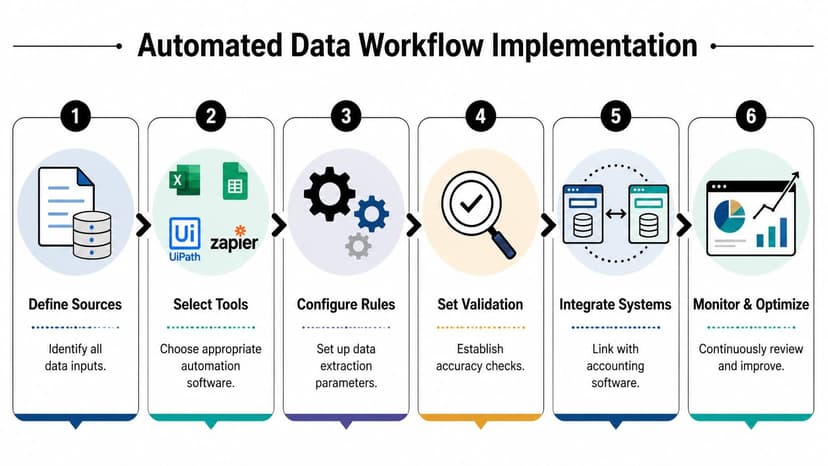
Use a six-step operating sequence
I recommend a workflow that looks like this:
Centralize intake
Send all statement files into one controlled intake point. Don’t let half the team work from email and the other half from desktop folders.Batch similar jobs together
Group by client, period, or statement source. Batching makes exceptions easier to spot because inconsistent output stands out.Run extraction before review
Let the system process the files first. Don’t pre-clean every PDF manually unless the file is unreadable.Review exceptions, not every line
Train staff to inspect balances, date continuity, and flagged fields rather than rereading the full statement transaction by transaction.Export into the next system immediately
Don’t let cleaned files sit in a holding spreadsheet for days. The faster the handoff, the lower the chance of duplicate work.Log every failure mode
Keep a short issue log. Page order problems, recurring bank format quirks, and import mismatches should become standard rules over time.
Pilot rules that actually work
A phased rollout beats a firmwide launch nearly every time because it gives you room to tighten controls before volume increases.
Use these guardrails:
- Pick repeatable files first: Monthly operating accounts are better than rare forensic jobs.
- Assign one reviewer: Mixed review standards ruin pilot data.
- Document pass-fail criteria: The output either meets your import standard or it doesn’t.
- Keep manual fallback available: Not because you want it long term, but because you need continuity during the pilot.
If your firm handles regulated clients, tie this workflow to your broader control environment. This resource on SOC 2 automation solutions is helpful for thinking through how automated processes fit into documented review and audit expectations.
Some firms run into trouble before extraction even starts because the source material is inconsistent. If clients send screenshots, mobile photos, or partial scans, get ahead of that with clear intake rules. This guide on working with bank statement images is a practical reference for defining what your system should accept and what needs resubmission.
Start small enough that your team can learn the workflow, then expand only after the review process is stable.
The first win shouldn’t be speed. It should be control. Once the firm can run the process the same way every time, scale becomes much easier.
Validating Data and Integrating with Accounting Software
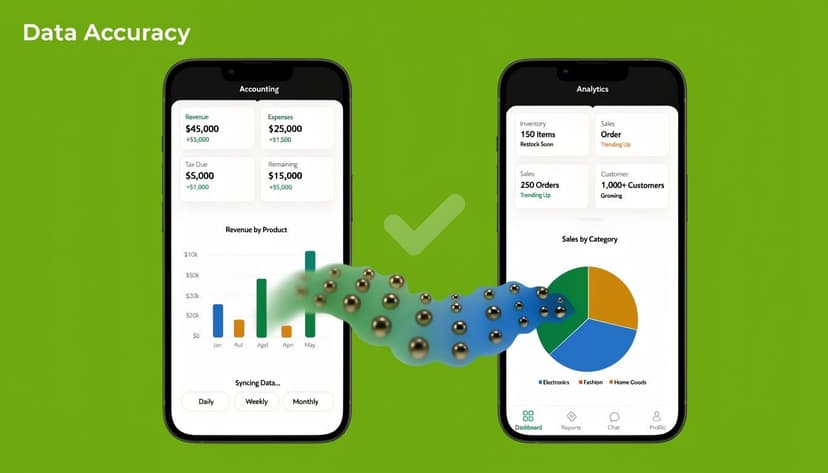
Extraction is only half the job. A firm doesn’t benefit from automation until the output is verified and moved cleanly into the accounting system.
Validate the file before you trust the export
I tell staff to review statement data in layers.
First, confirm structural completeness. Check that all pages were captured, opening and closing balances appear sensible, and the transaction count doesn’t look obviously short.
Second, test accounting logic. Debits and credits should align with the statement’s presentation, dates should be sequential, and ending balances should support reconciliation.
Third, check exception points. Foreign-language descriptions, unusual symbols, and broken rows usually reveal themselves quickly when you scan for outliers instead of rereading every line.
A short validation checklist helps:
- Balance check: Confirm the extracted activity supports the statement balance movement.
- Date review: Watch for month-day inversions and year rollovers.
- Amount review: Scan for sign reversals and misplaced decimals.
- Duplicate scan: Spot repeated lines caused by page overlap or parsing errors.
A clean import starts with a disciplined review standard, not blind faith in extraction.
Choose the right export for the next task
The export format should match the next job, not your personal preference.
| Export type | Best use |
|---|---|
| CSV | Review, manipulation, mapping, and Excel-based analysis |
| Excel | Working-paper review, custom formulas, and audit support |
| QBO or OFX | Direct import into accounting software when field structure is already aligned |
Use CSV or Excel when the file still needs categorization, memo cleanup, or custom mapping. Use QBO or OFX when the transactions are ready for accounting software and you want the shortest path into the ledger.
This is also where many teams discover that extraction alone doesn’t solve reconciliation. If the workflow ends with someone manually comparing imported transactions to account activity, you’ve only shifted the bottleneck. Strong review procedures should flow directly into your reconciliation process, which is why I recommend standardizing that handoff with tools and methods built for automated bank reconciliation software.
Keep integration boring
That’s a compliment.
Good integration isn’t dramatic. It produces files your accounting stack accepts consistently, with minimal field remapping and limited cleanup after import. If every batch requires a different workaround, the automation layer isn’t mature enough yet.
The best workflows don’t eliminate professional judgment. They reserve judgment for exceptions, coding decisions, and final review instead of wasting it on transcription.
Protecting Client Data with Secure Automation
For accounting firms, security isn’t a side consideration. It’s part of the buying decision from the start.
A 2025 Deloitte report referenced by V7 Labs found that 37% of breach incidents in 1,200 accounting firms stemmed from automation tools that lacked 256-bit SSL and confidentiality policies. The same source says 55% of CPAs cite compliance requirements such as SOC2 and GDPR as the top barrier to adoption. That tells you exactly where many firms hesitate. They don’t distrust automation. They distrust weak vendors.
Non-negotiable controls
Any system you use to automate data entry for bank statements should answer these questions clearly:
- How is data protected in transit: You want strong encrypted transport, not vague promises.
- How long are files retained: A short, explicit deletion policy is better than indefinite storage.
- Who can access uploads: Access controls should be role-based and easy to audit.
- What happens after processing: The vendor should explain whether files, outputs, and logs remain stored.
Cheap tools can become expensive risks
Free or low-cost utilities often look attractive for one-off conversions. The issue isn’t price alone. It’s whether the vendor treats client financial data like regulated information or like ordinary office files.
If your firm is evaluating cloud-based services, this overview of cloud data security challenges is a useful outside perspective on the operational risks that appear when storage, access, and retention aren’t designed carefully.
I’d rather reject a fast tool than explain to a client why their statements sat in a third-party system longer than expected. In practice, firms should prefer vendors that can articulate encryption, retention, and access policy in plain English. If the answer sounds evasive, move on.
A short vendor checklist
Before approval, ask for:
- Documented encryption standards
- A clear retention and deletion policy
- Access control details
- Confidentiality commitments
- An explanation of how financial files are handled after processing
Security review slows procurement a little. That’s fine. For statement automation, caution is part of competence.
Troubleshooting and Best Practices for Automation
A firm usually finds out whether its automation process is real or fragile during a busy close, not during a polished demo. The common failure points are predictable: poor source files, unclear review rules, and no single owner for exceptions.
I’ve seen firms blame the tool when the actual problem was upstream. A client uploads a phone photo with a cut-off right margin, three statements arrive under the same filename, or staff members use different review thresholds for the same account. Automation exposes process weakness fast.
What should you do with low-quality scans
Start by separating readability issues from missing information. A tilted scan, light background noise, or an older PDF can still produce usable output. Missing pages, cropped columns, and statements with transactions cut in half usually cannot.
My rule is practical. If the extracted file supports a quick balance check and transaction review, keep it in the workflow and flag exceptions. If it does not, request a replacement immediately. That saves more time than forcing staff to clean a file that never had enough information to begin with.
It also helps to set a firm standard for rejection. Without that, one preparer accepts a weak file, another rejects it, and your turnaround time becomes inconsistent.
Can automation handle foreign-language or multi-currency statements
Yes, if you test for it before rollout.
The issue usually is not language by itself. It is the mix of language, regional date formats, decimal separators, currency symbols, and bank-specific layouts inside one client portfolio. A tool can perform well on domestic statements and still struggle once you add French month labels, European number formatting, or accounts that switch currencies mid-period.
For accounting firms with cross-border clients, the pilot should include those files on day one. I trust sample-based testing far more than broad marketing claims. If a tool cannot hold accuracy across your actual statement mix, the downstream review cost will wipe out the time savings.
How should staff review automated output
Review should be risk-based. If staff compare every line item on every statement, the firm has recreated manual entry with extra steps.
Use a tiered review method:
- Check opening and closing balances first: If they fail, stop and inspect the extraction before doing anything else.
- Scan for pattern errors: Repeated rows, broken dates, sign reversals, merged descriptions, and strange symbols usually show up quickly.
- Focus on high-risk activity: Month-end, year-end, large transfers, loan activity, and unusual cash movement deserve closer review.
- Escalate by exception type: A formatting issue is not the same as a missing transaction or a balance mismatch. Staff should know the difference.
Process discipline is key to ROI. Senior staff should review exceptions and edge cases. Routine output should pass through a lighter control. That keeps experienced people focused where judgment matters.
How do you calculate ROI
Use your own labor rates and your own file volume. Generic ROI claims are rarely useful at the firm level.
A simple formula works:
(Time Saved per Week x Hourly Rate) - Annual Tool Cost = Net Annual Savings
The harder part is measuring time saved accurately. Compare the old workflow against the new one after the pilot settles down, not during the first week when everyone is still learning. Include review time, rework time, and client follow-up time for bad files. Firms often overstate savings by counting extraction time alone and ignoring the cleanup work that follows poor implementation.
I also recommend tracking one more number. Exception rate. If a lower-cost tool creates constant review friction, the subscription looks cheap and operates expensive.
Best practices that hold up over time
The firms that get lasting value from automation usually do a few simple things well, every month, without exception.
- Standardize intake rules: Define accepted formats, minimum scan quality, file naming, and who is responsible for complete uploads.
- Maintain an exception log: If one bank layout or one client habit causes repeat problems, document the fix and turn it into procedure.
- Separate extraction from coding work: Pulling transactions accurately is one control point. Categorizing them correctly is another.
- Retest after statement format changes: Banks change layouts. Clients switch institutions. A process that worked last quarter can drift unobserved.
- Assign ownership: One person or team should decide whether an issue belongs to intake, extraction, review, or client follow-up.
One sentence captures the operating model: review exceptions, not routine lines.
That is how firms protect margin. They do not chase automation for its own sake. They build a repeatable workflow, test it on real client files, and tighten the weak spots before those weak spots show up in close week.