
A bank statement is your financial reality check. It's a month-by-month record of every dollar that came into and went out of your account. Think of it less as a stuffy report and more as a financial report card from your bank—a brutally honest one.
It’s the official record that tells the story of your money, and for accountants and bookkeepers, it’s the source of truth.
The Complete Anatomy of Your Bank Statement

Learning to read a bank statement is like learning to read your financial vital signs. Just as a doctor scans a chart for clues, you can use your statement to spot issues, track your cash flow, and make smarter decisions. It's the document that financial pros rely on because it doesn't lie.
While the design of a statement can vary wildly from one bank to another, they all share the same DNA. They're built around a few fundamental pieces that give you a high-level overview before you get lost in the weeds of individual transactions.
Your Statement At a Glance
Every statement kicks off with the basics: your name, address, and account number, right at the top. You'll also see the statement period—for example, May 1 to May 31—which sets the stage for everything that follows. This is crucial for tracking income and spending on a monthly basis.
Right below that, you'll find the summary. This is the most important part for a quick financial snapshot. It’s the 30,000-foot view of your account's activity for the month.
A bank statement isn't just a list of transactions; it's a chapter in your financial story. Mastering it is a core skill for anyone managing money, whether for personal budgeting or professional accounting.
The summary boils down the month's activity into four key numbers. While the math is simple, the way banks present this info can differ. To see some real-world examples, check out our guide on different bank statement formats.
This quick-reference table breaks down the main components you'll find in that summary section on pretty much any statement you encounter.
Key Components of a Bank Statement at a Glance
| Component | What It Shows | Why It's Important |
|---|---|---|
| Beginning Balance | The money in your account at the start of the period. | This is your financial starting line for the month. |
| Total Deposits | The sum of all money added to your account (e.g., paychecks, transfers). | Tracks every dollar of your incoming cash flow. |
| Total Withdrawals | The sum of all money taken out (e.g., purchases, ATM cash, fees). | Shows your total spending and cash outflows. |
| Ending Balance | The money left in your account at the end of the period. | This is your financial finish line for the month. |
These four figures give you the entire story of your account's movement in just a few seconds. The beginning balance, plus all your deposits, minus all your withdrawals, equals your ending balance. It’s the fundamental equation of bookkeeping, right there on page one.
Decoding Your Account and Balance Summary
Before you dive into the sea of transactions, there’s a quick but crucial checkpoint at the top of every statement: your personal and account info.
Take a second to scan your name, address, and account numbers. Are they correct? This simple habit is your first line of defense against a bank’s clerical error or, worse, potential fraud. Get it done first.
Once you’ve done that, your eyes will land on the balance summary. Think of this as the 30,000-foot view of your financial month. It’s where the bank gives you the big-picture story of your cash flow in four key numbers.
The Core of Your Balance Summary
The summary tells a simple story: where your money started, what came in, what went out, and where you ended up. For a small business owner, this section is a quick pulse check on the company's financial health. No digging required.
It breaks down into four parts:
- Beginning Balance: The cash in your account the day the statement period started.
- Total Deposits/Credits: The sum of all money that came into your account.
- Total Withdrawals/Debits: The sum of all money that went out of your account.
- Ending Balance: Your final balance after everything has been added and subtracted.
These four numbers are the foundation for any reconciliation. For bookkeepers and CPAs, this summary is the starting point. If these numbers don’t line up with your own records, you know something is wrong before you even get to the individual transactions.
Understanding the Average Daily Balance
You’ll often spot another number in the summary: the average daily balance. It’s exactly what it sounds like—the average amount of money you had in your account on any given day during that statement period.
This isn’t just a fun fact; it has real financial consequences.
Many banks use this exact metric to decide if you get hit with a monthly fee. For instance, a major U.S. bank like PNC might require you to maintain an average daily balance of $2,500 to avoid their $12 monthly maintenance fee. Knowing this number and keeping it above the threshold can directly save you money. You can learn more about how banks structure fees and statement data on Business Insider.
While this summary is great for a quick check, it's also where a lot of time gets wasted. Recent industry data shows that 24% of accounting firms can burn over five hours a month just balancing these summaries, a process that can still lead to errors.
Pro Tip: If you keep getting dinged with monthly maintenance fees, look at your average daily balance. Sometimes a single, small transfer is all it takes to push your average over the fee-waiver threshold, saving you money month after month.
By getting a handle on these top-level figures, you get an instant snapshot of your financial position. It’s what makes the statement a vital tool for managing your own money and for professional accounting alike.
Unpacking Your Transaction History Line by Line
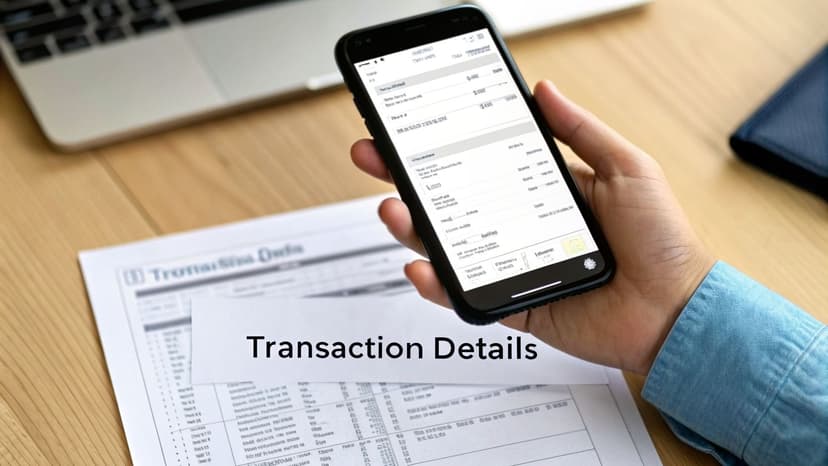
If the balance summary is the 30,000-foot view, the transaction history is where you get your boots on the ground. This is the nitty-gritty, line-by-line record of every dollar that officially hit or left your account during the statement period.
This is where the real work begins—whether you're a bookkeeper hunting down a discrepancy or just trying to figure out where your paycheck went. Each line holds crucial clues, but only if you know how to read them.
Reading Each Transaction
Every line item tells a small story, and they all follow a similar structure, even if the layout varies a bit from bank to bank. For every single transaction, you'll find these core pieces of information:
- Transaction Date: The date the bank officially processed the transaction. This isn't always the day you swiped your card.
- Description: A short, often cryptic, note about who you paid or who paid you. This could be a merchant name, a check number, or transfer info.
- Amount: The money involved, shown as either a debit (money out) or a credit (money in).
The date and amount are straightforward. The description, however, is where things get interesting—and often frustrating. A purchase from a marketplace vendor on Amazon might just show up as ‘AMZN Mktp US*’ or some other vague code. Learning to decode these is a skill in itself.
Deciphering Vague Descriptions
Those cryptic merchant names are more than just a minor headache. They're a common hiding spot for forgotten subscriptions and even fraudulent charges. That recurring $14.99 charge from a merchant you don't recognize? It could be a subscription you signed up for months ago and forgot about.
The transaction list is the ultimate source of truth for your finances. It's where you find the evidence to back up your budget, spot a fraudulent charge before it escalates, or confirm that a client’s payment has landed.
For accounting teams, manually sorting through these descriptions is a massive time-drain. It can eat up to 8 hours per week for a single bookkeeper, and even then, manual data entry has an error rate as high as 18%. You can find more practical tips for reading bank statements on Docuclipper.
Tracking Interest and Other Details
Beyond your daily spending, the transaction list also captures other key financial events. If you have an interest-bearing account, you’ll see those earnings show up here as a credit from the bank.
Most statements also include a separate box that breaks down the Annual Percentage Yield (APY) and shows the total interest you've earned year-to-date. For a business, this is taxable income that needs to be properly recorded. For an individual, it’s a quick gut-check on how hard your savings are working for you. Getting comfortable with this section turns your statement from a boring chore into a powerful financial tool.
How to Spot Hidden Bank Fees and Interest
While your transaction list shows where your money went, another section reveals what it costs just to keep your account open. These are the bank fees and interest charges, often tucked away in a small summary box or buried in the transaction list itself.
If you don't watch them, these fees can slowly drain your balance. Think of them as small leaks in a boat. One drop doesn't seem like much, but over time, they can leave you swamped. This isn't small change; major banks collect billions in fees every year. Spotting them is the first step to plugging the leaks.
Identifying Common Bank Fees
Your statement usually has a dedicated section that spells out the fees you were charged. But sometimes, a fee will just show up as a line item right alongside your debit card purchases, making it easy to overlook.
Keep an eye out for these common charges. They pop up constantly in both personal and business accounts:
- Monthly Maintenance or Service Fees: This is a recurring charge, usually $5 to $15, just for having the account. Most banks will waive it if you meet certain conditions, like keeping a minimum balance or setting up direct deposit.
- Overdraft Fees: This is the big one. It’s a heavy penalty for spending more than you have. The average overdraft fee in the U.S. is a staggering $35 per transaction. It’s one of the most expensive and avoidable costs in banking.
- ATM Fees: A charge for using an ATM that isn’t part of your bank’s network.
- Wire Transfer Fees: The cost to send or receive money via a wire.
- Annual Fees: Some premium checking or credit card accounts come with a yearly fee in exchange for perks.
The Impact of Hidden Costs
It’s easy to shrug off a $10 monthly service fee, but that’s $120 gone every year. If you’re a business running multiple accounts, those small costs multiply fast.
Catching a forgotten $250 annual fee on a credit card statement gives you a chance to do something about it. And you should. According to a study by Consumer Reports, you can get a fee waived just by asking more than 50% of the time. You can find more tips on how to read your statement at Commerce Bank.
When you scrutinize the fees section, you're not just reconciling numbers; you're auditing your bank's value proposition. Are the services you receive worth the fees you pay?
Besides fees, your statement also shows any interest you paid on loans or credit lines tied to the account. This completes the picture of your financial costs, showing you exactly what you’re paying for services and what you’re paying for borrowing.
How Professionals Reconcile Bank Statements
Okay, so you can read a bank statement. But turning that document into perfectly balanced books? That’s where the real work begins.
For professionals, this process is called bank reconciliation, and it's a non-negotiable monthly task. It’s the art of matching every single line item on the bank statement to the corresponding entry in a company’s own books, whether that's in QuickBooks, Xero, or a simple ledger.
Think of it like a detective’s final case review. The bank statement is the external evidence—what actually happened. Your accounting ledger is the internal record of what you thought happened. Reconciliation is where you prove both stories align, or you dig in and investigate until they do. This is a critical process often handled by skilled Accountants to protect a company's financial health.
Without this step, a business is essentially flying blind. Accurate books are the foundation for everything, from filing taxes to getting a business loan.
The Reconciliation Workflow
Here’s the thing: the ending balance on your bank statement and the balance in your accounting software almost never match at first. This isn't usually a sign of a mistake, but a matter of timing. A professional’s workflow is all about systematically finding and explaining these differences.
The process boils down to a few key steps:
Compare Deposits: First, you match the deposits on the statement to the credits in your books. Any money you've recorded but that hasn't cleared the bank yet is a deposit in transit.
Match Withdrawals: Next, you tick off every withdrawal, debit card purchase, and electronic payment on the statement against the debits in your ledger.
Find Outstanding Checks: Any checks you’ve written and recorded that haven't been cashed yet are outstanding checks. These are liabilities waiting to happen, so they have to be accounted for.
Record Bank Fees and Interest: This is a big one. You need to add any bank service charges, monthly fees, or interest earned directly from the statement into your accounting software. These are easy to miss in day-to-day bookkeeping.
Uncovering Common Discrepancies
After ticking and tying everything, you’ll build a reconciliation report. It starts with the bank’s ending balance, adds deposits in transit, subtracts outstanding checks, and makes other small adjustments. The final number should match your ledger's balance—down to the penny.
For a more detailed walkthrough, you can learn all the specifics of reconciling a bank account in our complete guide.
A single unreconciled dollar can be a simple typo, or it can be the first red flag for a major error or even fraud. A pro never ignores these small variances; they hunt them down.
The consequences of getting this wrong are no joke. A poorly reconciled account can lead to bounced checks, angry vendors, and bad financial data that blows up a tax filing or gets a loan application denied. It's a high-stakes game where precision is everything.
Automating Bank Statement Data Extraction
Once you've wrestled with reconciling a statement by hand, the first thing you think is, "There has to be a better way." We've all been there: hunched over a desk, squinting at a blurry, scanned PDF, manually typing hundreds of lines into Excel. That kind of work isn't just slow—it's practically an invitation for typos that will haunt you later.
This manual grind is a massive bottleneck, especially for busy accountants and bookkeepers. Thankfully, you can skip all of that. Modern conversion tools act as a bridge, turning that messy statement data into a clean, perfectly organized spreadsheet in seconds.
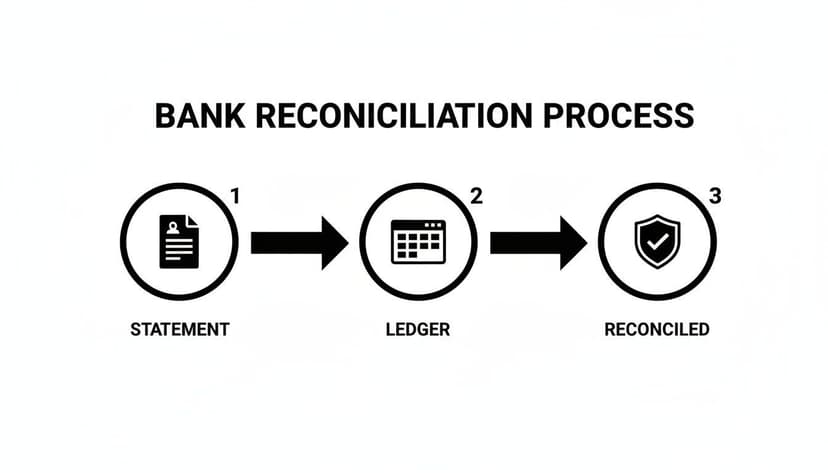
The goal is to get from the raw bank statement to a perfectly balanced ledger. Automation just makes that journey a whole lot faster.
How Automation Gets the Data Out
Tools like ConvertBankToExcel use AI Vision and advanced Optical Character Recognition (OCR) to read bank statements just like a human would—only much, much faster. It can pull every transaction from pretty much any statement you throw at it, even low-quality scans or massive multi-page documents. The whole process takes less than 60 seconds with over 99% accuracy.
But it's not just about getting it done quickly; it's about building a more reliable workflow. These tools are built by people who understand the daily frustrations of accounting work, with features that actually solve problems:
- Batch Processing: Got a stack of statements from different clients? Upload them all at once instead of one by one.
- Broad Bank Support: The software automatically recognizes statement layouts from thousands of banks worldwide, so you don't have to.
- Multiple Export Formats: Get your data out as an Excel file, a CSV, or a file formatted for direct import into your accounting software.
For accountants dealing with legacy systems, knowing your file types is key. For example, understanding the IIF file format can be a lifesaver when working with older versions of QuickBooks. If you want to go deeper on this, our guide on automated data entry software is a great next step.
The real win with automation isn't just saving a few hours. It’s about shifting your team's time from soul-crushing data entry to the strategic work that clients actually pay for—finding insights and offering real advice.
Ultimately, knowing what does a bank statement show is only half the battle. The other half is getting that data into your books without losing your mind. Adopting the right tools can save your team hours every single week, nearly eliminate data entry errors, and completely change how you approach your work.
Frequently Asked Questions
Even with a solid grasp of what's on a bank statement, real-world questions always pop up. Here are some of the most common ones I hear from business owners and individuals, along with straight-to-the-point answers.
How Long Should I Keep My Bank Statements?
For personal stuff, a good rule of thumb is to hold onto them for at least one year. That gives you plenty of time to track your annual spending or dig up a proof of purchase if you need it.
But for anything related to taxes, the game changes. The IRS suggests keeping any statements that back up your income or deductions for three to seven years. If you're running a business, just make it a flat seven years, minimum. You'll be glad you did if you ever face an audit.
Is a Digital Bank Statement as Valid as a Paper One?
Absolutely. For almost any official purpose—think loan applications, visa processing, and especially tax filings—a digital PDF downloaded straight from your bank's website is the real deal. Lenders and government agencies accept them every day without a second thought.
The key is authenticity. As long as the PDF is the official, unaltered document your bank provides, it carries the same legal weight as the paper copy that shows up in your mailbox.
What Is the Fastest Way to Get Old Bank Statements?
Your online banking portal is the quickest route. Most banks give you instant access to several years of past statements, which you can download as PDFs right away.
If you need statements older than what's available online, you’ll have to contact your bank directly. They can pull them from their archives, but be prepared—this service often comes with a fee and can take a few days to process.
Stop wasting hours on manual data entry. ConvertBankToExcel uses AI to convert any bank statement into a perfect Excel file in under 60 seconds. Try it for free today!