
You downloaded an XML export because someone told you it would be easy to turn into a spreadsheet. Then you opened the CSV and found blank cells, repeated headers, broken rows, or a single column stuffed with half the document. That failure is common.
xml to csv sounds like a file conversion task. In practice, it’s a data modeling task. If the XML is shallow and regular, you can get a usable CSV in minutes. If it contains nested transactions, attributes, namespaces, or inconsistent schemas, the “simple export” advice falls apart fast.
I’ve seen this most often in finance and operations work. Bank feeds, ERP exports, order histories, and application logs all arrive as XML. The hard part isn’t opening the file. The hard part is deciding what each row should represent, which fields belong in columns, and how to preserve relationships that XML can express but CSV cannot.
Why Converting XML to CSV Is Deceptively Hard
Many users hit the same wall. They assume XML and CSV are just two formats for the same data. They aren’t.
XML is hierarchical. It stores data as a tree of elements, child elements, attributes, and sometimes namespaces. CSV is flat. It expects a repeating set of rows with a stable set of columns. That mismatch is the whole problem.
The easy tutorials assume your data is cleaner than it is
A lot of guides treat xml to csv like a one-off office task. Open the file. Click import. Save as CSV. That works only when the XML already looks like a table.
In real accounting and financial operations, teams work with files from 2,000+ banks, each with its own schema and nesting choices, which is exactly why generic how-to content often fails in practice, as noted in Aryson’s discussion of multi-format bank statement complexity and export requirements across nine+ accounting formats including QBO, OFX, and IIF (Aryson Technologies on convert xml to csv).
That’s why a bank statement feed from one institution converts cleanly, while another produces duplicated rows or loses transaction detail. The XML isn’t wrong. Your chosen conversion method is too shallow for the structure.
XML stores relationships that CSV can’t express directly
A CSV row usually represents one thing. One customer. One invoice. One transaction.
XML often represents a parent with children:
- An account with many transactions
- An order with many line items
- A user with many addresses and preferences
- A log event with nested metadata and tags
If you flatten all of that into one row, you either repeat parent data for every child or collapse child values into delimited text. Both choices have trade-offs.
Practical rule: Before converting anything, decide what one CSV row is supposed to mean. If you can’t answer that clearly, your export will be messy.
Attributes, namespaces, and inconsistent tags break naive exports
Elements aren’t the only thing you need to map. XML may store values as attributes instead of child nodes. A transaction date might be an element in one file and an attribute in another. Namespaces can also make a valid tag look missing if your parser doesn’t account for them.
Then there’s source inconsistency. One system writes <Amount>. Another writes <TxnAmount>. A third nests it inside <Details>. In mixed workflows, that’s normal.
When files also come from scans or mixed document sources, teams need OCR before they even get to structured conversion. That problem shows up constantly in banking workflows, which is why it helps to understand where OCR in banking fits before assuming XML is always ready for tabular export.
Quick Conversions for Simple and Flat XML Files
Some XML files are easy. If the document is record-oriented and each record has the same children, the quick route is fine.
This is the case where xml to csv behaves like people expect. Product lists, employee directories, small configuration exports, and simple reference datasets often fit this pattern.
Using Excel when the XML is already table-like
XML was standardized by the W3C in 1998, and xml to csv became a routine task around 2003 when Microsoft Excel introduced native XML import features, making it possible to open XML and save it as CSV directly for simple record-oriented files (GoTeleport on XML to CSV conversion).
If your file is shallow, Excel is still a practical first test.
- Open Excel.
- Import or open the XML file.
- If Excel offers multiple import choices, choose the table-style option when available.
- Inspect the worksheet before exporting.
- Save the sheet as CSV.
This method works best when each repeating XML node maps cleanly to a row and the child fields map cleanly to columns.
What Excel handles well
Excel is useful when:
- The XML has one repeating record type: For example, every
<record>hasname,age, andcity. - Fields are consistent: The same tags appear in the same order across records.
- You need a quick human review: Spreadsheet inspection is handy before sending data onward.
- The file is not sensitive: More on that in a moment.
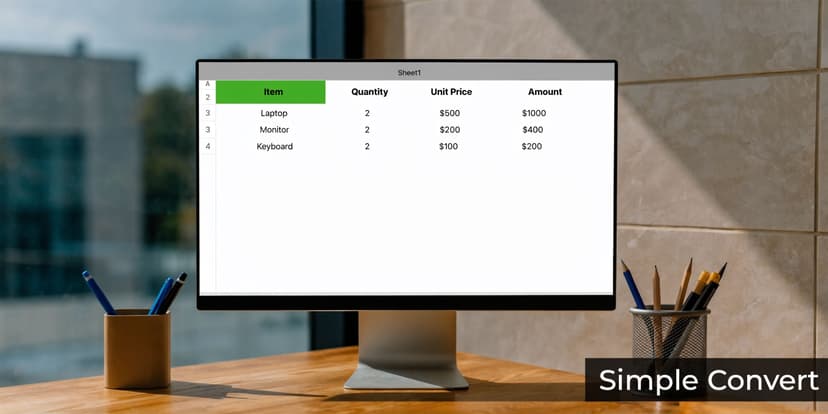
A simple sample with 2 records can parse into exactly 2 rows and 3 columns when the structure is flat enough for direct tabular mapping, which is the kind of scenario where XML-to-CSV conversion has 100% fidelity for flat structures in the referenced example.
Where Excel starts to fail
Excel struggles when the XML contains repeated nested groups, optional branches, attributes that matter, or multiple entity types in the same document.
Common failure patterns include:
| Situation | What happens |
|---|---|
| Repeating child nodes | Values get duplicated or collapsed awkwardly |
| Deep nesting | Important detail disappears or lands in the wrong row |
| Attributes mixed with elements | Some fields never surface as columns |
| Large files | Import becomes slow or unstable |
| Inconsistent records | Columns shift and blanks spread everywhere |
If the preview already looks odd in Excel, don’t keep clicking through and hope the CSV will fix itself. It won’t.
Online converters for one-off jobs
Online tools can be fast for simple XML. They’re useful when you need a quick result and the file is small, flat, and non-sensitive.
A few good habits matter here:
- Check the preview first: Make sure rows align with the intended repeating element.
- Verify headers: Auto-generated column names can be misleading.
- Look for quoted field options: Useful when text contains commas.
- Avoid confidential uploads: Bank statements, payroll data, customer exports, and internal logs shouldn’t be posted to random web tools.
Some online converters support header rows and quoted fields, and they’re most reliable on record-oriented XML where the source already resembles a table. That convenience is real. The limitation is equally real.
A quick decision filter
Use the quick path only if most of these are true:
- One repeating node defines your rows
- No important nested arrays exist
- Attributes are either absent or unimportant
- You can inspect the result manually
- The data isn’t confidential
If even one of those conditions fails, move to code or a dedicated tool. That’s the difference between a clean export and a silent data-loss problem.
Programmatic Conversion with Python and Pandas
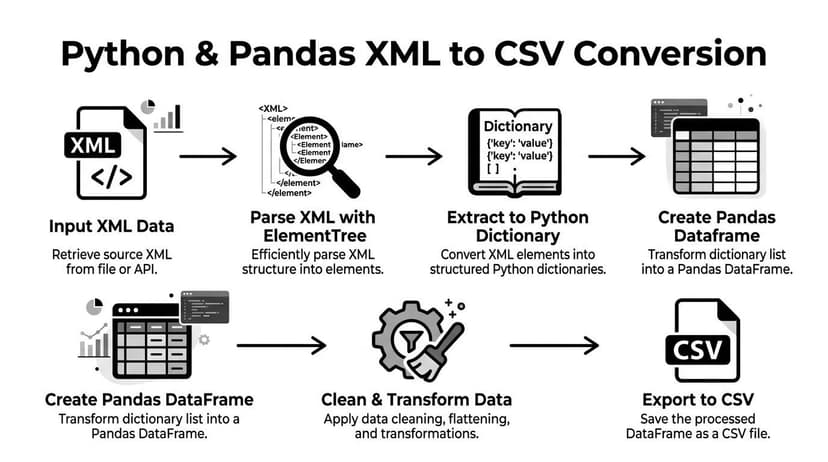
When the XML is messy, Python gives you control. You decide which element becomes a row, how attributes turn into columns, and whether nested structures should be flattened or split into related tables.
That control matters because simple flattening only works for shallow XML. For nested data, a recursive approach is what gets you past toy examples and into something reliable.
Start with the standard libraries and a flat example
For practical xml to csv work, the usual starting point is Python’s xml.etree.ElementTree plus pandas.
import xml.etree.ElementTree as ET
import pandas as pd

tree = ET.parse("input.xml")
root = tree.getroot()

rows = []
for record in root.findall(".//record"):
    rows.append({
        "name": record.findtext("name"),
        "age": record.findtext("age"),
        "city": record.findtext("city"),
    })

df = pd.DataFrame(rows)
df.to_csv("output.csv", index=False)
This works when each <record> is structurally consistent and direct children map to columns. It’s the same kind of flat structure where simple examples convert cleanly.
Why flat scripts break on real XML
Once the file contains nested elements, the script above starts dropping meaning.
Suppose an order has multiple items. If you read only the order node, you lose item detail. If you loop over items without carrying parent context, you lose order-level fields. If attributes matter and you ignore them, you lose IDs, statuses, or codes.
That’s why normalization matters more than brute-force flattening.
A separate but related issue is downstream transformation. After parsing XML into dictionaries or DataFrames, you still need joins, conditional reshaping, and staged cleanup. If that part is new territory, these advanced data transformation techniques are a good complement because xml to csv projects rarely end at raw export.
A recursive pattern for nested XML
The more durable approach is to walk the tree recursively and build rows from the current node plus inherited context.
import xml.etree.ElementTree as ET
import pandas as pd

def flatten_node(node, parent_path="", row=None):
    if row is None:
        row = {}

    current_path = f"{parent_path}_{node.tag}" if parent_path else node.tag

    # capture attributes
    for attr_name, attr_value in node.attrib.items():
        row[f"{current_path}@{attr_name}"] = attr_value

    children = list(node)

    # leaf node
    if not children:
        text = (node.text or "").strip()
        if text:
            row[current_path] = text
        return [row]

    # if children are unique fields, keep flattening into same row
    child_tags = [child.tag for child in children]
    if len(child_tags) == len(set(child_tags)):
        rows = [row.copy()]
        for child in children:
            new_rows = []
            for partial_row in rows:
                flattened = flatten_node(child, current_path, partial_row.copy())
                new_rows.extend(flattened)
            rows = new_rows
        return rows

    # repeated child nodes produce multiple rows
    rows = []
    for child in children:
        child_rows = flatten_node(child, current_path, row.copy())
        rows.extend(child_rows)
    return rows

tree = ET.parse("input.xml")
root = tree.getroot()

all_rows = []
for record in root:
    all_rows.extend(flatten_node(record))

df = pd.DataFrame(all_rows)
df.to_csv("output.csv", index=False)
This pattern does three useful things:
- It keeps parent context: Child rows inherit values already collected above them.
- It captures attributes explicitly: IDs and status flags don’t disappear.
- It distinguishes unique children from repeated children: That helps avoid accidental overwrites.
When flattening is the wrong goal
Not every XML document should become one CSV.
Using Python with xml.etree.ElementTree and pandas, developers can normalize XML instead of forcing every relationship into one table. In the referenced benchmarks, simple flattening works for shallow XML, but a recursive approach is needed for nested data to achieve over 95% accuracy. The same source notes that syntax errors can corrupt 20-40% of manual outputs, and that an optimized pandas approach can convert a 100MB file in under 5 minutes versus 30+ minutes with naive loops (Sonra on XML to CSV converters compared).
For orders and line items, create two CSVs. For accounts and entries, create two CSVs. Parent-child keys preserve the relationship.
Here’s the idea in plain terms:
orders.csvholds one row per order.items.csvholds one row per line item.items.csvincludesorder_id.
That model is safer than cramming repeated children into pipe-delimited strings inside one cell.
“If you need relational meaning later, preserve it now.”
A normalized extraction pattern
import xml.etree.ElementTree as ET
import pandas as pd

tree = ET.parse("orders.xml")
root = tree.getroot()

orders = []
items = []

for order in root.findall(".//order"):
    order_id = order.get("id")
    orders.append({
        "order_id": order_id,
        "customer": order.findtext("customer"),
        "order_date": order.findtext("date")
    })

    for item in order.findall(".//item"):
        items.append({
            "order_id": order_id,
            "sku": item.get("sku"),
            "description": item.findtext("description"),
            "quantity": item.findtext("quantity")
        })

pd.DataFrame(orders).to_csv("orders.csv", index=False)
pd.DataFrame(items).to_csv("items.csv", index=False)
This doesn’t look as neat as a one-file export. It’s more useful.
For teams that receive text exports alongside XML, the cleanup stage often overlaps. In those mixed-source pipelines, it helps to standardize your tabular output rules the same way you would when learning how to convert TXT to CSV.
A practical walkthrough can help if you want to see the flow visually.
What goes wrong in Python scripts
The failures are predictable:
- Tag assumptions break: A node is missing in one file, so your code emits blanks or crashes.
- Namespaces hide elements: Your XPath returns nothing even though the XML is valid.
- Repeated nodes overwrite each other: Only the last child survives.
- Memory usage spikes: Large documents get loaded fully and stall the process.
- Validation gets skipped: You produce a CSV, but don’t confirm it matches the source.
The cure isn’t more code. It’s better modeling and better checks.
Handling Large-Scale and Automated XML Conversions
Once the workload moves from one file to a folder full of exports, xml to csv becomes an operations problem. You’re no longer asking how to convert one document. You’re deciding how to process batches reliably, preserve structure, and recover cleanly when a source file is malformed.
XSLT is powerful if your input is consistent
XSLT exists for one reason: transforming XML into other formats. If your incoming files follow a known schema and that schema doesn’t drift much, XSLT can be a strong fit.
A simple stylesheet can select repeating nodes and emit comma-separated output. The appeal is obvious. XSLT is built around XML structure, so it handles navigation and mapping in a standards-based way.
A stripped-down example looks like this:
<xsl:stylesheet version="1.0"
xmlns:xsl="http://www.w3.org/1999/XSL/Transform">
<xsl:output method="text" />
<xsl:template match="/">
<xsl:text>name,age,city </xsl:text>
<xsl:for-each select="//record">
<xsl:value-of select="name"/><xsl:text>,</xsl:text>
<xsl:value-of select="age"/><xsl:text>,</xsl:text>
<xsl:value-of select="city"/><xsl:text> </xsl:text>
</xsl:for-each>
</xsl:template>
</xsl:stylesheet>
The downside is maintenance. Once schemas vary across senders, one stylesheet often turns into a family of stylesheets. That’s manageable in controlled integrations. It becomes brittle in mixed real-world feeds.
Batch scripting is flexible but needs guardrails
Python remains the better option when the incoming XML changes across sources or requires conditional logic.
A batch converter needs to do all of this:
- Walk a directory tree
- Detect parse failures and log them
- Apply source-specific mapping rules
- Write outputs predictably
- Track which files succeeded, failed, or need review
That’s where many teams discover that the converter itself isn’t the hard part. Operational discipline is.
A practical batch loop might:
- Read each XML file in a folder.
- Parse with error handling.
- Route to the correct transformation logic.
- Export one or more CSV files.
- Write a log entry with file name and status.
For adjacent workflows where the XML started life as a PDF extraction, the upstream transformation quality matters too. Converting PDF to XML is often the point where structural noise enters the pipeline, so this guide on convert PDF to XML is useful if your batch jobs inherit inconsistent XML from document conversion.
Large files change the tool choice
Big XML files expose the limits of casual scripting fast.
For enterprise-scale batch conversions of 1000+ files, standalone tools can process 500 pages/min and handle 10GB+ files, while open-source scripts can be slower on nested financial XML. The same benchmark notes that manual methods risk file corruption in 10-20% of cases and are unsuitable for files over 50MB because of memory errors, while specialized tools reduce project failure rates from 50% to under 5% by handling complex mappings and preserving data integrity (RecoveryTools on XML to CSV).
Those numbers line up with what practitioners see. Small scripts are excellent for controlled tasks. They’re not always the right production engine.
When dedicated tools beat custom code
Standalone converters make sense when you need repeatability more than flexibility.
They’re useful when:
| Need | Better fit |
|---|---|
| One-off analysis on a known schema | Python |
| Stable XML schema in an integration | XSLT |
| Huge batches across many senders | Dedicated tool |
| GUI-based mapping for operations staff | Dedicated tool |
| Custom business rules and enrichment | Python |
Specialized tools include selective field mapping, normalization options, previews, and audit logs. That matters in compliance-heavy teams because non-developers can review what the mapping will do before the job runs.
Field note: The best enterprise workflows don’t worship one method. They use scripts where custom logic is essential and dedicated tools where throughput, visibility, and repeatability matter more.
Streaming matters more than clever loops
If you do stay in Python for large XML, the main shift is architectural. Don’t load the whole tree when you can stream.
A streaming parser lets you process elements incrementally, write rows as they complete, and release memory as you go. That approach is especially useful for logs, transaction exports, and long statement histories where the document is large but structurally repetitive.
The mistake I see most often is trying to optimize row-building logic while still reading the entire XML into memory. Streaming produces the bigger win.
Validating Output and Reconciling Financial Data
A CSV file that opens isn’t proof of a correct conversion. It’s only proof that some output was generated.
That distinction matters most in financial data. A malformed export can still look tidy enough to pass a quick glance, then break reconciliation later. Missing child entries, duplicated transactions, shifted signs, or dropped attributes won’t always announce themselves.
Validation is part of conversion, not a separate chore
A reliable xml to csv workflow includes checks immediately after export.
The checks I trust most are simple:
- Row count checks: Compare expected record counts from the XML against the CSV output.
- Amount checks: Sum debit, credit, or transaction columns and compare them with the source totals.
- Schema checks: Confirm that every required field exists and uses the expected datatype or format.
- Spot checks on edge cases: Review records with optional fields, repeated children, foreign characters, or unusual dates.
- Key uniqueness tests: Make sure transaction IDs or composite keys aren’t duplicated unexpectedly.
If you skip those checks, you’re treating conversion as formatting. It isn’t. It’s extraction plus interpretation.
Reconciliation is where weak mappings get exposed
Financial XML contains parent-child relationships that don’t survive bad flattening. A statement may have account metadata at one level and entries below it. If you merge that poorly, your CSV might import, but reconciliation won’t tie out.
That’s why accountants care about evidence, not just output files. If your team works in audit-sensitive environments, the discipline behind documenting checks and exceptions isn’t optional. This overview of audit evidence is useful because XML conversions often feed records that later support reviews, reconciliations, or compliance work.
A practical reconciliation routine should answer:
- Did every source transaction appear?
- Did signs and dates survive correctly?
- Did balances or category totals still match?
- Can you trace a CSV row back to its source element?
A pretty CSV that can’t be traced back to the source is dangerous.
Financial workflows need stricter output standards
General-purpose scripts are fine for exploration. They’re less comfortable when the output feeds bookkeeping, tax prep, or audit support.
In those environments, teams need:
- Stable field naming
- Consistent date normalization
- Reliable handling of foreign characters
- Repeatable mapping across mixed statement layouts
- A path into reconciliation workflows
That’s also why automated downstream review matters. If your process ends at export, someone has to match transactions, identify misses, and fix inconsistencies manually. The payoff is better when conversion feeds automated bank reconciliation software instead of creating another cleanup task.
What good validation feels like in practice
Good validation is boring. That’s the point.
You run the conversion. You compare counts. You compare totals. You inspect exceptions. Nothing surprising happens.
Bad validation is emotional. Someone notices a mismatch after import, then the team reverse-engineers where the XML mapping failed. That’s expensive, and it happens because the CSV was treated as the finish line.
Frequently Asked Questions for XML to CSV Workflows
How do I handle XML namespaces
Namespaces are one of the most common reasons a parser appears to “miss” tags. The element exists, but its full name includes a namespace URI.
In practice, you either register the namespace and use it in your queries, or strip namespaces before processing if it won’t damage meaning. The first option is safer. The second can be convenient for one-off cleanup.
What’s the best way to convert very large XML files
Use a streaming parser and write rows incrementally. Don’t build the whole tree in memory unless the file is small enough that memory pressure isn’t a concern.
For repeated batch work, separate parsing, transformation, and validation into distinct steps. That makes failures easier to isolate and rerun.
Should I flatten nested data into one CSV or create multiple files
Create multiple files when the XML contains meaningful parent-child relationships. Flatten into one CSV only when that relationship can be simplified without losing analytical value.
Order headers and line items are a classic example. One file for orders, one file for items, linked by a key, is usually better than packing all items into one cell.
How do I deal with attributes versus child elements
Treat both as first-class data. If an attribute carries an ID, status, code, or timestamp, map it explicitly to a column.
Many weak converters focus only on element text. That’s how important identifiers vanish.
What if my source files come from mixed systems, not just XML exports
Standardize your target schema first. Then build source-specific mappings into it.
That matters when your pipeline includes XML, text files, scanned PDFs, or exports from accounting tools. In those broader intake processes, teams pair conversion with automated data entry software so the output lands in a controlled structure instead of becoming another manual cleanup queue.
Which xml to csv method should I choose
Choose based on complexity, scale, and sensitivity.
- Use Excel or an online converter for flat, non-sensitive, one-off files.
- Use Python and pandas when you need control and custom logic.
- Use XSLT when the schema is stable and XML-native transformation makes sense.
- Use dedicated tools when batch volume, file size, and operational repeatability are the bigger concern.
The right method isn’t the most technical one. It’s the one that preserves meaning without creating cleanup work later.
If your team works with bank statements, mixed file formats, or messy financial exports, ConvertBankToExcel is built for that reality. It converts statement data into structured outputs for Excel, CSV, and accounting systems, handles layouts from 2,000+ banks, supports nine+ formats, and is designed for firms that need speed, reconciliation, and dependable extraction without manual rework.